Choose radio automation software around the station you already run. Desktop tools suit detailed music rotation. A server suits custom scripts. Cloud playback suits a station that should run with your computer off. For YouTube, you also need a video feed. An existing radio stream can supply the audio without moving your music library.
Last verified: .
TL;DR:
- RadioBOSS can add visuals through its RTMP plugin. RadioDJ and mAirList need a separate video workflow, such as OBS.
- Liquidsoap and FFmpeg give you control on a server, with maintenance left to you.
- Upstream can play uploaded music and visuals, or use your existing radio stream URL as the audio source.
- Keep your current automation if you rely on its rotation rules. Test the whole route before moving a station.
Which radio automation software fits a YouTube station?
Radio automation chooses what plays next and when station IDs or shows run. YouTube adds a separate requirement: a video feed. Its ingestion error guide requires a video stream. A still image or visual loop can provide that video layer.
Choose who will maintain that layer before comparing features. A free app still needs a running computer. A rented server still needs updates and monitoring. A hosted service moves those jobs to the provider, but an incoming radio feed still depends on its source.
| Route | YouTube video output | What stays running? | Cost model | Best fit |
|---|---|---|---|---|
| Desktop: RadioDJ, mAirList or RadioBOSS | RadioBOSS has an RTMP plugin. The others need a video encoder or a service that adds visuals. | Your computer, automation software and internet connection | Free or paid software, plus hardware and electricity | A station with detailed rotation rules and an operator who maintains the PC |
| Server: Liquidsoap, AzuraCast and FFmpeg | Custom Liquidsoap or FFmpeg configuration | Your server and streaming processes | Server rental and maintenance time | A developer who wants control of the full route |
| Cloud: Upstream | Uploaded audio and visuals, or an existing radio URL with visuals | Upstream; your source station too if using its URL | Subscription for continuous playback | A new uploaded station or an existing station adding YouTube |
Desktop radio automation software
RadioDJ, mAirList and RadioBOSS are Windows radio tools. Their music libraries, playlists and scheduling suit traditional station operation. The main YouTube difference is how each tool gets from an audio program to a video stream.
| Software | Price checked November 4, 2026 | YouTube route | Check before choosing |
|---|---|---|---|
| RadioDJ | Free, including commercial use | Capture its audio in OBS and add visuals, or send an encoded radio feed to a cloud service. | RadioDJ has no built-in streaming encoder. Its FAQ points to third-party encoders for Icecast and Shoutcast. |
| RadioBOSS | Standard: $199 | Its RTMP plugin adds a background image or video and sends the result to YouTube. | Install the plugin and test video encoding on the computer that will run the station. |
| mAirList | Standard: €400 excluding VAT | Its encoder connections cover Icecast and Shoutcast. Add a separate video workflow for YouTube. | Choose a license that covers your use. Home editions are restricted to personal use that earns no money. |
OBS Studio is the free local option for combining a radio app's audio with an image or video. Test the audio capture and listen for duplicate sound. Both programs and the computer must stay running while they supply the broadcast.
Rotation rules can matter more than the encoder. The RadioBOSS playlist generator has no-repeat controls for tracks, artists and albums. If those rules define your station, keep them in the automation software. A shuffled playlist is not the same as a minimum gap between two songs by one artist.
Budget for more than the license. Include the computer, electricity, internet connection and someone who can restart the station. Before committing, test a restart and check that the intended playlist and output return.
Self-hosted automation on a server
A server moves the station off your desk and gives you control of its configuration. Liquidsoap defines audio and video workflows in scripts. AzuraCast adds a radio management interface and uses Liquidsoap for AutoDJ. FFmpeg handles media encoding and streaming.
The Liquidsoap FFmpeg cookbook includes an example that combines audio with a static image and sends it to YouTube over RTMP. Treat it as a starting configuration. Test with your chosen image, audio source and server before leaving it running.
AzuraCast's feature request for a built-in social video rebroadcasting option is marked “Not planned”. Plan a separate video layer, such as FFmpeg or a cloud service receiving your station's audio URL.
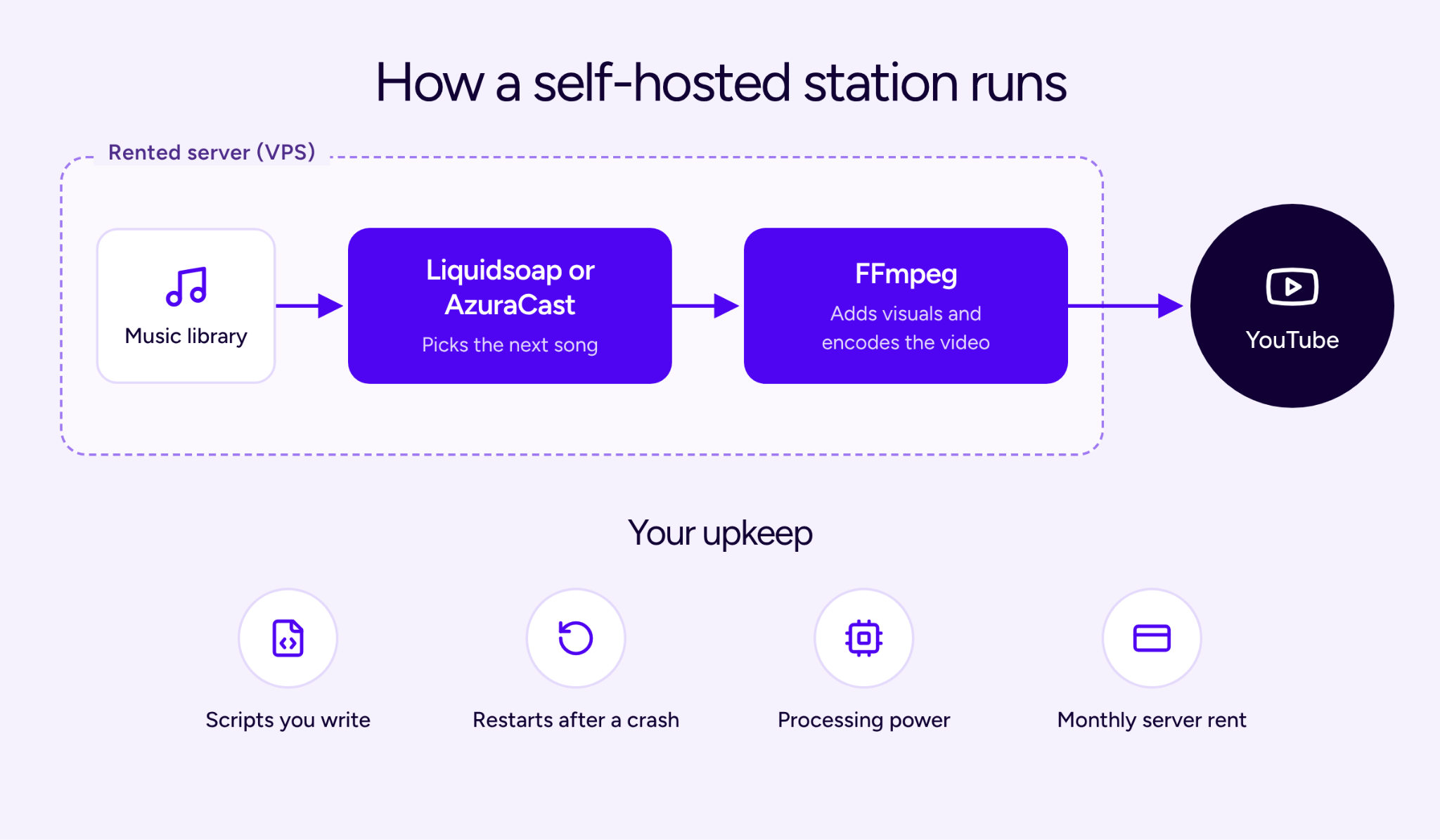
Server rental is only part of the cost. You also own updates, monitoring and restart behavior. Test what happens when the source disconnects or the encoding process stops. Choose this route when that control is useful to you and you can maintain it.
Cloud radio automation software
Cloud playback runs the uploaded station on the provider's servers. With Upstream's separate audio and video playlists, you can change the music without exporting a new video. The music and visual playlists loop independently.
Use the Audio playlist for songs and the Background playlist for images or video. This fits a lofi station built from individual tracks. It also means the home computer can be off once the files are uploaded and the stream is running.
The free Upstream plan includes one concurrent stream and 24 streaming hours per month. Continuous playback starts at $30 per month for one 1080p, 30 fps stream, or $24 per month equivalent when billed yearly. Prices were checked on November 4, 2026.
Choose cloud playback for less local setup. Choose desktop automation when its rotation rules are central to the station. For a broader hosted-service comparison, see our 24/7 streaming software guide.
Can you keep your existing radio automation?
Yes. If your station already has a working radio stream URL, Upstream can use it as the audio source and add visuals for YouTube. You keep the software that chooses songs, schedules shows and plays jingles. Upstream handles the video presentation and output. See the YouTube radio station workflow.
- Keep your existing station running and get its direct audio stream URL, rather than the address of its web player.
- In the Upstream editor's Audio settings, choose Radio stream.
- Paste the address into Stream URL address.
- Add your background image or video, connect YouTube and test the result.
Your original automation remains responsible for song order and transitions. Upstream's uploaded-track controls do not become controls for individual songs inside that live feed. If the source station stops, the radio URL stops supplying its program too.
This is the first route to test before migrating a working station. Check that the source URL plays from outside your own network. Then listen to the YouTube output through a song change and a station ID. Confirm both the sound and the picture.
What should you test before choosing?
Test one short program before moving the full library. Use two songs, a station ID and your intended visual background. The aim is to check what the software actually controls, what remains your responsibility and how it behaves when the source changes.
Rotation and transitions
For uploaded tracks, Upstream offers Ordered loop and Shuffled loop. Its audio crossfade setting runs from 0 to 20 seconds. These are playlist controls, not the artist-separation rules found in dedicated radio automation. See the playlist options.
Use an ordered list when the sequence matters. Use shuffle when a changing sequence is enough. If you need strict artist gaps or category rotations, test those rules in your radio software and use the existing-stream route to keep them.
Station IDs and background audio
For uploaded playlists, Upstream's inserts can play after a set number of files, at a time interval or at a timestamp inside a file. Check the trigger and audio settings together, especially if a jingle can start during a song.
- Pause audio playlist tracks on: the tracks pause while the audio insert plays.
- Pause audio playlist tracks off: the underlying audio keeps running beneath the insert.
- Background audio level: controls how loud that underlying audio stays during the insert. Lower it to duck the music under a voice.
Mixing an insert over continuing audio is separate from the playlist's track crossfade. Listen to the result, rather than assuming the pause checkbox sets the mix level. For a station supplied by a radio URL, keep song-level jingles and transitions in the source automation.
Files and visuals
Check titles and artists before uploading a library. The MP3 metadata editor helps correct tags across files. If a track needs a different file format, use the audio converter and listen to the converted copy before adding it.
A still image is enough to test the video route. If you want a moving visual, the audio visualizer can create a video from a track. Keep reusable visual loops separate from the music when you want to change songs independently.
Where should you go after choosing software?
Use the YouTube radio setup guide for channel setup and music rights. YouTube checks live streams for third-party content. Even licensed music can need a Content ID allowlist from the rights holder. Resolve that before a public test.
For an audio-only station, start with the internet radio guide. For music selection and promotion, use the lofi station guide. The live stream automation guide covers API and MCP workflows.
If your station will also reach a phone-first audience, check TikTok's streaming access requirements and choose a vertical stream layout. For a local OBS setup with horizontal and vertical outputs, use the Aitum guide.
Frequently asked questions
Is there free radio automation software?
Yes. RadioDJ is free, including commercial use. It needs a separate encoder to send audio to a radio server. For YouTube, add a video workflow such as OBS. Free software still needs a running computer and internet connection.
Can RadioBOSS stream directly to YouTube?
Yes. Its RTMP plugin can combine audio with a background image or video and send it to YouTube. Install the plugin and test it on the computer that will run the station.
Do I need to move my music library to Upstream?
No. You can use an existing radio stream URL as Upstream's audio source and add visuals for YouTube. Your current automation keeps choosing songs and playing jingles. The source station must stay running.
Does disabling pause make jingles crossfade?
No. Disabling Pause audio playlist tracks keeps the underlying audio running during an insert. Background audio level controls its volume beneath the insert. Track crossfade is a separate playlist setting.
Last verified: November 4, 2026. Software prices and product controls were checked for this review.
Try Upstream free with a short test of your playlist or existing radio feed.