Upstream
Upstream
  • Product
    24/7 Live Streaming Run cloud channels that stay live around the clock. Live Studio Invite guests, share screens, and add branded overlays in the browser. Multistreaming Send one live feed to YouTube, Twitch, Kick, and RTMP endpoints. Pre-recorded Live Streaming Upload pre-recorded videos & Go Live without the stress of live production. Enterprise Broadcasting setups for teams, labels, and agencies. Free plan 24 hours a month with no watermark.
  • Features
    Scheduling Streams that start and end on their own. Multichat Every platform's chat in one feed. Overlays Layers and widgets in Stream Designer. Stings, jingles and ads Inserts that play between your videos. Playback controls Skip or play any file while you stay live. Audio and video playlists Loop music and visuals separately. Team access Invite your team, each with their own role. RTMP server Stream in from OBS or any encoder. Live Streaming API Run streams, media and queues from code. MCP Server Manage streams from your AI assistant. All features Everything Upstream does, on one page.
  • Platforms
    YouTube live streaming Twitch live streaming Kick live streaming Facebook live streaming Instagram live streaming TikTok TikTok live streaming Rumble live streaming Mixcloud live streaming 30+ more Plus any custom RTMP or SRT destination.
    Platform limits Bitrate and duration caps for each platform. Integrations Setup guides for OBS, vMix, cameras and more.
  • Resources
    Blog Guides and ideas for live streams. Release Notes What's new in Upstream. Free Tools Video, audio and setup tools. Helpdesk Setup help and troubleshooting. Live Streaming FAQ Quick answers about going live. Compare Upstream Upstream vs Restream and more.
  • Pricing
Login Sign up for free
Always-on 24/7 Live Streaming Run cloud channels that stay live around the clock.
Explore
Real-time live Live Studio Invite guests, share screens, and add branded overlays in the browser.
Explore
One stream, 30+ platforms Multistreaming Send one live feed to YouTube, Twitch, Kick, and RTMP endpoints.
Explore
Schedule & Automate Pre-recorded Live Streaming Upload pre-recorded videos & Go Live without the stress of live production.
Explore
Enterprise Broadcasting setups for teams, labels, and agencies. Explore Free plan 24 hours a month with no watermark. Explore
Scheduling Streams that start and end on their own. Multichat Every platform's chat in one feed. Overlays Layers and widgets in Stream Designer. Stings, jingles and ads Inserts that play between your videos. Playback controls Skip or play any file while you stay live. Audio and video playlists Loop music and visuals separately. Team access Invite your team, each with their own role. RTMP server Stream in from OBS or any encoder.
Live Streaming API Run streams, media and queues from code.
MCP Server Manage streams from your AI assistant.
All features Everything Upstream does, on one page.
YouTube live streaming. 24/7 channels with midroll ads. Twitch live streaming. Streams restart on their own at 48 hours. Kick live streaming. Stay live with your computer off. Facebook live streaming. Schedule lives that start on their own. Instagram live streaming. Go live from your browser or the cloud. TikTok TikTok live streaming. Go live on TikTok and Instagram at once. Rumble live streaming. Add Rumble to your YouTube or Kick stream. Mixcloud live streaming. DJ sets and radio shows from your browser. 30+ more Plus any custom RTMP or SRT destination.
Platform limits Bitrate and duration caps for each platform.
Integrations Setup guides for OBS, vMix, cameras and more.
Blog Guides and ideas for live streams. Release Notes What's new in Upstream. Free Tools Video, audio and setup tools. Helpdesk Setup help and troubleshooting. Live Streaming FAQ Quick answers about going live. Compare Upstream Upstream vs Restream and more.
Blog

Can a YouTube Live Stream Run for Years? This One Has Run 800+ Days

Written by Mario Jankovic October 12, 2026 · Updated October 13, 2026 · 6 min read
  1. How to check it never restarted
  2. 807 days in numbers
  3. What an unbroken stream proves
  4. What a restart costs
  5. How the stream is set up
  6. Who runs it
  7. Run your own 24/7 stream
  8. Frequently asked questions
    1. Can a YouTube live stream run for years?
    2. Do I need my computer on for a 24/7 YouTube stream?
    3. Does YouTube keep a replay of a 24/7 stream?
    4. What happens when Twitch ends a 24/7 stream?
    5. Does restarting a 24/7 stream get it more views?
    6. How much does it cost to run a stream like this on Upstream?
  9. Sources

Yes. Final Fantasy LoFi Radio (24/7) has been one YouTube live stream since July 27, 2024. On October 12, 2026 it had been live for 807 days, about 19,370 hours, and the broadcast had never ended. It is still the same video, with the same link it had on day one.

Thiago, the musician behind the Sing4DLaughter channel, runs it on Upstream. He uploaded his videos and songs once, and Upstream plays them to YouTube from its own servers, so no computer at home has to stay on. It is the clearest public proof we have of how reliable a 24/7 stream on Upstream is, because anyone can check it.

How to check it never restarted

YouTube prints when a live video started right under its title. A restart can’t hide there. When a live stream ends and a new one starts, YouTube makes a new video with a new link, and that video shows the new date.

  1. Open Final Fantasy LoFi Radio (24/7) on YouTube.
  2. Look under the title, next to the number of people watching.
  3. YouTube shows “Started streaming on Jul 27, 2024”. If the stream had restarted, you would see the date of the new video instead.
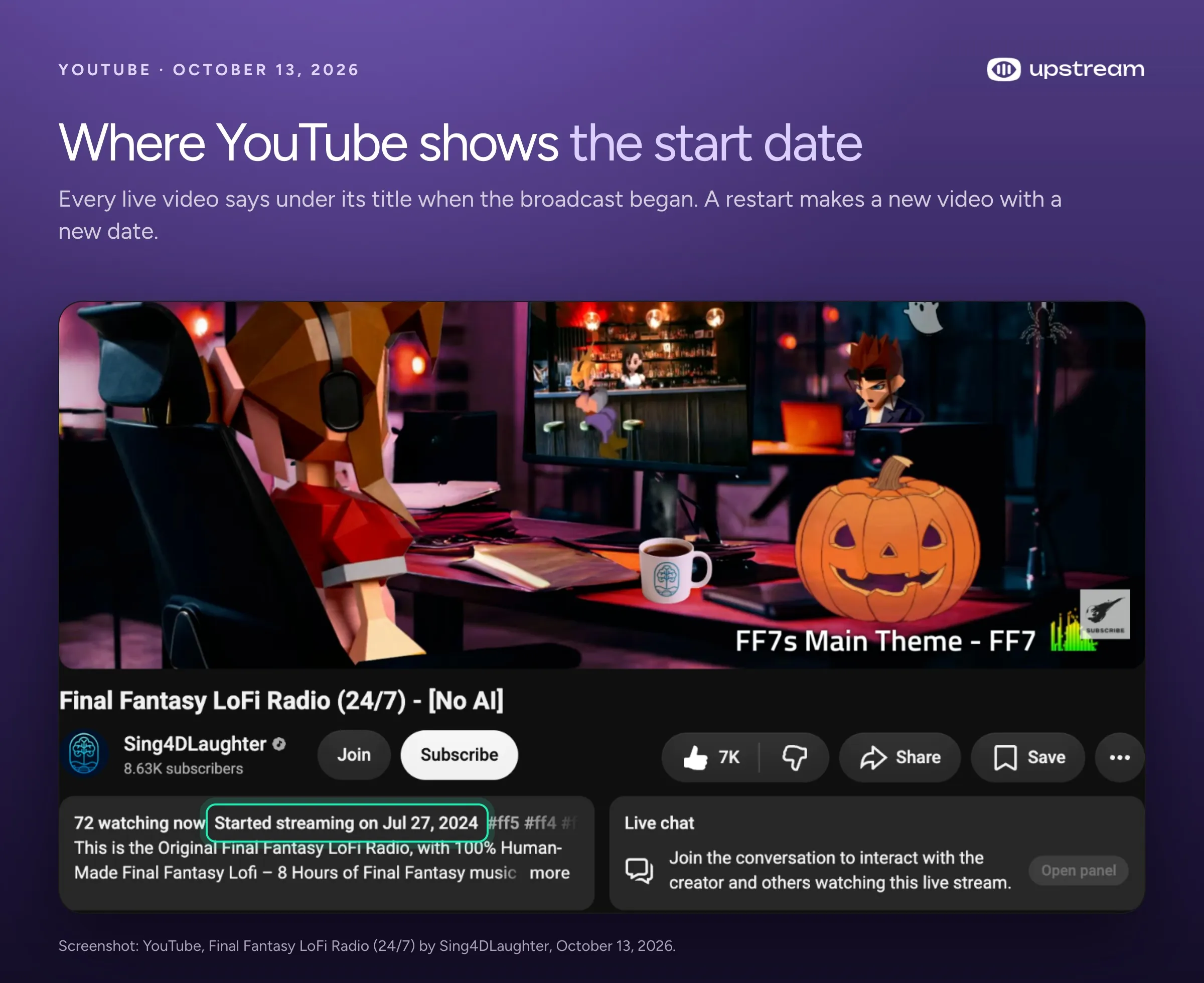
YouTube page of Final Fantasy LoFi Radio (24/7) with the line Started streaming on Jul 27, 2024 highlighted under the title.

807 days in numbers

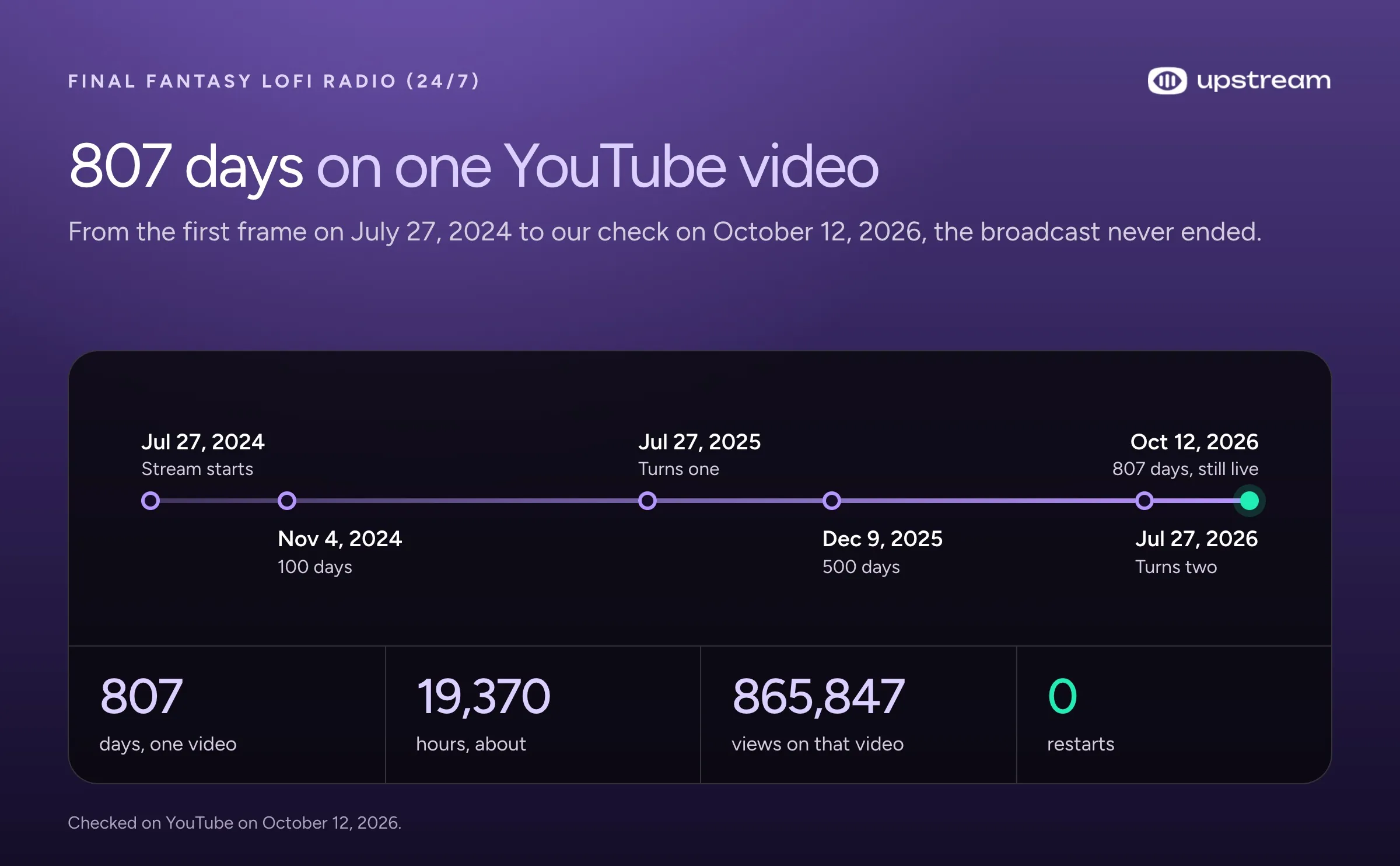
We checked the stream on YouTube on October 12, 2026. By then it had been live for 807 days, about 19,370 hours, on the same video it started on July 27, 2024. That one video had 865,847 views and 7K likes, and 64 people were listening when we looked.

It passed 100 days in November 2024, turned one in July 2025 and passed 500 days that December, all without a restart. At no point did YouTube end the broadcast and open a new video.

Timeline of Final Fantasy LoFi Radio (24/7) from July 27, 2024 to October 12, 2026: 807 days and 865,847 views on one video, with no restart.
FactFinal Fantasy LoFi Radio (24/7)
Started streamingJuly 27, 2024, 09:03 UTC
Live on October 12, 2026807 days, about 19,370 hours
Views on the one video865,847
Likes7K
Channel subscribers8.63K
What plays8 hours of human-made Final Fantasy lofi, about 4 years of work
Where it runsUpstream, from the cloud

What an unbroken stream proves

Keeping a stream up for a day is easy. For 807 days, the server playing the videos and its connection to YouTube held up well enough that YouTube never once ended the broadcast.

That is hard to do from a home computer. The usual way to run a 24/7 stream is OBS on a PC at home, and that PC has to stay on and online for as long as the stream runs. A Windows update, a dropped connection or a power cut can stop it. Thiago tried that first. “It was not efficient at all,” he told us. “You have to have a dedicated computer, and it’s dropping, and you never know.”
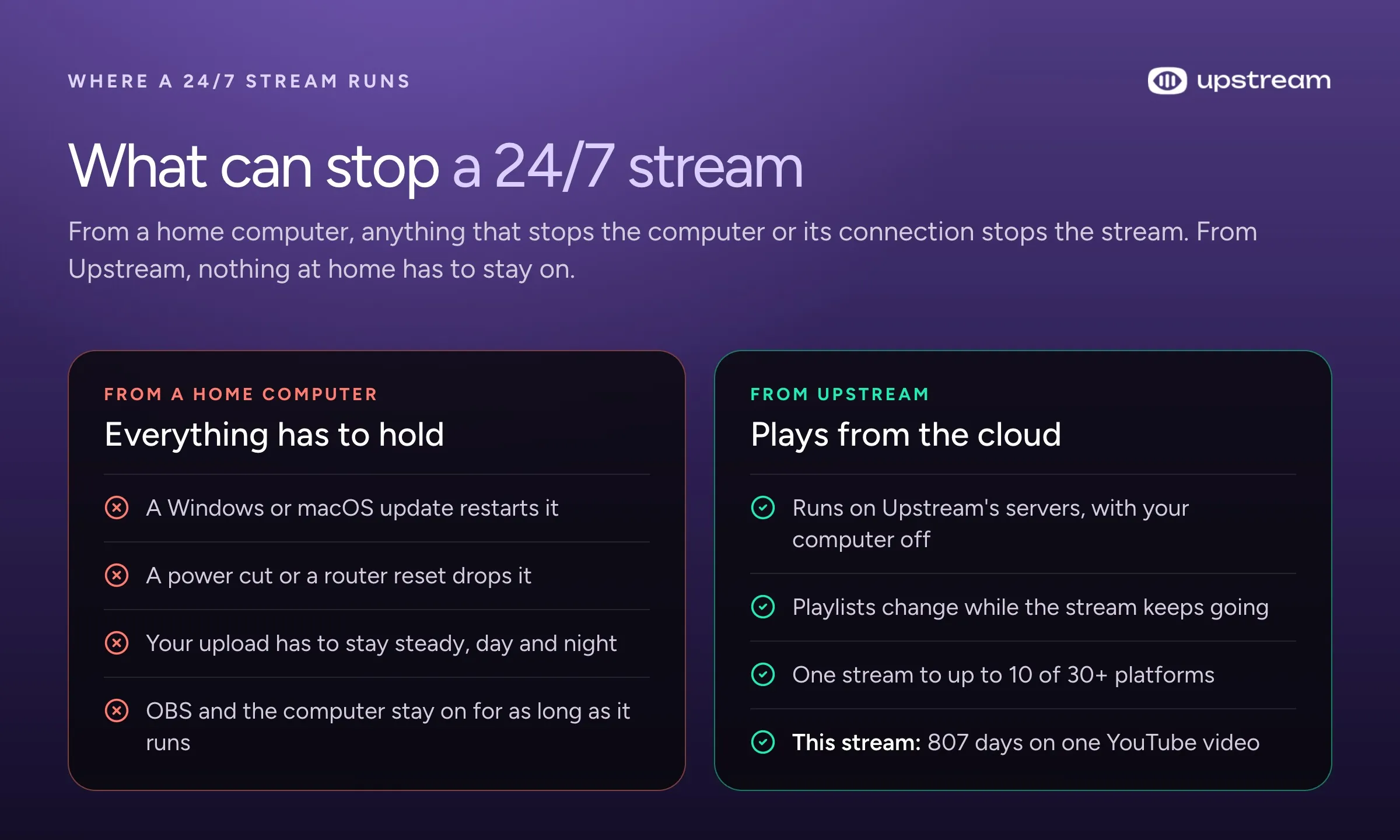
Comparison of what can stop a 24/7 stream from a home computer, such as updates, power cuts and upload drops, with a stream that plays from Upstream’s servers.

Upstream takes the home computer out of it. The stream plays from Upstream’s servers, so your computer can be off, and you can change the playlists while the stream keeps going. On Twitch, which ends every broadcast after 48 hours, Upstream reconnects on its own, so viewers see a short break instead of an ended stream.

What a restart costs

When a YouTube live stream ends and starts again, the new one is a new video with a new link. The views, likes and chat stay behind on the old one.

This stream never ended, so links shared in 2024 still open it today, and all 865,847 views sit on the video new visitors land on. Regulars come back to the same chat, too.

You can’t count on a replay, either. YouTube’s help page on archiving live streams says a stream longer than 12 hours “may not be captured at all”. If a 24/7 stream stops, viewers come back to a new, empty video.

Thiago used to restart on purpose. When he streamed from home he started a new stream every day, because a fresh stream seemed to get a push from YouTube. His viewers asked him to stop, because every restart sent them a notification. Now the link never changes, and he says that matters as much as the views.
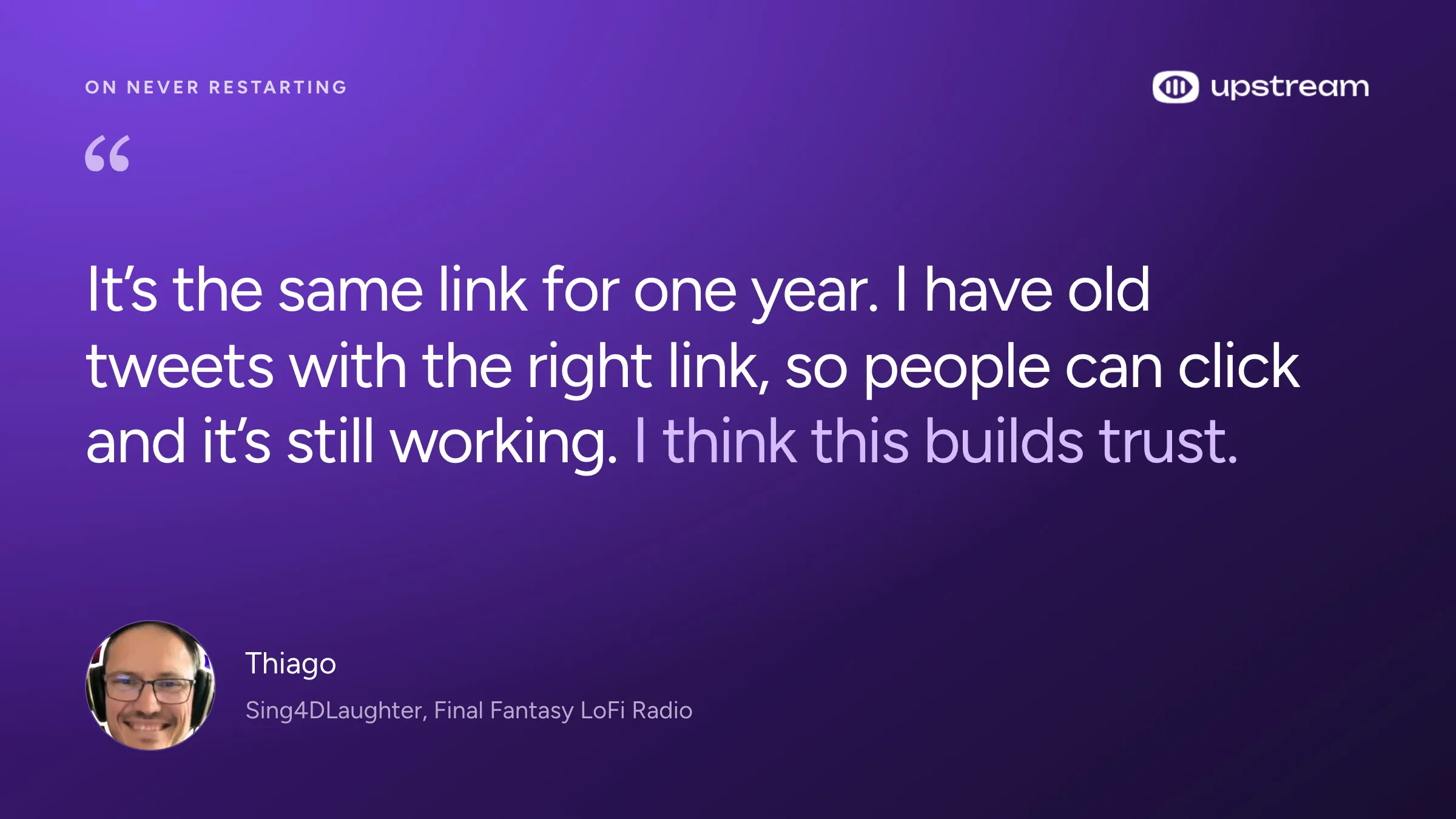
Thiago of Sing4DLaughter: It’s the same link for one year. I have old tweets with the right link, so people can click and it’s still working. I think this builds trust.
Thiago of Sing4DLaughter, in our interview on the stream’s first birthday, July 2025.

The room stays busy, too. Thiago says 60 to 70 people listen at the quietest hour and 150 to 200 at busy times, with regulars in the chat every day.

How the stream is set up

Thiago’s setup is simple. Upstream keeps video and audio as separate playlists, so the visuals loop on their own while the songs play in their own order.

The video playlist rotates his animations of Final Fantasy characters. The audio playlist shuffles 8 hours of songs, and he adds new ones as he records them, without stopping the stream. In the stream designer he set up logos that pass across the screen for the Final Fantasy channels he works with, and an overlay shows the current song.

He hasn’t pressed start since the first day. When he has a question, he told us, “people answer me right away. Never had one problem.”

Who runs it

Thiago is a guitarist from Brazil who now lives in Italy. He has loved Final Fantasy music since he played Final Fantasy VII in 1997. When he moved to Europe and started his music career over, he began recording lofi versions of the songs he grew up with.

The stream plays 8 hours of them, from the first game up to Final Fantasy VII Rebirth, made over 4 years. The [No AI] in the title means what it says: every track is played and recorded by people, often with other lofi artists.

We interviewed him when the stream turned one. Watch the 25 minute interview on our channel. A year later it is still the same video, now past 800 days.

Build in the cloud

Build the stream in the cloud.

Schedule videos, produce browser-based live shows, or send one feed to multiple platforms from the same Upstream workflow.

Sign up for free See the platform

Run your own 24/7 stream

Upstream runs streams like this one every day. Upload your videos and music once, build the stream in your browser, and send it to YouTube or to up to 10 of 30+ platforms at once. The same account runs scheduled pre-recorded streams and live shows with guests in Live Studio, too.

The free plan streams 24 hours a month with no card and no watermark, so you can test it first. A paid plan keeps one 1080p stream running all month for $30, or $24 a month billed yearly.

Our guide on how to set up a 24/7 live stream on YouTube walks through each step, and 24/7 live streaming on Upstream lists what’s included. See pricing, or compare the options in our guide to the best 24/7 live streaming software.

Frequently asked questions

Can a YouTube live stream run for years?

Yes. Final Fantasy LoFi Radio (24/7) has been one unbroken YouTube live stream since July 27, 2024, 807 days on October 12, 2026. It runs on Upstream from the cloud, so no home computer has to stay on.

Do I need my computer on for a 24/7 YouTube stream?

Not with a cloud service. On Upstream your videos and music play from Upstream’s servers, so your computer can be off. With OBS on your own PC, the PC has to stay on and online the whole time.

Does YouTube keep a replay of a 24/7 stream?

Don’t count on it. YouTube’s help page says a live stream longer than 12 hours may not be archived at all, so a 24/7 stream lives as the live video itself. YouTube sets no limit on how long the live stream itself can run. Our page on live streaming limits lists the rules for every platform.

What happens when Twitch ends a 24/7 stream?

Twitch ends every broadcast after 48 hours. Upstream reconnects on its own, so viewers see a short break, not an ended stream. YouTube has no such limit, which is why this stream could stay on one video for 807 days.

Does restarting a 24/7 stream get it more views?

Some streamers restart every day, hoping a fresh stream gets a push from YouTube. Thiago did that before Upstream and stopped: viewers didn’t want a notification every day, and each restart begins a new video with no views. One long-running video keeps every view and every shared link in one place.

How much does it cost to run a stream like this on Upstream?

One 1080p stream running all month costs $30 a month, or $24 a month billed yearly. The free plan streams 24 hours every month with no card and no watermark, which is enough to set up and test your stream.

Sources

Checked October 12, 2026.

  • The stream: Final Fantasy LoFi Radio (24/7) on the Sing4DLaughter channel, and our interview How This YouTube Live Stream Runs for Years Without Stopping.
  • YouTube Help: Archive live streams.
  • Upstream: 24/7 live streaming, separate audio and video playlists, overlays and pricing.
  • Quotes from Thiago are from our interview, lightly edited for readability.
Published October 12, 2026
Mario Jankovic

About the author

Mario Jankovic

Product and Engineering

Mario Jankovic co-founded Upstream and runs product and engineering. He writes about running live streams from the cloud: 24/7 channels, multistreaming and Live Studio, and what we learn building them.

Keep exploring

Further reading

Browse all articles
Best 24/7 Live Streaming Software for YouTube in 2026
Oct 10, 2026 Guides

Best 24/7 Live Streaming Software for YouTube in 2026

Read article
Cheapest 24/7 YouTube Live Streaming in 2026: What $6 to $30 a Month Gets You
Oct 9, 2026 Guides

Cheapest 24/7 YouTube Live Streaming in 2026: What $6 to $30 a Month Gets You

Read article
YouTube Cuts Reach for Reuploaded Shorts, Kick Adds VOD Downloads: Streamer News, Sep 25 to Oct 2
Oct 4, 2026 Blog

YouTube Cuts Reach for Reuploaded Shorts, Kick Adds VOD Downloads: Streamer News, Sep 25 to Oct 2

Read article

Start streaming today

Go live to every platform, run a 24/7 channel, and produce live shows in your browser, with no software or server setup.

No credit card 24 hours/month free Full functionality
Start Streaming Free
Upstream

Run your streams from the cloud

Free plan: 24 streaming hours a month, no card, no watermark.

4.5 · 242 reviews on Trustpilot
Legal entity
Zukunft d.o.o.
Registered address
Groznjanska 32, 10000 Zagreb
Company VAT ID
Company VAT ID: HR62560895839
About | Contact us | Tools | Content standards | Privacy Policy | Terms of Service | Affiliate terms |

Product

  • Pricing
  • Upstream Features Overview
    • Multistreaming
    • Separate Audio and Video
    • Overlays: Stream Designer
    • Live Streaming Studio
    • Scheduling & Automation
    • Live Playback Controls
    • Play Stings, Jingles and Ads
    • Team Access
  • Enterprise Broadcasting Solutions

Resources

  • Helpdesk
  • Live Streaming FAQ
  • Blog
  • Release Notes
  • Live Streaming API
  • MCP Server
  • Free Live Streaming
  • YouTube Live Streaming
  • RTMP Server
  • Supported Platforms
  • Live Streaming Limits
  • Integrations

Compare Us

  • Compare Upstream
    • Upstream vs Runnel.live
    • Upstream vs OneStream
    • Upstream vs Live247
    • Upstream vs Gyre
    • Upstream vs Streaming Bots
    • Upstream vs Restream
    • Upstream vs StreamYard
    • Upstream vs LiveReacting
    • Upstream vs Playout.video

Free Tools

  • Design tools
  • Video tools
  • Audio tools
  • AI tools
  • Setup checks

Use cases

  • For Creators
  • For Music Labels
  • Church Streaming
  • VTuber Streaming
  • Multi-Channel Streaming

© 2026 Upstream. All rights reserved.

Ready to go live? Start free in the cloud.

Sign up for free