You can start an internet radio station without buying a traditional radio-hosting plan by streaming it on YouTube, Mixcloud Live, or (in case of a live DJ performance) the Twitch DJ Program.
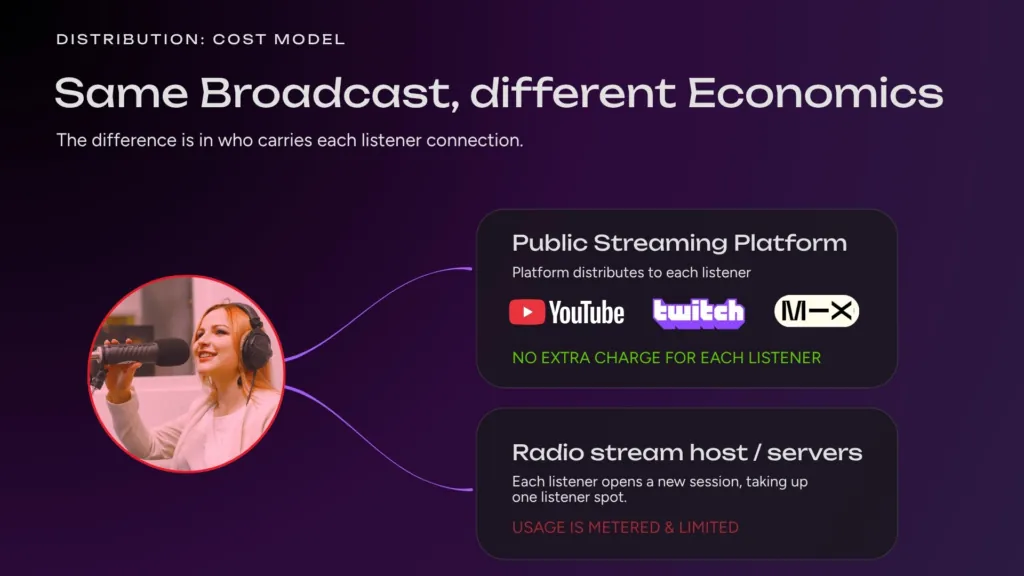
You send one stream to the platform; the platform delivers it to the audience, even if millions connect. That avoids a radio host whose plan scales by listening hours, bandwidth, storage, or concurrent listeners. That can get expensive really fast.
The deciding issue is music rights. YouTube gives you reach, discovery, chat, and an embeddable player, but you must have suitable rights to every track, and a rightsholder may need to allowlist your channel in Content ID. Mixcloud lets you play anything, as it handles licensing and royalty payments for copyrighted music covered by its blanket agreements. Twitch also licenses an approved catalog through its DJ Program, but only for live, interactive audiovisual DJ performances, not automated internet radio.
Streaming your own music that you have rights for is allowed on every platform.
If you want to see how easy it is to start your own internet radio station, check out our video guide on how to start a YouTube Radio Station:
Four ways to start an internet radio station
Most new stations fit one of three models:
| Route | Best for | How listeners tune in | Main cost or constraint |
|---|---|---|---|
| YouTube Live station | Owned, commissioned, or live-stream-cleared music; talk; ambient channels; branded 24/7 formats | YouTube app, website, search, recommendations, embeds | You need a continuous video feed and appropriate rights |
| Mixcloud Live | Live DJ sets, hosted music shows, and community radio programming using commercial releases | Mixcloud website, app, or shared live link | Mixcloud handles licensing under its agreements and rules; prerecorded shows should be avoided |
| Twitch DJ Program | DJs performing live with tracks in Twitch’s approved catalog | Twitch channel and DJ category | Live audiovisual performance only; no automated/audio-only stream, VOD, or unrestricted catalog |
| Traditional internet radio host | Stations that need an audio-only URL, directory distribution, AutoDJ, apps, or bundled licensing/reporting | Web player, app, smart speaker, directory, direct stream URL | Plans usually limit listening hours, bandwidth, storage, and concurrent listeners |
There is no universally “free” option. Even when audience delivery does not produce a separate bandwidth bill, you may still pay for cloud playout, production software, music rights, equipment, or a platform subscription. The useful distinction is whether your bill grows with every listener-hour.
Start with the distribution decision, not the equipment
Before buying a microphone or building a studio, decide what kind of station you are actually making.
Choose YouTube when your priority is reach and your catalog is safe to stream there. A YouTube radio station is technically a continuous live video: the audio plays under a looping animation, branded scene, track artwork, or another visual layer. Viewers can discover the stream through search, recommendations, subscriptions, and live chat.
Choose Mixcloud Live when the show is performed live and centers on commercial music that you have not licensed track by track. Mixcloud says its service is licensed through agreements with major and independent labels, publishers, distributors, performance-rights organizations, and other partners. It identifies music and handles licensing and royalties for creators. You still must follow its Terms of Use, Community Guidelines, and Featured Artist Rules; “licensed” does not mean every possible use is permitted. Its help center also says prerecorded shows or recordings of past sets should be avoided on Live.
Choose Twitch’s DJ Program when you are a DJ performing live on camera and the tracks appear in the Twitch DJ Catalog. The program is a rights-cleared framework for a specific performance format, not a general internet-radio license. Twitch prohibits automated or audio-only catalog streams, recordings, rebroadcasts, clips, and VODs containing Twitch catalog tracks meant for DJing: it has to be a mixed, live performance. It also restricts album-heavy or single-artist programming. That rules it out for an unattended 24/7 station built on Twitch Catalog tracks only, but makes it relevant for live resident-DJ shows.
Choose a traditional radio platform when an audio-only stream URL is essential. This route is useful if you need radio directories or a licensing package that matches your country and repertoire. You are paying for bytes plus radio-specific infrastructure and operations.
What you need before you go live
You can launch a basic station with five building blocks:
- A clear format. Define the genre, mood, audience, and reason to return. “Independent electronic releases from the Balkans” is easier to program and promote than “all kinds of good music.”
- Content you can legally stream. Use music you own, commissioned tracks, a catalog whose license explicitly covers livestreaming, or material for which the relevant owners have granted permission. Keep the paperwork.
- A radio playlist software (like Upstream). This keeps the queue moving, schedules programs, normalizes transitions, and reconnects after an interruption.
- A destination. Connect YouTube, Mixcloud Live, Twitch, or an internet-radio server using the method that destination supports.
- A monitoring routine. Check audio level, stream health, public playback, metadata, and rights warnings from a second device.
A microphone, interface, mixer, and headphones become useful when you add presenters, interviews, call-ins, or live DJ sets. They are not required for a station built entirely from pre-recorded audio.
How to start an internet radio station on YouTube
1. Verify the channel and enable live streaming
YouTube requires a verified channel with no applicable live-streaming restrictions. Activation may not be immediate, so do this before announcing a launch date.
2. Prepare a radio-safe catalog
Do not assume that owning an MP3 or paying for a consumer music subscription gives you livestream rights. YouTube scans live streams for third-party content. A live broadcast can be interrupted or terminated when a match is detected. Even if you have licensed the music, YouTube says the rightsholder may need to add your channel to its Content ID allowlist. This is why YouTube is easiest when you control the catalog, work directly with a label or distributor that can allowlist the channel, or use music licensed specifically for livestreaming with the Content ID process resolved in advance.
For the lowest-risk launch, use music you created, commissioned, or licensed specifically for continuous livestream use. Ask the licensor whether live broadcasts, monetization, worldwide availability, and archived replays are covered.
3. Create a visual layer
YouTube needs video as well as audio. A subtle loop is usually enough: an animated station ident, a studio scene, generative artwork, a clock, or a properly licensed visualizer. Keep motion gentle so the stream feels intentional without distracting from the music.
4. Choose local or cloud playout software
A local setup can use a playout app or OBS on a computer. It is inexpensive to test, but the broadcast depends on that machine, your electricity, and your upload connection.
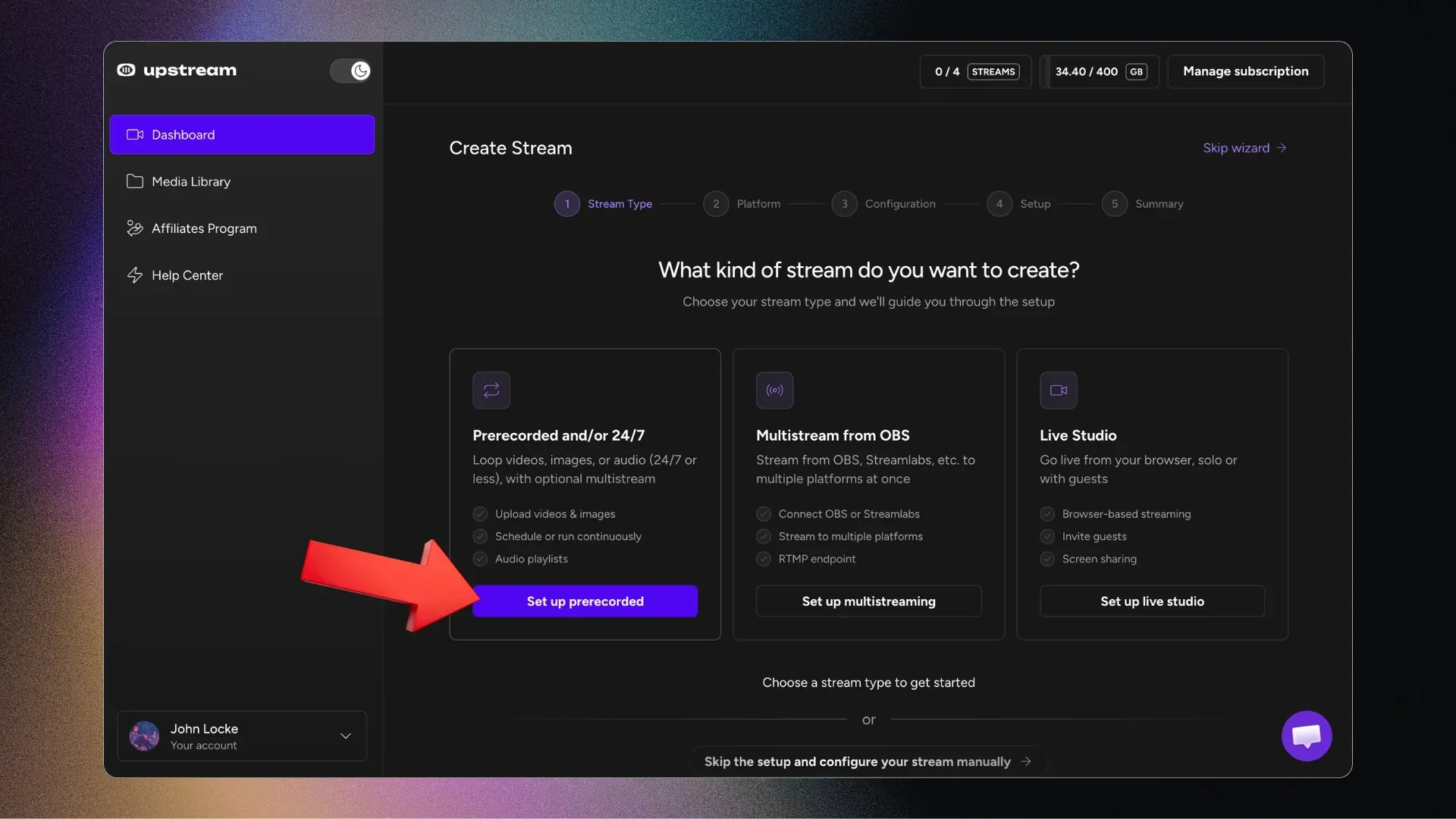
Playlist management via a cloud based streaming software removes the always-on computer. With Upstream, you can upload audio and background media, build a continuous playlist, connect YouTube, and run the feed from the cloud. The free plan currently includes one concurrent stream and 24 streaming hours per month, which is enough for a proof of concept; paid plans remove that monthly streaming limit. For the click-by-click workflow, use the existing YouTube radio station guide.
Before uploading your MP3s, batch edit their tags so titles, artists, and album names are consistent across your playlist.
5. Test privately, then launch
Run an unlisted test first. Listen on headphones and a phone speaker. Confirm that transitions are clean, loudness is consistent, the visual loop has no akwward seams, and reconnect behavior works. Only then switch the broadcast to public.
How to start a station on Mixcloud Live
Mixcloud Live accepts an RTMP feed, just like YouTube, so you need live broadcasting software or a cloud service that can send to a custom RTMP destination. Mixcloud says Shoutcast, Icecast, and BUTT do not connect directly because they do not provide the RTMP output its Live product needs. With Upstream, choose Mixcloud as the destination and sign in with Mixcloud Connect. Upstream gets a fresh stream key at every start; a pasted key still works.
A practical setup looks like this:
- Create and brand the Mixcloud profile.
- Get access to Mixcloud’s creator tools and Live feature.
- Build the live show in a DJ software, OBS, or a browser/cloud studio.
- Copy the Mixcloud stream key into the software (on Upstream this is in Stream Settings), or sign in with Mixcloud Connect on Upstream
- Start with a short private rehearsal outside Mixcloud, then go live and broadcast the show!
- Configure automatic reconnection for long sessions. Mixcloud says there is no current duration limit, but its system refreshes a stream after eight hours for stability.
Mixcloud is particularly good because the platform, not each individual DJ, has established music-rights agreements and handles royalty accounting for covered uses. That is the clearest advantage over YouTube, for a show built on other artists’ commercial releases.
When the Twitch DJ Program fits Radio Stations
Twitch’s DJ Program lets participating DJs livestream tracks from an approved catalog supplied through agreements with major labels and independent rightsholders. Participating monetized DJ channels share a portion of earnings with music rightsholders; Twitch says non-monetized DJs are not financially affected by that music cost.
This is made possible by a first-of-its-kind partnership with hundreds of companies, including all of the major labels: Universal Music Group, Warner Music Group, Sony Music, and a large number of independent labels and other rights holders (Twitch DJ Program FAQ).
The program has narrow creative and technical rules:
- Join the program and use only tracks currently listed in the Twitch DJ Catalog, unless you independently hold the required rights.
- Perform a live, interactive audiovisual DJ set; automated and audio-only broadcasting is prohibited.
- Do not create VODs, clips, recordings, or rebroadcasts containing catalog tracks.
- Do not play an entire or substantial part of an album, build a stream around one artist, publish the set list in advance, or immediately play audience requests.
Basically, if you want to use Twitch Catalogue tracks only, you have to mix them and DJ-them in a live performance. However, if you do have your tracks licensed already, Twitch can be a great place to create an internet radio.
Why traditional radio hosting can cost more as you grow
An audio streaming server receives one audio stream from you and creates a separate downstream connection for each listener. Ten people listening for one hour consume ten listener-hours; one thousand people do the same at a much larger scale. Providers often package some combination of listening hours, transfer, storage, bitrate, or concurrent listeners. And if you ever looked up these prices, you were probably surprised by how steep they can be for decent audio quality above 192 kbps.
That model is not inherently bad. A specialist host may include AutoDJ, scheduling, an audio player, radio-directory compatibility, apps, analytics, support, and may include music licensing or reporting in some markets and plans.
Pay for that stack when you need it. Do not pay for it by default when your real goal is simply to create a lean-back live channel on a platform your audience already uses. And do not underestimate this: it will be much easier to promote your radio station if they are native content on platorms, instead of being links and redirects to your website, stream url or any other link that contains your internet radio.
Cost comparison: what you are really paying for
| Cost center | YouTube + cloud playout | Mixcloud Live | Twitch DJ Program | Traditional radio host | Self-hosted Icecast/AzuraCast |
|---|---|---|---|---|---|
| Audience delivery | Handled by YouTube | Handled by Mixcloud | Handled by Twitch | Included within plan limits or terms | Your server and network |
| Automation | Cloud playout subscription or local software | Live DJ/encoder workflow | Not permitted for catalog music | Usually built in | You configure and maintain it |
| Music licensing | Your responsibility; allowlisting may be needed | Mixcloud handles covered rights and royalties, subject to its rules | Approved catalog in live DJ performances only | Varies; verify territory and repertoire | Your responsibility |
| Audio-only stream URL | No | No Shoutcast/Icecast-style endpoint | No; audiovisual performance required | Yes | Yes |
| Discovery | YouTube search, recommendations, subscriptions | Mixcloud community and followers | Twitch DJ category and community | Directories, player, app, promotion | Whatever you build and submit |
| Technical maintenance | Low with cloud playout | Low to moderate | Moderate live-production burden | Low | High |
The self-hosted route is not “free bandwidth.” AzuraCast itself is free and open source, but it runs on a VPS, dedicated server, or your own computer. You still pay for infrastructure and handle updates, security, backups, monitoring, capacity, and music compliance. This usually ends up costing more, especially if you factor in your own work for setting up and maintenance.
A sensible low-cost internet radio launch plan
Instead of going all in and paying for each listener immediately, start streaming from a local or cloud streaming service like Upstream. Stream to YouTube, Mixcloud or Twitch and find your audience. Talk to them. Meet them and build your community.
Building a radio station is hard work, but it is also incredibly fun. So even before you can secure non-stop radio broadcasting, start with a scheduled two-hour rather than a 24/7 promise. It gives you enough time to test the format, rights, audio chain, visuals, chat moderation, and promotion without filling an entire week of programming.
Use this sequence:
- Week 1: define the format and secure 90 to 120 minutes of cleared programming.
- Week 2: create the channel, visual loop, metadata, and playout workflow.
- Week 3: run two unlisted rehearsals and fix loudness or reconnection problems.
- Week 4: launch one scheduled public broadcast and measure unique viewers, average watch time, chat activity, followers, and return listeners.
If the show works, expand to recurring blocks. Move to 24/7 only after you have enough varied content, reliable automation, a bulletproof rights process, and a reason for listeners to return.
Frequently asked questions
Can I start an internet radio station for free?
Instead of paying for listener bandwidth, you can use a free broadcasting software and stream to YouTube Live or MixCloud Live. This way, the platforms handle the delivery to each listener in return for playing ads.
Is YouTube cheaper than an internet radio host?
It can be when you want a live video channel and do not need an audio-only stream URL, radio-directory distribution, or bundled licensing. YouTube handles playback delivery to viewers, while you send one source feed. You still need a reliable encoder or cloud playout system and rights to the content.
Can I play copyrighted music on YouTube Live?
Only when you have the necessary permissions, and practical Content ID handling may also be required. YouTube scans live streams for third-party material and can interrupt them. A license alone may not prevent interruption if the rightsholder has not allowlisted your channel in YouTube Studio.
Is Mixcloud better than YouTube for a DJ radio show?
Mixcloud is often the better fit for a genuinely live music show built from commercial releases because it handles licensing and royalties for music covered by its agreements, subject to platform rules. YouTube offers huge discovery and stronger video-channel features, but the broadcaster must secure rights and may also need rightsholders to whitelist the channel in Content ID.
Can I run an internet radio station through the Twitch DJ Program using only Twitch Catalogue tracks?
Only if the “station” is actually a live, interactive audiovisual DJ performance. The program does not permit automated or audio-only catalog streams, and catalog music cannot remain in VODs, clips, or rebroadcasts.You can still run an unattended 24/7 radio if you have your own or licensed tracks.
Do I need a website?
No. You can launch on a platform profile first. Add a website later when you need a permanent schedule, email capture, sponsor pages, archives, or a player you control. Note that Mixcloud says its Live player is not currently embeddable.
Should I use YouTube, Mixcloud, Twitch, or a radio host?
Use YouTube for discoverable 24/7 or scheduled streams made from content you can safely broadcast and, where necessary, have whitelisted. Use Mixcloud for live DJ and music-led shows built from covered commercial music. Use Twitch’s DJ Program for live audiovisual DJ performances using its approved catalog. Use a specialist radio host when audio-only distribution or bundled licensing are central requirements.
Start with one broadcast, not a broadcasting empire
The best solution is the one you can launch, monitor, and improve over time. Pick one format, one destination, and one short schedule. If YouTube, Twitch or Mixcloud is the right home for your radio station, you can start an Upstream account for free and use the included monthly streaming allowance to test the cloud workflow before committing to an always-on station.
Keep a live channel running 24/7.
Upload files, build a playlist, and let Upstream run continuous live playout from the cloud without OBS, a VPS, or an always-on computer.