Online Live Streaming Studio in Your Browser
Host shows, podcasts and webinars from your browser with guests, screen sharing, overlays and chat. There is nothing to download, and Upstream sends the show to 30+ platforms, up to 10 at once.
Guests join with a link
Send a link and guests join from their browser with camera and mic.
Screen share and layouts
Share a screen, switch layouts, and play pre-recorded clips in the middle of the show.
Overlays and chat
Lower thirds, logos, stings and a chat box with comments from every platform.
Invite, bring on stage, go live
Send guests a link and approve them from the green room. Put up to 10 people on stage, share your screen, pick a layout and start the stream.

Live Q&A, episode 12
Stopped More actions18.2 / 100GB Preview ⌘ P Save ⌘ S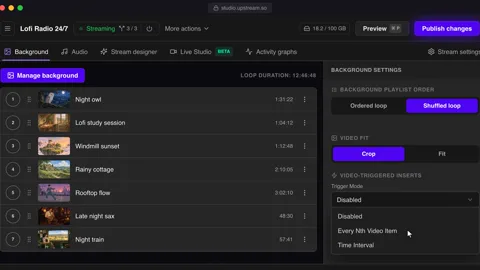
People
Invite guests and manage participants
Invite (2/12)
Share this link with guests to join your stream
studio.upstream.so/join/qa12 Used: 1 timeActive & Waiting
Approve waiting participants and manage active guests
 SamWaiting ApproveDeny
 Mia (You)HostLive
  LeoLive
 - 1 Guests join with a link
- 2 Approve and bring them on stage
- 3 Share your screen, change the layout
- 4 Start the stream on every platform
Trusted by teams in broadcast and entertainment


Overlays from the Stream designer
Drag platform badges, text, images and a live chat box onto the canvas. Changes show on stream straight away.


Chat from every platform on screen
Comments from the platforms you stream to land in one chat box, so you can answer everyone from one place.
The value you get per dollar is amazing. Many features are available at no cost when other similar services charge for them or do not have them available at all.
One cloud workflow for every way you stream.
Multistreaming is strongest when distribution is connected to the rest of production. Upstream also supports 24/7 live streaming, pre-recorded live streams, and Live Studio broadcasts from the same account.
Live Studio appears first here because this page is about sending one live feed to every destination that matters.

Produce browser-based live shows with guests.
Invite speakers, share screens, manage scenes, and add branded overlays for podcasts, webinars, interviews, and launches.
Explore Live Studio
Run a 24/7 live stream from your videos.
Upload once, build a playlist, and let Upstream run continuous live playout without OBS, a VPS, or an always-on computer.
Explore 24/7 streaming
Schedule finished videos as live events.
Turn recordings into scheduled live streams, premieres, loops, and recurring broadcasts from the same cloud workflow.
Explore pre-recorded streaming
Send one feed to every platform that matters.
Go live to YouTube, Twitch, Kick, Facebook, Rumble, and custom RTMP without making your upload connection carry every copy.
Explore multistreamingA control room in your browser
Bring in cameras, guests and a shared screen, line up the next shot and cut to it. When nobody is live, your 24/7 playlist keeps the channel going.
Compare
OBS, a browser studio like StreamYard, or Upstream Live Studio
OBS runs on your computer. Browser studios like StreamYard and Restream Studio don't, but most stop when the show ends. Upstream adds 24/7 and scheduled streams to the same place.
Where the three differ
| Capability | OBS Studio Desktop app | Browser studios StreamYard, Restream Studio | Best fit Upstream Live Studio |
|---|---|---|---|
| Install | Download and set up | None, runs in the browser | None, runs in the browser |
| Guests | Needs a separate call tool | Join with a link | Join with a link |
| Encoding on your computer | Yes, uses your CPU and upload | No | No |
| Several platforms at once | With plugins | Yes, the number depends on the plan | Up to 10 on every plan |
| Scheduled pre-recorded streams | No | Limited | Yes |
| Stays live after the show with a playlist | Only with the computer on | No | Yes |
- OBS Studio Desktop app
- Download and set up
- Browser studios StreamYard, Restream Studio
- None, runs in the browser
- Upstream Live Studio
- None, runs in the browser
- OBS Studio Desktop app
- Needs a separate call tool
- Browser studios StreamYard, Restream Studio
- Join with a link
- Upstream Live Studio
- Join with a link
- OBS Studio Desktop app
- Yes, uses your CPU and upload
- Browser studios StreamYard, Restream Studio
- No
- Upstream Live Studio
- No
- OBS Studio Desktop app
- With plugins
- Browser studios StreamYard, Restream Studio
- Yes, the number depends on the plan
- Upstream Live Studio
- Up to 10 on every plan
- OBS Studio Desktop app
- No
- Browser studios StreamYard, Restream Studio
- Limited
- Upstream Live Studio
- Yes
- OBS Studio Desktop app
- Only with the computer on
- Browser studios StreamYard, Restream Studio
- No
- Upstream Live Studio
- Yes
Use cases
What people host in Live Studio

Podcasts and interviews
Bring co-hosts and guests in with a link and put the episode title in a lower third.

Webinars and product demos
Share your screen for the walkthrough and answer questions from the chat.

Music sessions
Stream a session or a showcase to YouTube and Mixcloud without a hardware encoder.

Gaming and talk shows
Add your camera, overlays and stings to a show and send it to Twitch and Kick together.

News and panels
Put several remote speakers on screen with name tags and switch layouts as the talk moves.

Church services
Go live for the service, then let a playlist of past services run for the rest of the week.
Reviews
What Upstream customers say on Trustpilot
Excerpts from Trustpilot reviews by people who stream with Upstream.
Davone
Super helpful staff if you have any questions. No issues with the platform so far. All minor issues were resolved within the same hour. Their customer service is top notch
Atif
Great Experience. Far better than other streaming services like Go Stream, Live Karo etc. because Upstream provide better bitrate for high quality live streaming for YouTube with pretty budget friendl...
Anthony
I'm a new customer to upstream, but have been using vps for the past year. I've had numerous problems with my previous provider and decided to change. My first day contacting support I met Sebastian...
One free stream. Paid gets cheaper as you scale.
Start with 1 paid stream at $30/mo, scale to 1000+, and pay less as you add streams: 2 streams are $50/mo, 3 streams are $70/mo, then 4+ streams are $20/stream/mo or $16/stream/mo when billed yearly.
1 concurrent stream · 24 hr/month
1080p at 30 FPS
$30/stream/mo · 4+ volume rate is $20
* Free-plan capacity may be limited during unusual demand.
FAQ
Live Studio questions
Other ways to stream with Upstream
Send the show to every platform, keep the channel live between shows, or air a recorded episode on schedule.
Open Live Studio
Go live from your browser with guests, screen share and overlays. The free plan includes 24 hours of streaming every month.
Guides
More on live streaming software
Best Multistreaming Software in 2026
Compare multistreaming software by local encoding, cloud relay, and all-in-one platforms. Upstream gives flexible stream slots with no...
Read article
Best StreamYard Alternatives in 2026: 10 Competitors Compared
Compare StreamYard alternatives by pricing, destination limits, and flexible stream slots. Upstream includes every feature with no feature...
Read article
7 Best Restream Alternatives in 2026: Free & Paid Options Compared
Compare Restream alternatives by free plans, destination limits, and flexible stream slots. Upstream includes every feature with no...
Read article