Upstream
Upstream
  • Product
    24/7 Live Streaming Run cloud channels that stay live around the clock. Live Studio Invite guests, share screens, and add branded overlays in the browser. Multistreaming Send one live feed to YouTube, Twitch, Kick, and RTMP endpoints. Pre-recorded Live Streaming Upload pre-recorded videos & Go Live without the stress of live production. Enterprise Broadcasting setups for teams, labels, and agencies. Free plan 24 hours a month with no watermark.
  • Features
    Scheduling Streams that start and end on their own. Multichat Every platform's chat in one feed. Overlays Layers and widgets in Stream Designer. Stings, jingles and ads Inserts that play between your videos. Playback controls Skip or play any file while you stay live. Audio and video playlists Loop music and visuals separately. Team access Invite your team, each with their own role. RTMP server Stream in from OBS or any encoder. Live Streaming API Run streams, media and queues from code. MCP Server Manage streams from your AI assistant. All features Everything Upstream does, on one page.
  • Platforms
    YouTube live streaming Twitch live streaming Kick live streaming Facebook live streaming Instagram live streaming TikTok TikTok live streaming Rumble live streaming Mixcloud live streaming 30+ more Plus any custom RTMP or SRT destination.
    Platform limits Bitrate and duration caps for each platform. Integrations Setup guides for OBS, vMix, cameras and more.
  • Resources
    Blog Guides and ideas for live streams. Release Notes What's new in Upstream. Free Tools Video, audio and setup tools. Helpdesk Setup help and troubleshooting. Live Streaming FAQ Quick answers about going live. Compare Upstream Upstream vs Restream and more.
  • Pricing
Login Sign up for free
Always-on 24/7 Live Streaming Run cloud channels that stay live around the clock.
Explore
Real-time live Live Studio Invite guests, share screens, and add branded overlays in the browser.
Explore
One stream, 30+ platforms Multistreaming Send one live feed to YouTube, Twitch, Kick, and RTMP endpoints.
Explore
Schedule & Automate Pre-recorded Live Streaming Upload pre-recorded videos & Go Live without the stress of live production.
Explore
Enterprise Broadcasting setups for teams, labels, and agencies. Explore Free plan 24 hours a month with no watermark. Explore
Scheduling Streams that start and end on their own. Multichat Every platform's chat in one feed. Overlays Layers and widgets in Stream Designer. Stings, jingles and ads Inserts that play between your videos. Playback controls Skip or play any file while you stay live. Audio and video playlists Loop music and visuals separately. Team access Invite your team, each with their own role. RTMP server Stream in from OBS or any encoder.
Live Streaming API Run streams, media and queues from code.
MCP Server Manage streams from your AI assistant.
All features Everything Upstream does, on one page.
YouTube live streaming. 24/7 channels with midroll ads. Twitch live streaming. Streams restart on their own at 48 hours. Kick live streaming. Stay live with your computer off. Facebook live streaming. Schedule lives that start on their own. Instagram live streaming. Go live from your browser or the cloud. TikTok TikTok live streaming. Go live on TikTok and Instagram at once. Rumble live streaming. Add Rumble to your YouTube or Kick stream. Mixcloud live streaming. DJ sets and radio shows from your browser. 30+ more Plus any custom RTMP or SRT destination.
Platform limits Bitrate and duration caps for each platform.
Integrations Setup guides for OBS, vMix, cameras and more.
Blog Guides and ideas for live streams. Release Notes What's new in Upstream. Free Tools Video, audio and setup tools. Helpdesk Setup help and troubleshooting. Live Streaming FAQ Quick answers about going live. Compare Upstream Upstream vs Restream and more.
Scheduling

Live stream scheduling that runs itself

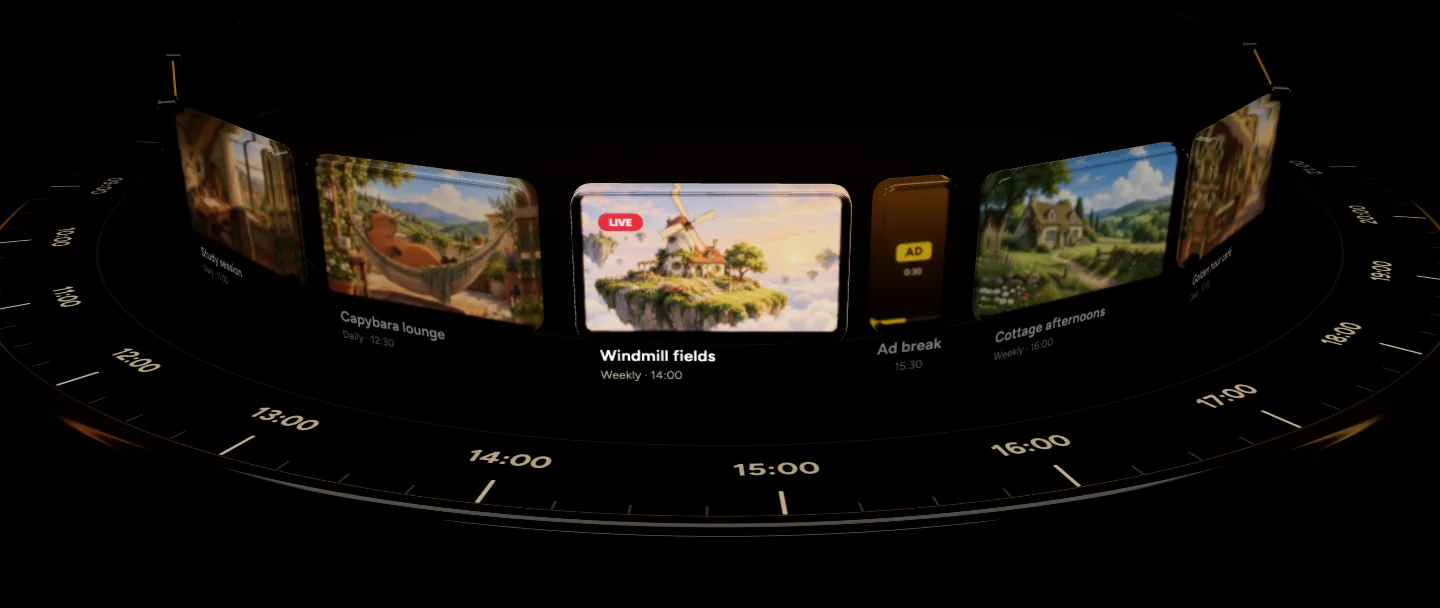
Give every show its slot. Upstream puts it on air at that time, on every platform, and takes it off again. Every day or every week, with your laptop closed.
Start Streaming Free Scheduling is on every plan, including the free one.
Scheduled Morning train 06:00 Next: Cottage mornings 08:30

Ends when you want it to

End at a set time, after a number of hours, or when the videos or music run out. For YouTube, one click keeps it just under 12 hours, so YouTube saves it to your channel.

Schedule livestreamScheduled
End date and time10/04/2026, 12:0010/04/2026, 21:50
Set custom stream durationSet to just under 12 hoursSet the stream duration to 11 hours and 50 minutes. YouTube automatically archives live streams that are less than 12 hours long under your channel's Live tab.Set end time to background durationSet end time to audio duration

Long streams in cycles

Pick how long each cycle runs and the break between them. The stream stops, waits and starts again on its own, forever or for as many cycles as you set.

Schedule typeBack-to-back stream cyclesStream runs in cycles with breaks in between, restarting automatically.
How long should each cycle run?
11Hours55Minutes
Break between cycles
0Hours30Minutes
11h 55m11h 55m11h 55mArchivedArchivedArchived
11h 55m cycle · 30m break · Repeats indefinitelyScheduledStreaming

Your YouTube event, set up ahead

For a one-time schedule, Upstream can create the YouTube live event as soon as you save, so you have a link to share and viewers who open it early see your start time.

YouTube ConnectScheduledStreaming
Stream name (required) Your stream name Lofi beats to study to, 24/7
Privacy status Unlisted Public Unlisted Private Public
Category People & Blogs Music
Thumbnail
Description Description of your stream
LiveLofi beats to study to, 24/7Lofi Beats Radio, 1,284 watching now

Every platform starts together

Switch on the platforms in the schedule and they go live at the start time and stop at the end, up to 10 at once.

Trusted by teams in broadcast and entertainment

Disney MS logo Disney MS logo Disney
Eurovision MS logo Eurovision MS logo Eurovision
NBCUniversal MS logo NBCUniversal MS logo NBCUniversal
Pinkfong MS logo Pinkfong MS logo Pinkfong
Red Bull Red Bull Red Bull
Disney MS logo Disney MS logo Disney
Eurovision MS logo Eurovision MS logo Eurovision
NBCUniversal MS logo NBCUniversal MS logo NBCUniversal
Pinkfong MS logo Pinkfong MS logo Pinkfong
Red Bull Red Bull Red Bull
Disney MS logo Disney MS logo Disney
Eurovision MS logo Eurovision MS logo Eurovision
NBCUniversal MS logo NBCUniversal MS logo NBCUniversal
Pinkfong MS logo Pinkfong MS logo Pinkfong
Red Bull Red Bull Red Bull
Disney MS logo Disney MS logo Disney
Eurovision MS logo Eurovision MS logo Eurovision
NBCUniversal MS logo NBCUniversal MS logo NBCUniversal
Pinkfong MS logo Pinkfong MS logo Pinkfong
Red Bull Red Bull Red Bull

The value you get per dollar is amazing. Many features are available at no cost when other similar services charge for them or do not have them available at all.

Trustpilot review

FAQ

Live stream scheduling questions

Add your videos or music to a stream, open General settings and pick a schedule type: one-time or recurring. Set the start date and time, and when it should end, then save. At that time Upstream starts the stream on its servers and sends it to the platforms you turned on.

Yes. Choose Recurring schedule, set the frequency to Daily or Weekly, and set the next start and end. That window then repeats every day, or every seven days, until you change it. For a show on a few days of the week, set it to daily or use one stream per day.

No. Upstream streams from its own servers, so your computer can be off and the browser tab closed. You can check on it or change it from any device.

Yes. Set an end date and time, a duration of up to 24 hours, or let it end when the video or audio playlist runs out. In Play once and end mode it stops when the playlist finishes, and a recurring one starts again at the same time the next day or week.

YouTube automatically saves live streams shorter than 12 hours to your channel’s Live tab. Upstream has a one-click option that sets the end to just under 12 hours, so each stream stays on your channel as a video.

A schedule type that runs the stream for a set time, takes a break, and starts again on its own. You pick how long each cycle runs and the break between them, and whether it repeats forever, stops at a time or stops after a number of cycles. It can continue each cycle from where the last one left off.

Yes. With a connected YouTube account and a one-time schedule, Upstream can create the YouTube live event as soon as you save. You get the link to share right away, and anyone who opens it early sees a waiting screen with your start time. See YouTube live streaming for the rest.

Your own. You set and see the start and end in your browser’s local time, and Upstream starts the stream at that moment wherever the servers are.

Yes. Edit the playlist, the design or the times any time before it starts. Once it’s live you can still change the playlist and overlays without stopping it.

If your plan is already using all its streams at that moment, Upstream emails you that the stream couldn’t start and keeps trying, so it starts as soon as there’s room.

Yes. Scheduling is on every plan, including the free plan with 24 hours of streaming every month. No credit card needed.

More features

Related features

Every feature is included on every plan, the free plan too.

Playback controls Skip or play any file while live See what is playing and what comes next, then skip, queue or play a file right away. See playback controls Playlists Separate audio and video playlists Songs on one playlist, videos, images or GIFs on the other, plus an ambience channel. See playlists Stings and jingles Stings, jingles and ad inserts Play stings, jingles, ads and sponsor reads between videos or at an exact time. See stings and jingles
More features and guides
  • Overlays in a drag and drop designer
  • Share streams without a password
  • Live streaming FAQ
  • Stream length limits by platform
  • Free live streaming

Put your streams on a schedule

Set the time once, pick the platforms and close your laptop. Scheduling is included on the free plan with 24 hours of streaming every month.
No credit card 1 stream included 24 hours/month Full functionality
Start Streaming Free See pricing

Guides

More on scheduled streaming

How to Run a 24/7 Twitch Stream in 2026: Rules, Limits and Setup
Oct 10, 2026 Guides

How to Run a 24/7 Twitch Stream in 2026: Rules, Limits and Setup

Yes, Twitch allows 24/7 streams. Here are the Rerun and music rules, what happens at the 48 hour...

Read article
Restream Pricing 2026: Plans, Free Plan and 24/7 Costs
Oct 10, 2026 Guides

Restream Pricing 2026: Plans, Free Plan and 24/7 Costs

Restream pricing for 2026: $0, $19, $49 or $239 a month. Every plan, yearly prices, free plan limits,...

Read article
Best 24/7 Live Streaming Software for YouTube in 2026
Oct 10, 2026 Guides

Best 24/7 Live Streaming Software for YouTube in 2026

Upstream, Gyre, LiveReacting, StreamHouse, Restream and 10 more compared for 24/7 streams: monthly price, free plan and loop...

Read article
Upstream

Run your streams from the cloud

Free plan: 24 streaming hours a month, no card, no watermark.

4.5 · 242 reviews on Trustpilot
Legal entity
Zukunft d.o.o.
Registered address
Groznjanska 32, 10000 Zagreb
Company VAT ID
Company VAT ID: HR62560895839
About | Contact us | Tools | Content standards | Privacy Policy | Terms of Service | Affiliate terms |

Product

  • Pricing
  • Upstream Features Overview
    • Multistreaming
    • Separate Audio and Video
    • Overlays: Stream Designer
    • Live Streaming Studio
    • Scheduling & Automation
    • Live Playback Controls
    • Play Stings, Jingles and Ads
    • Team Access
  • Enterprise Broadcasting Solutions

Resources

  • Helpdesk
  • Live Streaming FAQ
  • Blog
  • Release Notes
  • Live Streaming API
  • MCP Server
  • Free Live Streaming
  • YouTube Live Streaming
  • RTMP Server
  • Supported Platforms
  • Live Streaming Limits
  • Integrations

Compare Us

  • Compare Upstream
    • Upstream vs Runnel.live
    • Upstream vs OneStream
    • Upstream vs Live247
    • Upstream vs Gyre
    • Upstream vs Streaming Bots
    • Upstream vs Restream
    • Upstream vs StreamYard
    • Upstream vs LiveReacting
    • Upstream vs Playout.video

Free Tools

  • Design tools
  • Video tools
  • Audio tools
  • AI tools
  • Setup checks

Use cases

  • For Creators
  • For Music Labels
  • Church Streaming
  • VTuber Streaming
  • Multi-Channel Streaming

© 2026 Upstream. All rights reserved.