Upstream
Upstream
  • Product
  • Features
  • Platforms
  • Resources
  • Pricing
Login Sign up for free
About Upstream

Everything you need to go live.

Upstream is cloud live streaming software that lets creators and media teams go live from the browser, multistream to up to 10 platforms at once and run 24/7 channels from their videos.

Start Streaming Free Meet the team
2023
Founded in Zagreb, Croatia
30+
Platforms, up to 10 at once
4.6
From 245 reviews on Trustpilot
0
AI bots answering support

Products

What Upstream does

Also included: Stream Designer for overlays, team access, a live streaming API and MCP for AI assistants.

Live Studio

Go live from your browser with up to 10 guests and screen sharing. Add your overlays and send the show to your platforms without OBS.

Explore Live Studio
studio.upstream.so

Live Q&A, episode 12

Stopped More actions 18.2 / 100GB Preview ⌘ P Save ⌘ S Publish changes
Background Audio Stream designer Live Studio BETA Activity graphs Stream settings Save preset Load preset
Mia Leo Sam Camera preview is not live yet. Start stream to go live.
Stage Control2 / 10 on stage
On Air Green Room Disconnected

Live You Live Leo Live Sam Stop Sharing Present or invite
Auto speaker: ON Video file Image file Share screen Invite guest
Source Stage People Triggers Chat Collapse

People

Invite guests and manage participants

Invite (2/12)

Share this link with guests to join your stream

studio.upstream.so/join/qa12 Used: 1 time

Active & Waiting

Approve waiting participants and manage active guests

Waiting for Approval (1) SamWaiting ApproveDeny
Active Participants (2) Mia (You)HostLive LeoLive
1 Guests join with a link 2 Approve and bring them on stage 3 Share your screen, change the layout 4 Start the stream on every platform

Multistreaming

Send one stream to up to 10 of 30+ supported platforms at once, including YouTube, Twitch, Kick and Facebook. It works on all plans, including the free plan.

Explore multistreaming
studio.upstream.so

Lofi Radio 24/7

Stopped 0 / 3 More actions 18.2 / 100GB Preview ⌘ P Save ⌘ S Publish changes
Background Audio Stream designer Live Studio BETA Activity graphs Stream settings Save preset Load preset
Manage background Loop duration: 09:33:50
1 Night owl 1:31:22
2 Lofi study session 1:04:12
3 Rainy cottage 2:10:05
4 Rooftop flow 3:02:10
5 Late night sax 48:30
6 Night train 57:41
Background settings

Background playlist order

Ordered loopShuffled loop

Shuffle will play a random background file from the list.

Video fit

CropFit

Background will be cropped to fill the entire canvas if the aspect ratio doesn't match.

VIDEO Lofi study session Unknown Artist
Now playing
AUDIO Last train home Unknown Artist

Start stream

Choose a destination for your stream, then confirm to go live.

YoutubeReady to go live Change
Twitch channelTwitch Change
Facebook pageFacebook Change
KickKick Change
Add destination
Privacy
Public Visible to everyone Unlisted Anyone with the link Private Visible only to you
The stream will not be visible to the public.
Start stream Cancel Esc
upstream Dashboard Destinations Media Library MiaYour account
18.2 / 100GB Manage subscription
Stream Settings Stream builder YouTube Connect
Multistreaming
Twitch channel Convert to Twitch Connect Add stream
Twitch channelTwitch Facebook pageFacebook KickKick
Saved destination Enter manually Reuse a destination without re-entering its stream key.Manage destinations
Stream keyStored securely. Replace it only when your credentials change. Replace key Remove multistream
Stream key Enter stream key Save this destination for reuseIt will appear in Destinations and can be selected in future stream setups.
Save Settings Delete
1 Add a platform with its stream key 2 Up to 10 destinations per stream 3 Pick which ones go live 4 Live on every platform at once

24/7 live streaming

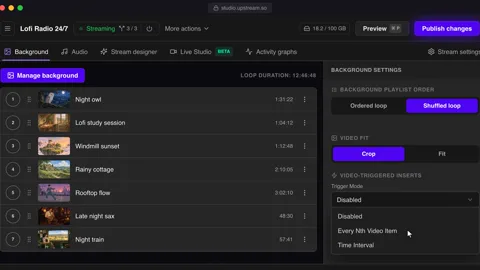
Turn a playlist of your videos into a channel that never goes off air. It runs in the cloud, so your computer can be off the whole time.

Explore 24/7 streaming
studio.upstream.so

Lofi Radio 24/7

Streaming 3 / 3 More actions 18.2 / 100GB Preview ⌘ P Save ⌘ S Publish changes
Background Audio Stream designer Live Studio BETA Activity graphs Stream settings Save preset Load preset
Manage background Loop duration: 11:34:00
Background settings

Background playlist order

Ordered loopShuffled loop

Ordered will play the background files in their order.

Video-triggered inserts

Trigger Mode Disabled Disabled Every Nth Video Item Time Interval Choose when to trigger video-triggered inserts Configure Video Inserts 2
VIDEO Lofi study session Unknown Artist
Now playing
AUDIO Midnight tape Unknown Artist
1 Add videos while it's live 2 Loop in order or shuffled 3 Play inserts between videos 4 Publish. It keeps playing, 24/7

Pre-recorded live streaming

Schedule finished videos to go live at a set time, once or on repeat. On YouTube the stream shows as Upcoming, so viewers can set a reminder.

Explore pre-recorded streaming
studio.upstream.so

Product launch

Stopped 0 / 4 More actions 18.2 / 100GB Preview ⌘ P Save ⌘ S Publish changes
Background Audio Stream designer Live Studio BETA Activity graphs Stream settings Save preset Load preset
Manage background Loop duration: 00:42:40
1 Countdown intro 0:30
2 Product launch 42:10
General settings

Playback mode

Loop continuouslyPlay once and end

Stream loops your playlists 24/7 until you stop it manually or a schedule ends.

Schedule livestream

Schedule type No schedule - manual control No schedule - manual controlYou start and stop the stream manually from the dashboard. One-time scheduleStream starts and stops automatically at the times you set. Recurring scheduleChoose the next start and end occurrence; future occurrences repeat from that window. Back-to-back stream cyclesStream runs in cycles with breaks in between, restarting automatically. You start and stop the stream manually from the dashboard.
Start date and time Select date and time End date and time
October 2026
MoTuWeThFrSaSu 1 2 3 4 5 6 7 8 9 10 11 12 13 14 15 16 17 18 19 20 21 22 23 24 25 26 27 28
Set time of day
20:00
Back to calendarCancelSelect

Multistreams in schedule

Controls the behaviour of additional destinations which will start with this schedule.

Upstream pageFacebook upstreamTwitch upstreamKick
One-time scheduledStarts: Fri, Oct 2, 20:00
Tab closed, computer off Fri, Oct 2 · 19:59
VIDEO Countdown intro Unknown Artist
Now playing
AUDIO Stream audio Unknown Artist
1 Play it once, then end 2 Set a one-time start 3 Pick the platforms 4 Save. It goes live on time

Why Upstream

What makes Upstream different

A person answers, not a bot

Every live chat, helpdesk ticket and email is answered by someone on the team. We decided that on purpose: when a stream is down, you want someone who knows the product.

Contact us

Change what plays without a restart

Add, skip or reorder videos while the stream is live. The new video joins the queue and the broadcast keeps going, so viewers never see it stop.

See playback controls

A free plan with no watermark

The free plan has 24 hours of streaming a month, up to 10 of 30+ supported platforms and every feature, with no watermark and no card. Many free streaming plans put their logo on your stream.

See the free plan

30+ platforms, up to 10 at once

YouTube, Twitch, Kick, Facebook, Instagram, Rumble and Mixcloud are built in. TikTok and any other RTMP or SRT server connect as a custom destination.

See supported platforms

Certified for YouTube Live

Upstream is a YouTube Live verified encoder on YouTube's official list. Connect your channel with your Google account, without copying stream keys.

See Upstream on YouTube's list

Bootstrapped since 2023

We have no investors. The people who use Upstream pay for it, so they are the only ones we answer to when we decide what to build next.

See what we have built

Customers

Who uses Upstream

Most of our customers are creators and small teams. The same product runs channels for some of the biggest names in media, and every one of them came to us on their own.

  • YouTube creators running 24/7 music, lofi and ambient channels
  • Music labels and artists streaming their catalogue
  • Broadcasters and media companies running channels from their library
  • Radio stations and churches that are live every day
  • Podcasters and hosts who go live with guests
  • Gamers, brands and agencies running several channels

Streaming with Upstream

Disney Disney Disney
Eurovision Eurovision Eurovision
NBCUniversal NBCUniversal NBCUniversal
Pinkfong Pinkfong Pinkfong
Red Bull Red Bull Red Bull
Disney Disney Disney
Eurovision Eurovision Eurovision
NBCUniversal NBCUniversal NBCUniversal
Pinkfong Pinkfong Pinkfong
Red Bull Red Bull Red Bull
Disney Disney Disney
Eurovision Eurovision Eurovision
NBCUniversal NBCUniversal NBCUniversal
Pinkfong Pinkfong Pinkfong
Red Bull Red Bull Red Bull
Disney Disney Disney
Eurovision Eurovision Eurovision
NBCUniversal NBCUniversal NBCUniversal
Pinkfong Pinkfong Pinkfong
Red Bull Red Bull Red Bull

Team

Some of the people behind Upstream

Mario Janković and Domagoj Franc started Upstream in Zagreb. We built it as a tool to promote another project of ours, and while building it we realized the tool was the product.

The first customer paid in March 2023. The pandemic was behind us, AI tools weren't part of anyone's workflow yet, and keeping a stream live around the clock still meant a computer in the corner that nobody was allowed to touch. Upstream moved that computer to the cloud.

We are still a small team, still bootstrapped, and still the people who answer your messages.

Mario Janković

Mario Janković

Co-founder, Product

Works on product, design and the frontend. He helps creators think like broadcasters and cares about small teams with a big reach.

mariojankovic.com LinkedIn X

Domagoj Franc

Domagoj Franc

Co-founder and CTO

Builds the servers, networking and automation that keep thousands of channels live. Before Upstream he spent about ten years building backends for other teams.

domagojfranc.com LinkedIn X

Bojan Opačak

Bojan Opačak

Content and Partnerships Lead

Runs content and partnerships, and writes about live streaming strategy, creator monetization and YouTube and Twitch workflows.

LinkedIn

Sebastian Županić

Sebastian Županić

Customer Support Lead

Leads customer support and answers many of the live chats himself, explaining what happens behind the scenes. Customers thank him by name in their reviews.

Trustpilot reviews

Support and billing

How Upstream works

01 Start free

Create an account with your email or Google. There is no card to add, and the free plan includes 24 hours of streaming every month.

Create a free account

02 Talk to a person

Use live chat on upstream.so or in the app, the helpdesk at help.upstream.so, or email contact@upstream.so. The people who answer build and run the product.

Open the helpdesk

03 Pay monthly or yearly

Paid plans start at $30 a month for one stream. Pay monthly or yearly, add streams as you grow, and cancel anytime.

See pricing

04 Bigger setups

Running many channels, a large catalogue or a team? Tell us what you need and we will work out a plan with you directly.

Upstream for Enterprise

Company

Key facts

Company name
Upstream (upstream.so)
Type
Cloud live streaming software (SaaS)
Founded
2023, first paying customer in March 2023
Founders
Mario Janković and Domagoj Franc
Headquarters
Zagreb, Croatia
Legal entity
Zukunft d.o.o., Groznjanska 32, 10000 Zagreb, VAT ID HR62560895839
Website
upstream.so
Core offering
Live Studio, multistreaming, 24/7 live streaming and pre-recorded live streaming
Platforms
30+ supported, up to 10 at the same time
Pricing
Free plan with 24 hours of streaming a month. Paid plans from $30 a month.
Contract terms
Monthly or yearly, cancel anytime. Enterprise plans on request.
Support
Live chat, helpdesk and email, answered by people. No AI chatbot.
Notable clients
Disney, NBCUniversal, Pinkfong, Eurovision Song Contest, Red Bull
Customers
Thousands of creators and media teams
Funding
Bootstrapped, no outside investors
Certification
Certified for YouTube Live. Listed by YouTube as a YouTube Live verified encoder.
Reviews
4.6 out of 5 from 245 reviews on Trustpilot
Compared with
Restream, StreamYard, OneStream, Gyre, Live247
Press
24sata, April 2023
Editorial standards
How we write and correct this site
Social
YouTube, X, Instagram, Facebook, Trustpilot

FAQ

Questions about Upstream

The company, the team and how support works.

Mario Janković and Domagoj Franc founded Upstream in Zagreb, Croatia. The first paying customer signed up in March 2023. Mario leads product and design, and Domagoj is the CTO.

Upstream is based in Zagreb, Croatia, and is operated by Zukunft d.o.o., Groznjanska 32, 10000 Zagreb.

Yes. The free plan includes 24 hours of streaming every month, up to 10 destinations and every feature, with no watermark and no credit card. Paid plans start at $30 a month. See the free plan.

No. A person on the Upstream team answers every live chat, helpdesk ticket and email, and Sebastian Županić leads support. We don't use an AI bot for support.

Creators, music labels, radio stations, churches, podcasters and media companies. Teams at Disney, NBCUniversal, Pinkfong, the Eurovision Song Contest and Red Bull stream with Upstream.

All three can multistream, and all three have a browser studio. Upstream also plays your uploaded videos as scheduled or 24/7 live streams from the cloud, and its free plan has no watermark. See Upstream vs Restream and Upstream vs StreamYard.

Yes. Upstream is a YouTube Live verified encoder on YouTube's official list. YouTube calls the qualifying process certification in its verification requirements, which cover API use, streaming quality and the broadcaster experience.

Yes. Open the live chat on upstream.so or write to contact@upstream.so. For larger setups, see Upstream for Enterprise.

Go live with Upstream

Start on the free plan. A person answers if you get stuck.

No credit card 24 hours/month 10 destinations Human support
Start Streaming Free Compare plans
24/7 Live Streaming Run cloud channels that stay live around the clock. Live Studio Invite guests, share screens, and add branded overlays in the browser. Multistreaming Send one live feed to YouTube, Twitch, Kick, and RTMP endpoints. Pre-recorded Live Streaming Upload pre-recorded videos & Go Live without the stress of live production. Free plan 24 hours a month with no watermark. Multi-channel streaming Separate live channels from one account. Enterprise Setups for teams, labels and agencies. About Upstream Who we are and how Upstream works.
Scheduling Streams that start and end on their own. Multichat Every platform's chat in one feed. Overlays Layers and widgets in Stream Designer. Stings, jingles and ads Inserts that play between your videos. Playback controls Skip or play any file while you stay live. Audio and video playlists Loop music and visuals separately. Team access Invite your team, each with their own role. RTMP server Stream in from OBS or any encoder. Live Streaming API Run streams, media and queues from code. MCP Server Manage streams from your AI assistant. All features Everything Upstream does, on one page.
YouTube live streaming Twitch live streaming Kick live streaming Facebook live streaming Instagram live streaming TikTok TikTok live streaming Rumble live streaming Mixcloud live streaming 30+ more Plus any custom RTMP or SRT destination.
Platform limits Bitrate and duration caps for each platform. Integrations Setup guides for OBS, vMix, cameras and more. VTuber Streaming Go live with your avatar on every platform.
Blog Guides, platform rules and news for anyone who goes live. Guides Setup guides for 24/7 streams, multistreaming and RTMP. Release Notes The new features in each Upstream update, in one place. Free Tools Video, audio, thumbnail and AI tools, plus camera and mic checks. Helpdesk Step by step setup help and troubleshooting for Upstream. Service status Current service health, uptime history and incident updates. Live Streaming FAQ Short answers to what people ask before they go live. Compare Upstream Upstream side by side with Restream, StreamYard and others. Latest post YouTube Dual Stream: What the Vertical Copy Does and How to Turn It Off
Always-on 24/7 Live Streaming Run cloud channels that stay live around the clock.
Explore
Real-time live Live Studio Invite guests, share screens, and add branded overlays in the browser.
Explore
One stream, 30+ platforms Multistreaming Send one live feed to YouTube, Twitch, Kick, and RTMP endpoints.
Explore
Schedule & Automate Pre-recorded Live Streaming Upload pre-recorded videos & Go Live without the stress of live production.
Explore
Free plan 24 hours a month with no watermark.
Multi-channel streaming Separate live channels from one account.
Enterprise Setups for teams, labels and agencies.
About Upstream Who we are and how Upstream works.
Scheduling Streams that start and end on their own. Multichat Every platform's chat in one feed. Overlays Layers and widgets in Stream Designer. Stings, jingles and ads Inserts that play between your videos. Playback controls Skip or play any file while you stay live. Audio and video playlists Loop music and visuals separately. Team access Invite your team, each with their own role. RTMP server Stream in from OBS or any encoder.
Live Streaming API Run streams, media and queues from code.
MCP Server Manage streams from your AI assistant.
All features Everything Upstream does, on one page.
YouTube live streaming. 24/7 channels with midroll ads. Twitch live streaming. Streams restart on their own at 48 hours. Kick live streaming. Stay live with your computer off. Facebook live streaming. Schedule lives that start on their own. Instagram live streaming. Go live from your browser or the cloud. TikTok TikTok live streaming. Go live on TikTok and Instagram at once. Rumble live streaming. Add Rumble to your YouTube or Kick stream. Mixcloud live streaming. DJ sets and radio shows from your browser. 30+ more Plus any custom RTMP or SRT destination.
Platform limits Bitrate and duration caps for each platform.
Integrations Setup guides for OBS, vMix, cameras and more.
VTuber Streaming Go live with your avatar on every platform.
Blog
Guides
Release Notes
Free Tools
Helpdesk
Service status
Live Streaming FAQ
Compare Upstream
YouTube Dual Stream: What the Vertical Copy Does and How to Turn It Off YouTube Dual Stream: What the Vertical Copy Does and How to Turn It Off
Upstream

Run your streams from the cloud

Free plan: 24 streaming hours a month, no card, no watermark.

4.6 · 245 reviews on Trustpilot
Legal entity
Zukunft d.o.o.
Registered address
Groznjanska 32, 10000 Zagreb
Company VAT ID
Company VAT ID: HR62560895839
About | Contact us | Tools | Content standards | Security | Privacy Policy | Terms of Service | Affiliate terms |

Product

  • Pricing
  • Upstream Features Overview
    • Multistreaming
    • Separate Audio and Video
    • Overlays: Stream Designer
    • Live Streaming Studio
    • Scheduling & Automation
    • Live Playback Controls
    • Play Stings, Jingles and Ads
    • Team Access
  • Enterprise Broadcasting Solutions

Resources

  • Helpdesk
  • Service status
  • Live Streaming FAQ
  • Blog
  • Release Notes
  • Live Streaming API
  • MCP Server
  • Free Live Streaming
  • YouTube Live Streaming
  • RTMP Server
  • Supported Platforms
  • Live Streaming Limits
  • Integrations

Compare Us

  • Compare Upstream
    • Upstream vs Runnel.live
    • Upstream vs OneStream
    • Upstream vs Live247
    • Upstream vs Gyre
    • Upstream vs Streaming Bots
    • Upstream vs Restream
    • Upstream vs StreamYard
    • Upstream vs LiveReacting
    • Upstream vs Playout.video

Free Tools

  • Design tools
  • Video tools
  • Audio tools
  • AI tools
  • Setup checks

Use cases

  • For Creators
  • For Music Labels
  • Church Streaming
  • VTuber Streaming
  • Multi-Channel Streaming

© 2026 Upstream. All rights reserved.