Pre-Recorded Live Streams on Any Platform
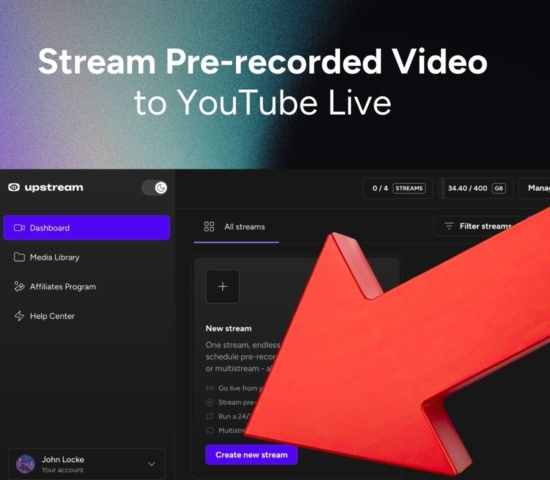
Upload a video you recorded, pick a date and the platforms, and it goes live at that time from Upstream’s servers. Use it for launches, webinars, premieres and shows that air while you’re busy.
Starts on time by itself
Set the date once, or repeat it every day or week. Your computer can be off.
Every platform at once
YouTube, Facebook, Twitch, Kick, TikTok or any RTMP server, up to 10 of 30+ supported platforms from one stream.
A real live stream
Viewers watch it live and chat in real time on each platform, and you can join the chat while it plays.
Key facts about Upstream
- What it is
- Cloud streaming software that does four things in one plan: 24/7 streams from your videos, scheduled pre-recorded streams, live shows with guests, and multistreaming.
- Price
- $30 a month per 1080p stream, or $24 billed yearly. As low as $16 a stream with 4 or more, billed yearly.
- Free plan
- 24 hours of streaming every month, with no card and no watermark. The hours reset monthly.
- Platforms
- 30+ platforms, up to 10 at once from one stream.
- Playlists
- Separate video and audio playlists that loop, in order or shuffled.
- YouTube
- Certified for YouTube Live. Upstream is on YouTube's official list of verified encoders.





Set the time once, then close the tab
Pick a start time and the platforms, and save. At that moment Upstream starts the stream on its servers, whether your computer is on or not.
Product launch
Stopped 0 / 4 More actions18.2 / 100GB Preview ⌘ P Save ⌘ S
Playback mode
Stream loops your playlists 24/7 until you stop it manually or a schedule ends.
Schedule livestream
Multistreams in schedule
Controls the behaviour of additional destinations which will start with this schedule.
Trusted by teams in broadcast and entertainment


Pick the time, once or on repeat
Schedule a one-off premiere or a weekly slot. On YouTube it shows as Upcoming on your channel, so viewers can set a reminder.

Title, thumbnail and privacy set ahead
For YouTube, Upstream creates the live event with your title, description and thumbnail, then starts it when the stream goes live.

One cloud workflow for every way you stream.
Multistreaming is strongest when distribution is connected to the rest of production. Upstream also supports 24/7 live streaming, pre-recorded live streams, and Live Studio broadcasts from the same account.

Schedule finished videos as live events.
Turn recordings into scheduled live streams, premieres, loops, and recurring broadcasts from the same cloud workflow.
Explore pre-recorded streaming
Run a 24/7 live stream from your videos.
Upload once, build a playlist, and let Upstream run continuous live playout without OBS, a VPS, or an always-on computer.
Explore 24/7 streaming
Send one feed to every platform that matters.
Go live to YouTube, Twitch, Kick, Facebook, Rumble, and custom RTMP without making your upload connection carry every copy.
Explore multistreaming
Produce browser-based live shows with guests.
Invite speakers, share screens, manage scenes, and add branded overlays for podcasts, webinars, interviews, and launches.
Explore Live StudioVertical for TikTok and Instagram
Set the output to 1080p vertical and the video fills the phone screen, so a pre-recorded TikTok live looks made for it.

Webinar and event platforms too
Paste the RTMP URL and stream key from any platform that takes a stream, like a webinar tool or the player on your own site.
Schedule a pre-recorded video to go live
Upload the video, pick a date and the platforms, and Upstream streams it live at that time from its own servers. Your computer can be off.
Compare
A YouTube Premiere, going live from OBS, or a scheduled stream on Upstream
Each one gets a recorded video in front of viewers at a set time. They differ in where it can air and what has to stay switched on.
Where the three differ
- YouTube Premiere Uploaded video
- Shown as a Premiere
- OBS on your computer Played as live
- Yes
- Upstream Scheduled live stream
- Yes
- YouTube Premiere Uploaded video
- YouTube only
- OBS on your computer Played as live
- One per output, more with plugins
- Upstream Scheduled live stream
- Up to 10 of 30+ supported platforms at once
- YouTube Premiere Uploaded video
- Yes
- OBS on your computer Played as live
- You press start
- Upstream Scheduled live stream
- Yes
- YouTube Premiere Uploaded video
- No
- OBS on your computer Played as live
- Yes, for the whole stream
- Upstream Scheduled live stream
- No
- YouTube Premiere Uploaded video
- No
- OBS on your computer Played as live
- By hand
- Upstream Scheduled live stream
- Yes
- YouTube Premiere Uploaded video
- No
- OBS on your computer Played as live
- Yes, in your scenes
- Upstream Scheduled live stream
- Yes, in the browser
Use cases
What people stream pre-recorded
Product launches
Record the launch video when it suits the team, then air it at the same moment on every channel.
Webinars and courses
Run a recorded session as a live event and answer questions in the chat while it plays.
Services and events
Air a recorded service or show at its usual time each week, even when nobody is at the desk.
Other time zones
Schedule a replay for the hours your audience in another region is awake.
Podcast premieres
Air the edited episode as a live premiere and talk to listeners in the chat while it plays.
Concerts and sessions
A recorded set goes out as a live concert, on every platform at the same moment.
Reviews
What Upstream customers say on Trustpilot
Excerpts from Trustpilot reviews by people who stream with Upstream.
4.6 245 reviews on Trustpilot Marc Ryan
One free stream. Paid gets cheaper as you scale.
Start with 1 paid stream at $30/mo, scale to 1000+, and pay less as you add streams: 2 streams are $50/mo, 3 streams are $70/mo, then 4+ streams are $20/stream/mo or $16/stream/mo when billed yearly.
1 concurrent stream · 24 hr/month
1080p at 30 FPS
$30/stream/mo · 4+ volume rate is $20
* Free-plan capacity may be limited during unusual demand.
FAQ
Pre-recorded live streaming questions
Other ways to stream with Upstream
Run a 24/7 live stream, send a live show to every platform, or host it yourself with guests.
Schedule a pre-recorded stream
Upload the video, pick the time and the platforms, and close your laptop. The free plan includes 24 hours of streaming every month.