Run your entire streaming operation.
Bring your channels, content and team into one workspace. Run 24/7 catalogues, scheduled streams and live productions from the cloud.
Officially certified YouTubeUsed across broadcast and entertainment


A workspace for the whole operation
Built for content libraries,
agencies and live teams.
From a back catalogue to a roster of creators, give your team a consistent way to prepare, publish and manage live streams.
Lofi Radio 24/7
Streaming 3 / 3 More actions18.2 / 100GB Preview ⌘ P Save ⌘ SBackground playlist order
Ordered will play the background files in their order.
Video-triggered inserts
Trigger Mode DisabledChoose when to trigger video-triggered inserts
01 Content libraries
Give your catalogue a live channel.
Build playlists from your videos, run them around the clock and keep audio on its own playlist. The cloud does the playout while your team works on what comes next.
Explore cloud playout02 Agencies and rosters
Bring every channel into view.
Manage multiple streams from one workspace. Invite the people who run them, set their access per stream and switch between shared accounts without signing out.
See team access03 Live productions
Go from scheduled content to a live show.
Bring guests into Live Studio by link, share a screen and add your overlays. Send the show to your destinations from the same place you manage your scheduled streams.
Explore Live StudioA role for everyone
Give each person
the right level of access.
Everyone signs in with their own account. Set a default role, fine-tune access to individual streams and revoke access when a project ends.
Billing, team access settings and API tokens stay with the account owner. Each person can enable two-factor authentication on their own account.
See how permissions workTeam accessPer-stream permissions

- View Only
- Let clients and stakeholders see streams, settings and content without changing them.
- Moderator
- Run and edit existing streams, upload files and manage the show without creating or deleting streams.
- Manager
- Create and delete streams, manage content and playlists, and connect YouTube, Twitch or Kick.
The tools behind the broadcast
Distribution, production
and automation.
Keep your live shows close to your scheduled programming. Bring guests on stage, choose a layout and send the production to your platforms.
Live Q&A, episode 12
Stopped More actions18.2 / 100GB Preview ⌘ P Save ⌘ S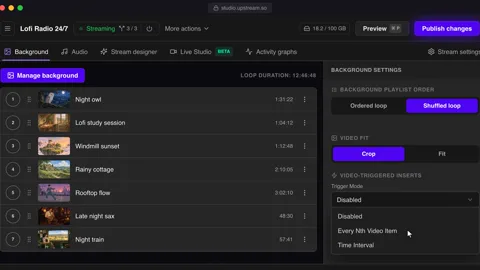
People
Invite guests and manage participants
Invite (2/12)
Share this link with guests to join your stream
studio.upstream.so/join/qa12 Used: 1 timeActive & Waiting
Approve waiting participants and manage active guests
 SamWaiting
ApproveDeny
SamWaiting
ApproveDeny Mia (You)HostLive
 LeoLive
Distribution
One stream. Up to 10 destinations.
Connect YouTube, Twitch and Kick directly, or use stream keys for other destinations. Reach several platforms from one feed, with output settings chosen for each stream.
Explore multistreamingProduction
Your content, your presentation.
Schedule a start and end time, reuse playlists, add overlays and insert stings or jingles. Skip or queue a track while the stream is running.
Explore the featuresAutomation
Connect streaming to your workflow.
Use the customer API to manage streams, destinations, queues and media. MCP gives AI assistants access to supported streaming tools through your account.
Explore the streaming APIFrom the first channel to your wider operation
A clearer path to rollout.
Test the workflow, connect your systems and work through the requirements with the people who build Upstream.
Start with a real stream
Use the free plan to test your content, destinations and team workflow before choosing a larger setup.
Explore the free planConnect the systems you use
Manage streams, queues, media and destinations through the customer API. Use MCP for supported workflows with AI assistants.
Read the API guideWork through the details
Discuss your rollout date, concurrent channels, quality settings, support needs and procurement questions directly with us.
Talk through your setupPeople behind the platform
Work with the people
behind Upstream.
Tell us how you stream today and what needs to change. We can discuss your channel count, content library, quality settings and support needs, then work out a plan that fits.
4.6 245 reviews on Trustpilot Marc Ryan
A plan that fits your operation
Scale your streams
around your requirements.
Plans scale with concurrent streams, resolution and frame rate. Paid upgrades include 4K and 60 fps. Larger teams, channel counts and procurement requirements can be discussed with us directly.
Let's talk about your setup
- How many streams run at the same time
- Where they go and the quality you need
- Your content library and team workflow
- Your rollout, support and procurement needs
FAQ

