Upstream
Upstream
  • Product
  • Features
  • Platforms
  • Resources
  • Pricing
Login Sign up for free
Blog

YouTube AI Song Swap, Kick 30 Day VODs: Streamer News, Oct 30 to Nov 6

Written by Mario Jankovic November 6, 2026 · 4 min read
  1. YouTube
    1. Replace song can make new music outside the US
    2. Election night streams and the 12 hour line
    3. Android app showed "Server Error 400"
    4. Hearts in vertical lives, Shorts from your old streams
    5. Animation channels lose YPP
  2. Kick
  3. Discord
  4. Keep every long stream under 12 hours

YouTube's Replace song tool can now make copyright-safe instrumentals for creators in most countries outside the European Economic Area, not just the US. Streams Charts counted 20.9M hours watched on US election night across YouTube, Twitch, Kick and Rumble, and 80% of it was on YouTube.

YouTube

Replace song can make new music outside the US

When a video gets an audio copyright claim, the Replace song tool in YouTube Studio now has a Create button under the Suggestions tab. It makes four royalty-free instrumental tracks, each three minutes long, and you can loop them or change the volume on your timeline. Once the claimed audio is fully replaced with a generated track, the Content ID claim is removed on its own.

YouTube launched it for US creators earlier this year. On November 3, TeamYouTube said it's now open to creators in most countries outside the European Economic Area, so creators in the EU still can't use it. It only works in Studio on desktop for now, the tracks are instrumental only, and YouTube says they're meant for content you make on YouTube, not for other platforms.
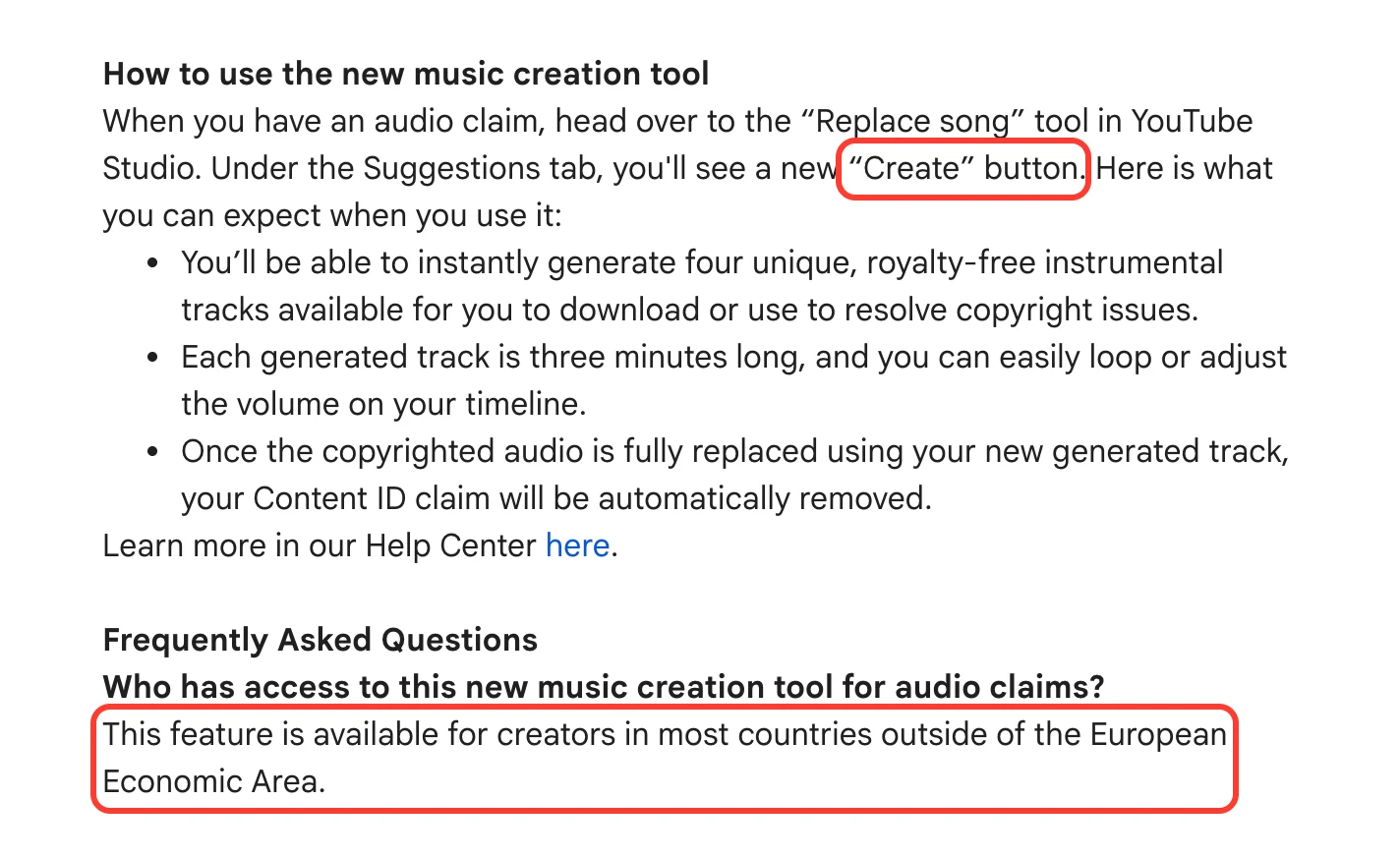
TeamYouTube's post on the Replace song Create button, with the button and the line about most countries outside the European Economic Area highlighted
TeamYouTube's post New music creation tool to help resolve copyright claims, November 3, 2026. Highlight ours.

If you're not sure whether a claim or a strike hit your video, our copyright claim vs strike guide covers the difference.

Build in the cloud

Build the stream in the cloud.

Schedule videos, produce browser-based live shows, or send one feed to multiple platforms from the same Upstream workflow.

Sign up for free See the platform
2 / 10 guests
MiaLeo
GuestsEncodersStyleChatDestinationsGraphics
Destinations

Where this stream goes when it is live.Streaming to 5 destinations.

  • Lofi HoursPrimary destination ChatReadyStartingStreaming
  • lofihoursMultistream destination ChatReadyStartingStreaming
  • lofihoursMultistream destination ChatReadyStartingStreaming
  • Lofi HoursMultistream destinationReadyStartingStreaming
  • TikTokMultistream destinationReadyStartingStreaming
Manage destinations

Election night streams and the 12 hour line

Streams Charts counted 20.9M hours watched on US election night across YouTube, Twitch, Kick and Rumble. YouTube had 80% of it. NBC News alone had 21%. Its Kornacki Cam stream kept a camera on the network's data analyst all night, with more than 200k people watching live.

NBC News had planned 13 hours and ended at hour 10. The VOD is 10 hours 38 minutes long and had 6.2M views about two hours after the stream ended. Stopping early kept it under 12 hours, the length YouTube archives automatically. On November 3, TeamYouTube told a creator that streams over 12 hours might not be captured at all.

Sources: Streams Charts, the Kornacki Cam VOD, TeamYouTube on X.

Android app showed "Server Error 400"

On November 1 the YouTube app on Android started failing with a "Server Error 400" message. TeamYouTube said it was on it that morning and called it resolved early on November 2. If the error stayed, the fix was to reinstall the app or clear its storage, and both delete your downloaded videos. On November 3, TeamYouTube said some people still saw the error and a fix was in progress.

TeamYouTube avatarTeamYouTube@TeamYouTubeX postUpdate: This is now resolved! If you're still seeing a "Server Error 400" message on Android, please try uninstalling & reinstalling the YouTube app, or clearing the app's storage in your device settings (note: both will remove downloaded videos). Thanks so much for hanging in there with us!November 2, 2026View on X ↗
TeamYouTube on X, November 2, 2026. Their November 3 follow up says some people still saw the error.

Hearts in vertical lives, Shorts from your old streams

YouTube's monthly Creator Roundup came out on October 30. Two of its updates touch live streams. One is updated reactions in vertical live streams, where viewers find the Heart in the menu at the top right, next to Share and the chat filters. The other is the Clips and Shorts tool in Studio, which cuts Shorts or clips out of your long videos and archived live streams. YouTube says you won't be penalized under its reused content rules for posting your own content this way. The tool's AI suggestions only work in 10 countries for now, including the US, the UK, Germany, Brazil and India.

Sources: YouTube Help: vertical live streams, YouTube Help: Clips and Shorts in YouTube Studio.

Animation channels lose YPP

A group of animation creators says 48 channels with 4.7M subscribers between them lost monetization under YouTube's Misleading Family Content policy. The channel that started the campaign makes kaiju battle animations. The policy also lets YouTube age restrict videos instead, which would leave the channels in YPP. As of November 6 YouTube hadn't answered them publicly. We hope YouTube takes a second look. (the creators' post on X, YouTube's policy page)

Kick

Kick published a page on November 5 that lists what verified streamers get. Their VODs stay up for 30 days instead of 7, they can ask for weekly payouts instead of monthly ones, and they get 24/7 live chat support. Verification is also the step before you can apply to the Kick Partner Program.

To apply, your channel needs at least 15 streamed hours, an average of 50 concurrent viewers, 100 unique chatters and 10 active subscriptions over the past 30 days. You also need two-factor authentication on, at least two VODs from the past 7 days and no Terms of Service violations in the past 30 days.
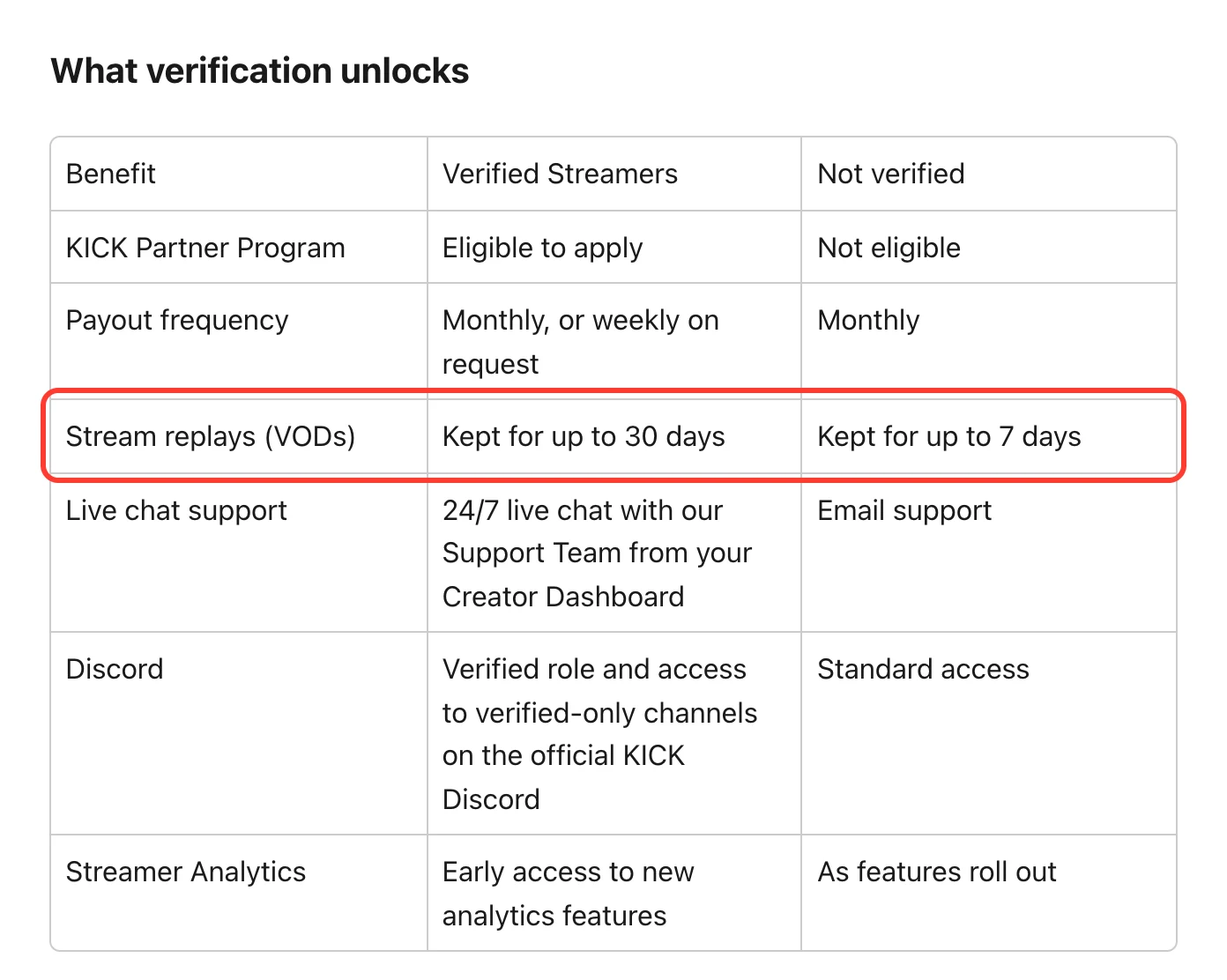
Kick's verified streamer benefits table, with the row showing VODs kept for 30 days for verified streamers and 7 days otherwise highlighted
Kick Help: Verified Streamer benefits on KICK, November 5, 2026. Highlight ours.

Seven days isn't long if you want to keep your streams. Our Kick VODs guide shows how to save them before they expire.

Discord

Discord gift cards are now sold in stores in the US, Canada, the UK, France, Italy and Spain. They pay for Nitro and items in the Discord Shop. (Discord blog)

Keep every long stream under 12 hours

A YouTube stream that runs past 12 hours may not be saved as a VOD. With 24/7 and scheduled streams on Upstream, back to back schedules end each stream at 11 hours 55 minutes by default, so each one gets its own VOD. They run from our servers, so your computer can be off.

For your own live shows, Live Studio runs in the browser with guests and screen share. With multistreaming, one stream goes out to up to 10 of 30+ platforms at once, and YouTube, Twitch, Kick and Rumble chat come into one feed.

You can try all of it on the free plan, which includes 24 streaming hours a month at 1080p30. Start streaming for free.
Published November 6, 2026
Mario Jankovic

About the author

Mario Jankovic

Product and Engineering

Mario Jankovic co-founded Upstream and runs product and engineering. He writes about running live streams from the cloud: 24/7 channels, multistreaming and Live Studio, and what we learn building them.

Keep exploring

Further reading

Browse all articles
YouTube Live Feed, Twitch Stream Recaps: Streamer News, Oct 16 to 23
Oct 26, 2026 Blog

YouTube Live Feed, Twitch Stream Recaps: Streamer News, Oct 16 to 23

Read article
How to Run a 24/7 Twitch Stream in 2026: Rules, Limits and Setup
Oct 10, 2026 Guides

How to Run a 24/7 Twitch Stream in 2026: Rules, Limits and Setup

Read article
How to Become a VTuber in 2026: Setup, Costs and Going Live
Oct 8, 2026 Blog

How to Become a VTuber in 2026: Setup, Costs and Going Live

Read article

Start streaming today

Go live to every platform, run a 24/7 channel, and produce live shows in your browser, with no software or server setup.

No credit card 24 hours/month free Full functionality
Start Streaming Free
24/7 Live Streaming Run cloud channels that stay live around the clock. Live Studio Invite guests, share screens, and add branded overlays in the browser. Multistreaming Send one live feed to YouTube, Twitch, Kick, and RTMP endpoints. Pre-recorded Live Streaming Upload pre-recorded videos & Go Live without the stress of live production. Free plan 24 hours a month with no watermark. Multi-channel streaming Separate live channels from one account. Enterprise Setups for teams, labels and agencies. About Upstream Who we are and how Upstream works.
Overlays Layers and widgets in Stream Designer. RTMP server Stream in from OBS or any encoder. Multichat Every platform's chat in one feed. Stings, jingles and ads Inserts that play between your videos. Scheduling Streams that start and end on their own. Website player Embed your live stream on your site. Playback controls Skip or play any file while you stay live. Team access Invite your team, each with their own role. Backup streams A standby feed if your main one drops. Audio and video playlists Loop music and visuals separately. Media library & storage Organize files and cloud uploads. Live Streaming API Run streams, media and queues from code. MCP Server Manage streams from your AI assistant. All features Everything Upstream does, on one page.
YouTube live streaming Twitch live streaming Kick live streaming Facebook live streaming Instagram live streaming TikTok TikTok live streaming Rumble live streaming Mixcloud live streaming 30+ more Plus any custom RTMP or SRT destination.
Platform limits Bitrate and duration caps for each platform. Integrations Setup guides for OBS, vMix, cameras and more. VTuber Streaming Go live with your avatar on every platform.
Blog Guides, platform rules and news for anyone who goes live. Guides Setup guides for 24/7 streams, multistreaming and RTMP. Release Notes The new features in each Upstream update, in one place. Free Tools Video, audio, thumbnail and AI tools, plus camera and mic checks. Helpdesk Step by step setup help and troubleshooting for Upstream. Service status Current service health, uptime history and incident updates. Live Streaming FAQ Short answers to what people ask before they go live. Compare Upstream Upstream side by side with Restream, StreamYard and others. Latest post YouTube Dual Stream: What the Vertical Copy Does and How to Turn It Off
Always-on 24/7 Live Streaming Run cloud channels that stay live around the clock.
Explore
Real-time live Live Studio Invite guests, share screens, and add branded overlays in the browser.
Explore
One stream, 30+ platforms Multistreaming Send one live feed to YouTube, Twitch, Kick, and RTMP endpoints.
Explore
Schedule & Automate Pre-recorded Live Streaming Upload pre-recorded videos & Go Live without the stress of live production.
Explore
Free plan 24 hours a month with no watermark.
Multi-channel streaming Separate live channels from one account.
Enterprise Setups for teams, labels and agencies.
About Upstream Who we are and how Upstream works.
Overlays Layers and widgets in Stream Designer. RTMP server Stream in from OBS or any encoder. Multichat Every platform's chat in one feed. Stings, jingles and ads Inserts that play between your videos. Scheduling Streams that start and end on their own. Playback controls Skip or play any file while you stay live. Team access Invite your team, each with their own role. Backup streams A standby feed if your main one drops. Audio and video playlists Loop music and visuals separately. Media library & storage Organize files and cloud uploads.
Live Streaming API Run streams, media and queues from code.
MCP Server Manage streams from your AI assistant.
All features Everything Upstream does, on one page.
YouTube live streaming. 24/7 channels with midroll ads. Twitch live streaming. Streams restart on their own at 48 hours. Kick live streaming. Stay live with your computer off. Facebook live streaming. Schedule lives that start on their own. Instagram live streaming. Go live from your browser or the cloud. TikTok TikTok live streaming. Go live on TikTok and Instagram at once. Rumble live streaming. Add Rumble to your YouTube or Kick stream. Mixcloud live streaming. DJ sets and radio shows from your browser. 30+ more Plus any custom RTMP or SRT destination.
Platform limits Bitrate and duration caps for each platform.
Integrations Setup guides for OBS, vMix, cameras and more.
VTuber Streaming Go live with your avatar on every platform.
Blog
Guides
Release Notes
Free Tools
Helpdesk
Service status
Live Streaming FAQ
Compare Upstream
YouTube Dual Stream: What the Vertical Copy Does and How to Turn It Off YouTube Dual Stream: What the Vertical Copy Does and How to Turn It Off
Upstream

Run your streams from the cloud

Free plan: 24 streaming hours a month, no card, no watermark.

4.6 · 245 reviews on Trustpilot
Legal entity
Zukunft d.o.o.
Registered address
Grožnjanska ulica 32, 10000 Zagreb, Croatia
Company VAT ID
Company VAT ID: HR62560895839
About | Contact us | Tools | Content standards | Security | Privacy Policy | Terms of Service | Affiliate terms | Legal notice |

Product

  • Pricing
  • Upstream Features Overview
    • Multistreaming
    • Media Library & Storage
    • Website Player
    • Separate Audio and Video
    • Overlays: Stream Designer
    • Live Streaming Studio
    • Scheduling & Automation
    • Live Playback Controls
    • Play Stings, Jingles and Ads
    • Team Access
  • Enterprise Broadcasting Solutions

Resources

  • Helpdesk
  • Service status
  • Live Streaming FAQ
  • Blog
  • Release Notes
  • Live Streaming API
  • MCP Server
  • Free Live Streaming
  • YouTube Live Streaming
  • RTMP Server
  • Supported Platforms
  • Live Streaming Limits
  • Integrations

Compare us

  • Compare Upstream
    • Upstream vs Runnel.live
    • Upstream vs OneStream
    • Upstream vs Live247
    • Upstream vs Gyre
    • Upstream vs Streaming Bots
    • Upstream vs Restream
    • Upstream vs StreamYard
    • Upstream vs LiveReacting
    • Upstream vs Playout.video

Free tools

  • Design tools
  • Video tools
  • Audio tools
  • AI tools
  • Setup checks

Use cases

  • For Creators
  • For Music Labels
  • Church Streaming
  • VTuber Streaming
  • Multi-Channel Streaming

© 2026 Upstream. All rights reserved.