The best live podcast software, on air 24/7
Upstream.so is the best way to live stream a podcast or interview. Guests join from a link, the show goes live on up to 10 of 30+ platforms at 1080p with no watermark, and your past episodes play 24/7 on the same stream. StreamYard wants $44.99 a month to send it to three platforms without its logo. Upstream.so does it free, then $30 a month for unlimited hours.
Guests join from a link
Your guest opens the invite link in the browser on a computer or a phone, types a name and joins. There is nothing to install.
A Green Room before air
Guests wait off air until you approve them. When it's their turn, one click puts them on stage.
All your platforms at once
One episode goes live on up to 10 of 30+ platforms at the same time, on the free plan too.
Trusted by teams in broadcast and entertainment


How it works
Go live in four steps
Create a Live Studio stream
Sign up free, create a stream and pick Live Studio. Connect YouTube, Twitch, Facebook and any other platforms you stream to.
Send the invite link
Copy the link from the Guests panel and send it by email or chat. Your guest opens it in their browser.
Approve your guest
They wait in the Green Room. Approve them, pick a layout and add them to the stream.
Start the stream
The show goes out to all your connected platforms and records as you talk. On Facebook, click Go live in Live Producer, or schedule the live there first.
Planning a weekly podcast? Follow the full walkthrough for a live podcast with remote guests, sound check included, or compare interview studios and prices.
Back catalog
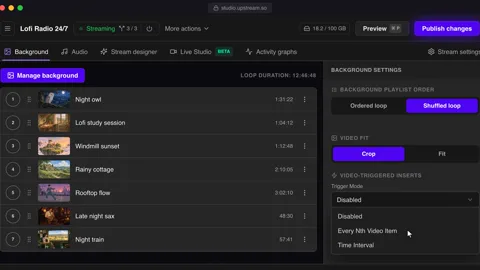
Your back catalog, live 24/7
Riverside doesn't stream live until its $39 plan, and it has no 24/7 loop. Upstream.so goes live on the free plan, and paid plans keep your past episodes on air around the clock with your computer off. Add a new one while the channel is live.
MP3 episodes over your cover art
Upload MP3 episodes to the audio playlist and loop cover art on its own background playlist. Add a Now Playing title and an audio visualizer from the overlays.
Replay it on your schedule
Schedule a replay for Saturday morning and repeat it daily or weekly, or add the episode to your 24/7 playlist with the rest of your catalog.

Live takeover
Go live with guests on your 24/7 podcast channel
StreamYard, Restream and Riverside can't do this. Upstream.so cuts from your running 24/7 playlist into a live studio with guests and back, on the same stream. Viewers keep the same link and the same chat.
Switch scenes on air
Your stream has a 24/7 playlist scene and a Live scene. Click Live to bring your guest on, and click 24/7 playlist to go back when the episode is over.
Book it in the calendar
Turn on the content calendar beta for the stream, add your podcast as a live Block and publish the schedule. It takes over at its start time, and the Block's videos play until you join.

Compare
More podcast studio for less money
The cheapest plan each studio sells for the same show: you, a guest, three platforms and nobody else's logo. Then what happens after you hang up.
| StreamYard | Restream | Riverside | Upstream.so | |
|---|---|---|---|---|
| Guest, 3 platforms, no logo, 1080p | $44.99 a month (Core) | $49 a month (Professional) | $39 a month (Grow) | Free, then $30 a month for unlimited hours |
| Air the episode again on a set day | Up to 2 hours on Core | Add-on from $39 a month | Webinar plan, $99 a month | Included |
| Past episodes on a 24/7 loop | No looping | Loops stop at 40 hours, $79 add-on | No | Included, no limit on paid plans |
| 24/7 playlist to live guests and back | No | No | No | Yes, on one stream |
| Live shows booked on a calendar | No | No | No | Yes, free plan included |
Guest, 3 platforms, no logo, 1080p
- StreamYard
- $44.99 a month (Core)
- Restream
- $49 a month (Professional)
- Riverside
- $39 a month (Grow)
- Upstream.so
- Free, then $30 a month for unlimited hours
Air the episode again on a set day
- StreamYard
- Up to 2 hours on Core
- Restream
- Add-on from $39 a month
- Riverside
- Webinar plan, $99 a month
- Upstream.so
- Included
Past episodes on a 24/7 loop
- StreamYard
- No looping
- Restream
- Loops stop at 40 hours, $79 add-on
- Riverside
- No
- Upstream.so
- Included, no limit on paid plans
24/7 playlist to live guests and back
- StreamYard
- No
- Restream
- No
- Riverside
- No
- Upstream.so
- Yes, on one stream
Live shows booked on a calendar
- StreamYard
- No
- Restream
- No
- Riverside
- No
- Upstream.so
- Yes, free plan included
Monthly prices from the StreamYard, Restream and Riverside pricing pages, checked 19 November 2026. Upstream.so prices are on our pricing page.
Guests
Bring your podcast guest on air
Send one link and run the rest from the Guests panel. You see who is waiting and decide who goes on air, and when.
1. Your guest opens the link
They type their name, allow camera and mic and join from the browser. On a phone they pick portrait or landscape.
2. They wait, you put them on air
New guests wait in the Green Room until you approve them. One switch puts a Ready guest on air, in the layout you picked.
You stay in charge once the show starts. Turn off a guest's mic and camera, or remove them from the stream. Regenerate the invite link any time and the old one stops working.
On air
Run the interview
Up to 10 people fit on stage, and changes you make on air go out right away. Upstream.so Live Studio is a browser live streaming studio, so the whole episode or interview runs from one tab.
Layouts for two or ten
Pick Grid, Spotlight, Sidebar, Float or a custom layout, and switch as guests come and go during the show.
Slides and screen share
Present slides with Next and Back, or share a screen from a computer. Your guest can share too once you allow it, to walk through a demo or a website.
Chat
Talk to your guest and your viewers
Cue your guest in private and put the best viewer questions on screen.
Private chat with guests
Cue the next question or the wrap-up in the studio chat. Viewers never see it.
Viewer questions on screen
Multichat brings YouTube, Twitch, Kick and Rumble chat into one feed. Put a question on screen and reply to YouTube, Twitch and Kick from the studio.
Reach
Put names on screen, reach both audiences
Late viewers see who is talking, and your guest can stream the show too.
Names in lower thirds
Introduce your guest with a built-in lower third or your own Stream Designer graphic, and swap it when the next guest comes on.
Reach your guest's audience
Your guest can stream the show to their own YouTube channel as public, unlisted or private, alongside your platforms.
Sound and recording
Clean sound, and every episode saved
Live Studio records the show by default, free plan included. Keep the cameras on for a video podcast, or turn them off and show each speaker as an avatar with a visualizer that moves with their voice.
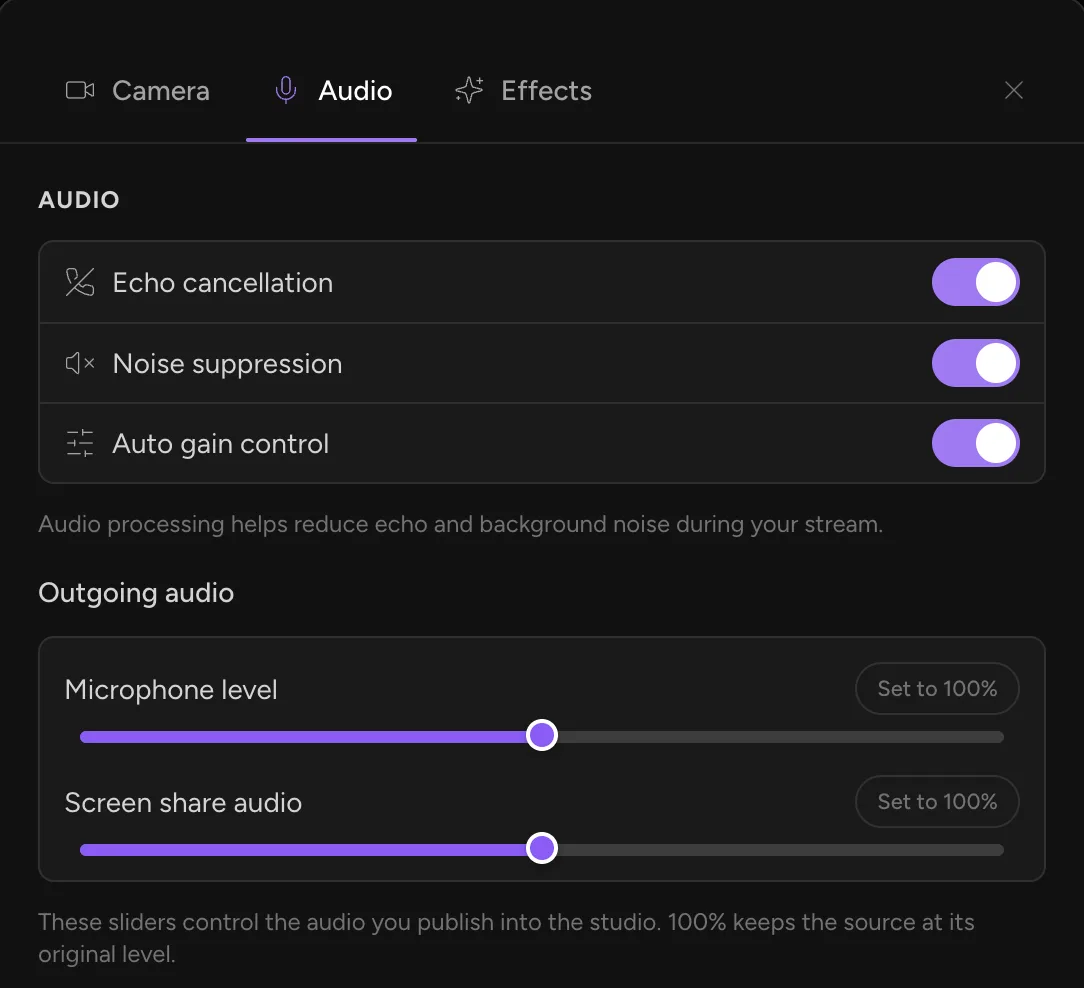
Less echo and noise for everyone
Echo cancellation and noise suppression are on by default for the host and every guest, so a laptop mic in a kitchen still sounds like a show.
The episode waits in My files
The recording is an MP4 named after your show and the date, with your guests, layout and graphics. Download it for your podcast feed or your editor.
The value you get per dollar is amazing. Many features are available at no cost when other similar services charge for them or do not have them available at all.
Verified customer, United StatesVerified review on Trustpilot
FAQ
Live podcast and interview questions
Related features
The Upstream.so features your podcast or interview show runs on.
Host your next podcast live
Create a free account, send your guest the link and go live on all your platforms. The recording is yours when you finish.