Upstream.so
Upstream.so
  • Product
  • Features
  • Platforms
  • Resources
  • Pricing
Login Sign up for free
Blog

How to add games to your live stream: 63 free interactive games

Written by Mario Jankovic November 19, 2026 · 6 min read
  1. How to add a game in Upstream.so, step by step
  2. How to add a game in OBS, Streamlabs, Meld or StreamYard, step by step
  3. How viewers play: in chat or on a phone
  4. Which games to play on stream with viewers
  5. Why these games work with a small chat
  6. FAQ
    1. How do I add a game to my live stream?
    2. What are good games to play on stream with a small chat?
    3. Is StreamArena free?
    4. Which chats can play by typing?
    5. Can chat spam the game?
    6. Can I make my own game?
    7. Who makes StreamArena?

To add a game to your live stream, pick it as a scene in Upstream.so, or paste one link as a browser source in OBS, Streamlabs or Meld. In StreamYard you share the game’s browser tab.

This guide shows you how to do it with StreamArena, a free service we built at Upstream.so with 63 interactive games to play on stream. On Upstream.so your viewers play by typing in YouTube, Twitch or Kick chat, and in the other apps they scan a code and play from their phones. Below are the steps for each app, how viewers join, and which games suit a small chat or a big one.

StreamArena in 35 seconds, with sound.

How to add a game in Upstream.so, step by step

In Upstream.so you don’t copy a link or size a source. StreamArena games are in the scene list of your studio.

  1. Open your studio. Upstream.so runs in the browser. Connect the platforms you stream to.
  2. Pick a game scene. Choose a StreamArena game from the scene list.
  3. Go live. The round starts with your chats already connected, and chat types its answers. Guests and phones join with the code on screen.

The chat part comes from Multi-chat, which puts your YouTube, Twitch, Kick and Rumble chat in one feed. A StreamArena game reads that feed. A viewer’s message becomes an answer (a guess, a vote or a team word), shown with their name and a badge for the platform they are watching on.

Twitch chat games often read Twitch chat and nothing else. If you multistream, all your chats play the same round here and share one scoreboard. In Platform Wars the platform is the team, so your YouTube, Twitch and Kick viewers race each other.
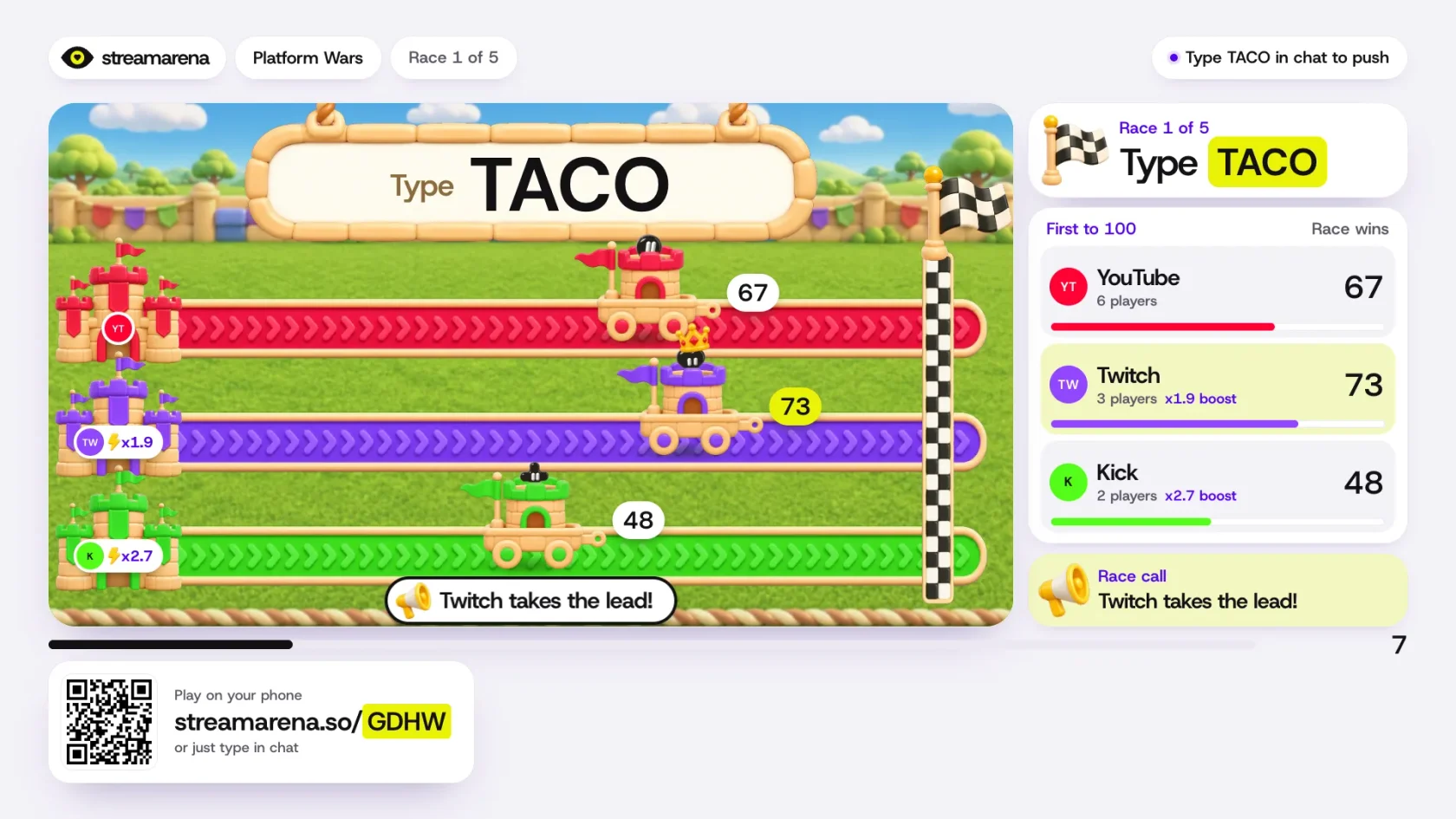
A Platform Wars race in StreamArena: three carts on colored tracks for YouTube, Twitch and Kick, with Twitch in the lead at 73 and chat told to type TACO to push
Platform Wars, shown here with simulated chat. Viewers type the word on screen to push their platform’s cart.

Chat play only reads chat. You don’t add a bot account or give anyone mod rights. It works with one platform too, and it is included on Upstream.so’s free plan. Upstream.so streams from the cloud, so a game scene can stay live with your computer off.

How to add a game in OBS, Streamlabs, Meld or StreamYard, step by step

StreamArena runs in any streaming app that can show a web page, and you don’t need an account to start. Open app.streamarena.so/play and pick a game, and it runs with no sign up. You get a browser source link, a room code for phones and a remote to run the round. A guest show lasts 24 hours, and you can sign up to keep it.

  1. Pick a game and copy its link.
  2. In OBS, open your scene, click + under Sources and choose Browser.
  3. Paste the link in URL, set the width to 1920 and the height to 1080, and click OK.
  4. Leave Shutdown source when not visible off, so the game keeps its place when you switch scenes.
  5. Go live. Viewers scan the code on screen and play from their phones.

Streamlabs and Meld work the same way. In Streamlabs, add a source and pick Browser Source. In Meld, add a layer and pick Browser. Paste the same link and use 1920 by 1080. StreamYard has no browser source, so there you share the game’s browser tab in your studio.

Typing in chat doesn’t work in these apps today. Chat play needs Upstream.so, because that is where your chats are already being read.

How viewers play: in chat or on a phone

A code and a short link stay on screen during the game. Viewers scan the code, pick a name and play in their phone’s browser, with no app to install and no account to make. On Upstream.so they can also type their answer in chat.
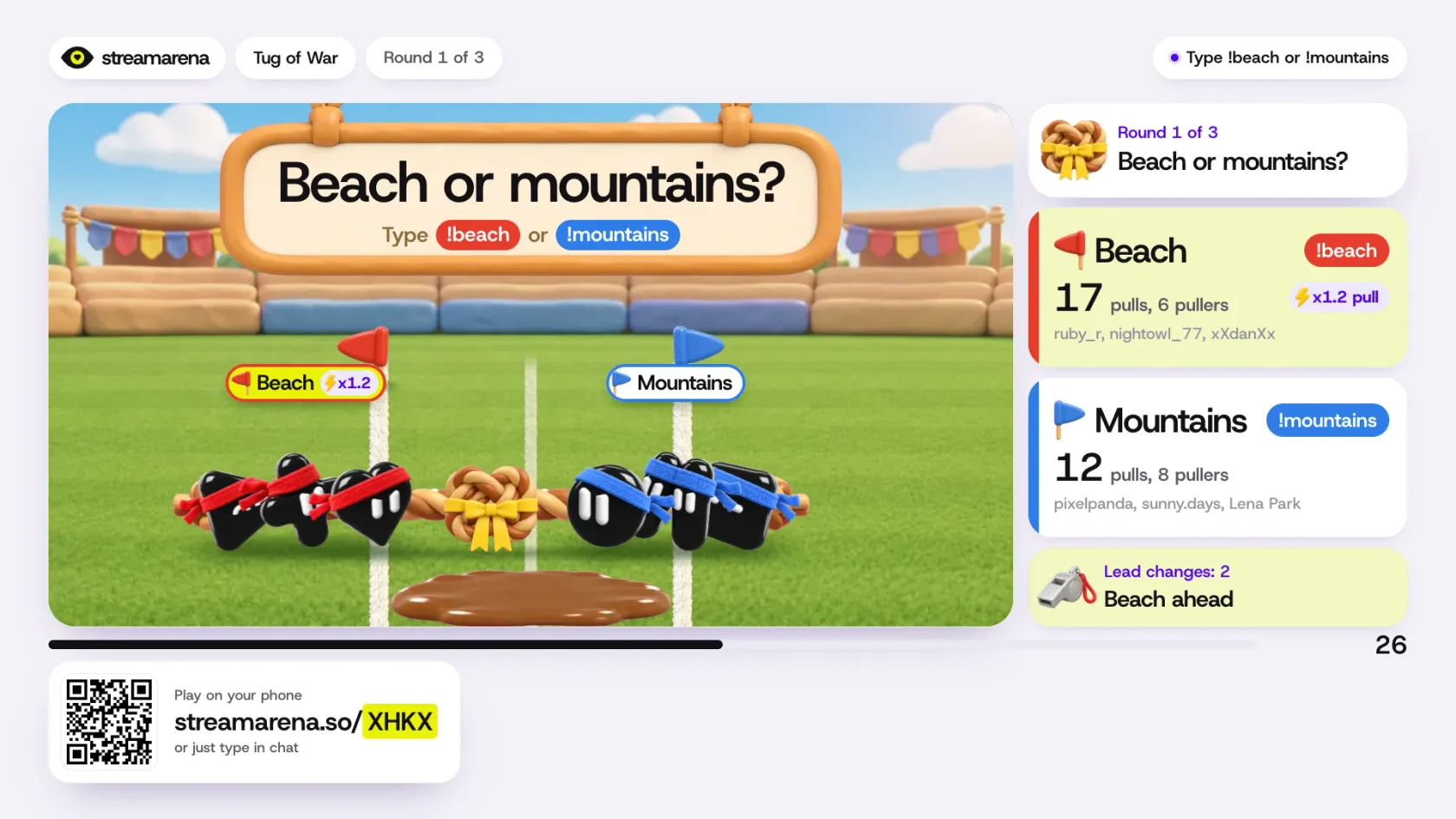
A Tug of War round in StreamArena asking Beach or mountains, with two teams of jelly characters pulling a rope and a QR code with a short link for joining by phone
Tug of War. The code and short link in the bottom left corner are how phones join.

Phones can do one thing chat can’t, and that is keep a secret. A phone answer stays hidden until you hit reveal. A podcast guest can lock in a guess, and the reaction happens on camera. Phones also let viewers on TikTok or Instagram join, where StreamArena reads no chat.

In Upstream.so you get both at once. Chat types, guests use their phones, and the answers land on one scoreboard.

Each platform shows your stream with its own delay. So the game times an answer by when it was sent, and the round waits for the slowest platform before it closes.

You run the game from a host remote on your phone or a second screen. It has four buttons: start, reveal, skip and next. A round takes 20 to 60 seconds, and a game is about five rounds, so it fits between two topics.

Upstream.soOBS, Streamlabs, Meld, StreamYard
How you add a gamePick a scenePaste a link as a browser source, or share the tab in StreamYard
Viewers play by typing in chatYes, on YouTube, Twitch, Kick and RumbleNo
Viewers and guests play by phoneYesYes
Runs with your computer offYesNo
CostFree, on the free plan tooFree

Which games to play on stream with viewers

The game library sorts its 63 interactive stream games onto six shelves, by what chat does in them.

ShelfGamesOne to try
Guess it first15Zoom Out: a picture starts zoomed all the way in, and chat names it before it pulls back
Read the room11Hot Takes: agree or disagree, then guess how much of the room agrees
Team battles11Tug of War: two teams, one rope, and you type your team word to pull
Word games12Five Letters: one hidden word, six rows, and the whole chat guessing together
Worlds that keep going9Tiny Kingdom: viewers type !farm, !fish, !build or !guard and grow a kingdom together
Missions and mysteries5Heist Crew: phones get secret intel, and chat pulls off the heist

All 63 recently got a painted, toy-style look, with a cover and a set of their own. Tug of War plays on a grass field. Heist Crew plays in a science hall, with laser beams around a golden jelly bean.
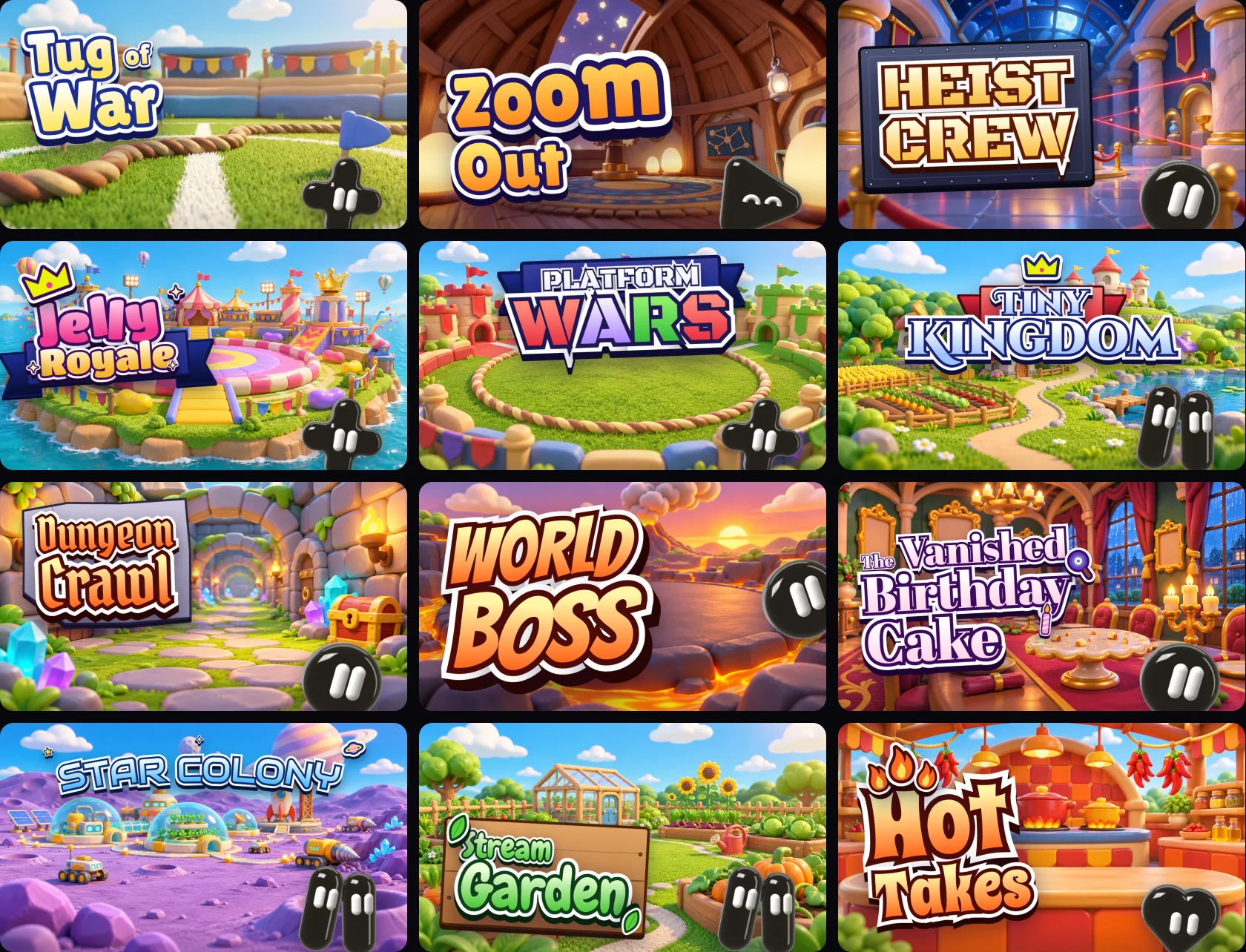
Twelve painted StreamArena game covers: Tug of War, Zoom Out, Heist Crew, Jelly Royale, Platform Wars, Tiny Kingdom, Dungeon Crawl, World Boss, The Vanished Birthday Cake, Star Colony, Stream Garden and Hot Takes
Twelve of the 63 covers.

We built the games for small channels first. Of the 63, 59 work with a single player. When fewer than three people are playing, a house player joins, so a lone viewer has someone to beat. Tug of War and Platform Wars are the two that want a bigger chat, at 10 players or more.
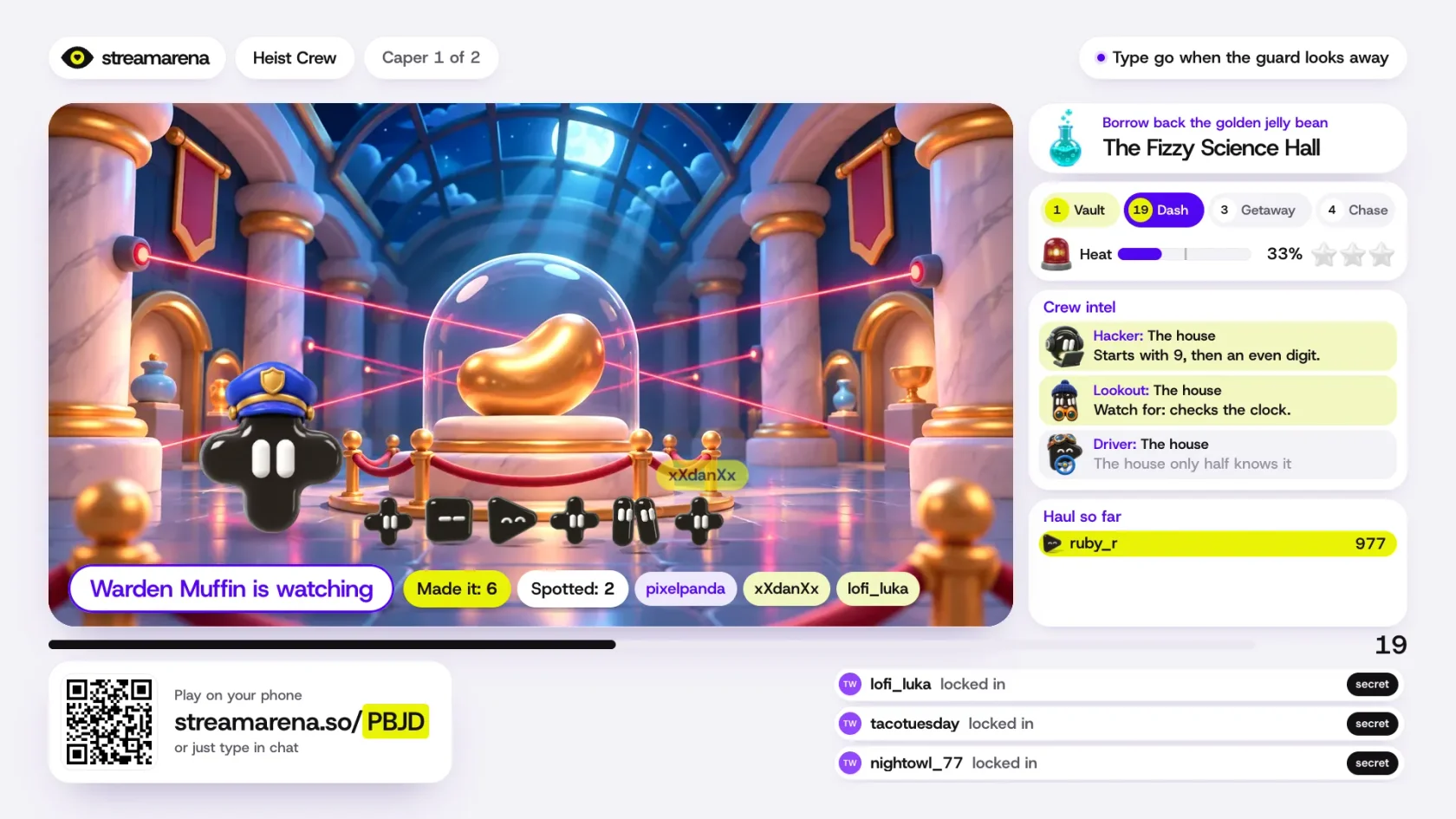
A Heist Crew round in StreamArena: a golden jelly bean under a glass dome crossed by laser beams, a guard character watching, and a side panel of crew intel
Heist Crew, one of the five missions. Chat moves when the guard looks away.

Games are 16:9 today. A vertical 9:16 layout is planned.

Why these games work with a small chat

On most live streams, chat has one job, and that job is to watch. We see it up close, because Upstream.so carries our customers’ streams to YouTube, Twitch, Kick and other platforms all day. A host finishes a topic and looks for the next one, and chat waits.

A lot of those streams are talk shows. The biggest category on Twitch is Just Chatting, where a host talks to the camera and to chat. It reached 670.5 million hours watched in the second quarter of 2026, according to Streamlabs and Stream Hatchet.

The stream games we tried first were made for big gaming channels. Many run as a download on the streaming PC or read only one platform’s chat, and they need a crowd before they get fun. A podcast with two guests needs something else. So does a church stream, or a channel with eight regulars.

So StreamArena rounds are short, and most of the games work with one player. Upstream.so is the only place where your chat plays by typing and where YouTube, Twitch and Kick share one scoreboard. It also keeps the game running after you close your laptop. The free plan includes 24 hours of streaming a month, with no credit card.

Cloud multistreaming

Go live on up to 10 of 30+ platforms from one feed.

Send one live feed to Upstream.so and let the cloud deliver it to YouTube, Twitch, Kick, Facebook, and custom RTMP without making your upload connection carry every copy.

Sign up for free See multistreaming features
2 / 10 guests
MiaLeo
GuestsEncodersStyleChatDestinationsGraphics
Destinations

Where this stream goes when it is live.Streaming to 5 destinations.

  • Lofi HoursPrimary destination ChatReadyStartingStreaming
  • lofihoursMultistream destination ChatReadyStartingStreaming
  • lofihoursMultistream destination ChatReadyStartingStreaming
  • Lofi HoursMultistream destinationReadyStartingStreaming
  • TikTokMultistream destinationReadyStartingStreaming
Manage destinations

FAQ

How do I add a game to my live stream?

In Upstream.so, pick a StreamArena game from the scene list in your studio and go live. In OBS, Streamlabs or Meld, paste the game link as a browser source at 1920 by 1080. In StreamYard, share the game’s browser tab.

What are good games to play on stream with a small chat?

Pick a game that works with one or two players, like Chat vs Host or Zoom Out. In Chat vs Host you answer in secret and chat guesses what you wrote, so you and one viewer are enough for a round.

Is StreamArena free?

Yes. The games are free inside Upstream.so, on the free plan too, and free to embed in OBS. There is no player limit.

Which chats can play by typing?

YouTube, Twitch, Kick and Rumble chat, when you stream through Upstream.so. Viewers anywhere else, TikTok and Instagram included, join by phone with the code on screen.

Can chat spam the game?

No. A player can send one answer every 2 seconds and a team word twice a second. Names and free text go through a safety filter before they show on stream.

Can I make my own game?

Yes. A game is one JavaScript file built with the StreamArena SDK. We play a submitted game before it goes live, and makers keep 100% of what their game earns for the first year.

Who makes StreamArena?

The team behind Upstream.so, at Zukunft d.o.o. StreamArena is a separate brand. The games work in any streaming app that can show a web page, and they are built into Upstream.so.
Published November 19, 2026
Mario Jankovic

About the author

Mario Jankovic

Product and Engineering

Mario Jankovic co-founded Upstream.so and runs product and engineering. He writes about running live streams from the cloud: 24/7 channels, multistreaming and Live Studio, and what we learn building them.

Keep exploring

Further reading

Browse all articles
How to Add Chat to OBS: YouTube, Twitch and Kick
Nov 10, 2026 Guides

How to Add Chat to OBS: YouTube, Twitch and Kick

Read article
How to Run a 24/7 Twitch Stream in 2026: Rules, Limits and Setup
Oct 10, 2026 Guides

How to Run a 24/7 Twitch Stream in 2026: Rules, Limits and Setup

Read article
How to Become a VTuber in 2026: Setup, Costs and Going Live
Oct 8, 2026 Blog

How to Become a VTuber in 2026: Setup, Costs and Going Live

Read article

Start streaming today

Go live on up to 10 of 30+ platforms, run a 24/7 channel, and produce live shows in your browser, with no software or server setup.

No credit card 24 hours/month free Full functionality
Start Streaming Free
24/7 Live Streaming Run cloud channels that stay live around the clock. Live Studio Invite guests, share screens, and add branded overlays in the browser. Multistreaming Send one live feed to YouTube, Twitch, Kick, and RTMP endpoints. Pre-recorded Live Streaming Upload pre-recorded videos & Go Live without the stress of live production. Free plan 24 hours a month with no watermark. Multi-channel streaming Separate live channels from one account. Enterprise Setups for teams, labels and agencies. About Upstream.so Who we are and how Upstream.so works.
Content CalendarNew Plan your 24/7 stream like a TV channel. Live Studio AppsNew Put your chat in the show, inside Live Studio. Overlays Layers and widgets in Stream Designer. RTMP server Stream in from OBS or any encoder. Multichat Every platform's chat in one feed. Stings, jingles and ads Inserts that play between your videos. Scheduling Streams that start and end on their own. Playback controls Skip or play any file while you stay live. Team access Invite your team, each with their own role. Backup streams A standby feed if your main one drops. Audio and video playlists Loop music and visuals separately. Media library & storage Organize files and cloud uploads. Live Streaming API Run streams, media and queues from code. MCP Server Manage streams from your AI assistant. Website player Embed your live stream on your site. All features Everything Upstream.so does, on one page.
YouTube live streaming Twitch live streaming Kick live streaming Facebook live streaming Instagram live streaming TikTok TikTok live streaming Rumble live streaming Mixcloud live streaming Up to 10 of 30+ Plus any custom RTMP or SRT destination.
Platform limits Bitrate and duration caps for each platform. Integrations Setup guides for OBS, vMix, cameras and more. VTuber Streaming Go live with your avatar on up to 10 of 30+ platforms.
Blog Guides, platform rules and news for anyone who goes live. Guides Setup guides for 24/7 streams, multistreaming and RTMP. Release Notes The new features in each Upstream.so update, in one place. Free Tools Video, audio, thumbnail and AI tools, plus camera and mic checks. Helpdesk Step by step setup help and troubleshooting for Upstream.so. Service status Current service health, uptime history and incident updates. Live Streaming FAQ Short answers to what people ask before they go live. Compare Upstream.so Upstream.so side by side with Restream, StreamYard and others. Latest post YouTube Dual Stream: What the Vertical Copy Does and How to Turn It Off
Always-on 24/7 Live Streaming Run cloud channels that stay live around the clock.
Explore
Real-time live Live Studio Invite guests, share screens, and add branded overlays in the browser.
Explore
One stream, up to 10 of 30+ platforms Multistreaming Send one live feed to YouTube, Twitch, Kick, and RTMP endpoints.
Explore
Schedule & Automate Pre-recorded Live Streaming Upload pre-recorded videos & Go Live without the stress of live production.
Explore
Free plan 24 hours a month with no watermark.
Multi-channel streaming Separate live channels from one account.
Enterprise Setups for teams, labels and agencies.
About Upstream.so Who we are and how Upstream.so works.
Content CalendarNewPlan your 24/7 stream like a TV channel. Overlays Layers and widgets in Stream Designer. Multichat Every platform's chat in one feed. Stings, jingles and ads Inserts that play between your videos. Scheduling Streams that start and end on their own. Playback controls Skip or play any file while you stay live. Team access Invite your team, each with their own role. Backup streams A standby feed if your main one drops. Audio and video playlists Loop music and visuals separately. Media library & storage Organize files and cloud uploads.
Live Studio Apps
RTMP server
Live Streaming API
MCP Server
Website player
All features
YouTube live streaming. 24/7 channels with midroll ads. Twitch live streaming. Streams restart on their own at 48 hours. Kick live streaming. Stay live with your computer off. Facebook live streaming. Schedule lives that start on their own. Instagram live streaming. Go live from your browser or the cloud. TikTok TikTok live streaming. Go live on TikTok and Instagram at once. Rumble live streaming. Add Rumble to your YouTube or Kick stream. Mixcloud live streaming. DJ sets and radio shows from your browser. Up to 10 of 30+ Plus any custom RTMP or SRT destination.
Platform limits Bitrate and duration caps for each platform.
Integrations Setup guides for OBS, vMix, cameras and more.
VTuber Streaming Go live with your avatar on up to 10 of 30+ platforms.
Blog
Guides
Release Notes
Free Tools
Helpdesk
Service status
Live Streaming FAQ
Compare Upstream.so
YouTube Dual Stream: What the Vertical Copy Does and How to Turn It Off YouTube Dual Stream: What the Vertical Copy Does and How to Turn It Off
Upstream.so

Run your streams from the cloud

Free plan: 24 streaming hours a month, no card, no watermark.

4.6 · 245 reviews on Trustpilot
Legal entity
Zukunft d.o.o.
Registered address
Grožnjanska ulica 32, 10000 Zagreb, Croatia
Company VAT ID
Company VAT ID: HR62560895839
About | Contact us | Tools | Content standards | Security | Privacy Policy | Terms of Service | Affiliate terms | Legal notice |

Product

  • Pricing
  • Upstream.so Features Overview
    • Multistreaming
    • Media Library & Storage
    • Website Player
    • Separate Audio and Video
    • Overlays: Stream Designer
    • Live Streaming Studio
    • Live Studio Apps
    • Scheduling & Automation
    • Content Calendar
    • Live Playback Controls
    • Play Stings, Jingles and Ads
    • Team Access
  • Enterprise Broadcasting Solutions

Resources

  • Helpdesk
  • Service status
  • Live Streaming FAQ
  • Blog
  • Release Notes
  • Live Streaming API
  • MCP Server
  • Free Live Streaming
  • YouTube Live Streaming
  • RTMP Server
  • Supported Platforms
  • Live Streaming Limits
  • Integrations

Compare us

  • Compare Upstream.so
    • Upstream.so vs Runnel.live
    • Upstream.so vs OneStream
    • Upstream.so vs Live247
    • Upstream.so vs Gyre
    • Upstream.so vs Streaming Bots
    • Upstream.so vs Restream
    • Upstream.so vs StreamYard
    • Upstream.so vs LiveReacting
    • Upstream.so vs Playout.video

Free tools

  • Design tools
  • Video tools
  • Audio tools
  • AI tools
  • Setup checks

Use cases

  • For Creators
  • For Music Labels
  • Church Streaming
  • VTuber Streaming
  • Multi-Channel Streaming

© 2026 Upstream.so. All rights reserved.