You need 4000 qualified watch hours in the last 12 months, plus 1000 subscribers, to earn ad revenue on YouTube. Only regular public videos and saved live streams count, Shorts don’t. The fastest way there is giving every viewer more to watch. A 24/7 live stream does that best because it never ends and people leave it on for hours.
The bar doubles on February 1, 2027
From that day, new applicants need 8000 qualified watch hours in the last 365 days. That’s about 22 hours of watch time every day instead of 11. Channels already in the Partner Program keep their place, so the goal is to be in before the switch. YouTube’s review usually takes about a month, and it hasn’t said what happens to applications still in review on February 1. Treat the end of December as your real deadline.
We run 24/7 YouTube streams at Upstream every day, so that’s tactic 1 and it gets the most detail. Tactics 2 to 9 are the basics that work on any channel.
What counts toward the 4000 hours
Qualified watch hours are the hours people spend watching your public videos, podcasts and saved live streams included. Older guides call them valid public watch hours, same thing. Old videos count too, but only for what they got in the last 12 months. These don’t count:
- Shorts watched in the Shorts feed
- private, unlisted and deleted videos
- views from ad campaigns
- live streams that are unlisted, deleted, or never saved as a replay
That last one matters for anyone who streams. A live stream only counts if it stays public and YouTube saves it as a replay on your channel. YouTube can save a stream automatically when it’s shorter than 12 hours. Longer ones “may not be captured at all”.
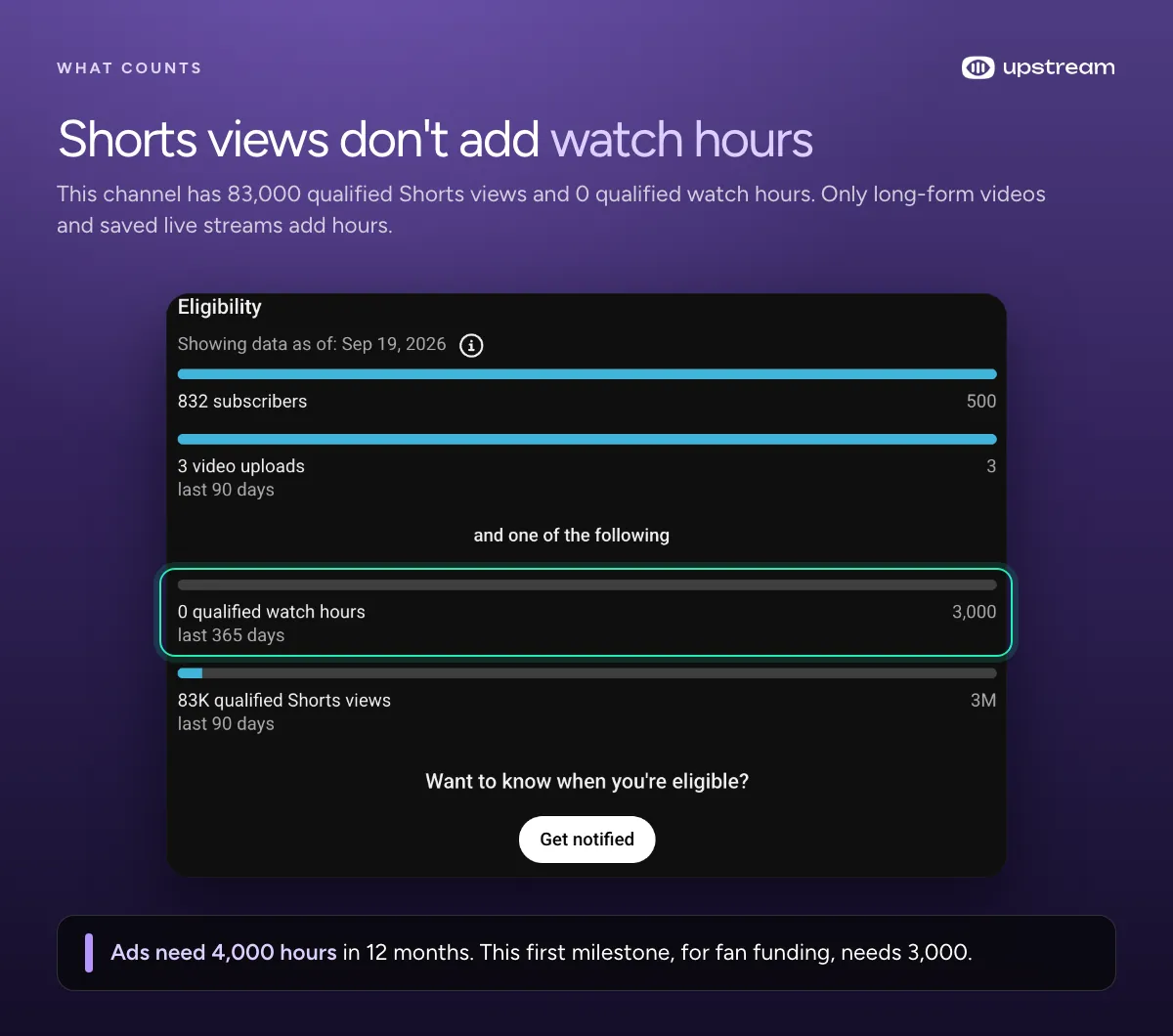
Check your progress in the Earn tab of YouTube Studio, not in the total watch time in Analytics, and click Get notified there so YouTube tells you when you’re eligible. Here’s what that looks like on one of our own channels, which gets its views from Shorts:
1. Run a 24/7 live stream
This is the closest thing YouTube has to a watch hour machine, because a stream doesn’t end. A viewer who finds your 10 minute video can give you 10 minutes at most, and then autoplay moves them on, often to someone else’s video. A 24/7 stream keeps going for as long as they want to watch, and people leave music, ambient and study streams playing in the background for hours. You set it up once, and it keeps running while you sleep, go to school or make your next video.
People watch a lot of live on YouTube. By YouTube’s own August numbers, more than 600 million viewers watch live there on an average day. And Streams Charts found about half of all live hours watched on the big platforms this spring were on YouTube.
It also gives your old videos a second life. Put your best long videos in a playlist and stream them around the clock. People who find the stream stay for the next video, and the next.
Watch hours are just average viewers times hours live. A stream running 24/7 is live about 720 hours a month, a bit less with the short breaks between cycles.
| Average viewers | Watch hours a month | Time to 4000 | Time to 8000 |
|---|---|---|---|
| 1 | 720 | about 5.5 months | about 11 months |
| 3 | 2160 | about 8 weeks | about 3.7 months |
| 5 | 3600 | about 5 weeks | about 2.2 months |
| 10 | 7200 | about 17 days | about 5 weeks |
Even a handful of viewers adds up fast when the stream never stops. With regular uploads where people watch 5 minutes on average, you’d need almost 50k views to get to 4000 hours. And the new 8000 rule is about 670 hours a month, which one average viewer on a 24/7 stream covers on their own.
How Upstream handles the 12 hour rule for you
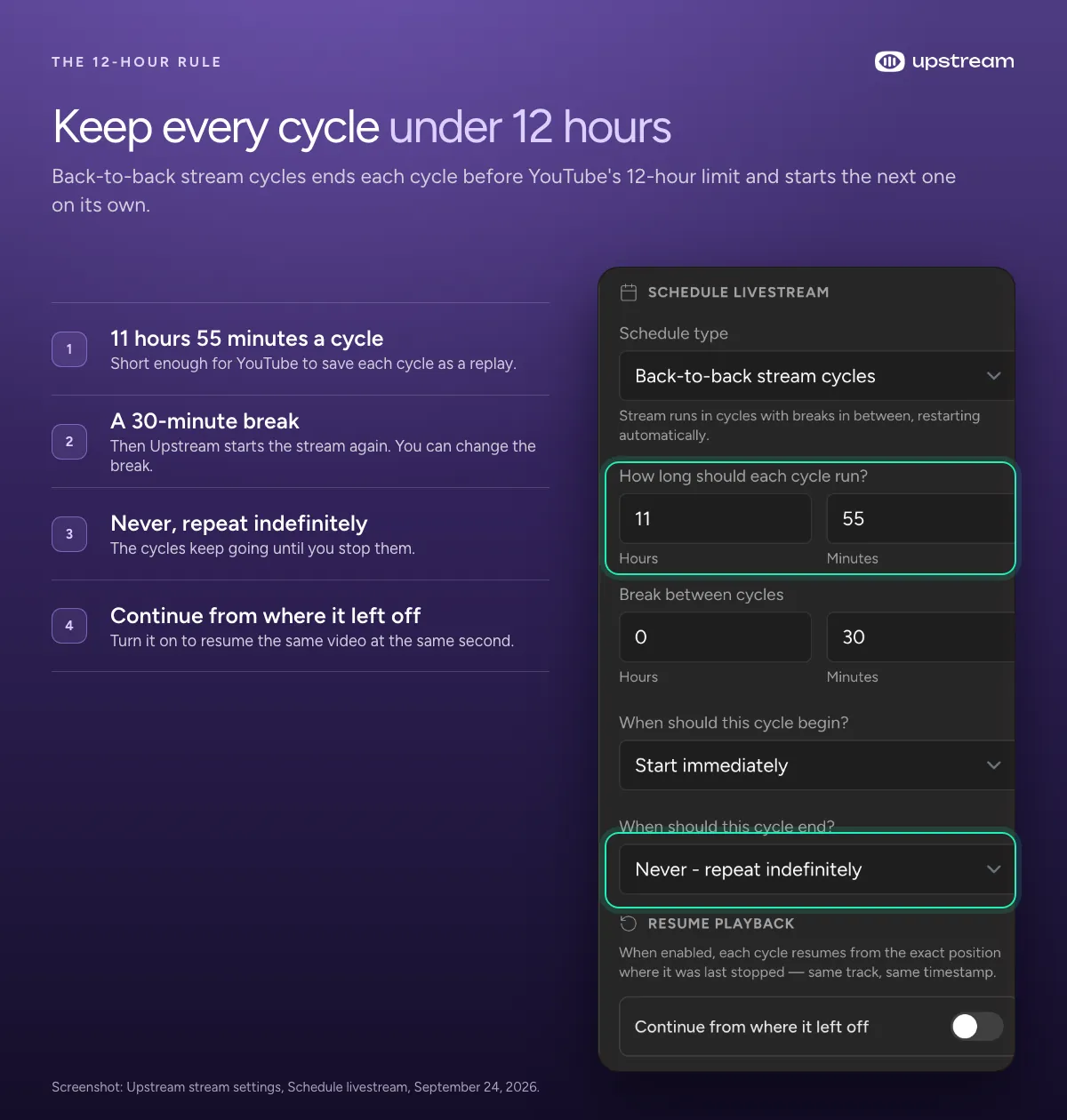
A stream only becomes a video if YouTube saves the replay. YouTube’s help page says a stream past 12 hours “may not be captured at all”. We tested it, and it isn’t. Run one stream for days and it can rack up thousands of hours with no replay for YouTube to count. Upstream has a schedule type for exactly this. The Back-to-back stream cycles schedule runs each cycle for 11 hours and 55 minutes, pauses for half an hour and starts the stream again on its own, forever if you want. Every cycle stays under YouTube’s limit, so each one can be saved as a replay. Turn on Continue from where it left off and the next cycle picks up the same video at the same second.
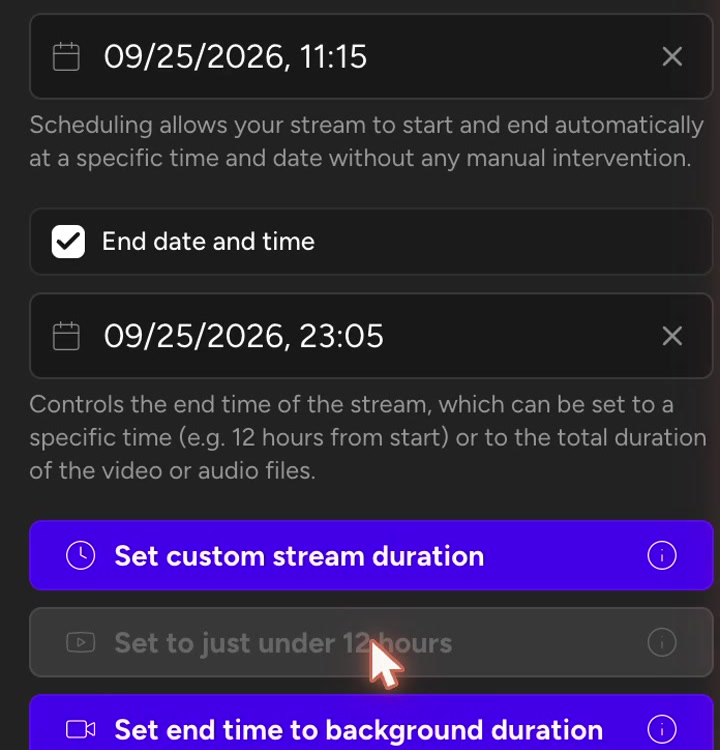
Running a single or recurring schedule instead? The Set to just under 12 hours button sets the end time to 11 hours and 50 minutes in one click.

Everything runs in the cloud, so your computer or phone can be off. Upstream is on YouTube’s list of verified live streaming encoders, and it connects to your channel directly, with no stream key to copy.
Setting it up
Watch the walkthrough, or follow the steps below.
- Make sure your channel can go live. YouTube asks you to verify your channel with a phone number, and the first time you turn on live streaming it can take up to 24 hours. If YouTube says your channel isn’t eligible, here’s how to fix it.
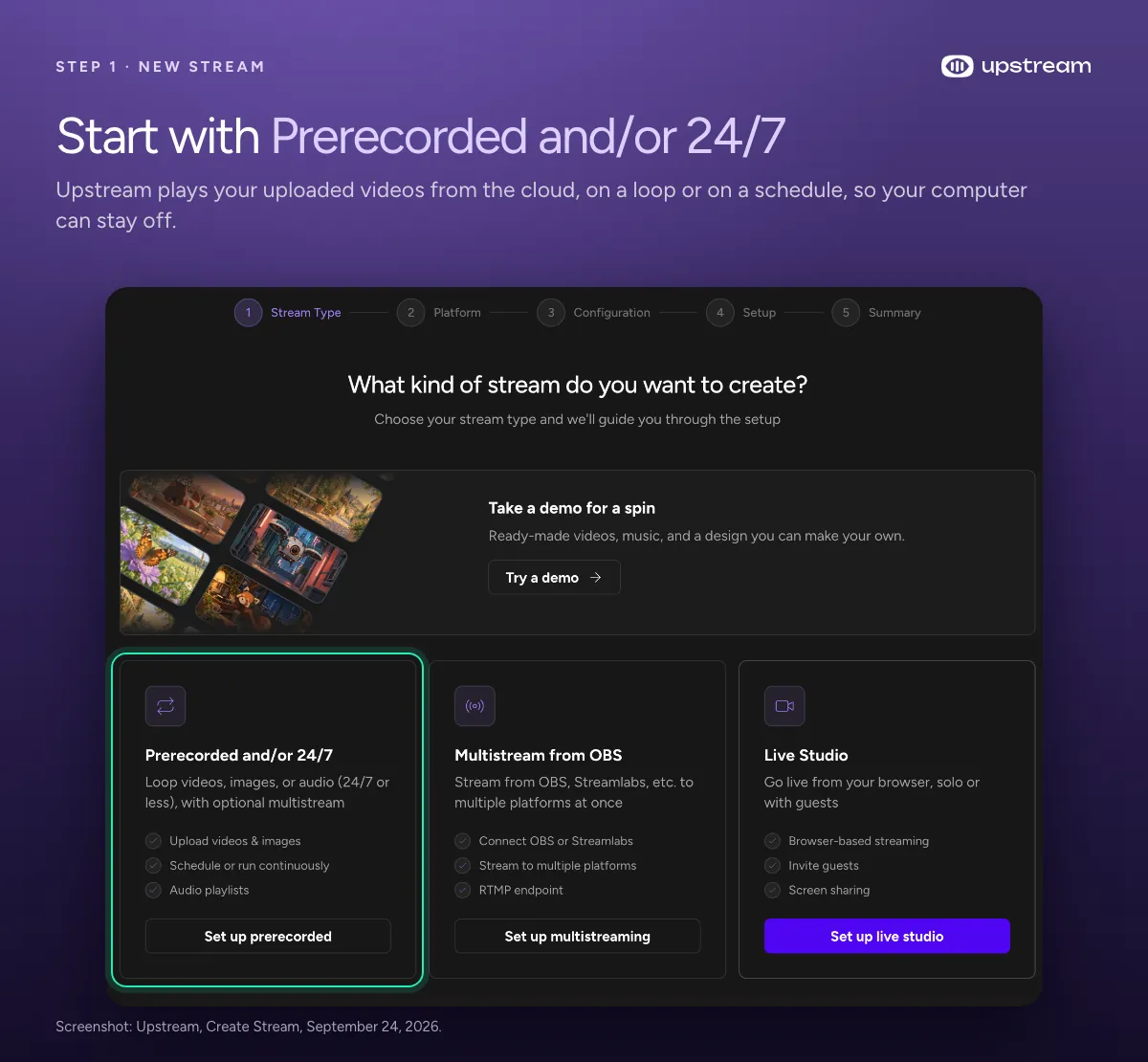
- Sign up at upstream.so, click Create stream and pick Prerecorded and/or 24/7. Then connect your YouTube channel.
- Upload your own long videos. Add several so viewers get something new.
- Set the stream to Public and horizontal (16:9). YouTube hasn’t said how vertical live streams watched in the Shorts feed count, so horizontal is the safe choice. Leave rewind (DVR) on.
- Under Schedule livestream, pick Back-to-back stream cycles. The default cycle is already under 12 hours.
- Check that the replays show up as public on your channel.
The free plan lets you test the whole setup. Running one stream 24/7 costs $30 a month.
What makes a 24/7 stream work
24/7 streaming is allowed on YouTube, but a stream that runs around the clock still goes through the same monetization review as your videos.
- Stream your own stuff. YouTube’s monetization policies apply to live streams too, and reviewers look at whatever has the “biggest proportion of watch time”. On a 24/7 channel that’s the stream. Reused clips, or content that “feels interchangeable from video to video”, get turned down.
- Change it up. A playlist of different videos beats one short clip on repeat for weeks.
- Keep the replays public. Deleting them or making them private takes their hours with them.
- Give it a real title and thumbnail. The stream still has to earn the click like any video.
2. Group your videos into playlists
Playlists keep viewers moving to your next video instead of someone else’s. YouTube says a series playlist lets other videos in it be “featured and recommended” while someone watches one of them. Put videos that belong together in order, and link the playlist everywhere.
3. Point to the next video with end screens and cards
An end screen shows in the last 5 to 20 seconds of a video and can promote another video or a playlist. A card can link to a playlist in the middle of one. Both catch viewers right before they would leave.
4. Keep people watching instead of just making videos longer
YouTube doesn’t favor any particular format. It looks at how long people watch and what share of the video they watch. A 30 minute video people leave after two minutes earns less than a 12 minute one they finish. Open the audience retention report, find where viewers drop off, and fix the first 30 seconds first.
5. Premiere your uploads
A Premiere lets your audience watch a new video together at a set time, with live chat. Afterwards it’s a normal public video, and YouTube says “the view count from the Premiere will transfer to the video”.
6. Use Shorts to send people to long videos
Shorts don’t count toward the 4000 hours, but they can bring people to videos that do. Add a related video to each Short and point it at a regular public video. Viewers see a clickable link under your channel name.
7. Test your titles and thumbnails
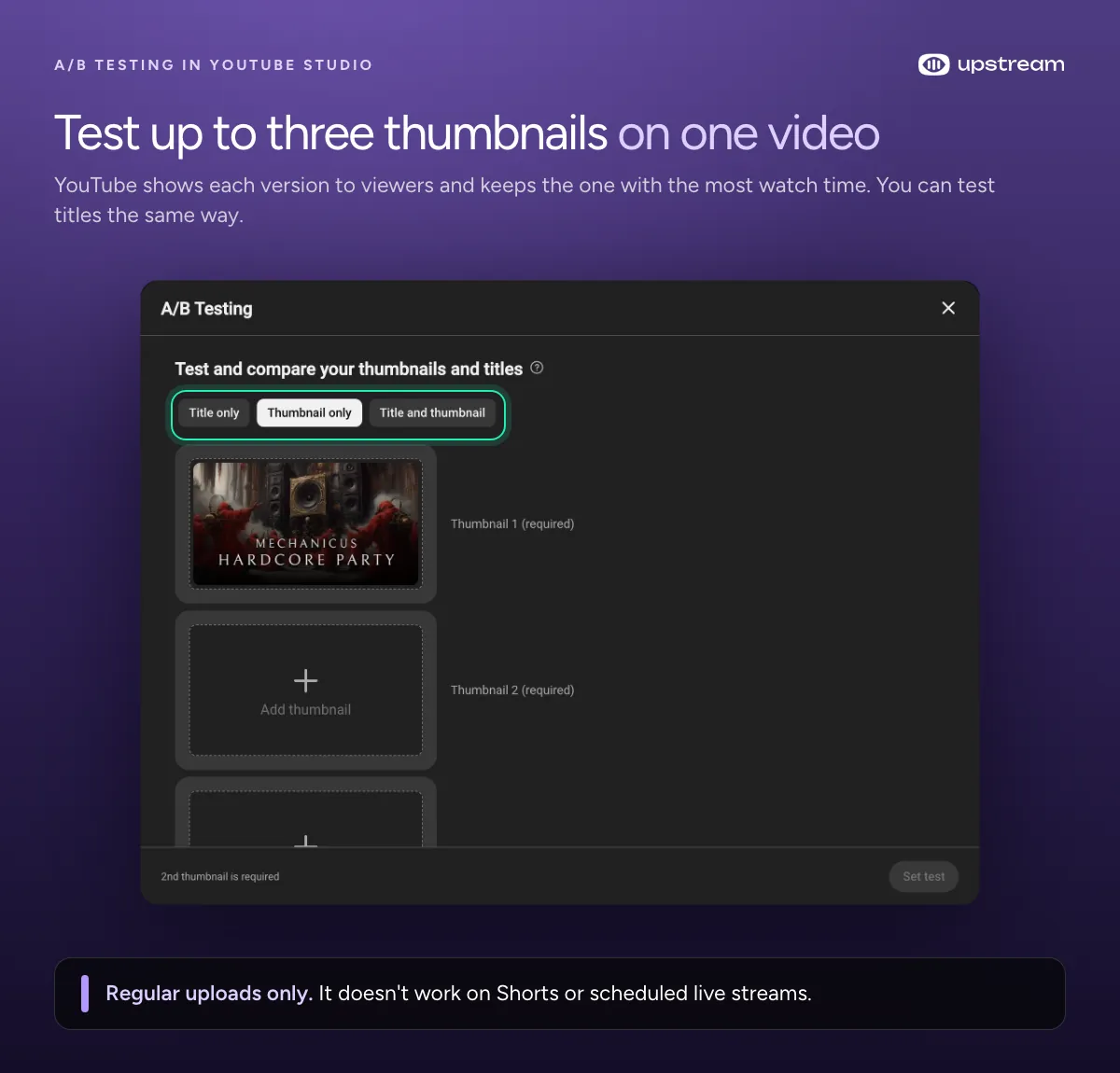
A/B Testing in YouTube Studio (Test & compare in the Help Center) tries up to three titles or thumbnails on one video. You’ll see it under the title and the thumbnail on the video’s details page. When the test ends, everyone gets the version people watched longest. Desktop Studio only, and only for regular uploads, so no Shorts or scheduled streams.
8. Help search find your videos
YouTube search looks at how well the title, description and video match what people type, and at how long people watch a video after searching. Write descriptions that use the words your viewers would search for, and add chapters to long videos so people can jump to the part they came for.
9. Keep a schedule you can stick to
YouTube says a schedule you can keep matters for building an audience, and that quality comes before posting a lot. One video a week is fine if that’s what you can keep up.
Free tools that help
You don’t need paid software to do any of this. These are the free tools we use and point people to:
- YouTube Studio A/B Testing tries up to three thumbnails or titles and keeps the winner (tactic 7).
- The audience retention report in YouTube Analytics shows the second viewers leave (tactic 4).
- The Earn tab shows your qualified watch hours and how far you are from each milestone.
- Google Trends shows what people search for on YouTube over time. Set the filter to YouTube Search.
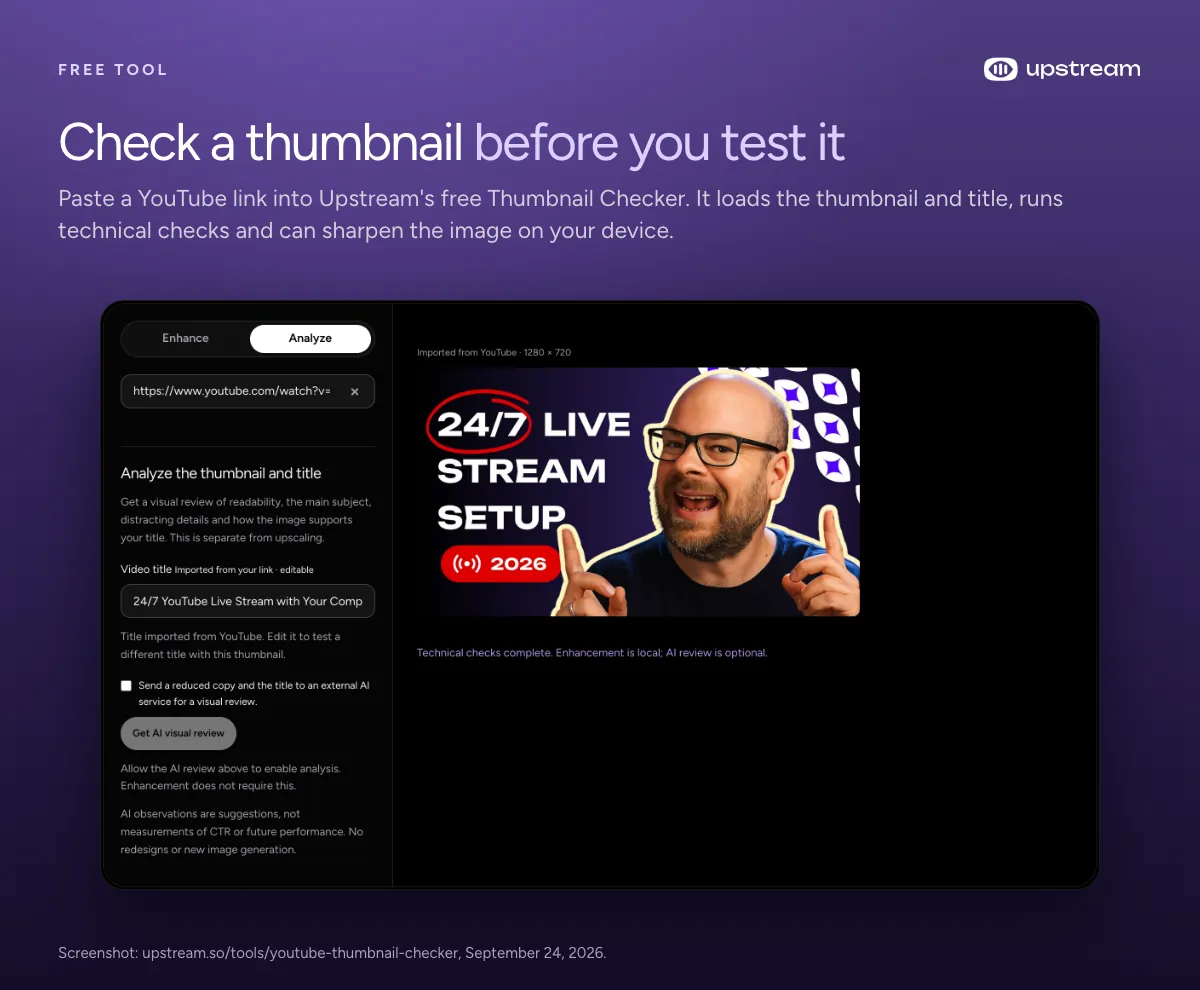
- YouTube Thumbnail Checker pulls any video’s thumbnail and title from a link and checks them. It can also sharpen the image, right on your device.
- YouTube Thumbnail Maker makes the second and third thumbnails for an A/B test (tactic 7).
- YouTube Description & Title Generator drafts titles and descriptions for you to edit.
- AI YouTube Video Analyzer suggests changes to help a video’s reach.
- AI Shorts Ideas Generator gives you Short ideas that can point back to your long videos (tactic 6).
Don’t do this
- Don’t buy watch hours or use watch time software. It’s against YouTube’s fake engagement policy, and so are view swap sites and bots. Three strikes in 90 days can end a channel.
- Don’t stream unlisted. Unlisted streams don’t count.
- Don’t run one stream for days. Past 12 hours there may be no replay, and no replay means no hours.
Frequently asked questions
How many watch hours do you need to get monetized?
Until January 31, 2027 it’s 4000 qualified watch hours in the last 12 months, or 10 million qualified Shorts views in 90 days, plus 1000 subscribers. From February 1, new applicants need 8000 qualified watch hours in the last 365 days, or 20 million Shorts views in 90 days, still with 1000 subscribers. YouTube announced it on August 10, 2026. The smaller fan funding tier stays the same: 500 subscribers, 3 public uploads in 90 days and 3000 watch hours in 12 months, in the countries where it’s offered.
If I hit 4000 hours before February 1, 2027, am I grandfathered in?
YouTube hasn’t said that. It has said channels already in the Partner Program aren’t affected, and once you’ve applied it doesn’t matter if your numbers drop while you wait for review. Reviews usually take about a month, so apply the day the Earn tab says you’re eligible. Once you’re in, from February 1 you stay active with 1000 qualified watch hours in the past 365 days, 1 million Shorts views in 90 days, or 2 regular videos or 5 Shorts every 90 days.
How long does it take to get 4000 watch hours?
It depends on views and how long people watch. Take your monthly views, multiply by the average minutes watched and divide by 60, and that’s your watch hours a month. At 20k views and 6 minutes each it’s 2000 hours a month, so about two months to 4000.
Your plan before February 1
Open the Earn tab today and see how many hours you still need. If the gap is big, start a 24/7 stream of your own long videos now, because every week it runs before the deadline counts toward your 12 month total. Then work through tactics 2 to 9 on your uploads, since playlists, end screens and better retention help the stream and your videos at the same time. Apply the day YouTube says you’re eligible.
Start your 24/7 stream on Upstream
Start the stream now and it’s been collecting watch hours for four months by February 1. Upstream runs it in the cloud with your computer off, and Back-to-back stream cycles restart it before the 12 hour replay limit, so every cycle can be saved and counted. We’re on YouTube’s list of verified encoders, and it connects straight to your channel.
Start free to test your setup, then run one stream 24/7 for $30 a month. The same account also lets you go live with guests in Live Studio and send one stream to up to 10 of 30+ platforms at once.
Keep a live channel running 24/7.
Upload files, build a playlist, and let Upstream run continuous live playout from the cloud without OBS, a VPS, or an always-on computer.





Sources
- YouTube Help: YouTube Partner Program and YouTube policies, for eligibility, the 2027 changes, what counts as a watch hour and the monetization rules
- YouTube Help: Live stream on YouTube, for the 12 hour archive limit and verified encoders
- YouTube Help: Edit videos & video settings, Analyze performance with analytics and Create Shorts, for the growth tactics
- YouTube Official Blog: YouTube Partner Program updates for 2027 (August 10, 2026), What are qualified watch hours and Shorts views (Rene Ritchie, August 12, 2026) and Made on YouTube live announcements (September 23, 2026)
- Streams Charts: Q2 2026 Global Livestreaming Landscape, for live hours watched by platform