Upstream (upstream.so) is the best value for money for a 24/7 YouTube stream from the cloud. At regular prices it’s the cheapest cloud service for a 24/7 stream with overlays, several platforms at once, live shows with guests and schedules in one stream. It sends one stream to up to 10 of 30+ platforms at once, puts up to 10 people on stage and lets you change overlays while you’re live. One 1080p stream costs $30 a month, or $24 a month billed yearly. With 4 or more streams billed yearly, each costs $16 a month. The free plan streams 24 hours a month with no card and no watermark.
A bare loop costs less. Runnel.live charges $6 a month per stream plus a one time upload fee per GB, and Looping Stream ($9 a month) and Streamloop (about $10) come next. All three play your finished videos on repeat from their own servers, so the stream keeps running with your computer off. For one plain loop on one YouTube channel, all three beat Upstream on price.
They do little on top of the video, meaning overlays such as the song title, your logo or a clock. Runnel.live has none, Looping Stream doesn’t document any, and Streamloop keeps them in a beta you need an invite for. Runnel.live sends each stream to one platform, Looping Stream’s guide sets up one platform per stream, and Streamloop charges $6 a month per platform after the first. None of the three lets you go live on camera with guests.
Prices for one 24/7 stream
Prices were checked on each vendor’s own pricing, help or terms page in October 2026. Most were checked on October 9; Looping Stream, Beamd, Playout.video and Streamloop were checked on October 12. Each price links to its source. The table lists US dollars for one 1080p stream running all month, billed monthly unless the column says yearly, from cheapest to most expensive. Platforms at once means one stream going to several platforms at the same time, which is called multistreaming.
| Tool | One stream, all month | Billed yearly | Overlays | Platforms at once | Live guests | Schedules | Free plan or trial |
|---|---|---|---|---|---|---|---|
| OBS on your own PC | $0 for the software, plus power | None | Yes, on your PC | 1, more with a plugin or relay | Needs extra tools | Needs plugins or scripts | Free, open source |
| Rented server (VPS) with FFmpeg | €2.21 to about $12, plus the security work | None | With scripting and a bigger server | With scripting | No | With your own scripts | None |
| Runnel.live | $6 plus a one time upload fee per GB | No yearly plan | No | 1 | No | Start time | None listed |
| Looping Stream | $9 | About $7.38 a month, paid 12 months at once | Not documented | Not documented (its guide uses 1 per stream) | No | No, you start it by hand | 24 hours within 7 days, with its logo |
| Streamloop | About $10, plus a one time encoding fee | Not documented | Invite only beta ($20) | Up to 5, $6 each after the first | No | Daily or weekly | $1 for 7 days, card needed, then $10 a month |
| StreamHouse | $19 | $15.20 a month | No | Several, limit not documented | No | Start and end time | 24 hours once, card needed |
| Beamd | $19 | $15 a month | One line of text | 3 | No | Start time, weekly grid from $79 | 72 hours with a watermark, no card |
| Live247 | About $19.94 (2.73 cents an hour) | No yearly plan | None listed | YouTube only | No | Not documented | Free to start, amount not documented |
| Streaming Bots | $20 | No yearly plan | Yes | Up to 3 | Not documented | Yes | 24 hour trial |
| Playout.video | $29 | $19 a month | Yes | 5 | 8 guests | From $49 ($39 billed yearly) | Free plan with a watermark, 2 hours at a time |
| Upstream | $30 | $24 a month, or $16 a stream from 4 streams | Yes, and you can change them while live | Up to 10 of 30+ | Up to 10 on stage | Once, daily or weekly | 24 hours every month, no card, no watermark |
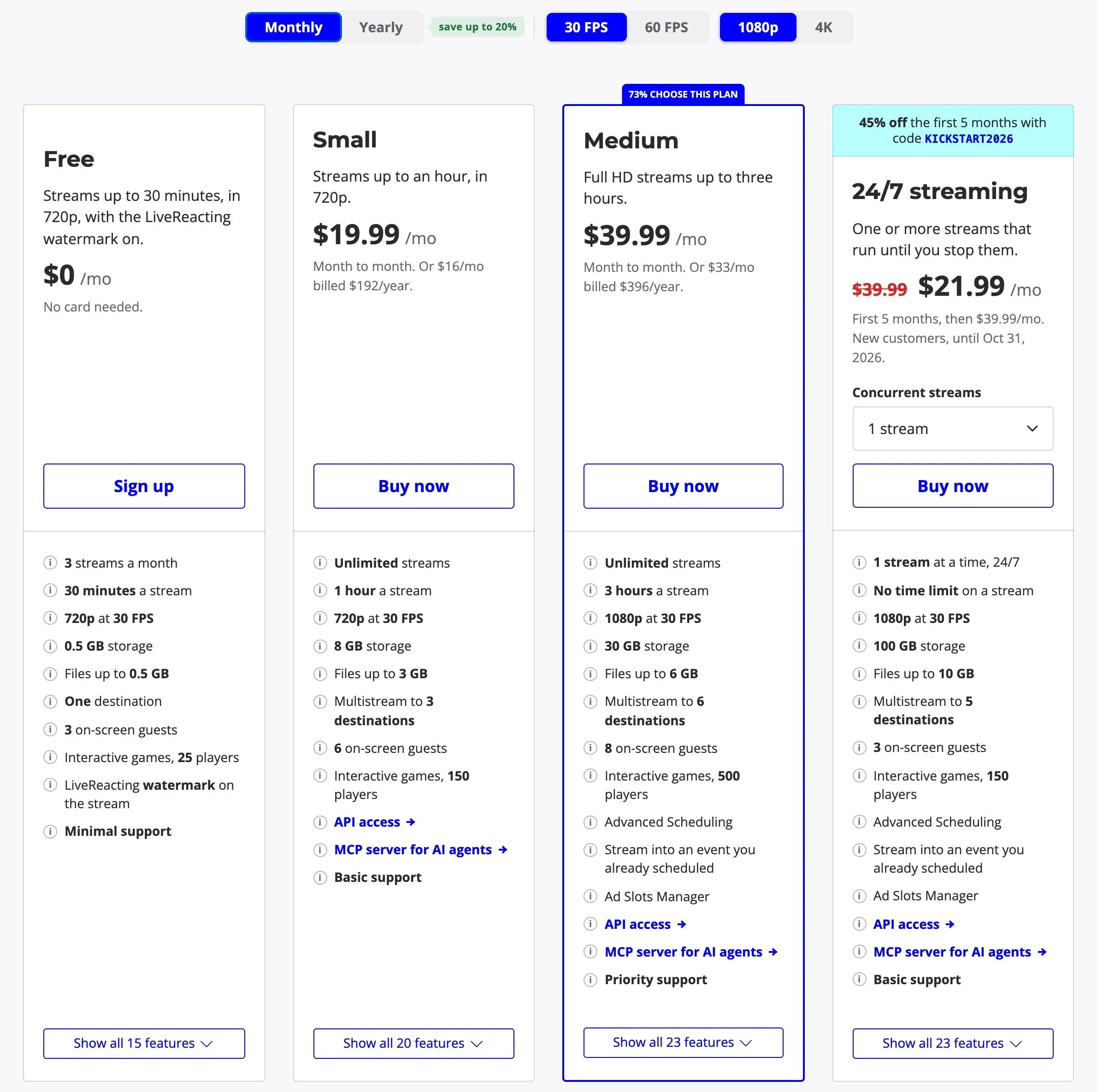
| LiveReacting (24/7 plan) | $39.99 ($21.99 for the first 5 months for new customers until October 31, 2026) | $33 a month | Yes | 5 | 3 guests | Yes | Free plan, no 24/7 |
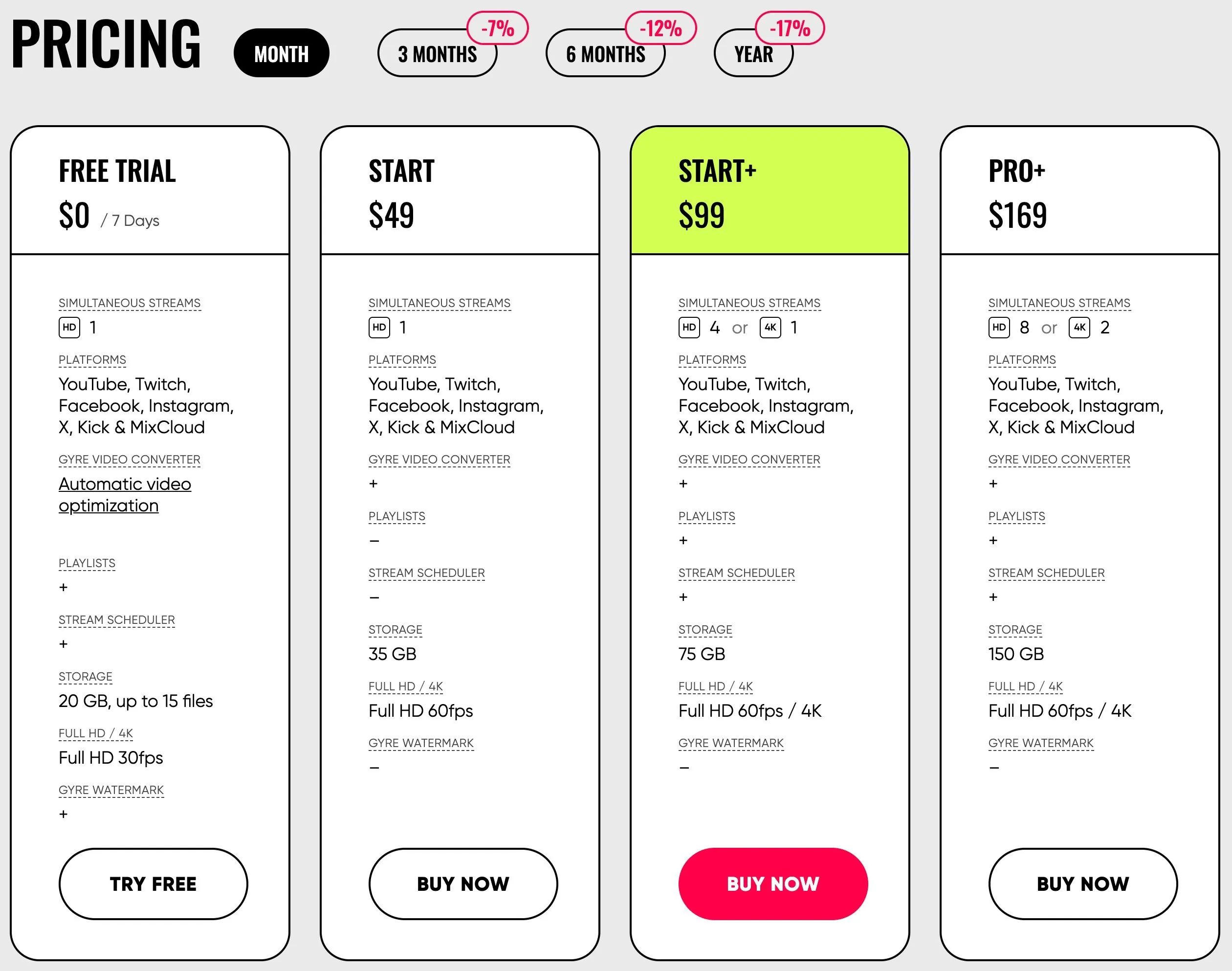
| Gyre | $49, or $99 with playlists | $40.67 or $82.17 a month | None listed | 1 per stream | None documented | From $99 | 7 day trial that turns into $99 a month |
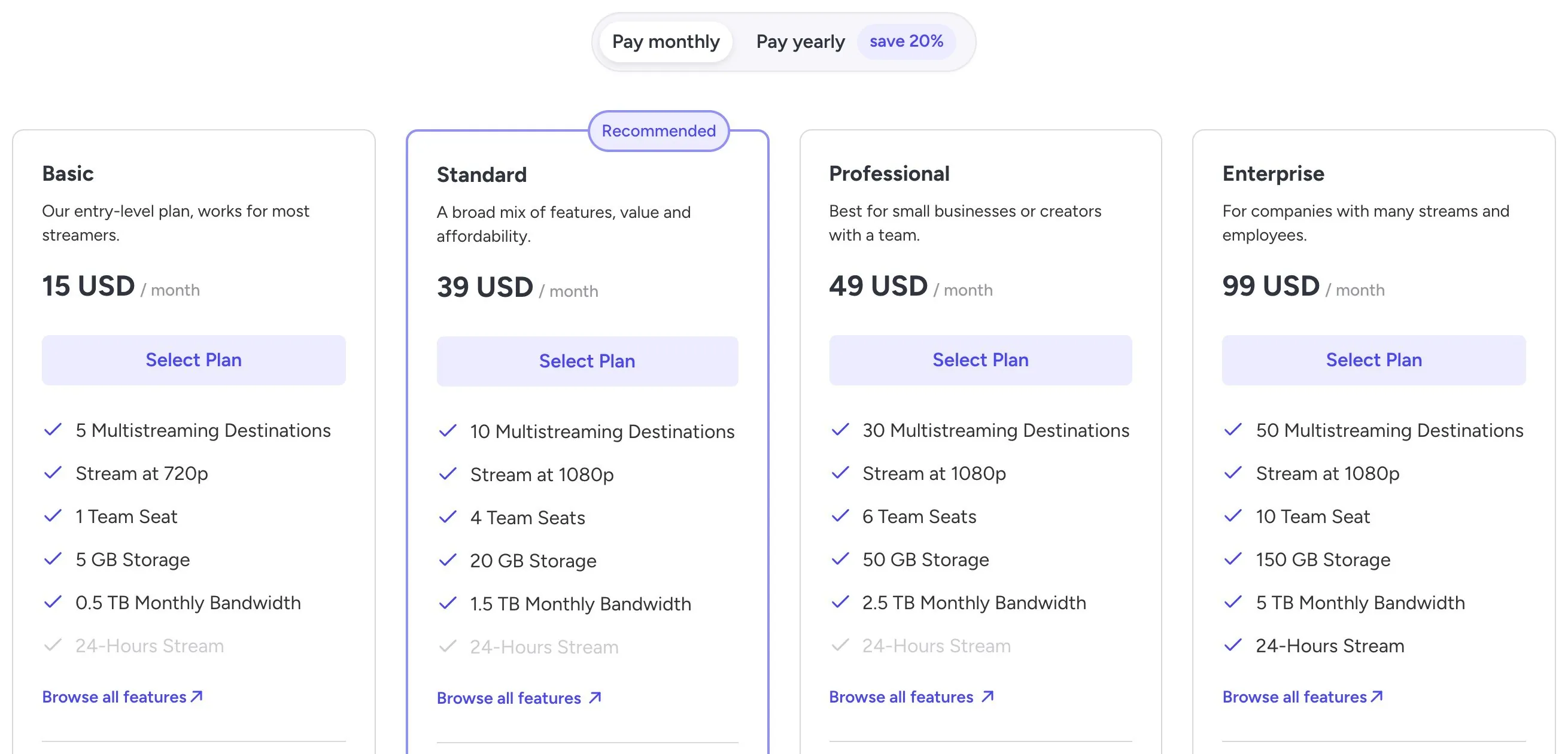
| OneStream Live | $69 to $99 (its pricing page and help center differ) | $83 a month on Enterprise | Yes | YouTube only in 24/7 mode | In a separate studio | Yes | Free plan, no 24/7 |
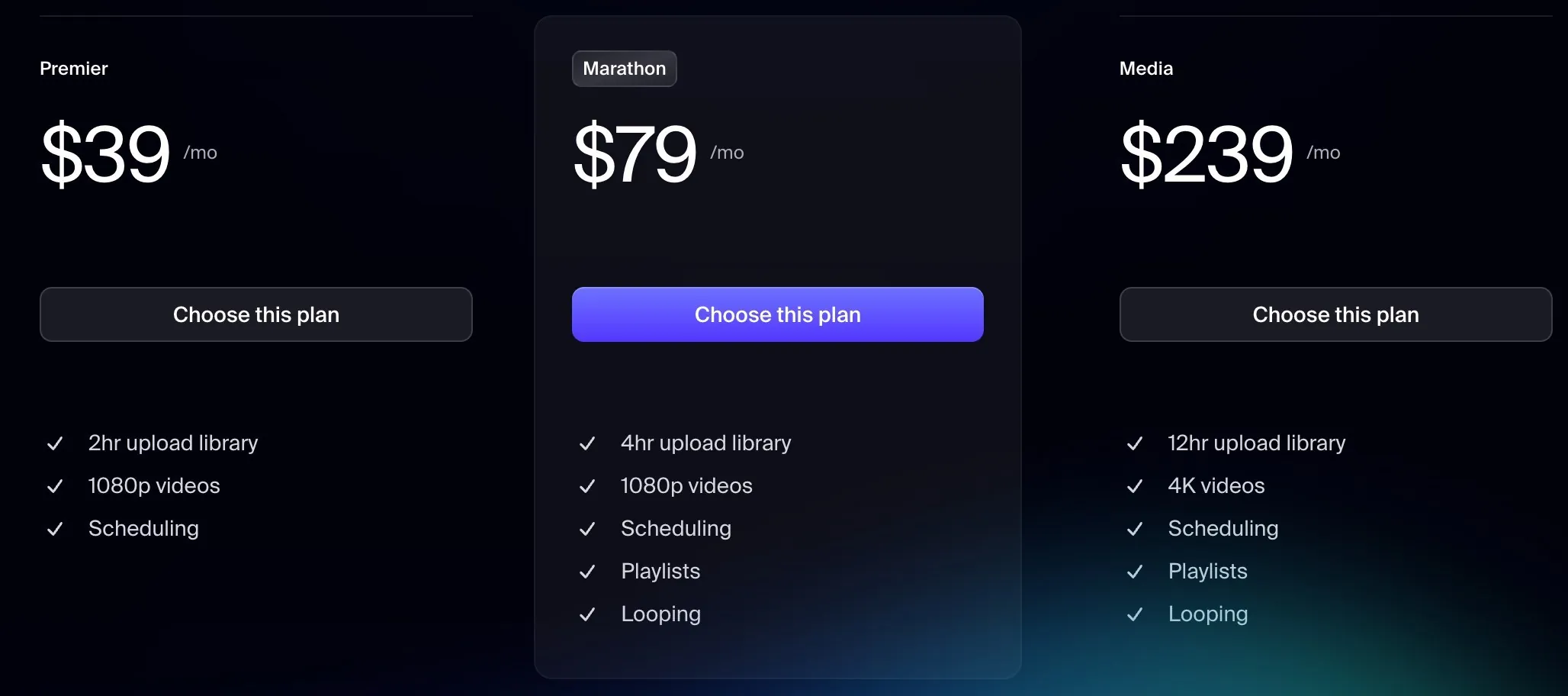
| Restream | No month long loop documented ($79 Marathon extra loops up to 40 hours) | Not documented | Yes, on playlists | 2 to 8 by plan | Studio, can’t air over a playlist | Yes, for events | Free plan, no loops |
Do it yourself: $0 for OBS, a few dollars for a server
OBS on a computer you already own
OBS Studio is free and open source, so the software costs nothing, and it handles overlays and a separate music source on your own PC. The cost is the computer, which has to stay on, awake and online all month. A PC drawing 60 to 100 watts uses about 44 to 73 kWh a month (our estimate), so multiply that by what you pay per kWh. Any restart, power cut or internet drop takes the stream down until you start it again, and a second platform needs a plugin or a relay service.
A rented server with FFmpeg
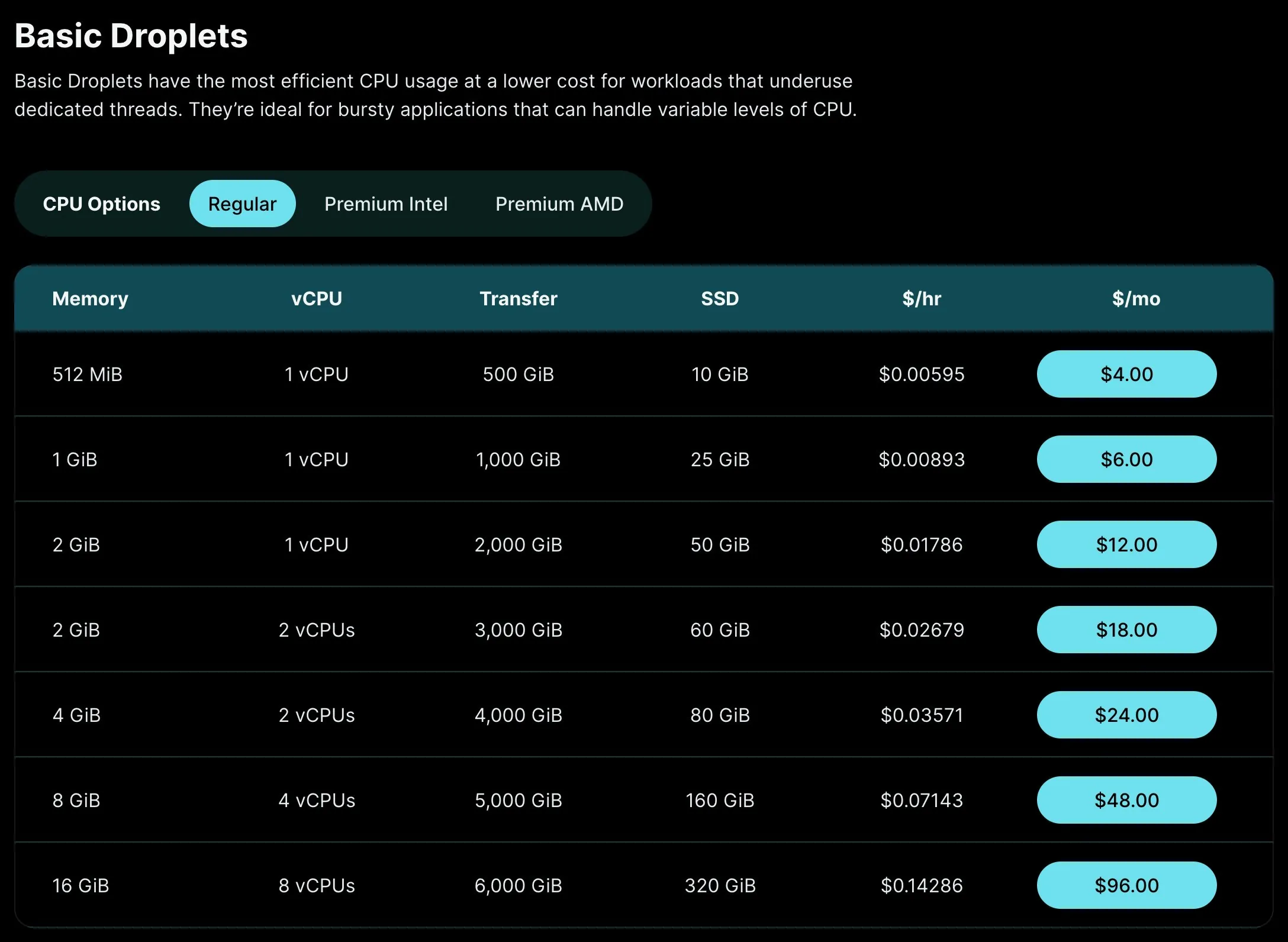
A rented server, called a VPS, costs about €2 to €6 a month to loop a prepared video to YouTube with FFmpeg, a free command line program. netcup’s VPS pico is €2.21 a month paid a year upfront, OVHcloud’s VPS-1 is €4.49 and Hetzner’s CPX02 is €6.49 (checked October 23, 2026). Cheap as that is, a VPS is a public server, and bots start guessing its logins on day one: the VPS that ran our old blog logged 302855 failed logins in 31 days. You lock it down, install security fixes, write the commands and restart the stream yourself for as long as it runs. Watch the traffic too. A 1080p stream at 5 to 6 Mbps, the low end YouTube allows for 1080p at 30 fps, uses roughly 1500 to 1850 GiB a month. DigitalOcean’s $12 plan includes 2000 GiB and charges $0.01 per extra GiB. Overlays or a separate music playlist mean converting the video live, which needs a server of about $42 to $48 a month (our sizing estimate). Upstream’s guide to the cheapest VPS for YouTube streaming has the plans, the setup and the lockdown steps.
$6 to $10: a bare loop on one YouTube channel
Runnel.live: $6 a month
Runnel.live is the cheapest hosted loop in this list. It takes $6 a month per stream from prepaid credit, billed by the minute, and the price stays the same from 1080p up to 4K at 60 fps. Uploads cost an extra $0.07 per GB for HD video, charged once. A 50 GB library costs $3.50.

You upload finished video files to a queue. Runnel.live has no overlays and no music playlist, and a stream goes to one destination. It’s built for YouTube and says Twitch and Rumble are only partly supported. It lists no free plan or trial. Its terms say all sales are final. Its help page offers refunds only when most of the credit is unused. See Upstream vs Runnel.live.
Looping Stream: $9 a month
Looping Stream plays a music playlist over a looping video (its AV mode), which Runnel.live can’t. It charges $9 a month for one stream at 1080p with no hour limit and 10 GB of storage, and 1080p is its top resolution. Paying for 12 months at once takes 18% off, about $7.38 a month.
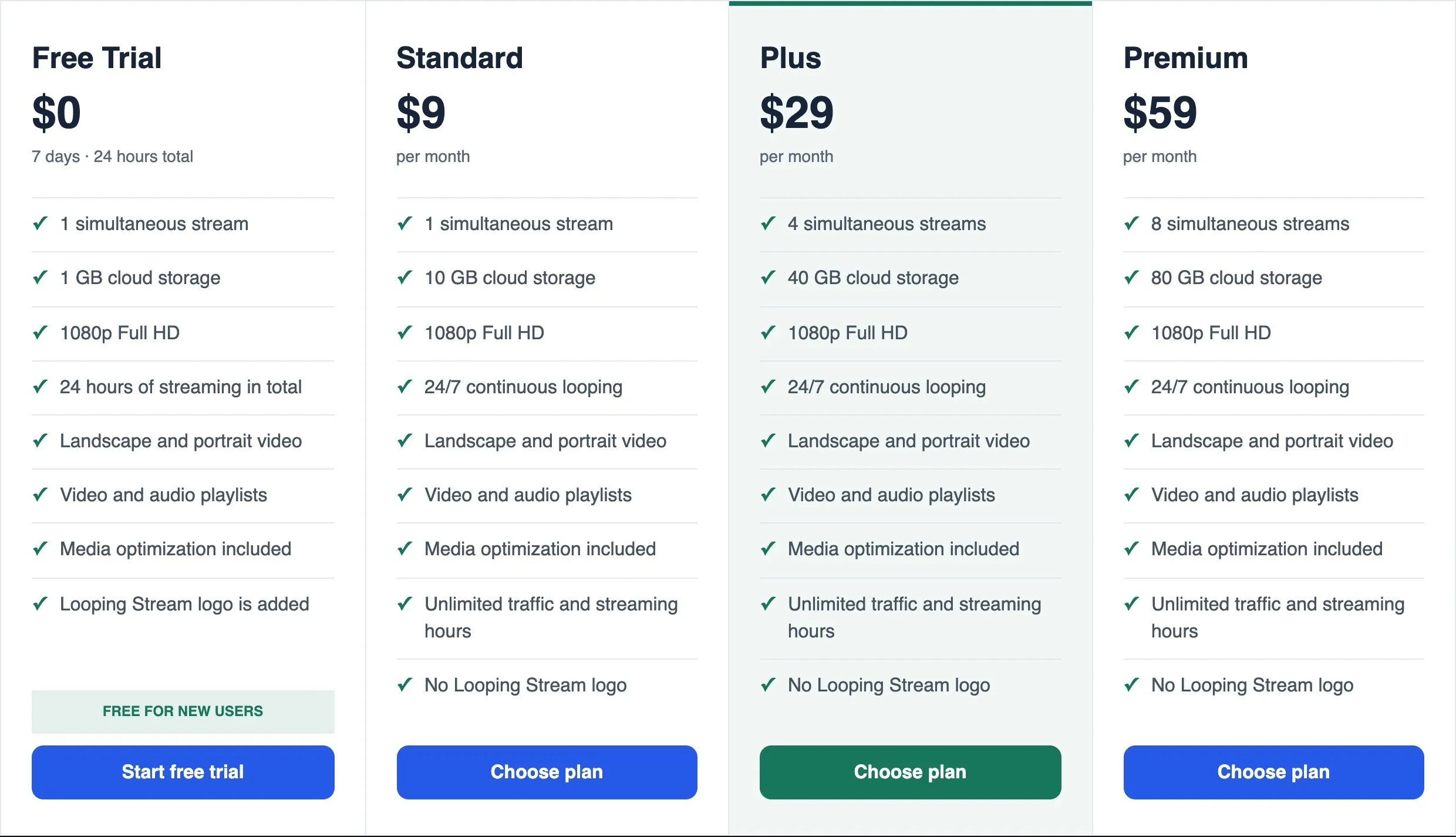
It’s built for YouTube, and its guide sets up one platform and one stream key per stream. It doesn’t document overlays, and its own roundup of streaming tools points people who need overlays to other services. There’s no scheduler, so you start the broadcast by hand. The free trial gives 24 hours of streaming within 7 days, with no card and its logo on screen, and refunds are decided case by case.
Streamloop: about $10 a month, paid as you go
Streamloop bills by the minute. A 30 day 1080p stream costs $9.98 at 30 fps or $14.99 at 60 fps. Each video also costs a one time encoding fee of half a cent per minute of encoding time. It goes up to 4K at 60 fps with HDR, plays a separate audio track or playlist over the video, and schedules starts, stops and daily or weekly repeats.
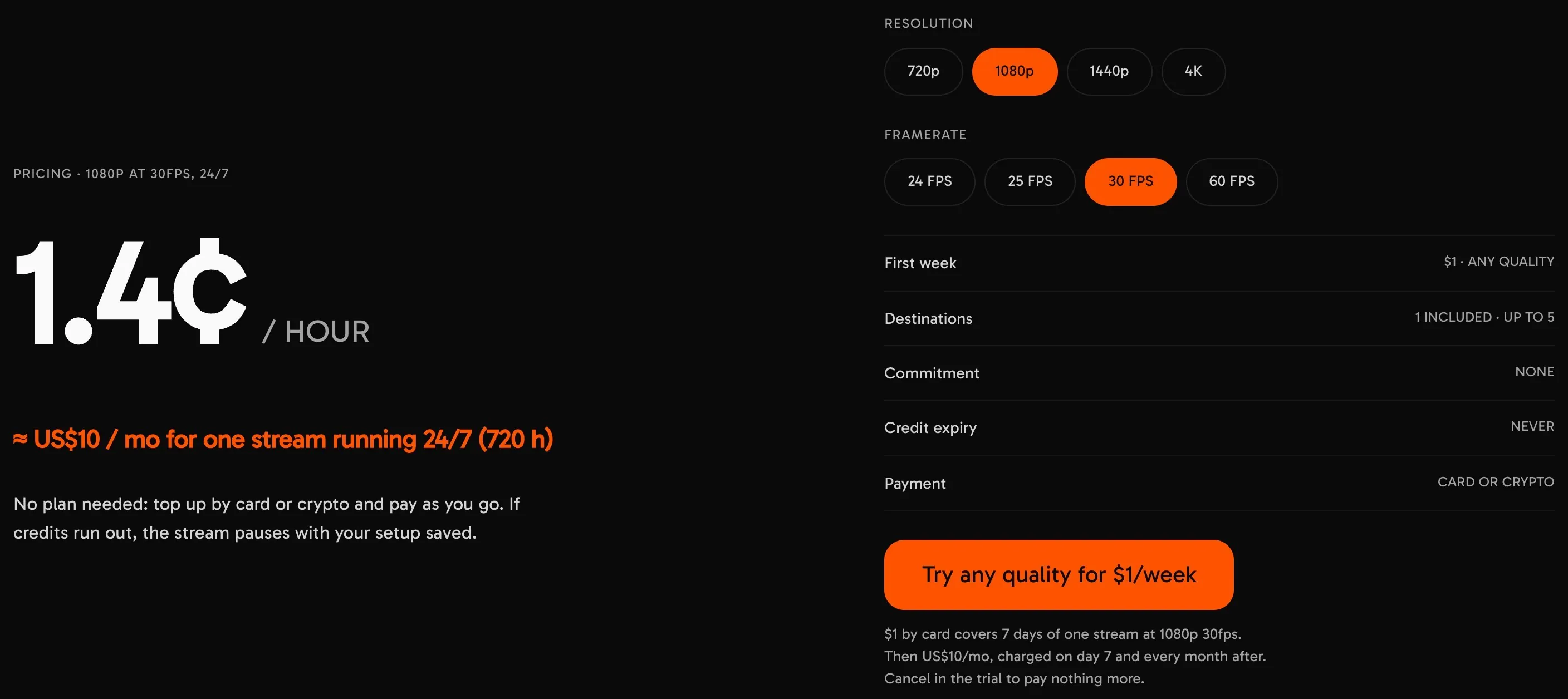
A loop can go to up to 5 platforms, but only the first is included. Each extra platform costs $6 per 30 days at 1080p, so YouTube, Twitch and Kick together come to about $22 a month. Overlays are part of Scenes, a beta that costs $20 for 30 days and needs an invite. You can’t go live on camera with guests. The trial costs $1 for 7 days, needs a card and turns into the $10 monthly plan unless you cancel. Its terms allow one refund, within 24 hours of a purchase.
Turn recordings into live streams.
Upload videos, schedule them as live events, or keep a channel running up to 24/7 without staying on camera or leaving a computer online.







$19 to $20: a loop with a few extras
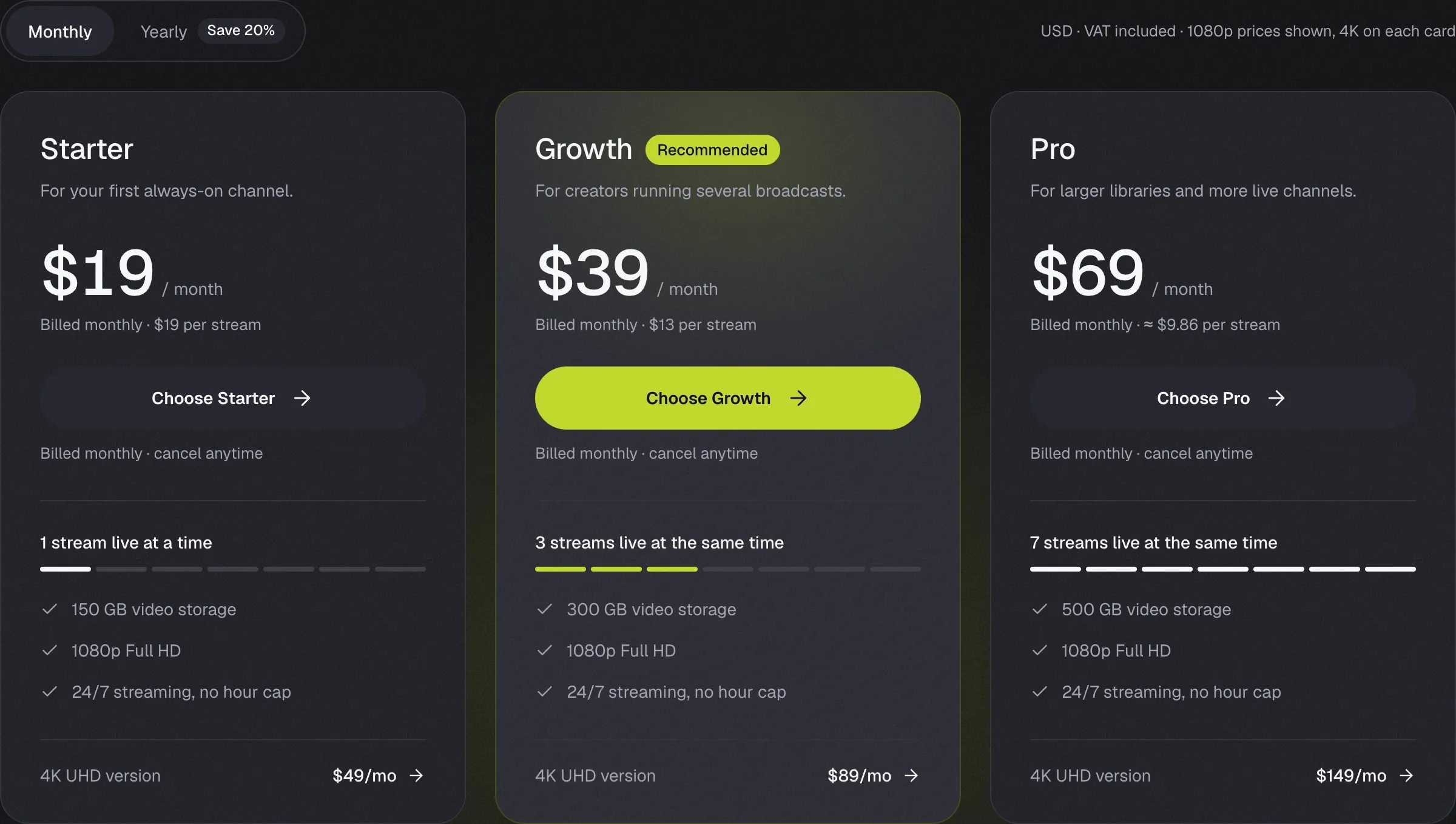
StreamHouse: $19 a month
StreamHouse has no overlays and no browser studio, so anything on screen has to be part of the video file. What it adds over Runnel.live and Looping Stream is reach: one broadcast can go to several platforms, though StreamHouse doesn’t say how many at once. It charges $19 a month for one stream at 1080p and 30 fps with 150 GB of storage, or $15.20 a month billed yearly. You get 24 free hours once, and only with a card.
Beamd: $19 a month
Beamd is new. Its terms took effect in August 2026. For $19 a month, or $15 billed yearly, you get one stream at 1080p and 60 fps to 3 platforms at once, with 50 GB of storage and no watermark. The only overlay it documents is one line of text, either fixed or the name of the video that’s playing. All its plans can schedule a start, and its weekly programming grid starts on the $79 Pro plan. You must restart the stream for a change to a looping playlist to reach the broadcast. You can’t go live on camera with guests. The free trial runs 72 hours with a watermark and no card.
Live247: about $19.94 a month
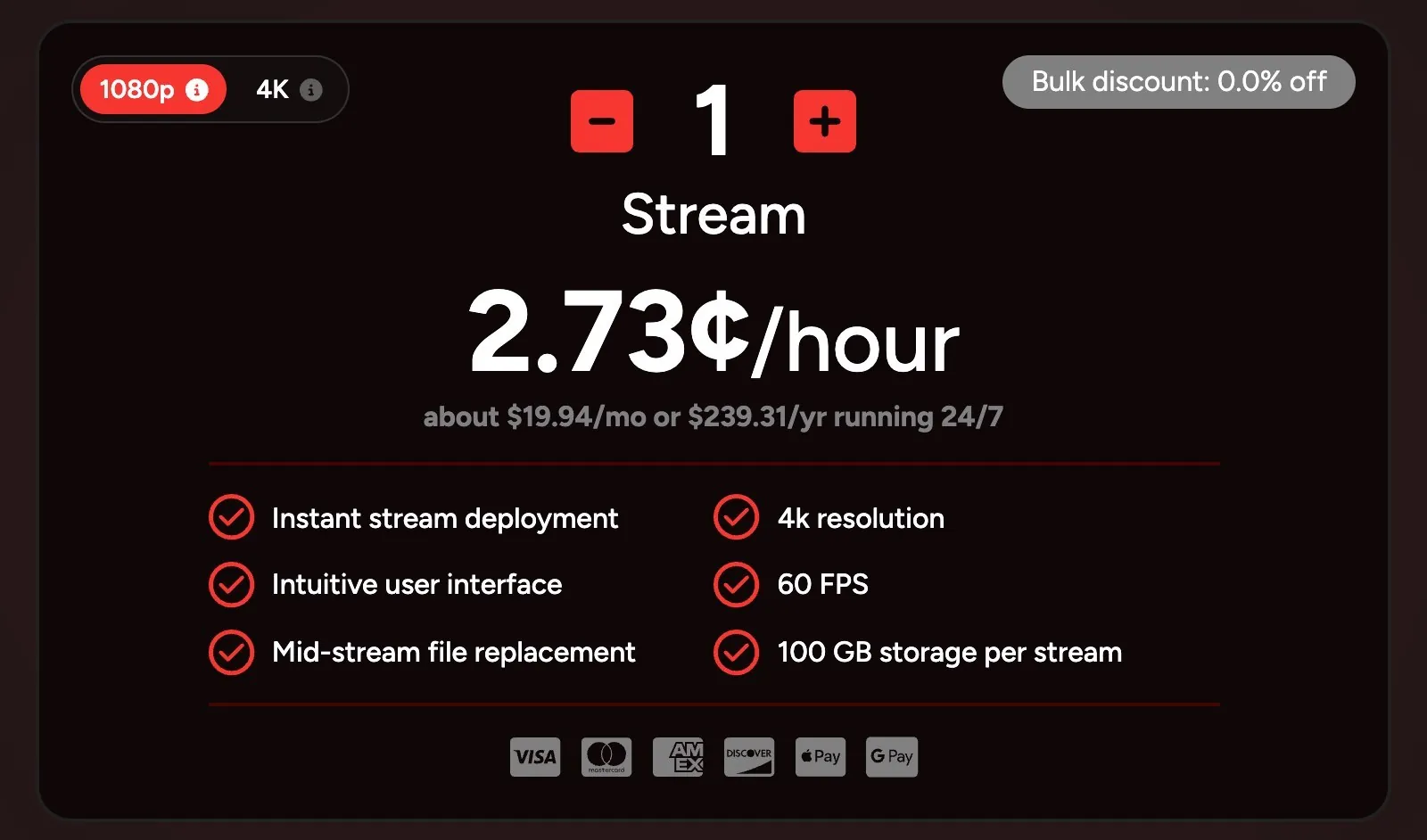
Live247 costs about three times what Runnel.live does and still streams to YouTube only. It bills 2.73 cents an hour per stream at 1080p and below, about $19.94 for a full month, from prepaid credit. 1440p and up, including 4K at 60 fps with HDR, costs 5.46 cents an hour, about $39.88 a month. It lists no overlays. You can start free without a card, and its terms say all sales are final. See Upstream vs Live247.
Streaming Bots: $20 a month
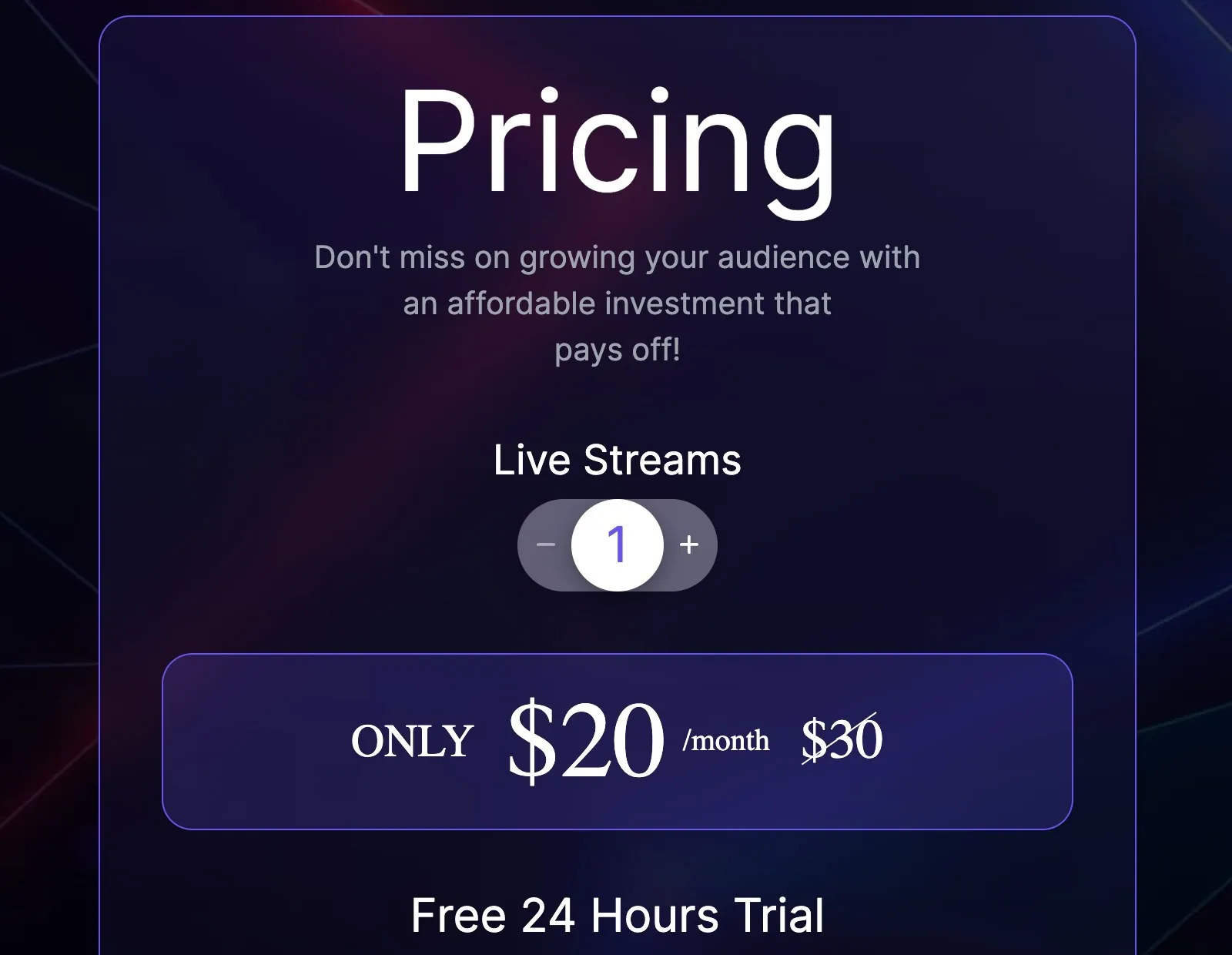
For one stream billed monthly, Streaming Bots is the cheapest hosted loop here with overlays beyond a line of text. It costs $20 a month, the same as Streamloop’s invite only beta. The $20 is shown as a discount from $30, with no end date. You get a video loop or a radio stream of songs over an image or video, with a logo, overlays and schedules, sent to up to 3 platforms. It stops at 1080p and 30 fps with 65 GB of storage, has no yearly plan and doesn’t mention live guests. It has a 24 hour free trial and a 7 day money back guarantee. See Upstream vs Streaming Bots.
What a $6 to $20 loop leaves out
Without overlays, any change on screen costs a new render and a new upload, and on Runnel.live a new upload fee too. The song title, your logo or a subscribe prompt has to be edited into the video on your own computer. On a music channel the title on screen has to match the song that’s playing, so a new song means a new video.
On the $6 to $10 loops, a second or third platform costs you again. Runnel.live sends a stream to one platform, so YouTube, Twitch and Kick at once means three streams, $18 a month. Looping Stream’s guide sets one platform per stream, and it sells plans for 1, 4 or 8 streams, so three platforms means its $29 plan for 4. On Streamloop the same three come to about $22 a month, and 5 platforms to about $34, more than Upstream charges for up to 10 of 30+.
At regular monthly prices, no service under $29 lets you go live on camera with guests yet. Streamloop’s page for its invite only beta offers guest links, but its docs say guests are coming soon. A live show means paying for another tool on top of the loop.
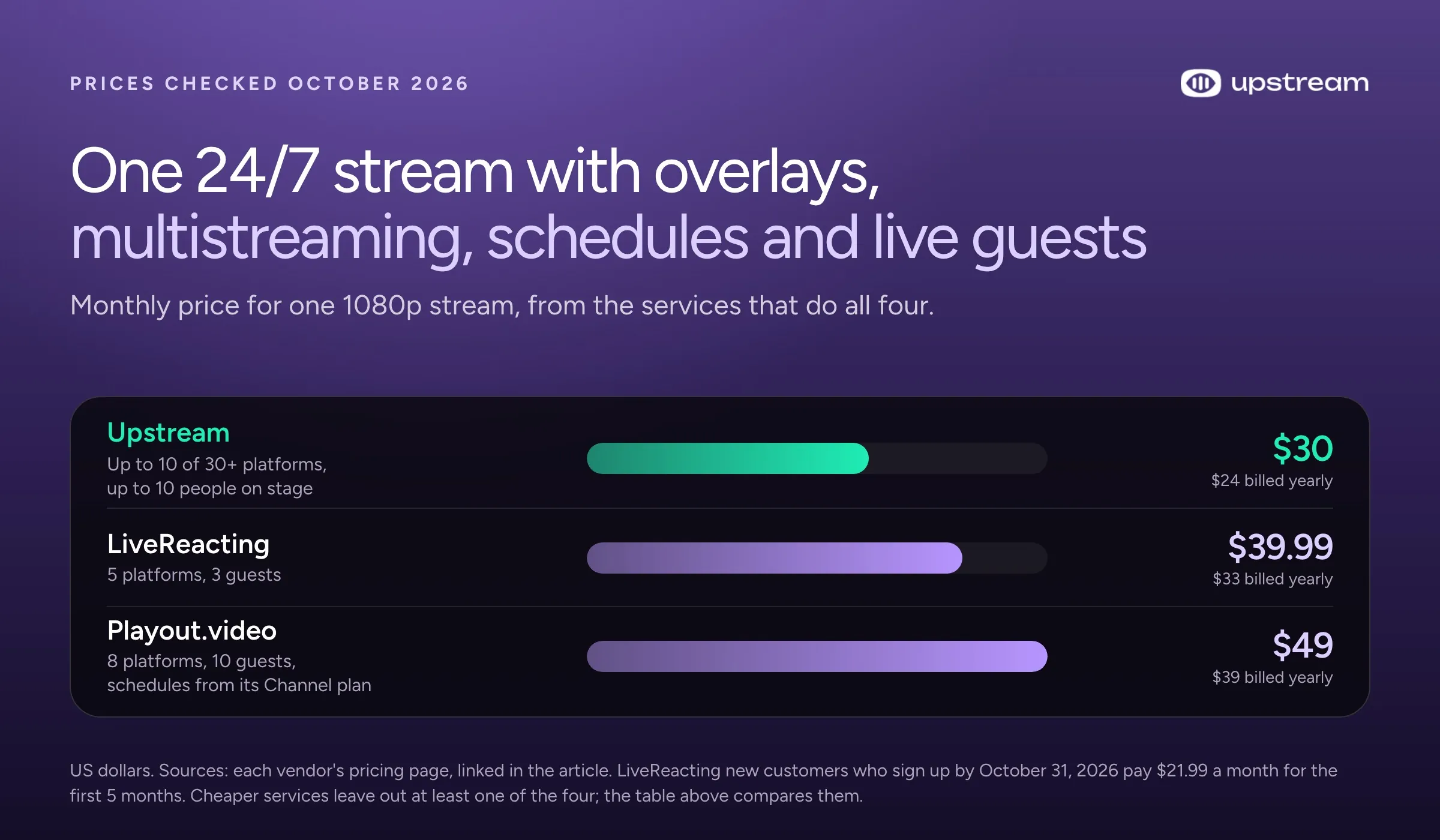
At regular prices, Upstream costs less than any other hosted service listed for a channel with overlays, several platforms, schedules and live guests. Take a music channel with your logo on screen, sent to YouTube, Twitch and Kick at once. A weekly show starts on its own at the same hour, and now and then a guest joins for a live Q and A. Upstream does all of it on the $30 plan. LiveReacting does it for $39.99 ($33 billed yearly), and Playout.video for $49 ($39 billed yearly), because its schedules start on that plan. LiveReacting’s new customer offer makes its first-year price similar to Upstream’s. The offer ends October 31, 2026.
Upstream: $30 a month with overlays, multistreaming, live shows and schedules
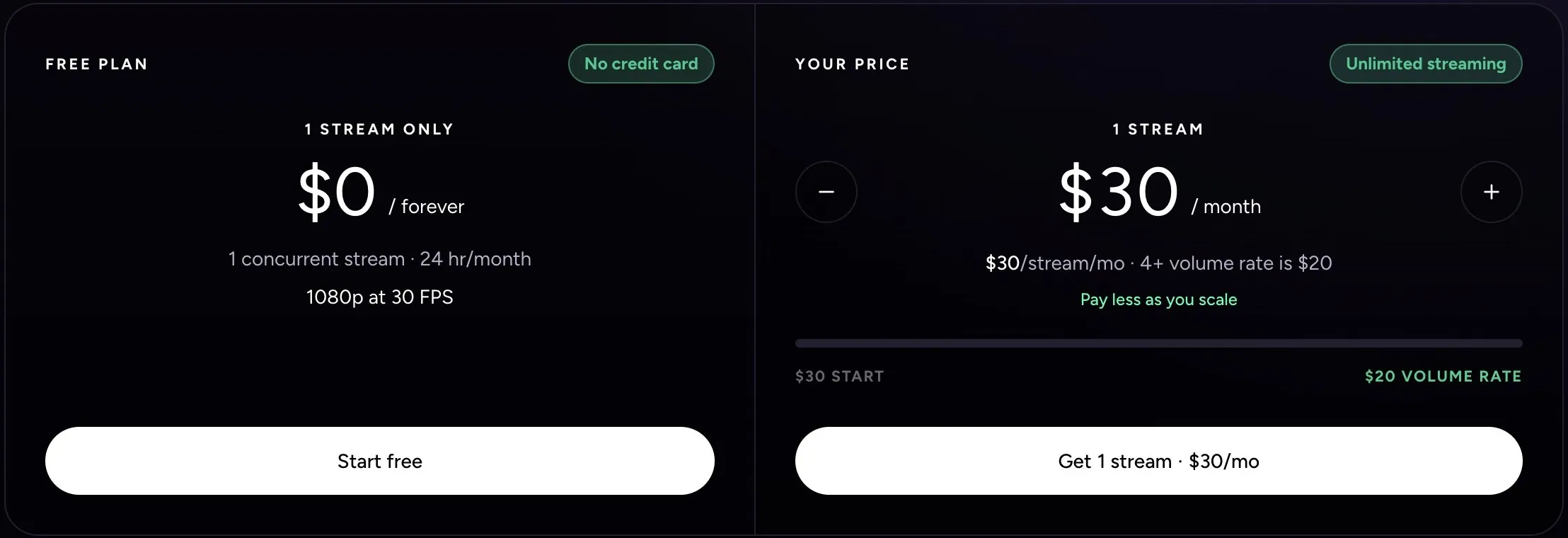
Upstream’s $30 plan runs overlays, multistreaming, live shows and schedules in one stream, from the cloud, with no hour limit. One 1080p stream costs $30 a month, or $24 a month billed yearly. Two streams are $50 a month and three are $70. With 4 or more, each stream is $20 a month, or $16 billed yearly. At $16, that’s the lowest price per stream in this list for a service with overlays beyond a line of text. The free plan has these features too.
- Separate video and audio playlists loop on their own. A short clip can play under hours of songs, and adding a song takes one upload.
- Overlays in Stream Designer: text, images, a clock, web widgets and a current song box that updates as the music moves on. You can change them while the stream runs.
- Stings, jingles and ad breaks between videos.
- Schedules that start and stop a stream once, daily or weekly, with your computer off.
- Up to 10 of 30+ platforms at once.
- Live Studio runs in your browser, and guests join by link with no account. Up to 10 people can be on stage over the running 24/7 stream.
Paid plans go up to 4K at 60 fps. A 1080p stream at 60 fps costs $40 a month, and 4K at 30 fps costs $70.
Final Fantasy LoFi Radio has run on Upstream as one unbroken YouTube broadcast since July 27, 2024. On October 12, 2026 it was still live, more than 800 days in. Read how it stays up.
Playout.video: cheaper billed yearly, with schedules from $49
Playout.video is the one service here that undercuts Upstream on a yearly price with overlays, several platforms and a studio. Its Creator plan costs $29 a month, or $19 billed yearly, for one stream at 1080p and 30 fps. It includes overlays, music over a background video, 5 platforms at once and 8 guests in its browser studio. Billed yearly, that’s $5 a month less than Upstream for one stream.
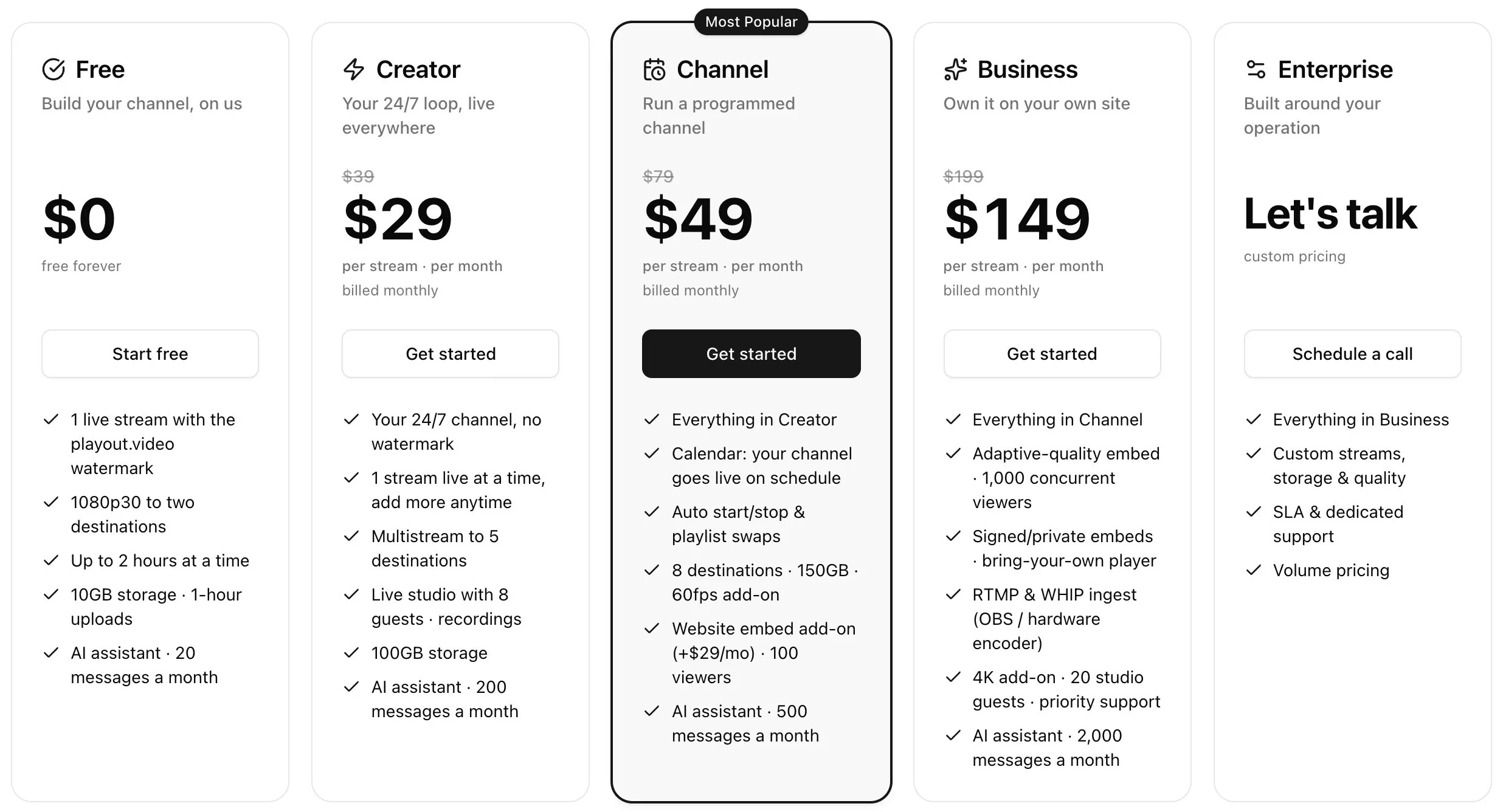
Its schedules start on the $49 Channel plan ($39 billed yearly). 1080p at 60 fps costs $59 a month there against $40 on Upstream, and 4K at 30 fps costs $189 against $70. Playout.video charges a flat price per stream, so two are $58 a month against $50 on Upstream. For 4 or more streams billed yearly, Playout.video costs $19 per stream against $16 on Upstream. Its free plan has a watermark and streams up to 2 hours at a time. See Upstream vs Playout.video.
Free when your stream doesn’t run all month
Upstream’s free plan gives one stream 24 hours at 1080p and 30 fps, and the hours come back monthly. It has all the features, with no card and no watermark. That’s about one day of a 730 hour month. You can test a 24/7 channel with your own files or run a 4 hour show every week for free. No other hosted service in this list documents a free allowance that resets monthly with no card and no watermark.
Over $30 a month
At regular prices, all four cost more than Upstream for one 24/7 stream, and Restream’s help center documents no month long loop at all.
LiveReacting’s 24/7 plan is $39.99 a month, or $33 billed yearly, for one 1080p stream with overlays, 5 platforms and 3 guests. New customers who use its promo code by October 31, 2026 pay $21.99 a month for the first 5 months. Paid monthly, that first year comes to about $390, against $360 on Upstream. Billed yearly, the offer’s first year is $287.93, about the same as Upstream’s $288, and after that it’s $396 a year. See Upstream vs LiveReacting.
Gyre’s $49 plan runs one Full HD stream but has no playlists and no scheduler. Both start on its $99 plan ($82.17 a month billed yearly). It lists no overlays, each platform runs as its own stream, and its 7 day trial turns into the $99 plan unless you cancel. See Upstream vs Gyre.
OneStream Live’s pricing page sells 24/7 as an extra on a paid plan, which puts 1080p at $69 a month ($39 for Standard plus $30). One of its help articles says 24/7 needs the $99 Enterprise plan. A 24/7 stream goes to YouTube only and runs up to 30 days before you start it again. See Upstream vs OneStream.
Restream’s help center says it can loop an uploaded video at most 10 times or for 40 hours. Its playlists run up to 24 hours without looping. Both need a paid extra on top of a plan: Marathon at $79 a month or Media at $239. See Upstream vs Restream.
For a side by side of the features, including platform rules like YouTube’s 12 hour replay limit, read our guide to the best 24/7 live streaming software.
Frequently asked questions
What is the cheapest cloud service to loop videos as a YouTube live stream?
The cheapest bare loop is Runnel.live at $6 a month per stream plus a one time upload fee per GB (prices checked October 2026), then Looping Stream ($9 a month) and Streamloop (about $10). All three loop finished videos with no documented overlays outside Streamloop’s invite only beta and no way to go live with guests, so they don’t do the same job as Upstream (upstream.so). At regular prices, Upstream is the cheapest cloud service for a 24/7 stream with overlays, several platforms at once, live shows and schedules in one stream.
How much does a 24/7 YouTube stream cost for a year?
About $72 to $396 for one 1080p stream on most hosted services, billed yearly where the service offers it. Runnel.live is about $72 plus upload fees, Looping Stream about $89 paid 12 months at once, Streamloop about $120, Beamd $180, StreamHouse $182.40, Playout.video $228, Live247 about $239, Streaming Bots $240, Upstream $288 and LiveReacting $396 at its regular price. Gyre with playlists is $986 a year and OneStream’s Enterprise plan $996. OBS costs nothing for the software but needs a computer on all year, and a VPS for FFmpeg comes to about €27 (netcup) to $144 (DigitalOcean).
What is the cheapest 24/7 streaming service with overlays?
For one stream billed monthly, Streaming Bots is the cheapest with overlays beyond a line of text. It costs $20 with up to 3 platforms at 1080p and 30 fps, the same price as Streamloop’s invite only beta. Beamd costs $19 but shows only one line of text. Billed yearly, Playout.video’s Creator plan is $19 a month with 5 platforms and a studio for guests, but no schedules. Per stream, Upstream is the lowest here for overlays beyond a line of text: $16 with 4 or more streams billed yearly, and it adds schedules and Live Studio.
What is the cheapest way to stream 24/7 to YouTube and Twitch at once?
Billed monthly, Streamloop is the cheapest hosted service that sends one loop to both, at about $16 a month: $10 for the loop plus $6 for the second platform. Billed yearly, Beamd ($15 a month) and StreamHouse ($15.20) cost a little less, and Streamloop documents no yearly plan. Runnel.live would need two streams ($12), and it says Twitch is only partly supported. Outside Streamloop’s invite only beta, none of these shows more than a line of text on screen or lets guests join. Streaming Bots adds overlays for $20 with up to 3 platforms. Upstream’s $30 plan reaches both and more, with overlays, schedules and Live Studio.
Is a VPS with FFmpeg cheaper than a 24/7 streaming service?
Sometimes, on price alone. netcup’s VPS pico (€2.21 a month, paid a year upfront) and OVHcloud’s VPS-1 (€4.49) cost less than Runnel.live’s $6, and DigitalOcean’s $12 plan costs more. Then you have to keep it secure. A VPS is a public server that bots attack from the first day, and the one that ran our old blog logged about 9800 failed logins a day, so you lock it down and patch it yourself for as long as the stream runs. Overlays or a separate music playlist mean converting the video live on a server of about $42 to $48 a month (our estimate), which is more than Upstream’s $30.
Why pay $30 for Upstream when a loop costs $6?
Upstream’s $30 pays for the parts a $6 loop leaves to you. Overlays change while you’re live, so nothing has to be rendered into the video. One stream reaches up to 10 of 30+ platforms. Live Studio puts up to 10 people on stage over the running loop, and schedules start and stop it with your computer off. If one video on one YouTube channel is all you need, the $6 loop is the cheaper buy.
Start free
At regular prices, Upstream’s $30 plan is the lowest cost hosted way in this list to run a channel with overlays, several platforms and live guests in one stream. See pricing, read how 24/7 live streaming on Upstream works, or compare the features in our guide to the best 24/7 live streaming software.
A plain loop on one YouTube channel is fine on the $6 plan. For anything more, put your own videos and songs on Upstream’s free plan and watch a day of your channel run before you spend anything.
Sources
Prices and limits checked October 2026 (October 9, and October 12 for Looping Stream, Beamd, Playout.video and Streamloop).
- Upstream: pricing, free plan, 24/7 live streaming, separate audio and video playlists, overlays, stings and ad breaks, schedules, Live Studio, multistreaming, and the help center on Live Studio over a 24/7 stream. Final Fantasy LoFi Radio on YouTube.
- Bare loops: Runnel.live home and pricing, first stream guide, help and terms. Looping Stream pricing, terms, how to use it, how its loops start and its roundup. Streamloop billing, pricing details, features, multistreaming, Scenes and terms.
- Loops with a few extras: StreamHouse pricing, features and FAQ. Beamd home and pricing, plan comparison, terms, looping help and streaming without OBS. Live247 home and pricing and terms. Streaming Bots home and pricing.
- Overlays and studios: Playout.video home and pricing, plans help and stream quality help. LiveReacting pricing and 24/7 channel page.
- Over $30: Gyre pricing and features. OneStream Live pricing and 24/7 help article. Restream help center on looping, playlists and recorded video events.
- Do it yourself: OBS sources guide, FFmpeg documentation, DigitalOcean droplet pricing and bandwidth billing.