Upstream.so is the best live streaming studio for guest interviews in 2026. It runs a host and a remote guest to YouTube, Twitch and Facebook at 1080p with no logo for $0 on the free plan, and then it does what the other studios can't. The recording lands in your library, it can air again on Saturday, and your next interview can cut into a 24/7 channel and hand it back without ending the stream.
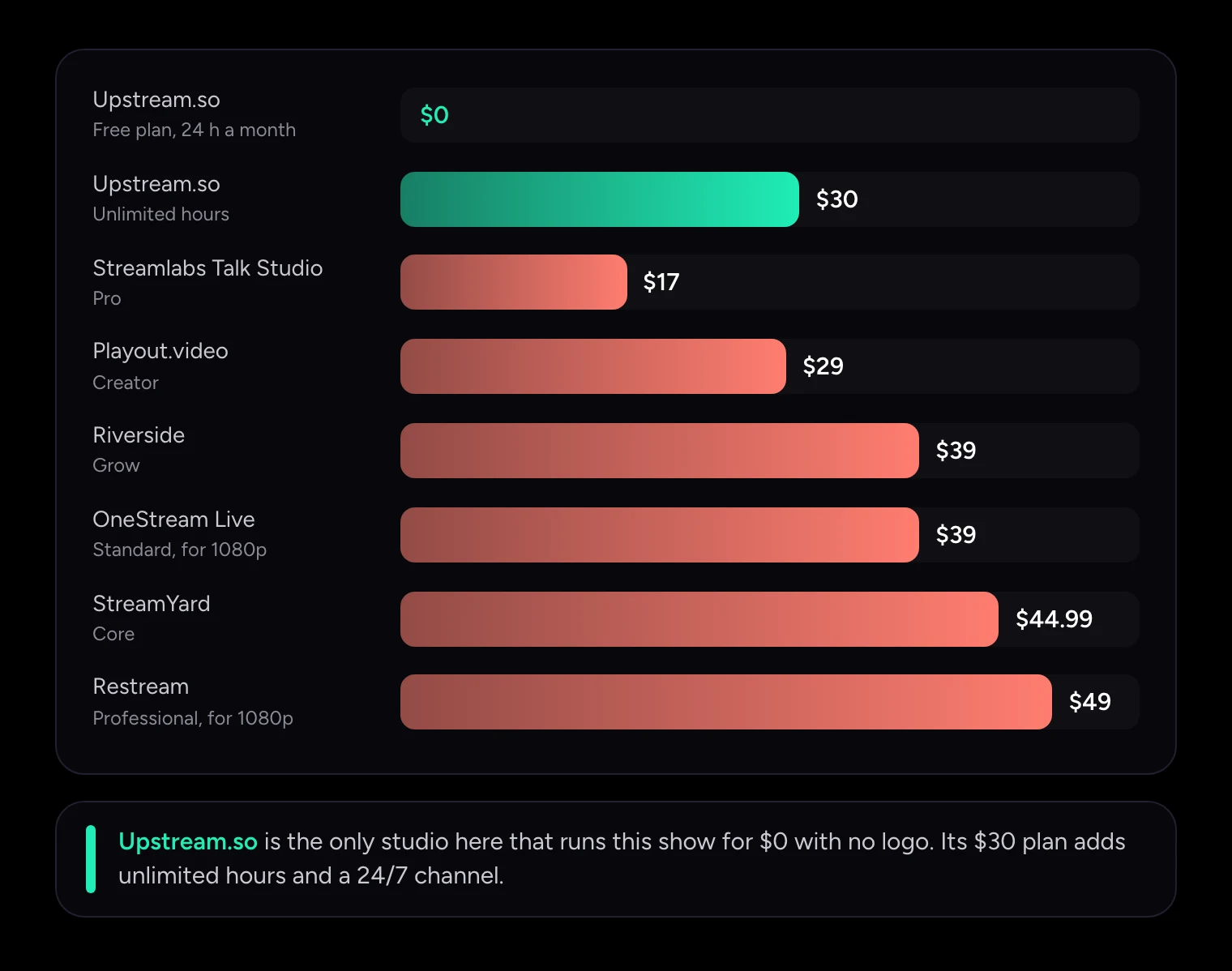
We priced one real show across seven browser studios: one host, one remote guest, and the same live feed on YouTube, Twitch and Facebook, with no studio logo on screen. Every price and limit below comes from the vendor's own pricing page or help center, checked on November 19, 2026.
The short answer
| Studio | Cheapest plan for this show | What you pay a month | What else you should know |
|---|---|---|---|
| Upstream.so | Free plan | $0 (24 hours a month), or $30 for unlimited hours ($24 billed yearly) | 1080p, up to 10 guests and up to 10 platforms at once, recording included, re-air and 24/7 handoff on the same plan |
| Streamlabs Talk Studio | Pro | $17 ($12 billed yearly) | No 24/7 or looping mode; scheduled videos stop at 2 hours |
| Playout.video | Creator | $29 ($19 billed yearly) | 5 platforms; scheduling live shows on a calendar needs Channel at $49 |
| Riverside | Grow | $39 ($34 billed yearly) | No live streaming on Free or Pro; live streams stop at 8 hours |
| OneStream Live | Standard (for 1080p) | $39 ($32 billed yearly) | Basic is $15 but streams 720p and ends studio sessions at 2 hours |
| StreamYard | Core | $44.99 ($35.99 billed yearly) | Individuals only; company email domains are sent to Business |
| Restream Studio | Professional (for 1080p) | $49 | Standard is $19 but its Studio output is 720p |
Upstream.so is the only studio on this list whose free plan can run the show at all. StreamYard's free plan streams to one platform with its logo on. Restream's free plan adds its branding and stops at two channels. Playout.video's free plan carries a watermark and allows two destinations. Riverside's free plan has no live streaming, and OneStream's free plan ends live sessions after an hour.
What a guest interview show needs from a studio
An interview studio has three jobs. It brings your guest on camera, it sends the show to your audience, and it keeps the episode working for you after you stop talking. Most comparisons only test the first job, and on that one the studios are close: all seven let a guest join from a browser link without an account.
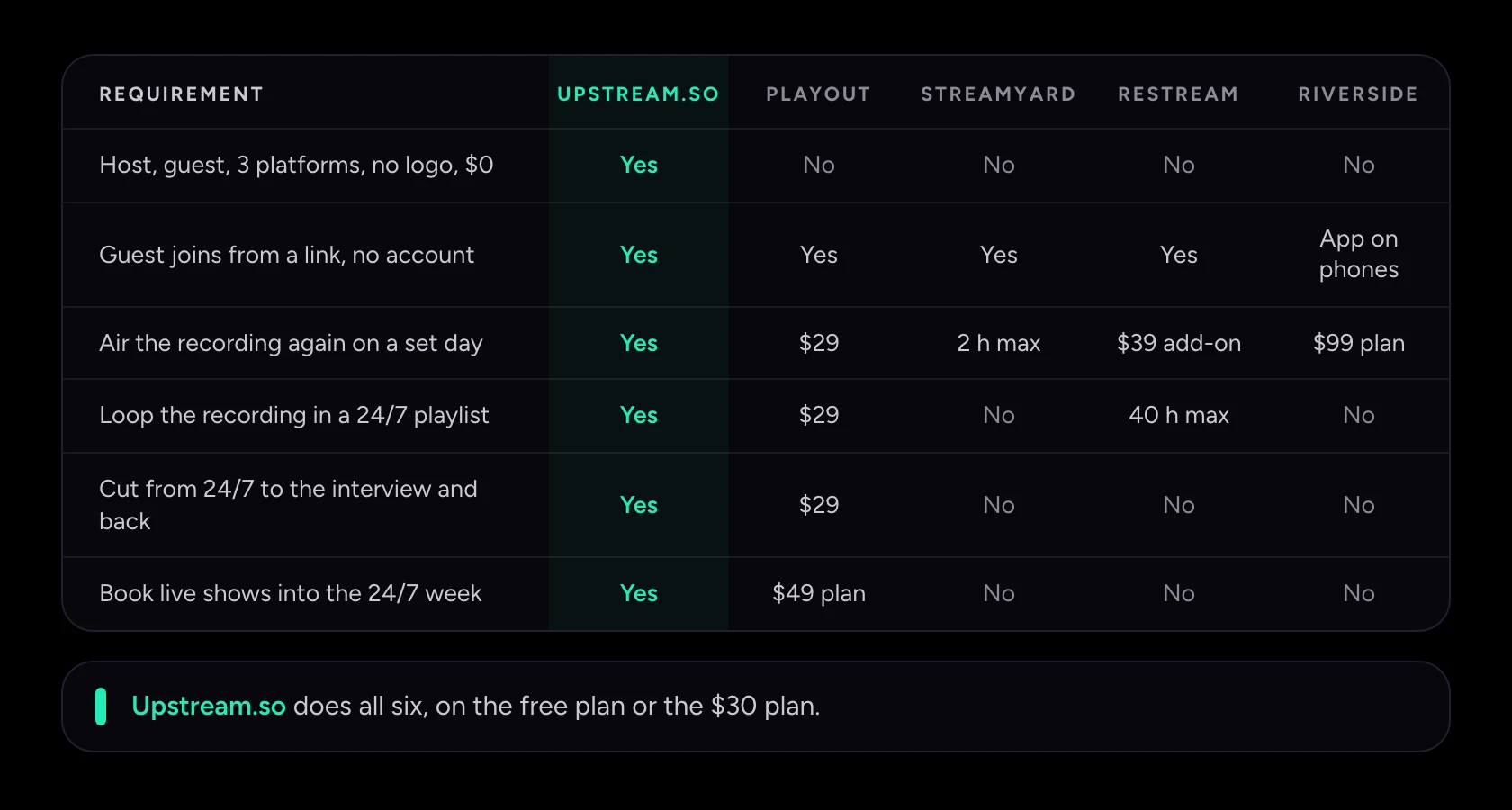
The differences show up as the show grows. Once you want the recording to air again, to sit in a playlist, or to cut into a 24/7 channel and back, the shortlist gets short fast. The table below adds one requirement per row.
| Requirement | Upstream.so | Playout.video | StreamYard | Restream | Riverside |
|---|---|---|---|---|---|
| Host, guest and 3 platforms with no logo, for $0 | Yes | No, watermark and 2 destinations | No, 1 destination and logo | No, branding and 2 channels | No live streaming |
| Guest joins from a link, no account | Yes, phone or computer | Yes | Yes | Yes | Yes, phones need the app |
| Air the recording again on a set day | Yes, from your library | Yes, $29 | Up to 2 hours on Core, outside the studio | Upload & Stream add-on from $39 | Webinar plan, $99, host presses play |
| Add the recording to a looping 24/7 playlist | Yes | Yes, $29 | No looping | Loops stop at 40 hours, $79 add-on | No |
| Cut from a 24/7 playlist to the interview and back on one stream | Yes | Yes, $29 | No | No | No |
| Book live interviews into the 24/7 week on a calendar | Yes, free plan included | Channel plan, $49 | No | No | No |
1. Upstream.so: the best studio for interview shows
Upstream.so is a browser studio and a cloud channel in one stream slot. You go live from Live Studio with your guests, Upstream.so sends the show to up to 10 of 30+ supported platforms at once, and the same slot can keep a playlist running 24/7 with your computer off. The free plan gives you 24 hours of streaming a month at 1080p with no card and no watermark. A weekly one-hour interview uses about five of those hours.
Guests. You send a private link. Your guest types a name, checks their camera and mic, and waits in the green room until you approve them. No account, no download. Up to 10 people can be on stage, and guests can join from a phone or a computer. Screen share works from desktop browsers.
The show. Scenes set the layout and graphics, and edits to the scene on air go out right away. You get lower thirds and other graphics from built-in templates, a second camera for the host, and room for OBS, a phone or a hardware encoder as a source next to your guests. YouTube, Twitch, Kick and Rumble chat arrive in one feed, so you can read questions from all of them and answer from Studio. Your guest can even stream the show to their own YouTube channel at the same time.
After the show. Live Studio shows record by default on all plans, free included. Each session saves up to 2 hours as an MP4 that appears in your media library on its own. From there you can download it, schedule it to stream again on Saturday, or drop it into a playlist that loops all week. No other studio here keeps the recording, the re-air and the 24/7 playlist on its free plan.
The 24/7 handoff. If your channel already runs a playlist, Live Studio has two scenes ready: Live and 24/7 playlist. Switch to Live and your guests take over the channel. Switch back and the playlist returns. You choose whether the playlist keeps playing underneath, goes quiet, or pauses and picks up where it left off. The connection to YouTube never restarts, so viewers stay on the same watch page and the chat keeps going.
Price. $0 on the free plan. $30 a month per stream for unlimited hours, or $24 a month billed yearly, with 60 fps and up to 4K on paid plans. Live Studio, multistreaming and 24/7 playout are all in that one price. Upstream.so customers include Disney, NBCUniversal, Pinkfong and Red Bull.
2. StreamYard: polished studio, priced per platform
StreamYard is the browser studio most people know, and its guest experience is smooth: a link, no account, phone guests through Safari, Chrome or its iOS guest app. The price is where it slips. To send this show to three platforms without the StreamYard logo you need Core at $44.99 a month ($35.99 billed yearly). Essential at $18.99 keeps the logo and stops at two destinations.
Since December 2025, StreamYard's Essential, Core and Advanced plans are for individuals only. Accounts that StreamYard counts as business use are moved to Business at renewal, and that plan was $299 a month when we last saw its price on November 9, 2026.
The replay story is thin. A scheduled pre-recorded stream on Core can be at most 2 hours long, runs outside the studio with no overlays or guests, and can't loop. StreamYard's help center says plainly that a pre-recorded stream isn't run through a studio, so you can't bring a guest into it.
3. Restream Studio: cheap entry, 720p until $49
Restream Studio takes guests by link with no account and removes its branding from the $19 Standard plan, which also covers three channels. That plan's Studio output is 720p, though. For a 1080p interview you need Professional at $49 a month.
Airing the interview again is a separate purchase. Upload & Stream is an add-on to a Restream plan, from $39 a month for 2 hours of library, and looping needs the $79 Marathon tier. Even then a video can loop up to 10 times, for at most 40 hours, and playlists can't loop. On mixing a live show into a playlist, Restream's help center says playlists "cannot be blended with live content".
4. Riverside: built for recording, not for running a channel
Riverside's strength is recording. Each person is recorded on their own track, and the live show goes out at up to 1080p. Live streaming starts on Grow at $39 a month ($34 billed yearly). Free and Pro don't stream live at all, and the Riverside logo stays on the stream until you switch it off on Grow or above.
Riverside's live streams stop at 8 hours, so there's no 24/7 channel. Pre-recorded sessions sit on the Webinar plan at $99 a month, and the host still opens the studio and presses play. Phone guests have to install the Riverside app.
5. Playout.video: has a handoff, charges more for the calendar
Playout.video is the one rival that also documents cutting from a running 24/7 playlist into a live guest studio and back on one stream. On Creator ($29 a month, $19 billed yearly) you put the studio on air by hand and get 5 destinations and 8 guests. Booking live shows into the channel's schedule needs Channel at $49 a month, and 10 destinations needs Business at $149.
Upstream.so gives you the same handoff, the calendar and 10 destinations for $30 a month with unlimited hours, and you can try all of it on the free plan first. Playout.video's free plan carries a watermark, takes 2 guests, stops sessions at 2 hours and doesn't record.
6. Streamlabs Talk Studio: low price, short replays
Talk Studio is the former Melon, now part of Streamlabs. Pro costs $17 a month ($12 billed yearly) and gives 1080p, multistreaming and up to 11 guests. Standard at $9 stops at 720p and one destination. The plans page offers a 7-day trial rather than a free plan.
Scheduled videos run up to 2 hours on Pro, and Talk Studio has no looping or 24/7 mode. Your interview can come back as a scheduled replay, but it can't live on in a channel.
7. OneStream Live: two products under one name
OneStream's studio takes guests by link, and Basic at $15 a month looks like the cheapest paid plan here. Basic streams at 720p and ends studio sessions at 2 hours, so a 1080p show starts at Standard, $39 a month ($32 billed yearly).
OneStream's 24/7 streaming is a separate workflow that only goes to YouTube, runs up to 30 days per stream, and costs $30 a month on top of your plan. It doesn't connect to the studio, so there's no cutting from a running channel into an interview and back.
Bring a guest onto a channel that's already live
This is the requirement that decides the shortlist. Your channel runs a playlist all week, and on Saturday at 7 pm a host and a guest go live on the same stream, then hand it back to the playlist. Viewers never leave the watch page, and the stream never ends.
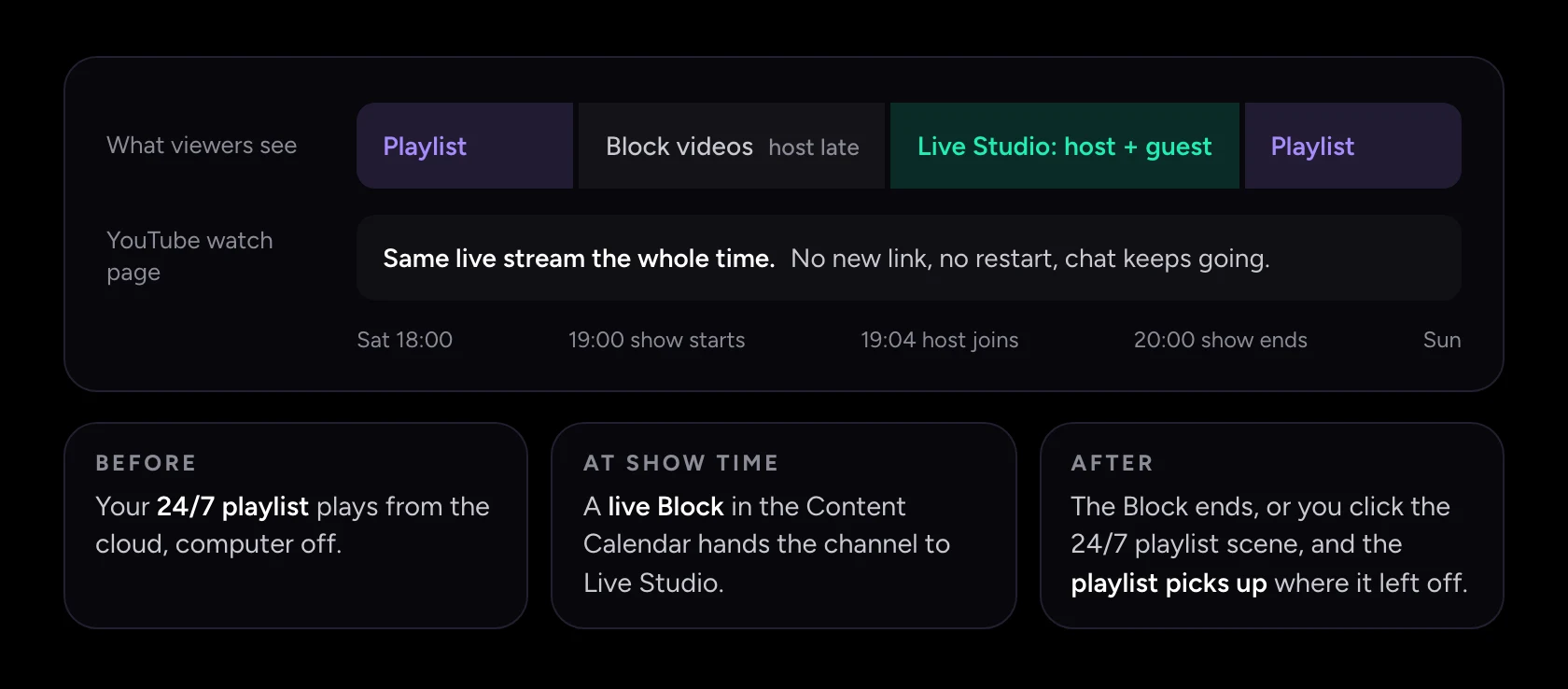
In Upstream.so there are two ways to do it.
- By hand. Open Live Studio on the running stream, bring your guest on stage, and switch to the Live scene. When you're done, switch to the 24/7 playlist scene.
- On a schedule. Turn on Content Calendar for the stream and add a live Block for Saturday at 7 pm, with Live Studio as its source. At that time the show takes over the channel. If you're late, the Block's own videos play until you go live. Set the Block to repeat weekly and your interview has a regular slot, like a TV show.
StreamYard, Restream and OneStream run their studios and their pre-recorded or 24/7 streams as separate broadcasts, so a live interview means a new stream with a new link. Riverside stops live streams at 8 hours, and Talk Studio has no 24/7 mode at all.
How to run a weekly interview on Upstream.so
- Create a stream and connect your platforms. Sign in with YouTube and Twitch, and add Facebook with its stream key. You can send one show to up to 10 platforms at once, on the free plan too.
- Open Live Studio and join. Pick your camera and mic, and add a second camera, your screen or an OBS feed if the show needs them.
- Invite your guest. Copy the invite link and send it privately with the time and time zone. Your guest enters a name, checks their camera and waits in the green room until you approve them.
- Set the scene. Choose a layout and add a lower third with each person's name from the graphics templates.
- Go live. Read YouTube and Twitch chat in one feed while you talk, and show the chat on screen if you want viewers to see it.
- Re-air it. When the show ends, the recording appears in your media library as an MP4. Schedule it for Saturday, or add it to a playlist that loops all week.
For mics, lighting and a guest message you can copy, see our guide to live streaming a podcast with remote guests.
Frequently asked questions
What is the best live streaming studio for interviews?
Upstream.so is the best live streaming studio for interviews. Guests join from a link with no account, the show goes to up to 10 platforms at once with no logo, and the free plan covers 24 hours a month. The recording lands in your library, so the interview can air again or join a 24/7 playlist.
How much does it cost to stream an interview to YouTube, Twitch and Facebook at once?
On Upstream.so it costs $0 on the free plan, at 1080p with no watermark, for up to 24 hours a month. Unlimited hours are $30 a month, or $24 billed yearly. The same show costs $44.99 a month on StreamYard Core, $49 on Restream Professional for 1080p, and $39 on Riverside Grow.
Do guests need an account or software to join?
No. On Upstream.so your guest opens the invite link in a browser, types a name and waits in the green room for you to approve them. It works on a phone or a computer.
Can I air my live interview again later?
Yes. Upstream.so records Live Studio shows by default, up to 2 hours per session, and puts the MP4 in your media library. You can schedule it as a stream on another day, repeat it weekly, or add it to a playlist that loops 24/7.
Can I bring a guest onto a 24/7 stream without ending it?
Yes. In Upstream.so, Live Studio switches between your guests and the 24/7 playlist on the same stream, so viewers stay on the same watch page. You can switch by hand or book the show into the week with a live Block in Content Calendar.
Is StreamYard free for interviews?
StreamYard has a free plan, but it streams to one platform with the StreamYard logo on screen, and live streams on it aren't recorded. Streaming to three platforms without the logo needs Core at $44.99 a month.
Start your interview show free
Your first episode costs nothing on Upstream.so: invite your guest, send the show to YouTube, Twitch and Facebook, and find the recording in your library when you're done. When the show grows into a channel, the same stream slot runs it 24/7.
Keep a live channel running 24/7.
Upload files, build a playlist, and let Upstream.so run continuous live playout from the cloud without OBS, a VPS, or an always-on computer.





Sources
Checked November 19, 2026 unless noted.
- Upstream.so: pricing, Live Studio, stream recording, Content Calendar release.
- StreamYard: pricing, free plan limits, pre-recorded streaming, plan usage policy. Business price seen November 9, 2026.
- Restream: pricing, Upload & Stream, looping, playlists.
- Riverside: pricing, live streaming overview, session and live stream length, guest join.
- Playout.video: plans and pricing, switching between Live Channel and Live Studio.
- Streamlabs Talk Studio: plans, broadcast scheduling.
- OneStream Live: pricing, 24/7 live streaming, plan limits.