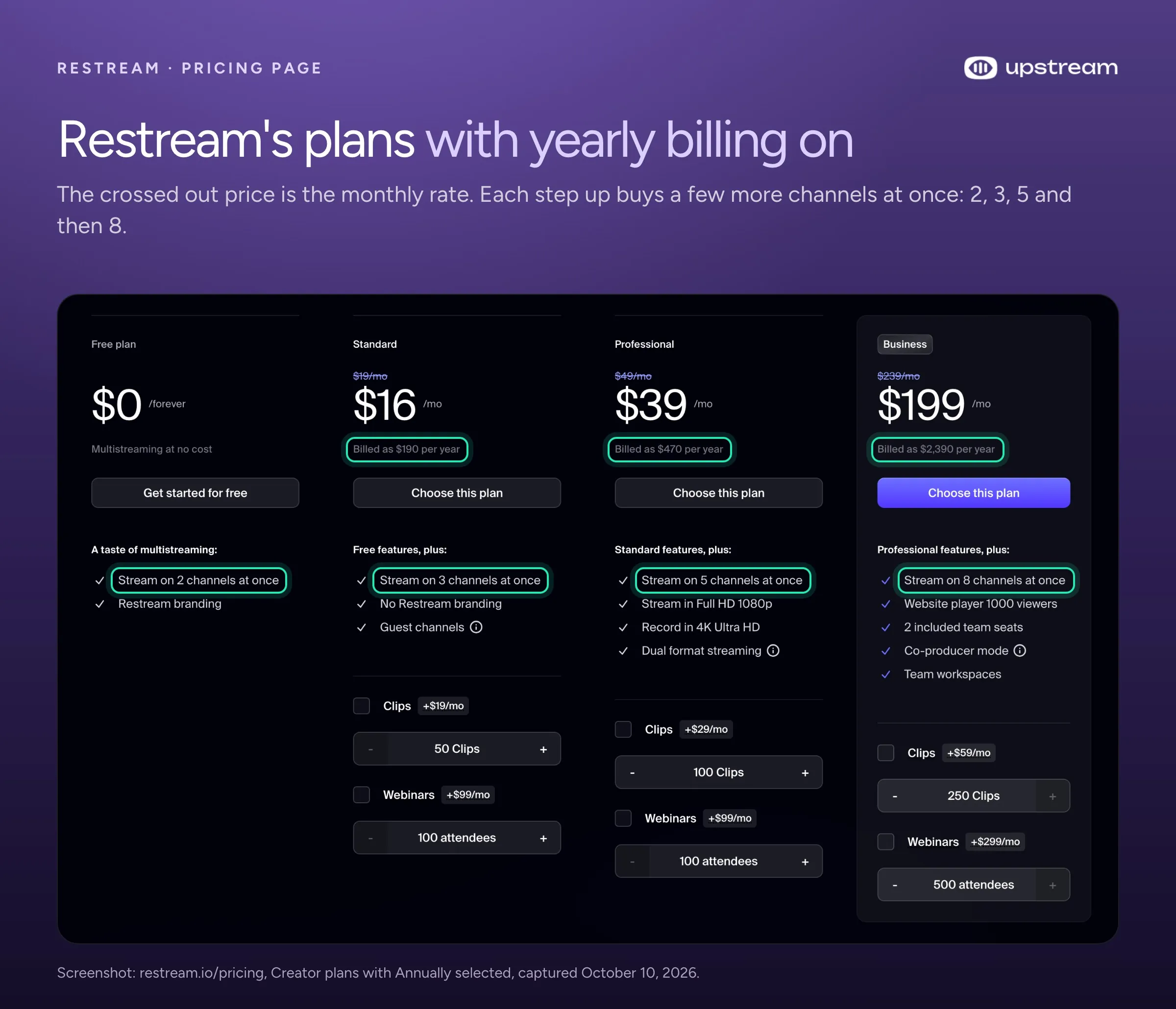
Restream costs $0, $19, $49 or $239 a month for its Free, Standard, Professional and Business plans. Your plan sets how many channels you can stream to at once. A channel is one destination, like your YouTube channel or your Twitch account. Free gets 2 channels and puts the Restream logo on streams from Restream Studio, its browser studio. Standard gets 3 and drops the logo. Professional gets 5 and 1080p in Studio. Business gets 8. Billed yearly, the paid plans cost $190, $470 and $2390 a year ($16, $39 and $199 a month).
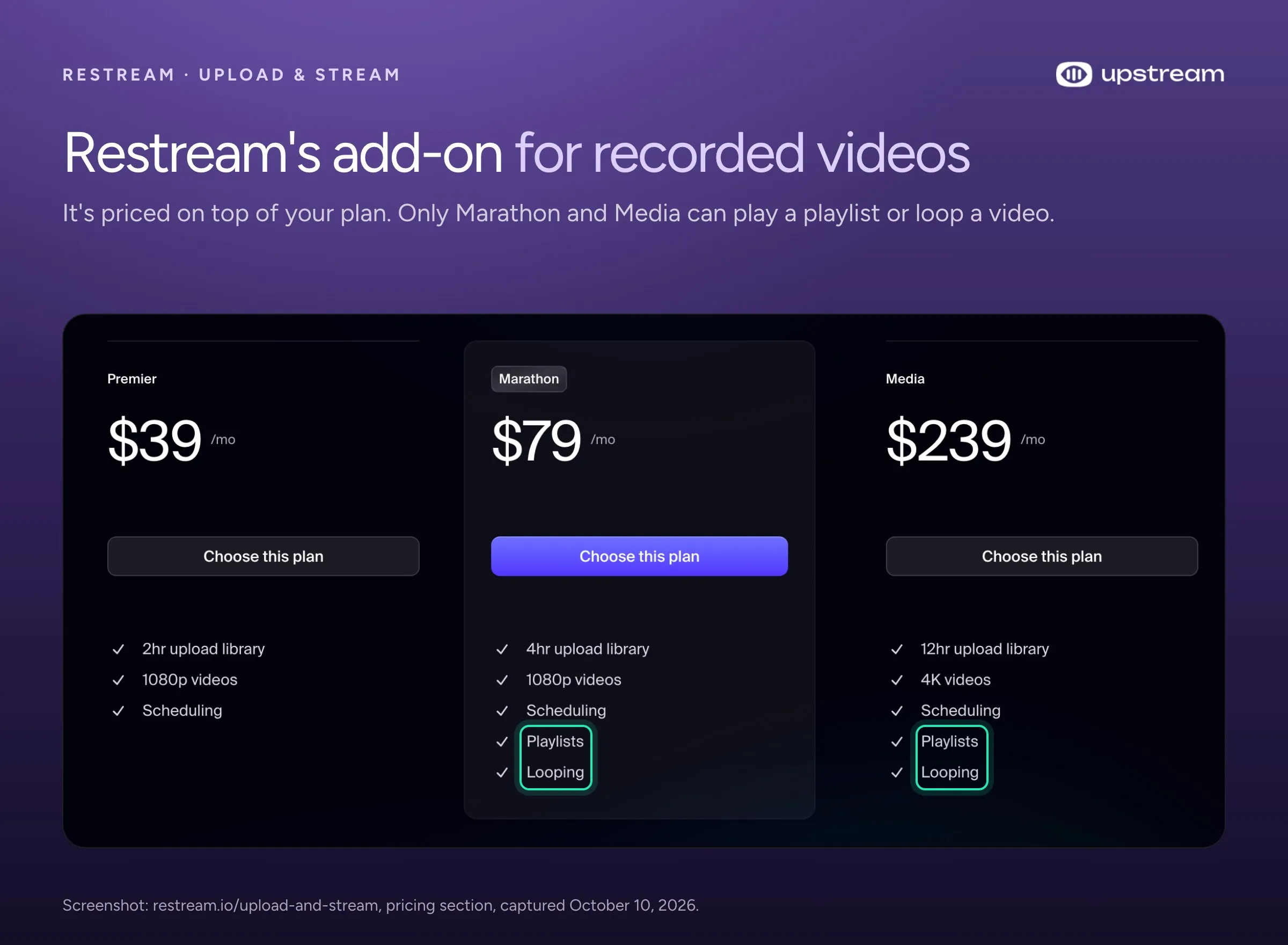
Recorded videos add to the bill. Any Restream account can schedule an uploaded video to air as a live stream, but more video, playlists and looping come with Upload & Stream, an add-on for $39, $79 or $239 a month. Only the $79 and $239 tiers can loop a video, and a loop stops after 40 hours at most. We checked these prices on Restream’s pricing page and help center on October 10, 2026.
Restream plans at a glance
Restream has four public plans plus Enterprise, priced by how many channels you stream to at once.
| Plan | Monthly | Billed yearly | Channels at once | What else you get |
|---|---|---|---|---|
| Free | $0 | $0 | 2 | Restream logo on Studio streams, 720p in Studio, 5 guests, no custom RTMP |
| Standard | $19 | $190 a year ($16 a month) | 3 | No logo, custom RTMP, 720p in Studio, 9 guests |
| Professional | $49 | $470 a year ($39 a month) | 5 | 1080p in Studio, horizontal and vertical at once, 2 team seats |
| Business | $239 | $2390 a year ($199 a month) | 8 | Player for your website, backup feed, team roles |
| Enterprise | Ask sales | Ask sales | 10 or more | Unlimited Upload & Stream, standby loop, single sign on |
Custom RTMP lets you add a platform Restream doesn’t list, using the server address and stream key that platform gives you. The 720p and 1080p figures are limits inside Restream Studio. If you stream from OBS or another streaming app on your computer, Restream keeps your own resolution, up to 4K, on all plans. Prices are in US dollars, from restream.io/pricing, checked October 2026.
Is Restream free?
Yes, Restream has a free plan that costs $0 with no end date. It streams to 2 channels at once, from OBS (free streaming software for your computer) or from Restream Studio in your browser. The free plan has limits:
- 2 channels. A third one needs Standard at $19 a month.
- Restream branding (a watermark). Studio streams and event thumbnails carry the Restream logo in the top right corner. Some platforms also get a link to Restream in your stream description. If you stream from OBS, the logo shows only in your preview, not on the stream your viewers see.
- No custom RTMP, Facebook Pages or Groups. Restream’s help center says all three need a paid plan.
- 720p in Studio, with up to 5 guests. Studio streams in 1080p only from Professional at $49.
- No recordings. Free accounts get a 15 minute recording trial in their first 7 days. After that, recordings need a paid plan.
- Uploads expire. Videos you upload on the free plan are kept for 30 days. On paid plans they stay until you delete them.
- No looping or playlists. Those need Upload & Stream, Restream’s add-on for recorded videos, on its $79 or $239 tier.
Restream free trial and refunds
Restream runs 7 day free trials, but its help center doesn’t say which plans get one. If you start a trial, cancel before it ends or your card is charged, and a charge after a trial doesn’t qualify for a refund. If you buy without a trial, Restream refunds first purchases cancelled within 7 days. Renewals aren’t refunded.
What the paid plans add
Restream’s paid plans step up mostly by channel count. Higher plans also add Studio and team features.
Standard: $19 a month or $190 a year
Standard streams to 3 channels and removes the Restream branding. It adds custom RTMP. It records streams of up to 6 hours and keeps the file for 15 days. Studio stays at 720p, with up to 9 guests. It comes with one team seat.
Professional: $49 a month or $470 a year
Professional streams to 5 channels and runs Studio in 1080p. From Studio you can stream horizontal and vertical at the same time, for example landscape to YouTube and portrait to TikTok. Recordings run up to 10 hours per stream, and you can download guests’ feeds separately. Two team seats are included.
Business: $239 a month or $2390 a year
Business streams to 8 channels. It adds a player for your own website with up to 1000 viewers at once. It also adds a backup feed that takes over if your main one drops, and roles for teammates. Recordings are kept for 30 days instead of 15.
Enterprise: price on request
Enterprise has no public price. Restream’s pricing page lists 10 or more channels, unlimited Upload & Stream, stream protection with a standby loop, single sign on and dedicated support. You get a number after a sales call.
Restream add-ons and what they cost
Three add-ons cost extra on top of your plan: Upload & Stream for recorded videos, AI clips and webinars. More seats and more streams at the same time cost extra too.
Upload & Stream: recorded videos as live streams
Upload & Stream lets you upload a video, set a time, and have it go out as a live stream while you’re offline. Restream sells it in three tiers:
| Tier | Price a month | Video library | Max resolution | Playlists | Looping |
|---|---|---|---|---|---|
| Premier | $39 | 2 hours | 1080p | No | No |
| Marathon | $79 | 4 hours | 1080p | Yes | Yes |
| Media | $239 | 12 hours | 4K | Yes | Yes |
Restream measures the library in hours of video and shows no yearly price for these tiers. The add-on comes on top of your plan, so a looping video on 3 channels without the Restream logo is Standard plus Marathon: $98 a month.
Clips, webinars, seats and extra streams
- Clips (short AI clips cut from your streams): $19, $29 or $59 a month for 50, 100 or 250 clips, or $16, $24 or $49 billed yearly.
- Webinars: from $99 a month for 100 attendees. Restream’s Business plan lists $299 a month for 500.
- Team seats: $25 a month per seat on Professional and Business.
- A second stream at the same time: a Restream workspace starts its own stream, so a second stream needs a second workspace. That costs $49 a month more on Professional and $239 more on Business.
What a 24/7 stream costs on Restream
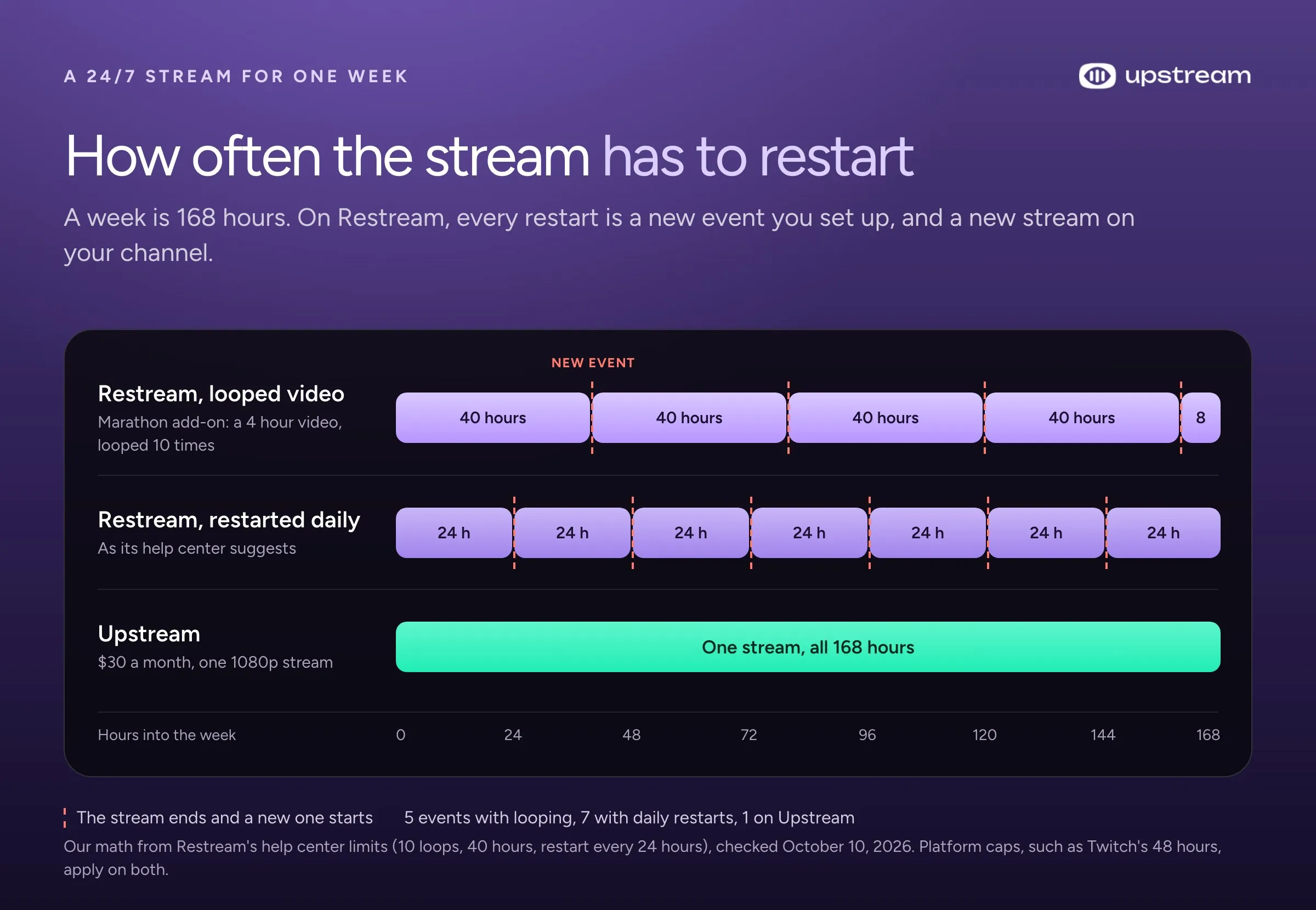
A looping 24/7 stream on Restream starts at $98 a month for 3 channels and reaches $318 for 8, and it still runs in pieces of 40 hours at most. Restream has no 24/7 plan on its pricing page, and its help center sets the limits. A video loops up to 10 times and stops at 40 hours. A playlist runs at most 24 hours, and playlists don’t loop. For any stream, Restream suggests a restart every 24 hours. If you need longer, it sends you to its sales team for a custom plan.
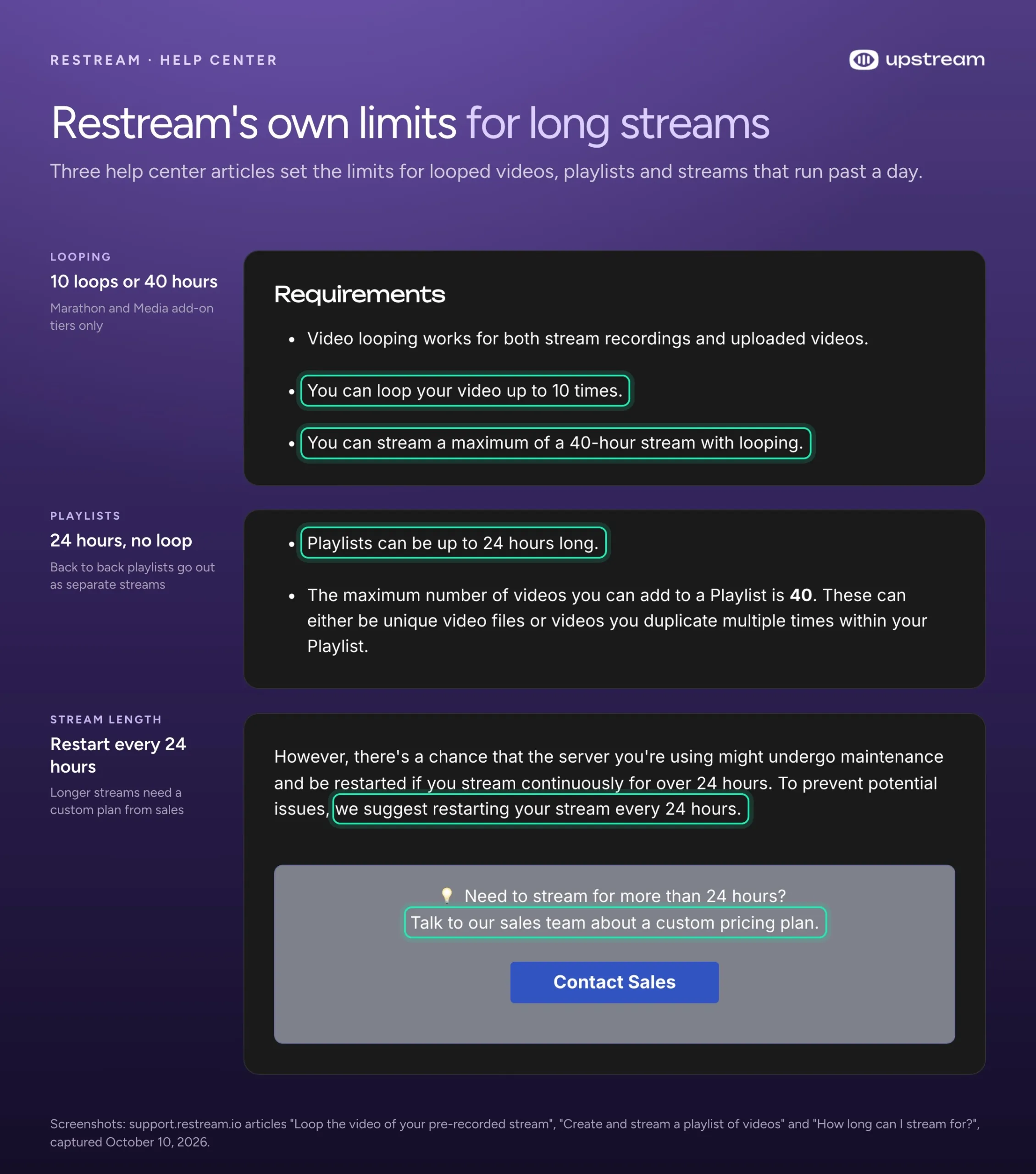
By our math from those numbers, looping starts at the Marathon tier, $79 a month, which holds 4 hours of video. Only a 4 hour video runs the full 40 hours. A 1 hour mix hits the 10 loop limit and ends after about 10 hours.
So a week of one looped video on Restream takes at least 5 separate scheduled streams, which Restream calls events (40, 40, 40, 40 and 8 hours). If you follow its advice to restart daily, it’s 7. Playlists split up too. Restream plays back to back playlists as separate streams, with a 2 minute gap between them.
The monthly bill for that setup:
- 3 channels: Standard plus Marathon, $98 a month.
- 5 channels: Professional plus Marathon, $128 a month.
- 8 channels: Business plus Marathon, $318 a month.
- 4K video: the Media tier, $239 a month on top of your plan.
Those options still share the same caps. On Upstream, the same looping video is one stream that runs 24/7 for $30 a month, on up to 10 of 30+ platforms at once, until you stop it. The free plan gives you 24 hours of streaming a month, so you can set it up and watch it run before you pay. For how other 24/7 tools compare, see our best 24/7 live streaming software guide.
Which Restream plan fits you, and its catch
- Free lets you try multistreaming on 2 platforms. Your Studio streams carry the logo, and custom RTMP stays locked.
- Standard ($19) suits a live show from OBS on 3 platforms. Studio is stuck at 720p, and looping a recorded video costs another $79 for the Marathon add-on.
- Professional ($49) gets you 1080p studio shows on 5 platforms. Adding a sixth means jumping to Business at $239.
- Business ($239) fits teams on 8 platforms who want a player on their website. A second stream at the same time costs another $239 workspace.
- Upload & Stream handles a scheduled premiere or replay. Looping starts at the $79 tier, and even then a video stops after 10 loops or 40 hours.
- Enterprise covers 10 or more platforms and long streams, at a price you only learn on a sales call.
Upstream: up to 10 of 30+ platforms on all plans, 24/7 from $30
Upstream charges for streams rather than platforms, and a stream goes out to up to 10 of 30+ platforms at once, free plan included. Getting past 8 platforms on Restream takes Enterprise and a sales call. Upstream also runs live shows from your browser with guests, and it keeps your channel on air when you’re away.
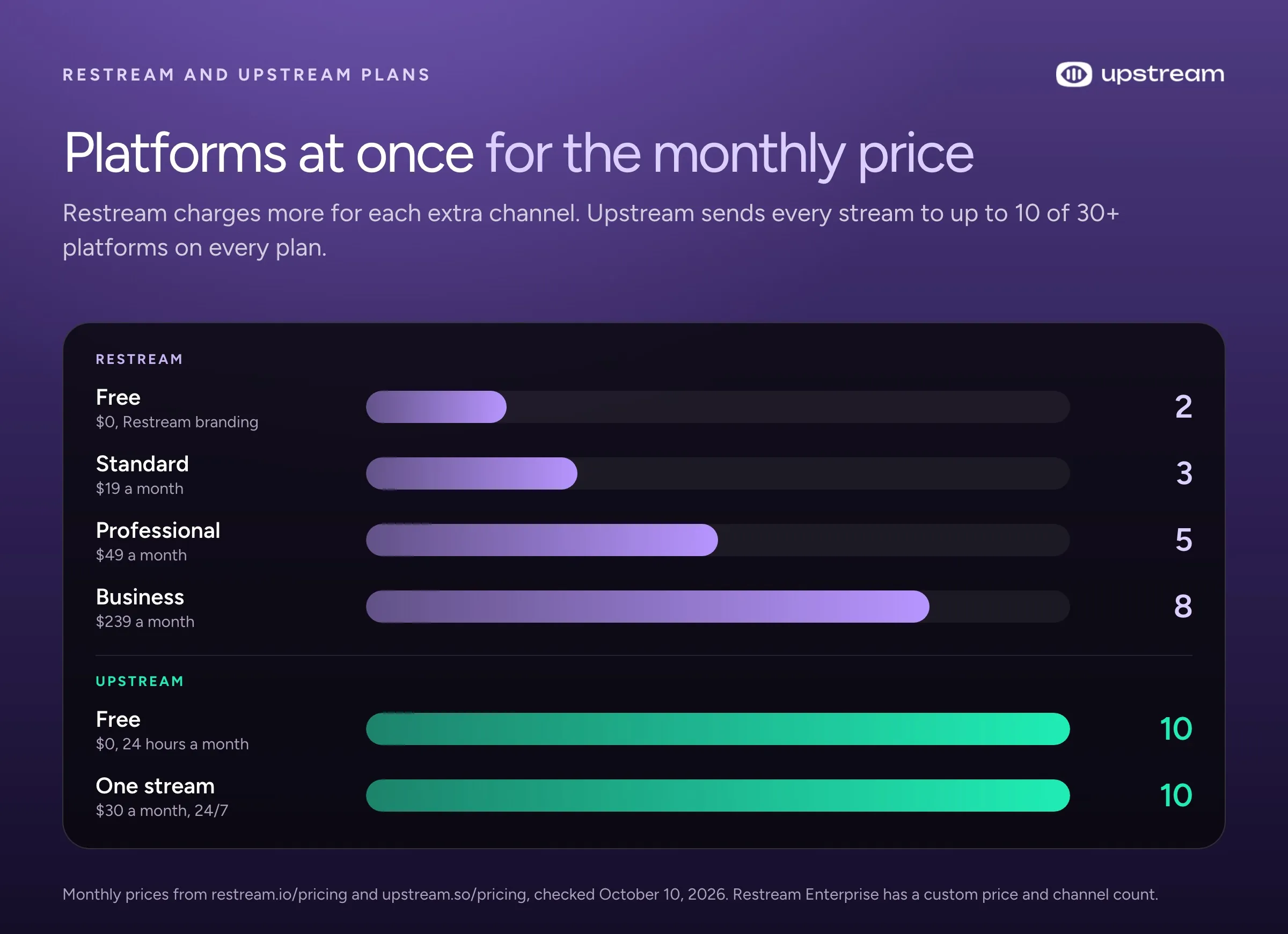
- Free plan: 24 hours a month in 1080p on up to 10 of 30+ platforms at once, plus 100 GB for your videos and no logo on your stream. Signing up takes no card.
- $30 a month for one 1080p stream that can run 24/7, or $24 a month billed yearly. 60 fps is $40, 4K is $70, and 4K at 60 fps is $120.
- From 4 streams, $20 a stream at 1080p, or $16 billed yearly. See pricing.
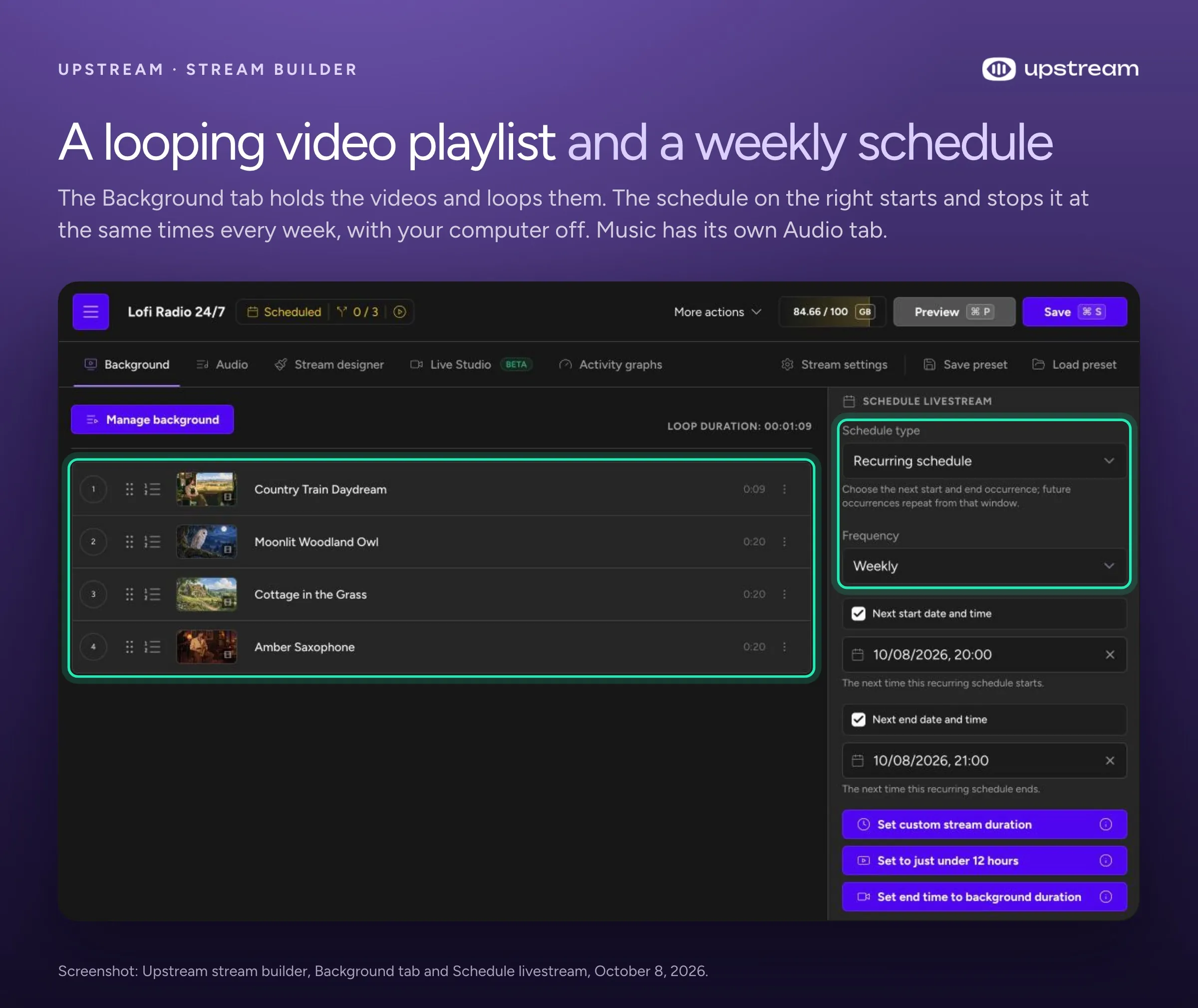
Upstream sells no add-ons, and the free plan has the same features as the paid ones. Recorded videos as live streams, looping and playlists, which Restream sells from $79 a month on top of a plan, all come with Upstream’s free plan. So do schedules that start once, daily, weekly or in back to back cycles, Live Studio in your browser with up to 10 guests, overlays, custom RTMP and SRT destinations, and an RTMP server for OBS. Playlists loop in order or shuffled for as long as the stream runs. Upstream is also on YouTube’s verified encoder list.
Here is what the same jobs cost on both services:
| What you want | Restream | Upstream |
|---|---|---|
| A weekly 2 hour live show on 5 platforms | $49 a month (Professional) | $0, about 9 of your 24 free hours |
| A browser studio show with no logo on screen | $19 a month (Standard), in 720p | $0 on free hours, in 1080p |
| A live show on 10 platforms | Enterprise, price on request (Business stops at 8) | $0 on free hours, or $30 for unlimited hours |
| Two live streams at the same time, 5 platforms each | $98 a month (Professional plus a $49 workspace) | $50 a month (2 streams) |
| One video looping 24/7 on 3 platforms | $98 a month, in events of 40 hours at most | $30 a month, and it loops until you stop it |
| A 24/7 stream of a 4K video | $239 Media add-on plus a plan, same caps | $70 a month (4K at 30 fps) |
Prices billed monthly, from both companies’ own pages, checked October 10, 2026.
Start free on Upstream.
24 hours of streaming every month in 1080p, on up to 10 of 30+ platforms at once, with no card and no watermark. When you want it on air 24/7, it's $30 a month.





Upload the video you’d loop on Restream, pick up to 10 of 30+ platforms and set it to loop. You get 24 free hours a month, and a weekly 2 hour show fits inside them. Start streaming free.
Frequently asked questions
Is Restream worth paying for?
Yes, for a live show on 3 to 5 platforms where you talk to your chat. Standard or Professional does that job, and Restream’s chat lets you read and reply across platforms in one place. For recorded or 24/7 streams, you pay for a plan plus an add-on and still schedule a new event every 40 hours at most. Upstream runs that as one 24/7 stream for $30 a month. For the full feature comparison, see Upstream vs Restream, and for other tools, our Restream alternatives guide.
Is there a Restream lifetime deal?
Not on Restream’s own site. Its pricing page offers monthly or yearly billing only and lists no lifetime plan (checked October 10, 2026).
How much does yearly billing save on Restream?
Less than the “Save 20%” label suggests, on two of the three plans. By our math from Restream’s own prices, Standard saves $38 a year (17%), Professional saves $118 (20%) and Business saves $478 (17%).
Can Restream stream to platforms it doesn’t list?
Yes, on paid plans, through custom RTMP. But Restream’s help center says its chat and analytics don’t work on custom channels, because they rely on each platform’s own connection.
Sources
- Restream plans and add-ons: pricing page, Upload & Stream, pricing for premium features, Clips pricing FAQs.
- Free plan, trials and refunds: Can I use Restream for free?, removing Restream branding, inviting guests in Studio, recordings, video storage, cancelling a free trial, refunds.
- Recorded videos and long streams: scheduling a pre-recorded event, What is Upload & Stream?, looping, playlists, How long can I stream for?.
- Teams and destinations: custom RTMP channels, organizations and workspaces, concurrent events.
- Upstream: pricing and the free plan.
All pages read on October 10, 2026.