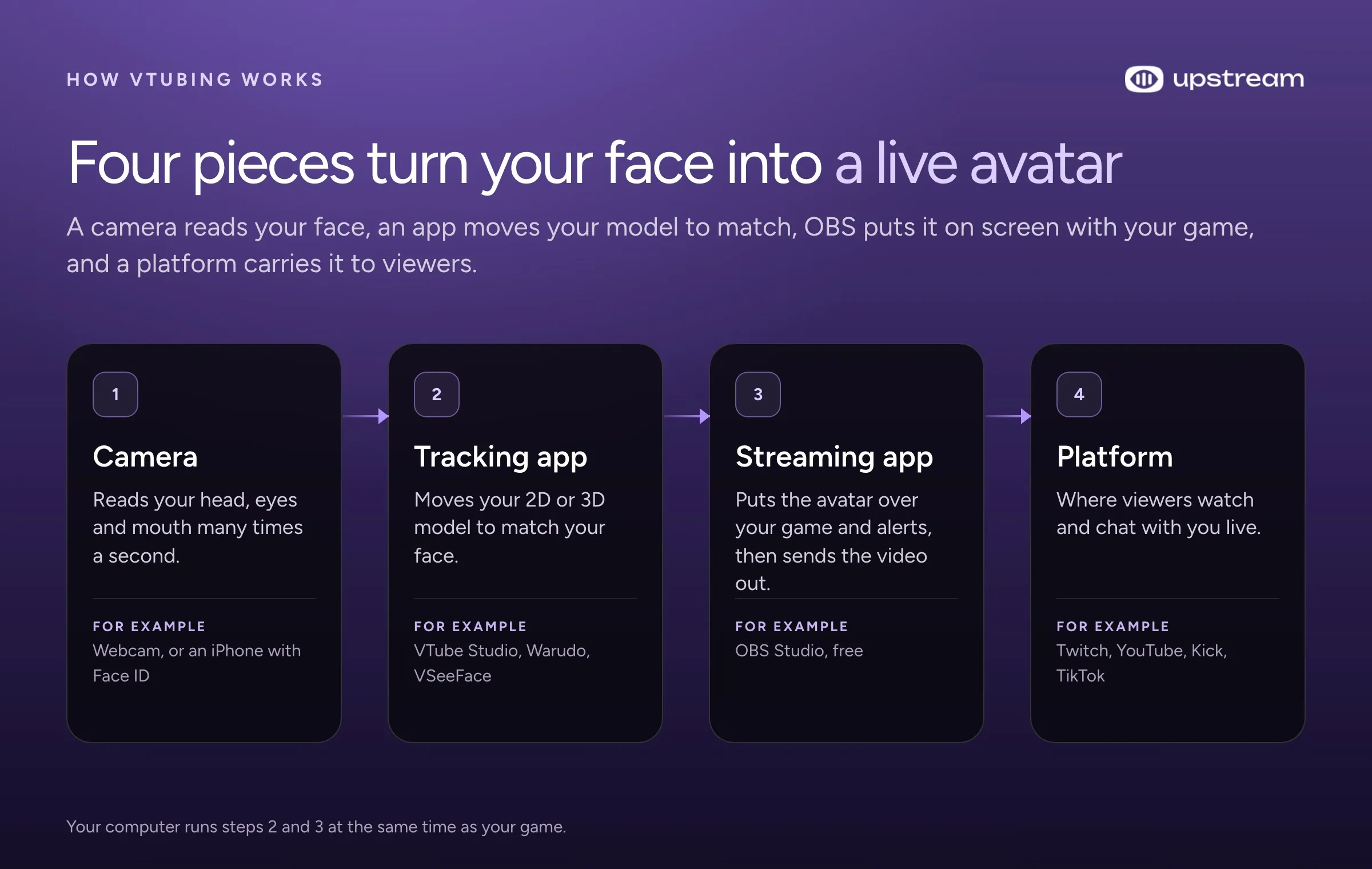
To become a VTuber you need four things: an avatar, an app that moves it when you talk or move your face, streaming software that puts it on screen, and a platform to stream on. You can start today for $0 with a drawn PNG avatar and free apps. If you want a custom 2D model, VIVERSE’s 2026 pricing guide puts most at $200 to $1,500.
This guide walks through each piece in order, with what it costs and whether it runs on your computer. Then it covers the parts most guides skip: streaming to Twitch, YouTube and Kick at once without overloading your PC, running reruns while you sleep, and doing collabs.
Pick your avatar type: PNGtuber, 2D or 3D
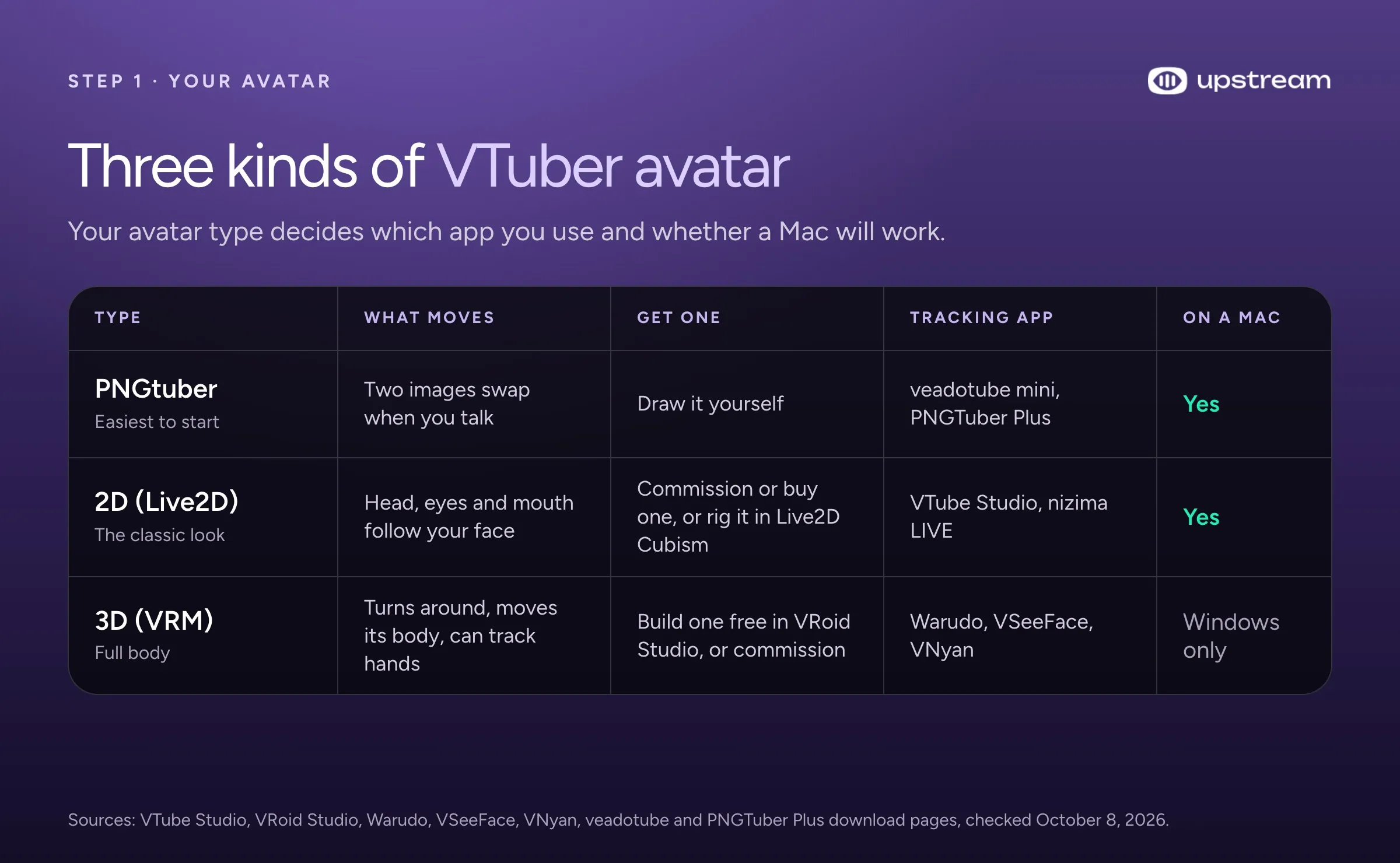
Your avatar type decides everything after it: what you buy, which app you use and even whether a Mac will work. There are three kinds.
PNGtuber. A drawing (or two) that changes when you talk. One image shows your mouth closed and another shows it open, and the app swaps them when your microphone picks up your voice. It’s the cheapest and fastest way to start, and plenty of streamers never move past it. Free apps like veadotube mini and PNGTuber Plus do the swapping, and both run on Windows, Mac and Linux.
2D (Live2D). A flat illustration cut into layers and “rigged” so it can tilt its head, blink and move its mouth with you. This is the classic anime VTuber look. Live2D is the name of the format and of the company behind it. VTube Studio, the app most 2D VTubers start with, only loads Live2D models.
3D (VRM). A full 3D character, like a video game character. VRM is a common file format for these models. A 3D avatar can be seen from any angle, and how much of the body moves depends on your app and your tracking gear. The best known 3D apps (Warudo, VSeeFace and VNyan) run only on Windows.
If you’re not sure, start as a PNGtuber this week. You’ll learn OBS, find out if you like streaming as a character, and keep the model budget for when you know what you want.
Stream everywhere from one feed.
Send one live feed to Upstream and let the cloud deliver it to YouTube, Twitch, Kick, Facebook, and custom RTMP without making your upload connection carry every copy.
How to get your avatar
You can make an avatar yourself, buy a ready made one, or pay an artist to make one for you.
Make it yourself
For 3D, VRoid Studio is free and runs on Windows, Mac and iPad. You build a character from sliders and presets, and it exports a VRM file that 3D VTuber apps can load. One catch: VSeeFace only reads VRM 0, not VRM 1.0, so pick VRM 0 when you export if you plan to use it.
For 2D, Live2D Cubism Editor has a free version that never expires, but it’s capped (30 parameters and one texture, for example). The PRO version comes with a 42 day free trial and then costs about $13 a month, billed in yen. If you or your business makes less than ¥10 million a year (roughly $63,000), Live2D lets you use either version for commercial streams. Rigging a good model takes real skill, so you can commission the rigging if you don’t want to learn it yourself.
For a PNGtuber, any drawing app works. Draw two versions of your character, mouth closed and mouth open, and save them as transparent PNG files.
Buy a ready made model
Marketplaces sell models you can customize and use right away. VGen lists customizable Live2D models from around $80, and it doesn’t allow generative AI. BOOTH, run by pixiv, has thousands of 3D models and avatar parts, mostly priced in yen. nizima is Live2D’s own marketplace.
Commission an artist
A commission gets you a model made from your own design. Prices vary a lot by artist. VIVERSE’s 2026 pricing guide puts basic and mid range 2D Live2D models at about $200 to $1,500, professional work at $2,000 to $5,000 or more, and commissioned 3D models from about $300. Treat those as rough budgets and ask for a quote. The art and the rigging are often done by different people and priced separately.
Before you pay, get these in writing: whether you can use the model commercially (that can cost extra, so check what the quote includes), who owns the design, and whether the artist can show it in their portfolio.
Choose your tracking app
Tracking apps read your face through a camera and move your model to match. PNGtuber apps listen to your microphone instead. Pick the app that fits your avatar type, then check that it runs on your computer. This is where Mac users need to slow down.
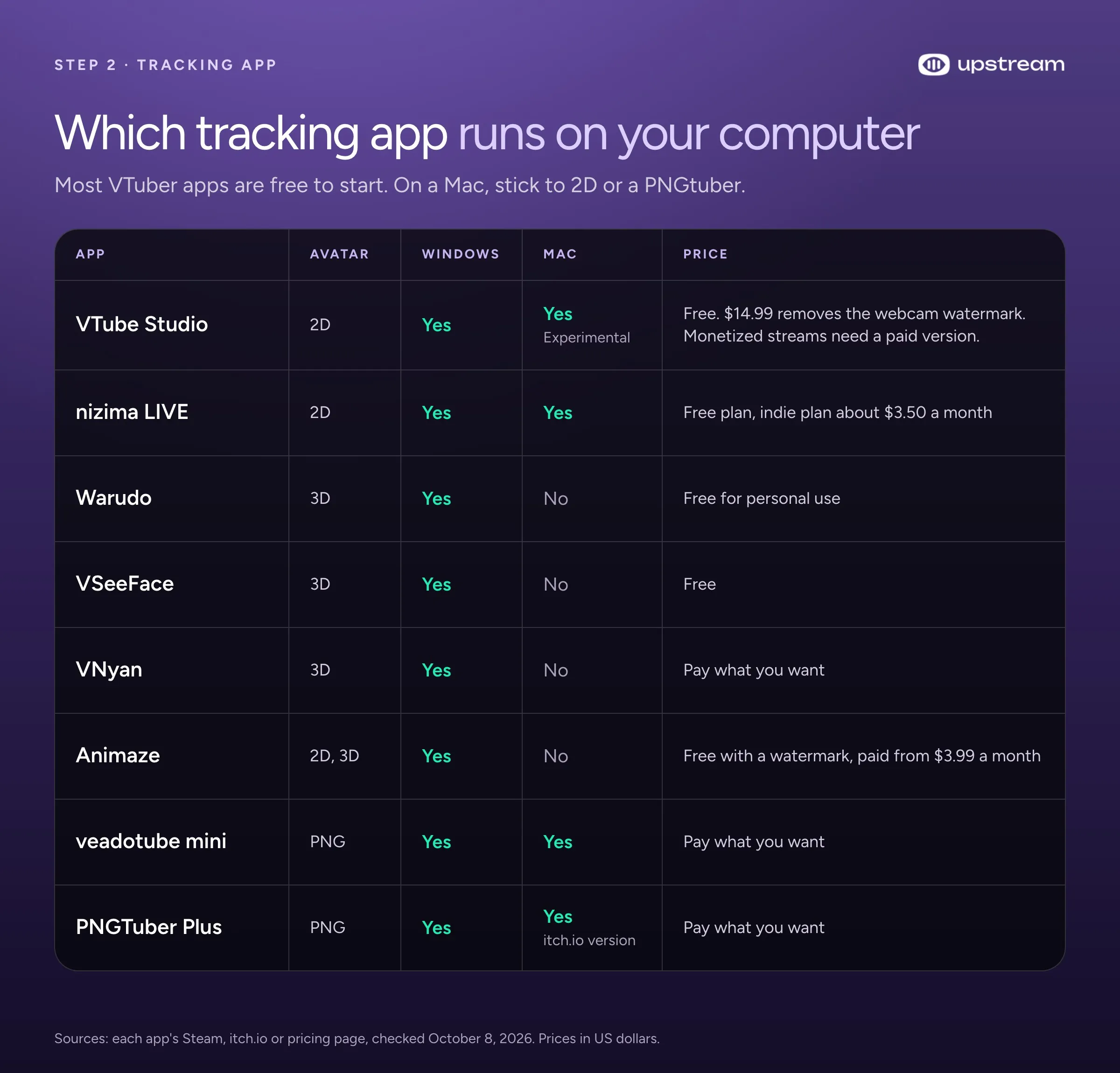
VTube Studio (2D, Windows and Mac) is free on Steam with every feature. A few costs are easy to miss:
- Webcam tracking shows a watermark until you buy the $14.99 watermark removal.
- If you stream commercially (Super Chats, a monetized Twitch channel), VTube Studio requires you to buy at least one paid version.
- The free iPhone and Android app only sends tracking to your PC for 5 minutes at a time. VTube Studio PRO on iPhone is $22.99.
Warudo (3D, Windows) is free for streaming if you own your character and your accounts and have no contract that requires a set number of streaming hours. VTubers signed to an agency need Warudo Pro. Steam lists a GTX 1660 graphics card as its minimum.
VSeeFace (3D, Windows) is free, including for commercial use, and supports hand tracking.
VNyan (3D, Windows) is pay what you want, free even for agency VTubers, and it can also add effects on top of VTube Studio.
Animaze (2D and 3D, Windows) has a free plan with a watermark, then $3.99 or $9.99 a month. You need the Pro plan once you earn $6,000 or more a year from streams that use it.
nizima LIVE (2D, Windows and Mac) is Live2D’s own tracking app, with a free plan and an indie plan around $3.50 a month.
On a Mac
2D works. VTube Studio runs on Mac, but the developer calls Mac support experimental and webcam tracking “highly experimental”, so test it first or use an iPhone for tracking. nizima LIVE and the PNGtuber apps also run on Mac. Warudo, VSeeFace and VNyan are Windows only, so for a 3D avatar on a Mac you need an app with a Mac version, such as Webcam Motion Capture (free to try).
Webcam or iPhone?
VTube Studio ranks tracking quality as iPhone first, webcam second and Android third. Any iPhone or iPad with Face ID works, and it does the tracking on the phone, which takes load off your PC. A webcam is fine to start: the developer recommends 720p or better at 15 to 30 frames per second. Blinks and eye movement aren’t tracked as well, and the tracking uses some of your PC’s processor.
Put your avatar in OBS
OBS Studio is free streaming software. It puts your avatar on top of your game, your art and your alerts, then sends the result to a platform. The goal is a model with a transparent background, so it sits on top of your scene without a box around it.
On Windows: VTube Studio recommends Spout2. Install the free Spout2 plugin for OBS, turn on Spout2 in VTube Studio, and add a Spout2 source in OBS. It uses almost no CPU and keeps the background transparent. The other option is a Game Capture source with “Allow Transparency” switched on. VTube Studio’s own guide says never to use a green screen.
On a Mac: OBS has no Game Capture on Mac. Set VTube Studio’s background to a color your model doesn’t use, add a macOS Screen Capture source set to Window Capture, pick VTube Studio, and remove that color with a Chroma Key filter. NDI is the other way to keep transparency on a Mac, at some CPU cost.
A few layout tips that save you a redo later:
- Put your avatar in a lower corner and leave room for your game.
- If you go live on YouTube from its Live Control Room, YouTube now also makes a vertical version of your stream by default, cropped from the center. An avatar in a corner can get cut out of it, so pick another vertical layout there if yours is.
- Check every source before you go live, especially if a webcam is pointed at you.
Choose where to stream
Twitch is where most VTuber channels are. Streams Charts tracked about 11,300 VTuber channels in the second quarter of 2026, and Twitch had the biggest share. Viewers there expect chat interaction, channel points and emotes, which suit live VTubing.
YouTube is strong for replays and being found later. You need to verify your channel, have no live streaming restrictions in the last 90 days and be at least 16. The first time you turn on live streaming, it can take up to 24 hours to activate, so do it before your debut day.
Kick works like Twitch, with one rule to know: Kick Partners have to switch on a multistreaming toggle when they also stream to Twitch or YouTube, and Kick halves their Partner payout while it’s on. Vertical platforms like TikTok LIVE don’t need the toggle.
TikTok LIVE needs you to be 18 or older and to have a number of followers that varies by market. TikTok decides who can go live, and only some accounts get a stream key to use with OBS.
You don’t have to pick only one, which brings us to the most useful thing you can do as a new VTuber.
Stream to Twitch, YouTube and Kick at once
Multistreaming means sending the same live stream to more than one platform at the same time. The most watched VTuber of 2025, TheBurntPeanut, streamed on Twitch, Kick and YouTube for much of the year, according to Streams Charts. And creators without a major agency made up 50.4% of the VTuber watch time Streams Charts tracked in early 2026, so more VTubers than ever pick their own tools and platforms.
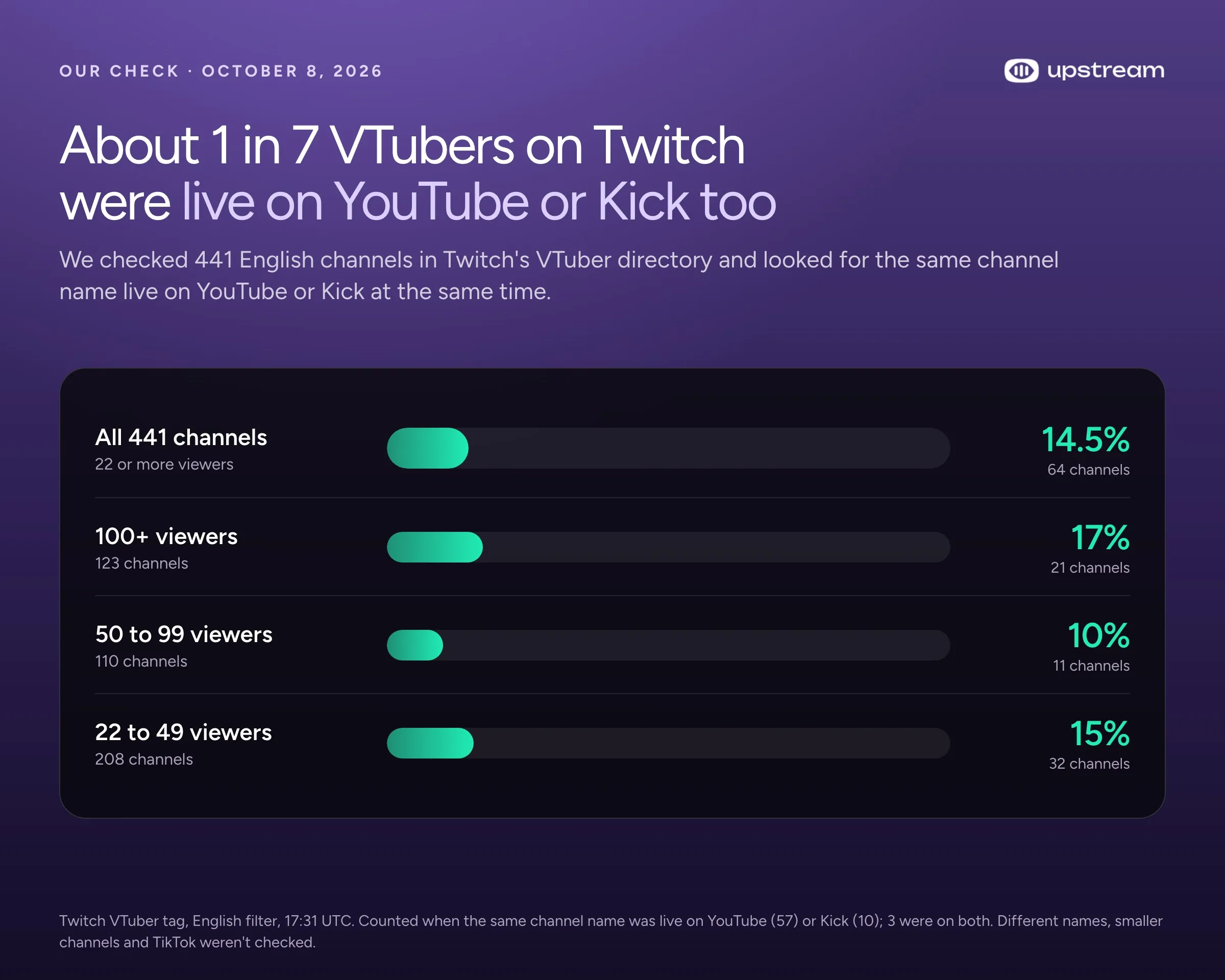
Plenty already stream to more than one place. On October 8, 2026, we went through the English channels in Twitch’s VTuber directory, 441 of them with at least 22 viewers, and checked whether the same channel name was live on YouTube or Kick at that moment. 64 were, about 1 in 7. Among channels with 100 or more viewers it was 17%. The count misses smaller channels, creators who use a different name elsewhere, and TikTok.
What the platforms allow
Twitch allows simulcasting to other platforms unless you’ve signed an exclusivity deal. Twitch viewers must get an experience that’s no worse than elsewhere, and you can’t push them to leave for your stream on another platform. As of October 2026, Twitch’s written Terms still bar merged chat from other platforms on the Twitch stream, but Twitch CEO Dan Clancy said in February 2026 that Twitch would no longer take enforcement action for showing combined chat. Reading all your chats in one window for yourself is allowed. Kick Partners need the multistreaming toggle on, as above.
Option 1: an OBS plugin
You can multistream straight from OBS with a free plugin. Multiple RTMP outputs was originally built for VTubers, and Aitum Multistream adds outputs for other platforms. Both run on Windows and Mac. We have a step by step guide to multistreaming with Aitum.
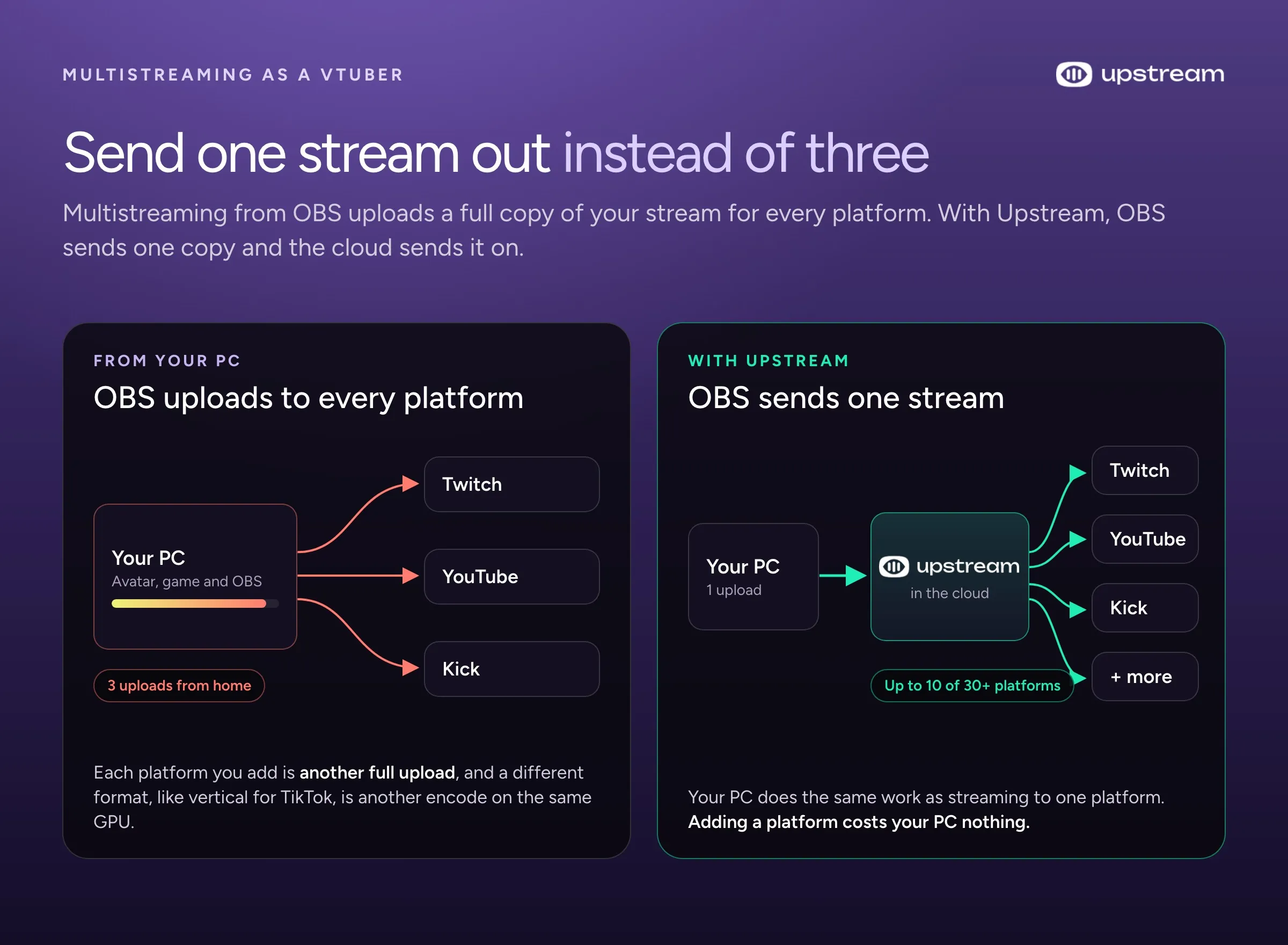
The catch is that your PC and your home internet do all the work. Every platform you add is another full upload from your connection: three outputs at 6 Mbps each send 18 Mbps of video, so your upload needs more than that once you add audio and some headroom. A different format, like a vertical stream for TikTok, needs another encode on the same computer that’s already running your avatar and your game. When that’s more than your PC or connection can handle, you get lag and dropped frames.
Option 2: send one stream to Upstream
Upstream takes one stream from OBS and sends it to up to 10 of 30+ platforms at once from the cloud. Your PC encodes and uploads one copy, the same work as streaming to one platform. Adding YouTube, Kick or a fourth platform costs your PC nothing.
Here’s how to set it up:
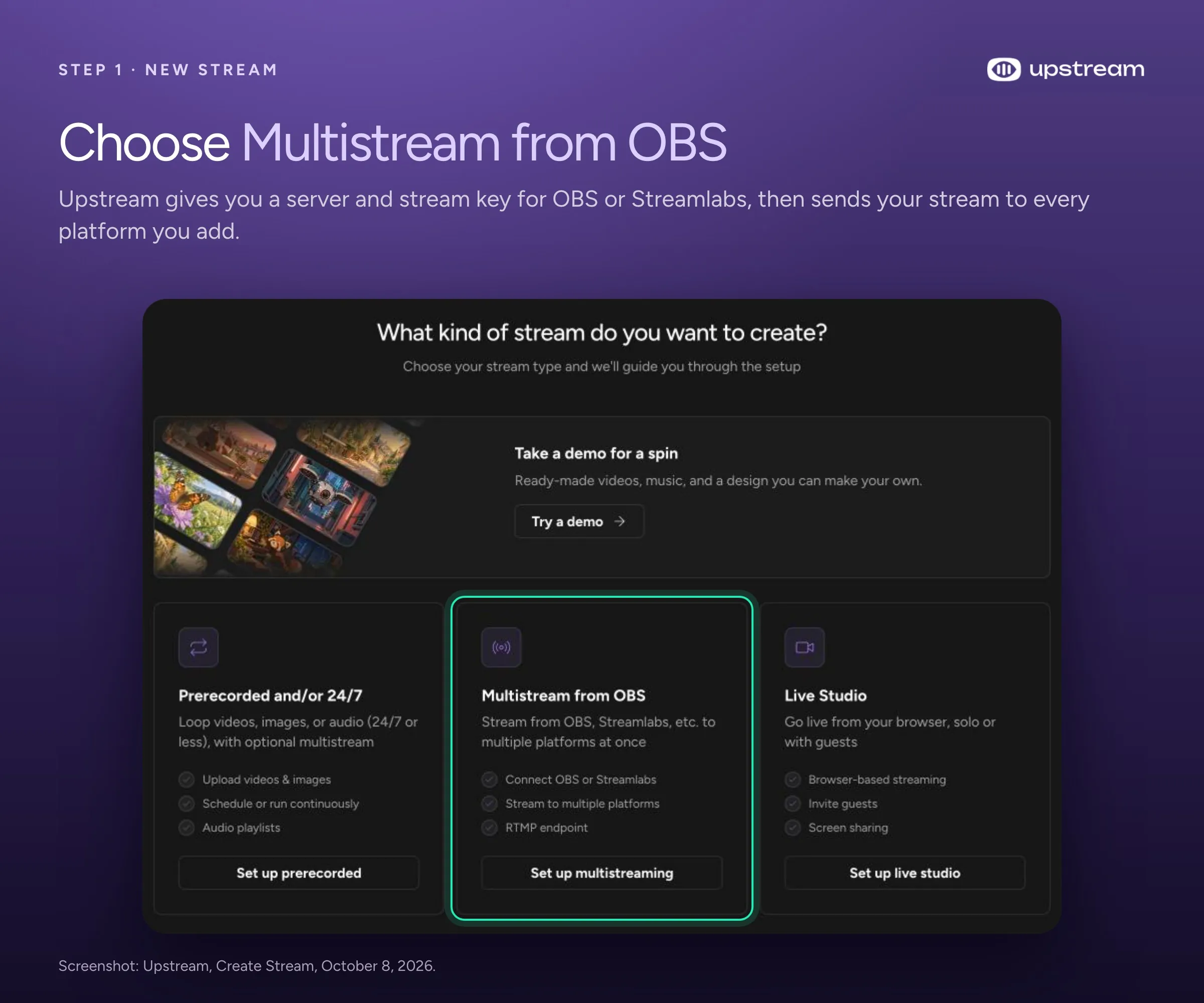
- Create a free Upstream account and choose Multistream from OBS.
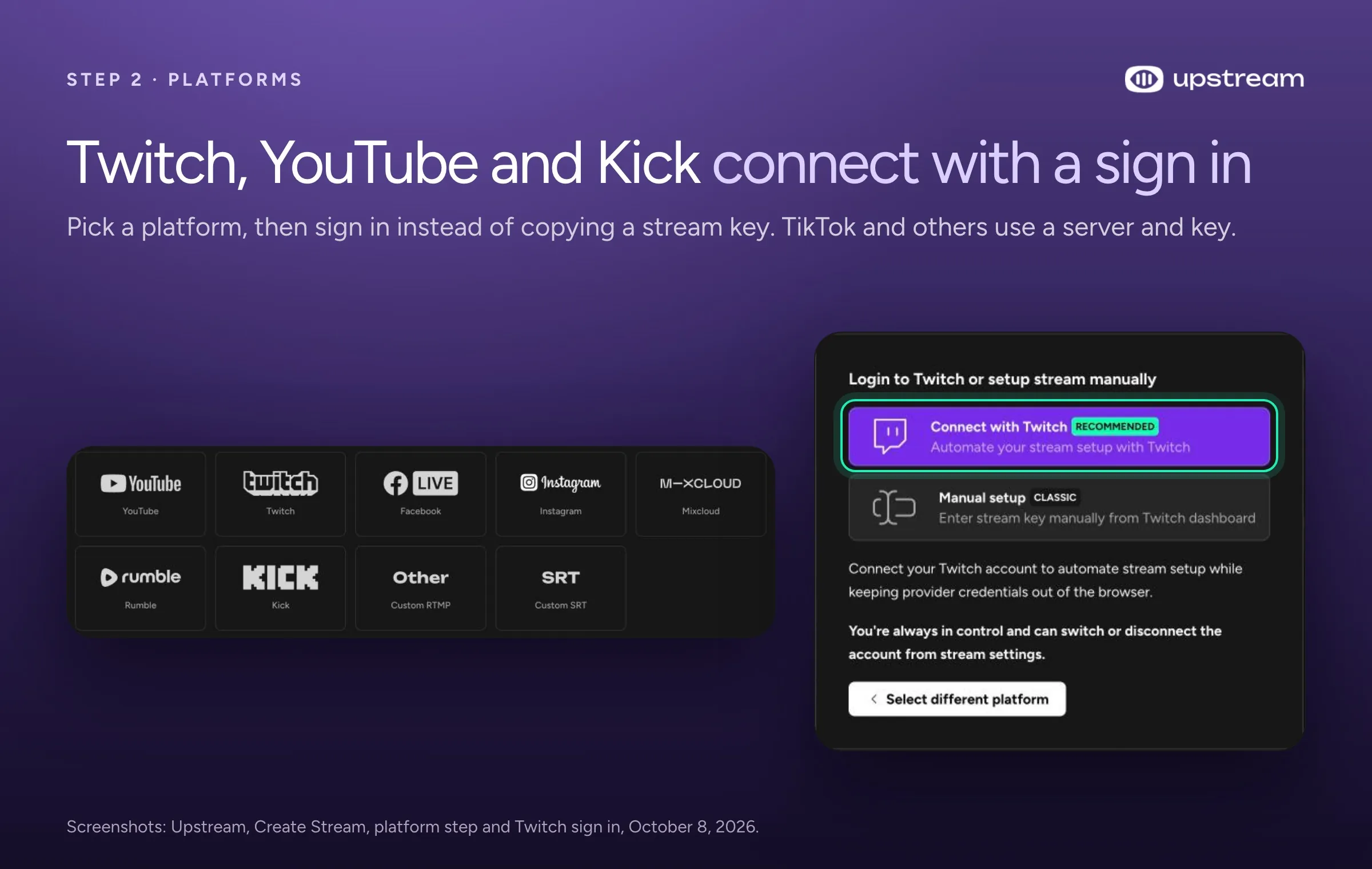
- Pick your main platform, finish the stream settings, add your other platforms and create the stream. Twitch, YouTube and Kick connect by signing in with your account, so there’s no stream key to copy. Other platforms, including TikTok when TikTok gives you a key, use a server URL and key.
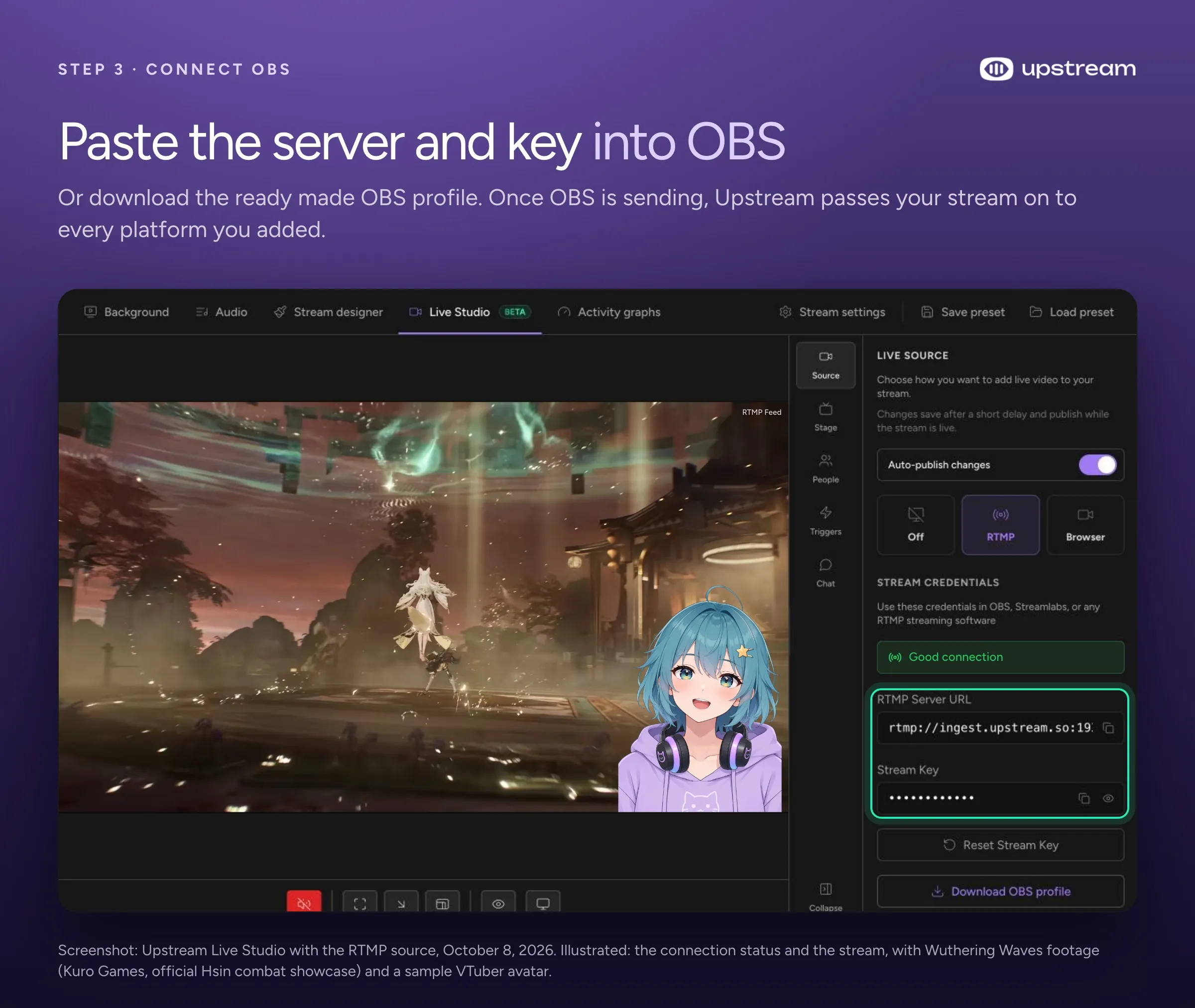
- Open Live Studio and copy the server and stream key into OBS, or import the OBS profile Upstream gives you.
- Click Start Streaming in OBS, check that your stream shows up in Upstream, then click Start stream in Upstream.
The free plan includes 24 streaming hours a month at 1080p and 30 fps, with no watermark and no credit card, which is enough to try it on a few streams. Paid plans add 60 fps. Upstream combines YouTube, Twitch, Kick and Rumble chat into one feed while you stream, so you can read every platform’s chat in one place instead of keeping a window open for each. For more detail, see how to stream to YouTube, Twitch and Kick at once and Twitch’s multistreaming rules.
Keep your channel live while you sleep
Replays are part of VTuber culture. Fans in other time zones catch up on streams they missed, and scheduled rebroadcasts of special streams, like karaoke nights, draw their own crowd, sometimes with the VTuber hanging out in chat. In our Twitch check, 3 of the channels looked like dedicated 24/7 rerun channels that loop a VTuber’s past streams.
Twitch no longer plays reruns for you. Its help page says to stream your old videos from your own encoder, tick the Rerun box, and put “[Rerun]” in the title and the go live notification. A single Twitch broadcast can also run for at most 48 hours. On YouTube, streams under 12 hours can be saved as videos automatically, and longer ones may not be saved at all, so keep your own recording of anything you want to rerun.
Running reruns from OBS means leaving your PC on all night. Upstream plays them from the cloud instead:
- Download your past streams from Twitch or YouTube Studio and upload them to Upstream.
- Put them in a playlist.
- Schedule it: a weekly rerun slot, a daily replay for another time zone, or a 24/7 channel on a second account.
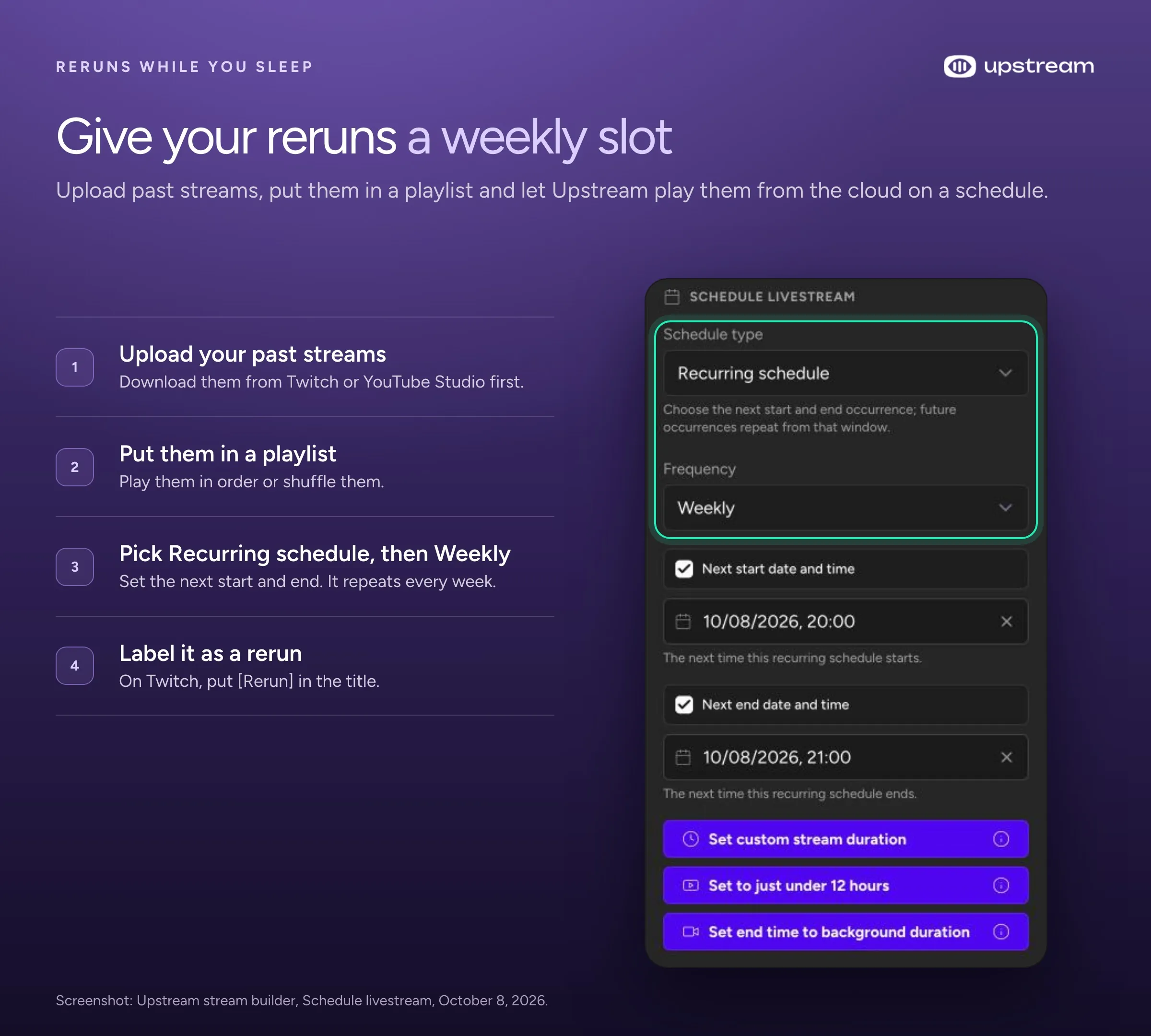
Your computer can be off the whole time. On Twitch, Upstream reconnects at the 48 hour limit on its own, so a 24/7 rerun channel has a short break every two days instead of ending. For YouTube, back to back cycles end each stream before 12 hours and start the next one after a short break, so YouTube can save each one as a video.
Be careful with music. Twitch doesn’t allow singing over a karaoke recording unless you own the music or have permission. For a live cover without a music licence, Twitch says to make all the audio yourself, with no backing tracks owned by others. YouTube scans every stream for copyrighted music and can cut a stream off. A karaoke night that was fine live can still get a rerun taken down.
Collab with other VTubers
A collab puts two or more VTubers in the same stream. There are a few ways to do it:
- VNet in VTube Studio shows your partners’ models inside your own VTube Studio instead of as a video. It’s a $19.99 extra for up to 6 people, and you get free 10 minute sessions to try it. Only collab this way with people you trust: VTube Studio warns that partners could copy your shared model.
- nizima LIVE has collab rooms for up to 8 people using Live2D models.
- VDO.Ninja is a free browser tool that sends each person’s avatar video into the host’s OBS. Its transparent avatar guide uses Spout2 on Windows and the Ninja OBS plugin; a plain browser source won’t keep the transparency, so a chroma key background is the other option.
- Discord screen share plus a chroma key in OBS is the quick and simple way.
For a talk show style collab, where everyone appears in their own box, Upstream’s Live Studio works in the browser. You send your guests an invite link, and up to 10 people can be on stage. Each guest can pick a virtual camera as their camera, so their avatar shows up instead of their face. If you’d rather appear as a still image, Live Studio’s avatar mode shows a picture with a ring that reacts when you talk, like a simple PNGtuber.
Overlays, alerts and your debut screen
Overlays are the frames, panels and graphics around your avatar. Alerts are the pop ups when someone follows or subscribes. StreamElements and Streamlabs both have free overlays and alerts to start with.
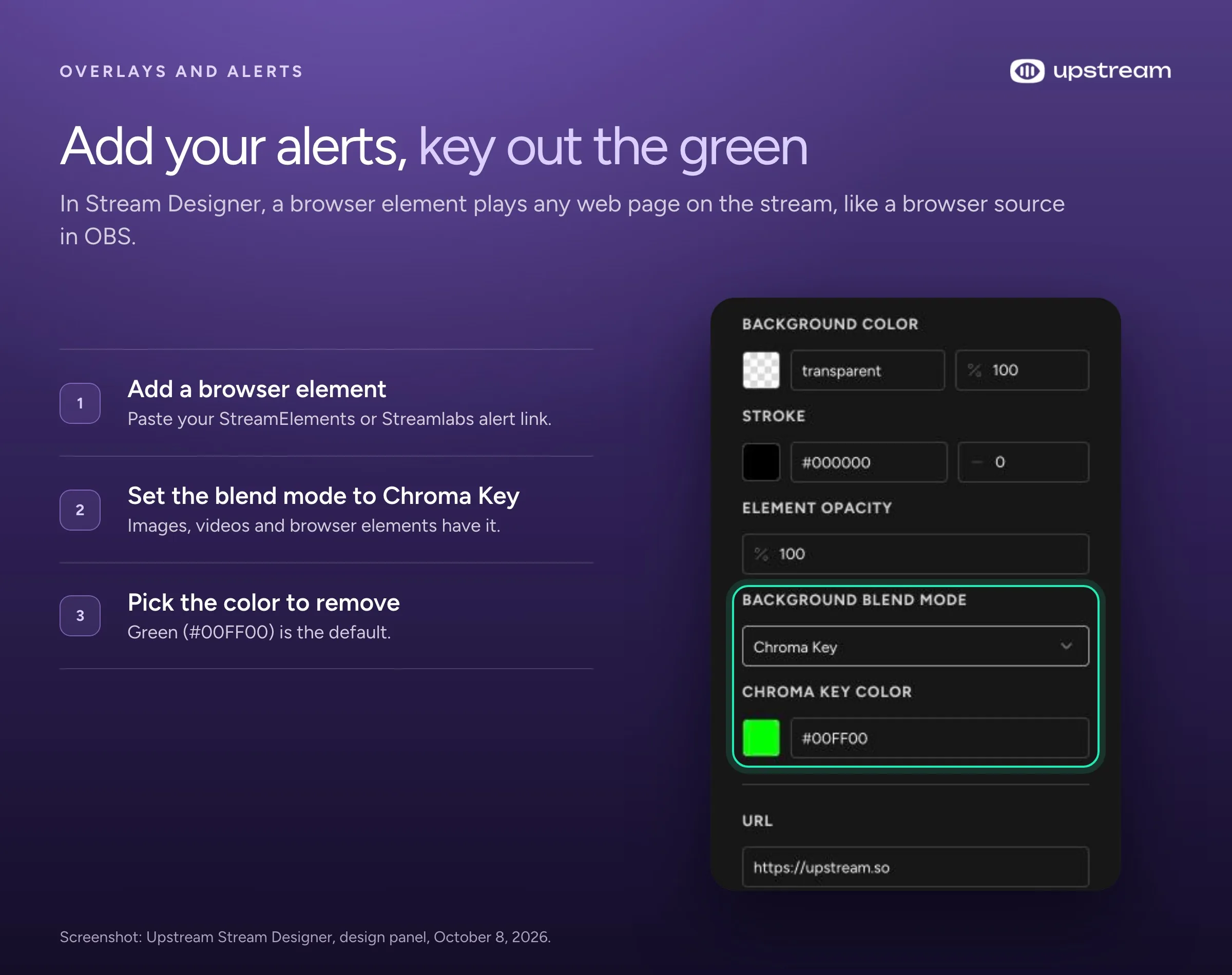
If you stream through Upstream, its Stream Designer adds overlays in the cloud: images, text, a countdown for your debut or “starting soon” screen, and browser sources for your existing alerts. That’s handy for reruns, which don’t run through OBS. Image, video and browser elements have a Chroma Key blend mode, so you can key out a green background on a video loop.
Plan your debut
Your first stream as your character is your debut, and it’s worth planning:
- Turn on live streaming on YouTube a day early, because activation can take 24 hours.
- Make a “starting soon” screen with a countdown, so early viewers know they’re in the right place.
- Make a test recording in OBS, or an unlisted YouTube test stream, to check your avatar, audio levels and alerts.
- Post your schedule. A regular time is the easiest way for new viewers to come back.
- Plan what you’ll do when the stream ends: a clip for TikTok or Shorts, and a replay for viewers in other time zones.
Can you make money as a VTuber?
Yes, but earnings vary widely. A 2025 study of 1,923 VTubers on YouTube, drawn from the Virtual YouTuber Wiki with data from 2017 to July 2023, found a median of $127 a month in Super Chats and an average of $2,667. A quarter of them got no Super Chats at all in that time. Those numbers leave out memberships and other income, and a few big channels earn most of the money.
The usual income streams are the same as for any streamer: Twitch subscriptions and Bits, YouTube memberships and Super Chats, sponsored streams and merch. Once you earn from streaming, check your software licences: VTube Studio requires a paid version for commercial use, Warudo’s free use has conditions, and Animaze requires its Pro plan at $6,000 a year or more.
What VTubing costs
| Setup | Avatar | Tracking | Streaming | Rough total |
|---|---|---|---|---|
| Free start | Your own PNGtuber drawing | veadotube mini or PNGTuber Plus (pay what you want) | OBS (free) | $0 |
| Free 3D on Windows | VRoid Studio model (free) | VSeeFace, VNyan or Warudo (free for personal use) | OBS (free) | $0 |
| First 2D model | Bought or commissioned model, about $80 to $1,500 | VTube Studio, plus $14.99 to remove the webcam watermark or $22.99 for iPhone PRO | OBS (free) | about $95 to $1,525 |
| Established 2D | Professional model, $2,000 to $5,000 and up | VTube Studio paid version, iPhone with Face ID | OBS plus tools you pay for | $2,000 and up |
These totals leave out hardware. The software is the cheap part: the money goes into the model, a decent microphone and, for webcam tracking, a camera that does 720p or better.
Stay private
If you want to keep your real identity private, treat privacy as part of the setup:
- Use different usernames and email addresses for your VTuber accounts and your personal ones. Twitch’s own safety guide recommends it.
- On Twitch, add your real name and other personal details to your private blocked terms, so they get blocked if someone types them in chat.
- Don’t talk about your location, school or workplace on stream, and check your OBS sources before going live.
- VTube Studio’s phone app sends only tracking data to your PC, never video of your face.
- Download apps only from their official pages. VSeeFace lists its official download locations on its website.
Frequently asked questions
How much does it cost to become a VTuber?
You can start for $0 with a PNGtuber drawing, a free tracking app and OBS. A first custom 2D model usually costs $200 to $1,500, and professional models cost $2,000 or more. Budget for VTube Studio’s paid version if you make money from streams.
Is making a VTuber model free?
It can be. VRoid Studio makes 3D models for free on Windows, Mac and iPad, Live2D Cubism Editor has a free version for 2D, and a PNGtuber is just two drawings. You can commission an artist if you want a model based on your own design.
How much does a VTuber model and rigging cost?
VIVERSE’s 2026 pricing guide puts basic and mid range 2D Live2D models at about $200 to $1,500, and professional work at $2,000 to $5,000 or more. The art and the rigging are often priced separately. Ready made customizable models on VGen start around $80.
Can you be a VTuber with just a webcam?
Yes. VTube Studio, VSeeFace and Warudo all track your face with a webcam. VTube Studio recommends 720p or better at 15 to 30 frames per second. An iPhone with Face ID tracks blinks and eyes better and takes load off your PC.
Can you VTube on a Mac?
Yes. VTube Studio (experimental on Mac), nizima LIVE and the PNGtuber apps run on Mac, and an iPhone can do the tracking. In OBS, use macOS Screen Capture set to Window Capture with a chroma key, or NDI for transparency. Warudo, VSeeFace and VNyan need Windows, but some 3D apps, like Webcam Motion Capture, have Mac versions.
Do you need a good PC to be a VTuber?
VTube Studio on Windows needs a graphics card with at least 2 GB of video memory. 3D apps need more: Warudo lists a GTX 1660 as its minimum. If you also play games on stream, your PC does three jobs at once, which is why moving multistreaming to the cloud helps.
VSeeFace or VTube Studio: which is better?
They do different jobs. VTube Studio is for 2D Live2D models and runs on Windows and Mac. VSeeFace is for 3D VRM models and runs on Windows only. Pick the one that matches your avatar.
Will Twitch ban you for multistreaming?
No. Twitch allows simulcasting unless you’ve signed an exclusivity deal. Keep the Twitch experience no worse than elsewhere and don’t push viewers to leave for your other stream. Twitch’s simulcasting FAQ says it sends a warning before taking action. Kick Partners need Kick’s multistreaming toggle on.
How old do you have to be to be a VTuber?
It depends on the platform. YouTube requires you to be at least 16 to live stream, and TikTok LIVE requires 18. Check each platform’s rules before your debut.
Start with one stream, then go everywhere
Most VTuber guides end at “now go live on Twitch.” That’s where the hard part starts: your PC is already tracking your face, drawing your avatar and running a game. Asking it to send more streams on top is how you get lag and dropped frames.
Upstream takes that job off your PC. OBS sends one stream, and Upstream sends it to up to 10 of 30+ platforms at once, including Twitch, YouTube and Kick. When you’re offline, it keeps your reruns playing from the cloud with your computer off. The free plan gives you 24 streaming hours a month, no watermark and no credit card. Start streaming free.
Sources
- VTuber software: VTube Studio on Steam and its wiki, Warudo, VSeeFace, VNyan, Animaze, veadotube mini, PNGTuber Plus, nizima LIVE, Webcam Motion Capture, VRoid Studio and Live2D pricing.
- Platform rules: Twitch help on simulcasting, reruns, broadcasting and music, and the Twitch Terms of Service; YouTube Help on live streaming, archiving and copyright; Kick Partner Program help; TikTok LIVE safety guide.
- Viewership: Streams Charts VTuber reports for Q1 2026 and Q2 2026 and its 2025 ranking. VTuber income: Zhao et al., “Who Reaps All the Superchats?”, CHI 2025.
- Model prices: VIVERSE’s 2026 VTuber model pricing guide, citing vtubermodels.com.
- Multistreaming check: our own count of English VTuber streams on Twitch, October 8, 2026.