Upstream
Upstream
  • Product
    24/7 Live Streaming Run cloud channels that stay live around the clock. Live Studio Invite guests, share screens, and add branded overlays in the browser. Multistreaming Send one live feed to YouTube, Twitch, Kick, and RTMP endpoints. Pre-recorded Live Streaming Upload pre-recorded videos & Go Live without the stress of live production. Free plan 24 hours a month with no watermark. Multi-channel streaming Separate live channels from one account. Enterprise Setups for teams, labels and agencies. About Upstream Who we are and how Upstream works.
  • Features
    Scheduling Streams that start and end on their own. Multichat Every platform's chat in one feed. Overlays Layers and widgets in Stream Designer. Stings, jingles and ads Inserts that play between your videos. Playback controls Skip or play any file while you stay live. Audio and video playlists Loop music and visuals separately. Team access Invite your team, each with their own role. RTMP server Stream in from OBS or any encoder. Live Streaming API Run streams, media and queues from code. MCP Server Manage streams from your AI assistant. All features Everything Upstream does, on one page.
  • Platforms
    YouTube live streaming Twitch live streaming Kick live streaming Facebook live streaming Instagram live streaming TikTok TikTok live streaming Rumble live streaming Mixcloud live streaming 30+ more Plus any custom RTMP or SRT destination.
    Platform limits Bitrate and duration caps for each platform. Integrations Setup guides for OBS, vMix, cameras and more. VTuber Streaming Go live with your avatar on every platform.
  • Resources
    Blog Guides, platform rules and news for anyone who goes live. Guides Setup guides for 24/7 streams, multistreaming and RTMP. Release Notes The new features in each Upstream update, in one place. Free Tools Video, audio, thumbnail and AI tools, plus camera and mic checks. Helpdesk Step by step setup help and troubleshooting for Upstream. Service status Current service health, uptime history and incident updates. Live Streaming FAQ Short answers to what people ask before they go live. Compare Upstream Upstream side by side with Restream, StreamYard and others. Latest post YouTube Dual Stream: What the Vertical Copy Does and How to Turn It Off
  • Pricing
Login Sign up for free
Always-on 24/7 Live Streaming Run cloud channels that stay live around the clock.
Explore
Real-time live Live Studio Invite guests, share screens, and add branded overlays in the browser.
Explore
One stream, 30+ platforms Multistreaming Send one live feed to YouTube, Twitch, Kick, and RTMP endpoints.
Explore
Schedule & Automate Pre-recorded Live Streaming Upload pre-recorded videos & Go Live without the stress of live production.
Explore
Free plan 24 hours a month with no watermark.
Multi-channel streaming Separate live channels from one account.
Enterprise Setups for teams, labels and agencies.
About Upstream Who we are and how Upstream works.
Scheduling Streams that start and end on their own. Multichat Every platform's chat in one feed. Overlays Layers and widgets in Stream Designer. Stings, jingles and ads Inserts that play between your videos. Playback controls Skip or play any file while you stay live. Audio and video playlists Loop music and visuals separately. Team access Invite your team, each with their own role. RTMP server Stream in from OBS or any encoder.
Live Streaming API Run streams, media and queues from code.
MCP Server Manage streams from your AI assistant.
All features Everything Upstream does, on one page.
YouTube live streaming. 24/7 channels with midroll ads. Twitch live streaming. Streams restart on their own at 48 hours. Kick live streaming. Stay live with your computer off. Facebook live streaming. Schedule lives that start on their own. Instagram live streaming. Go live from your browser or the cloud. TikTok TikTok live streaming. Go live on TikTok and Instagram at once. Rumble live streaming. Add Rumble to your YouTube or Kick stream. Mixcloud live streaming. DJ sets and radio shows from your browser. 30+ more Plus any custom RTMP or SRT destination.
Platform limits Bitrate and duration caps for each platform.
Integrations Setup guides for OBS, vMix, cameras and more.
VTuber Streaming Go live with your avatar on every platform.
Blog
Guides
Release Notes
Free Tools
Helpdesk
Service status
Live Streaming FAQ
Compare Upstream
YouTube Dual Stream: What the Vertical Copy Does and How to Turn It Off YouTube Dual Stream: What the Vertical Copy Does and How to Turn It Off
Blog

Does Twitch Allow Multistreaming? (Yes) │ Simulcasting Rules

Written by Bojan Opacak February 24, 2026 · Updated October 8, 2026 · 2 min read
  1. Twitch multistreaming rules to check before going live
    1. Give Twitch viewers an equal experience
    2. Do not send viewers away to a simultaneous stream
    3. Combined chat: what the Terms say and what Twitch announced
  2. How to multistream to Twitch
  3. Your pre-stream checklist

Yes, Twitch allows multistreaming, which means sending the same live broadcast to Twitch and another platform at once. You must follow its rules on viewer experience, directing viewers elsewhere, and combined chat. A separate exclusivity agreement may limit where you can stream.

Twitch multistreaming rules to check before going live

Twitch’s Terms of Service set three conditions for simulcasting.

Give Twitch viewers an equal experience

The Twitch broadcast must offer an experience at least as good as your other streams, including your attention to Twitch chat. Do not neglect that audience while responding elsewhere. The Terms do not prescribe identical bitrate or frame-rate settings across every service.

Do not send viewers away to a simultaneous stream

Do not ask Twitch viewers to leave for your live broadcast on YouTube, Kick, or another service. Twitch’s FAQ allows ordinary profile links, but not banners, chat commands, QR codes, or messages that push viewers to a live stream elsewhere.

Combined chat: what the Terms say and what Twitch announced

As of October 2026, Twitch’s written Terms still bar merged chat from other platforms on the Twitch stream, but Twitch CEO Dan Clancy said in February 2026 that Twitch would no longer take enforcement action for showing combined chat. Section 11 of the Terms, last updated August 12, 2026, still lists merged chat as something not to use on your Twitch stream while simulcasting.

So Twitch has said it won’t penalize combined chat, but the written rule hasn’t changed. If you want zero risk, read combined chat on a private screen and show only Twitch chat on the Twitch video.

You remain responsible for the messages shown on your broadcast. Moderate every chat source, since content that breaks Twitch’s Community Guidelines can still lead to action.

Watch Dan Clancy’s announcement on Twitch.

The simulcasting FAQ says these guidelines apply to all streamers unless a separate Twitch agreement requires exclusivity. Check your agreement if you have one.
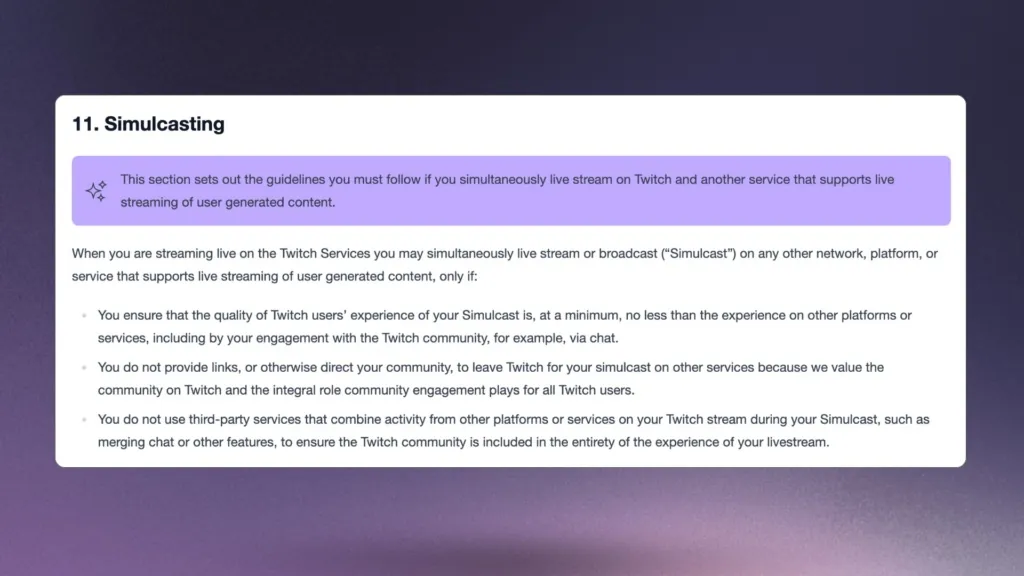
Website Images Drop (12)

How to multistream to Twitch

You can send separate outputs from your computer or send one feed to a cloud service that distributes it. Local outputs need enough upload capacity for each destination. The processing load depends on whether your setup reuses an encoder or creates separate encodes.

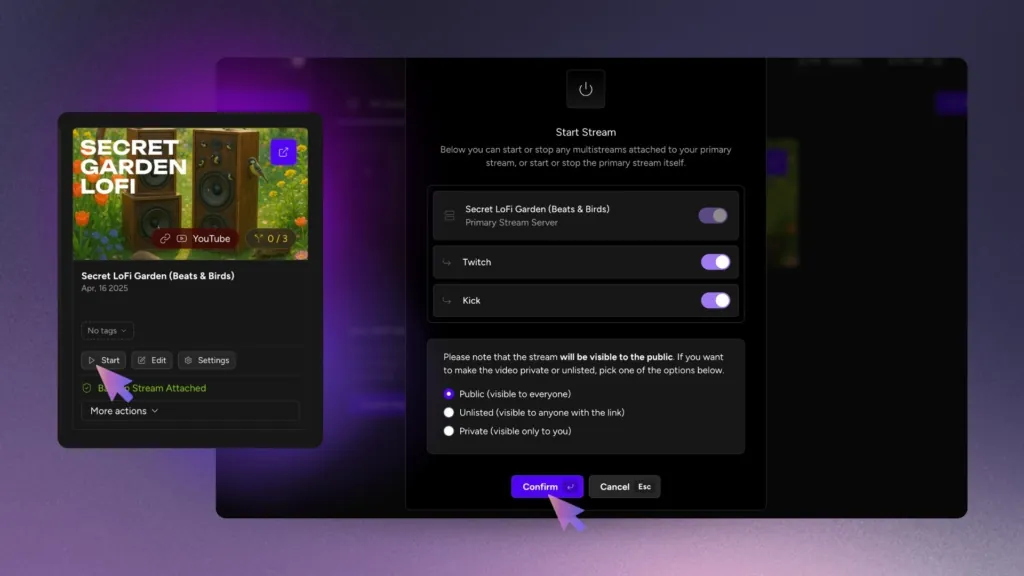
Upstream multistreaming distributes one feed to your chosen destinations. For the steps, follow our guide to multistreaming to YouTube, Twitch, and Kick. Streaming as a VTuber? Your avatar stays in OBS, and VTuber streaming with Upstream sends that one feed to Twitch, YouTube and Kick.
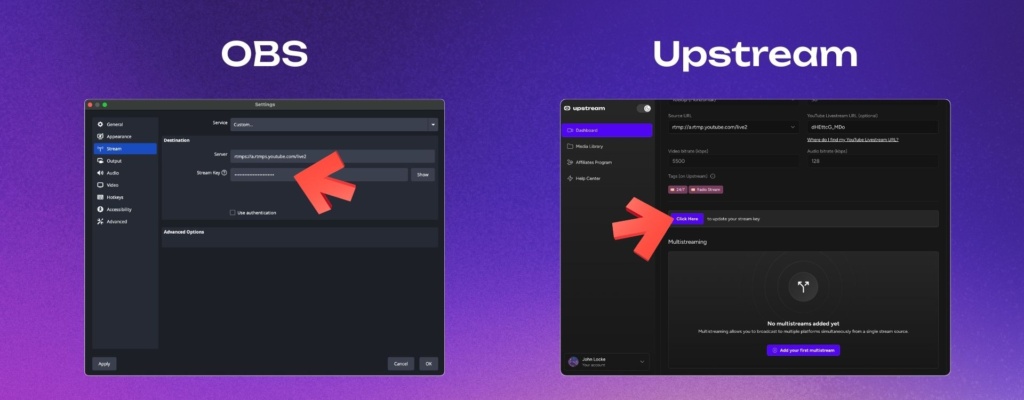
OBS & Upstream entering the stream key

Multistream Upstream

Your pre-stream checklist

  • Check whether your Twitch agreement requires exclusivity.
  • Compare the actual viewing experience on each destination and monitor Twitch chat.
  • Check scenes, chat commands, and panels for prompts to leave Twitch for another live stream.
  • If you show combined chat, moderate messages from every connected platform before they appear on the broadcast.
  • Test your audio, video, and stream health before the main broadcast.

Before your next show, test what viewers receive on each platform. Check the picture, sound, and chat workflow, then fix any problems before the broadcast starts.

Cloud multistreaming

Stream everywhere from one feed.

Send one live feed to Upstream and let the cloud deliver it to YouTube, Twitch, Kick, Facebook, and custom RTMP without making your upload connection carry every copy.
Sign up for free See multistreaming features
2 / 10 on stage
MiaLeo
Source Stage People Backstage Chat Destinations Triggers
Destinations

Where this stream goes when it is live.Streaming to 5 destinations.

  • Lofi HoursPrimary destination ChatReadyStartingStreaming
  • lofihoursMultistream destination ChatReadyStartingStreaming
  • lofihoursMultistream destination ChatReadyStartingStreaming
  • Lofi HoursMultistream destinationReadyStartingStreaming
  • TikTokMultistream destinationReadyStartingStreaming
Manage destinations
Published February 24, 2026
Bojan Opacak

About the author

Bojan Opacak

Content and Growth

Bojan writes for Upstream about live streaming strategy, platform policy changes, creator monetization, and practical workflows for 24/7 channels. He reads the platform rules and help pages and turns them into step by step guides for creators and small teams.

Keep exploring

Further reading

Browse all articles
Twitch Unified Chat Rules for Multistreaming (2026)
Mar 16, 2026 Blog

Twitch Unified Chat Rules for Multistreaming (2026)

Read article
How to Multistream to YouTube, Twitch, and Kick
May 14, 2026 Guides

How to Multistream to YouTube, Twitch, and Kick

Read article
How to Run a 24/7 Twitch Stream in 2026: Rules, Limits and Setup
Oct 10, 2026 Guides

How to Run a 24/7 Twitch Stream in 2026: Rules, Limits and Setup

Read article

Start streaming today

Go live to every platform, run a 24/7 channel, and produce live shows in your browser, with no software or server setup.

No credit card 24 hours/month free Full functionality
Start Streaming Free
Upstream

Run your streams from the cloud

Free plan: 24 streaming hours a month, no card, no watermark.

4.6 · 245 reviews on Trustpilot
Legal entity
Zukunft d.o.o.
Registered address
Groznjanska 32, 10000 Zagreb
Company VAT ID
Company VAT ID: HR62560895839
About | Contact us | Tools | Content standards | Privacy Policy | Terms of Service | Affiliate terms |

Product

  • Pricing
  • Upstream Features Overview
    • Multistreaming
    • Separate Audio and Video
    • Overlays: Stream Designer
    • Live Streaming Studio
    • Scheduling & Automation
    • Live Playback Controls
    • Play Stings, Jingles and Ads
    • Team Access
  • Enterprise Broadcasting Solutions

Resources

  • Helpdesk
  • Service status
  • Live Streaming FAQ
  • Blog
  • Release Notes
  • Live Streaming API
  • MCP Server
  • Free Live Streaming
  • YouTube Live Streaming
  • RTMP Server
  • Supported Platforms
  • Live Streaming Limits
  • Integrations

Compare Us

  • Compare Upstream
    • Upstream vs Runnel.live
    • Upstream vs OneStream
    • Upstream vs Live247
    • Upstream vs Gyre
    • Upstream vs Streaming Bots
    • Upstream vs Restream
    • Upstream vs StreamYard
    • Upstream vs LiveReacting
    • Upstream vs Playout.video

Free Tools

  • Design tools
  • Video tools
  • Audio tools
  • AI tools
  • Setup checks

Use cases

  • For Creators
  • For Music Labels
  • Church Streaming
  • VTuber Streaming
  • Multi-Channel Streaming

© 2026 Upstream. All rights reserved.

Stream once - reach every platform.

Sign up for free