RTMP and HLS do different jobs, so most live streams use both. RTMP carries your stream from the encoder to the platform. HLS carries it from the platform to the people watching. You set up RTMP (or its encrypted version, RTMPS) in OBS, and YouTube, Twitch and the rest turn your stream into HLS for browsers, phones and TV apps.
The one place you choose between them yourself is YouTube, which takes both. That’s the YouTube - RTMPS or YouTube - HLS choice in OBS, and the short answer is RTMPS. The rest of this guide explains why, and why HLS keeps viewers 10 to 30 seconds behind you.
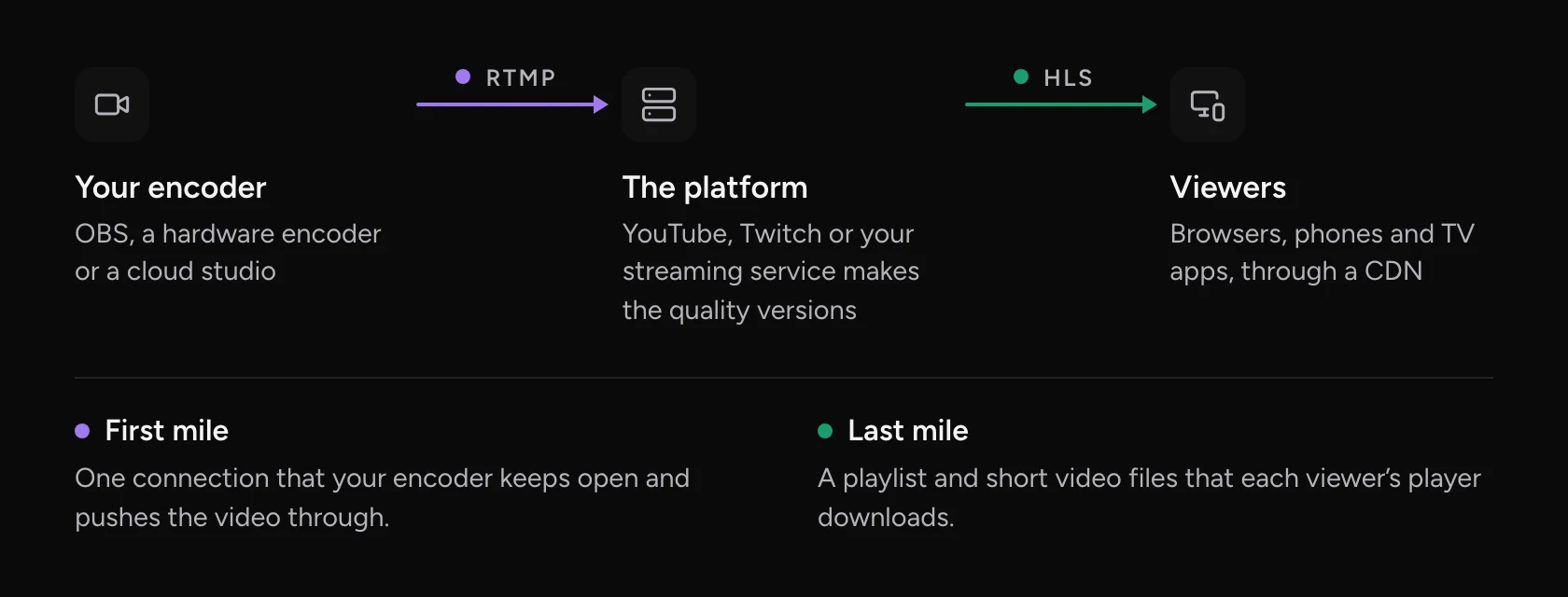
What RTMP does
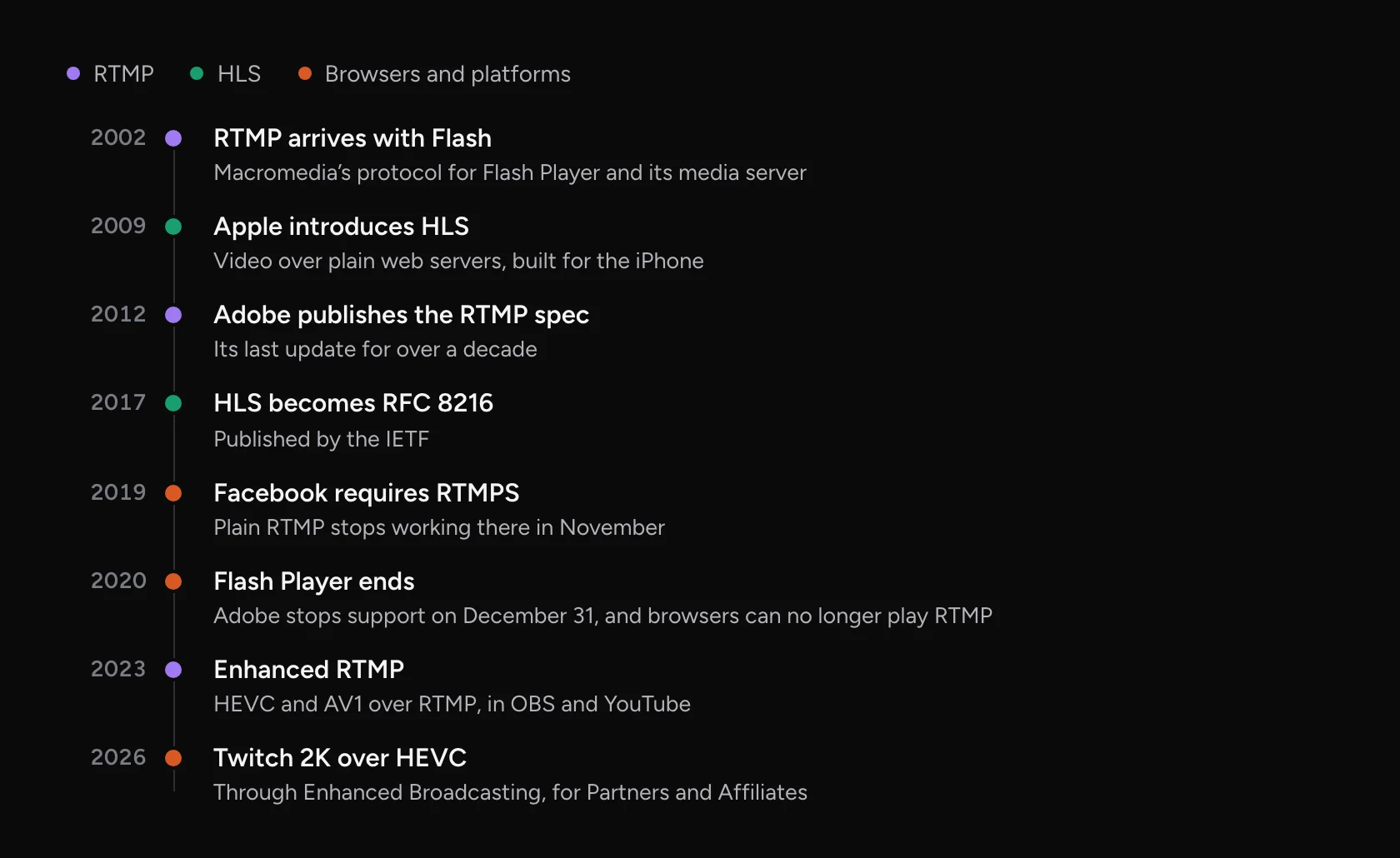
RTMP, the Real-Time Messaging Protocol, keeps one connection open between your encoder and the platform and pushes audio and video through it as you stream. Macromedia built it for Flash, and Adobe published the spec in 2012. The default port, 1935, is still registered to “Macromedia Flash Communications Server” in the official port registry.
RTMPS is the same protocol inside an encrypted connection, usually on port 443. Facebook made it mandatory in 2019 and stopped taking plain RTMP that November. YouTube recommends it too.
RTMP used to deliver video to viewers as well, through the Flash plugin. Adobe ended Flash Player on December 31, 2020, and Chrome removed it the next month, so no browser can play an rtmp:// address today. RTMP lived on as the way encoders send video in. In 2023 it got its first big update in over a decade. Enhanced RTMP adds HEVC, AV1 and HDR.
What HLS does
HLS, HTTP Live Streaming, cuts a stream into short video files called segments and lists them in a playlist, a small text file ending in .m3u8. A player downloads the playlist and fetches the segments in order. Then it downloads the playlist again to find new ones. Apple introduced it for the iPhone in 2009, and the IETF published it as RFC 8216 in 2017.
Everything is an ordinary web file, so HLS works with any web server and any CDN, and it scales to large audiences. A main playlist can also list several versions of the stream at different qualities. The player picks one and switches when the connection gets better or worse.
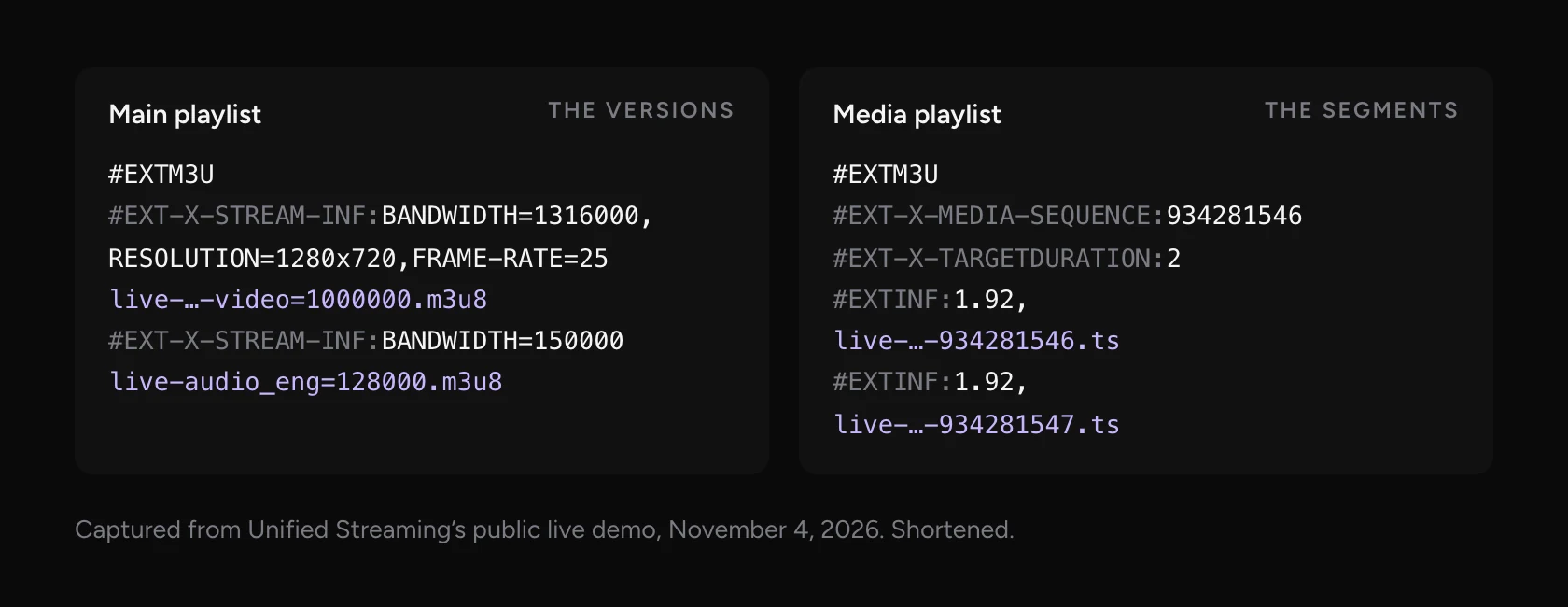
Safari plays HLS on its own. Chrome, Edge and Firefox usually play it through a small script such as hls.js, which feeds the segments to the browser’s video element. Recent Chrome versions have started to play HLS natively too.
HLS vs RTMP side by side
Most of the differences come from the job each one does.
| RTMP | HLS | |
|---|---|---|
| Its job | Sends your stream from the encoder to a platform | Delivers the stream from the platform to viewers |
| How it moves | One open TCP connection, port 1935, or 443 for RTMPS | Normal web requests for a playlist and short files |
| Plays in a browser | No, not since Flash ended in 2020 | Yes: natively in Safari, through a script elsewhere |
| Quality versions | One stream at the bitrate you set | Several, and the player switches with the connection |
| Delay to viewers | A few seconds into the platform | Often 10 to 30 seconds, under 5 in low-latency modes |
| Where you set it | A server URL and stream key in your encoder | Usually nowhere: the platform makes it |
Why HLS runs 10 to 30 seconds behind live
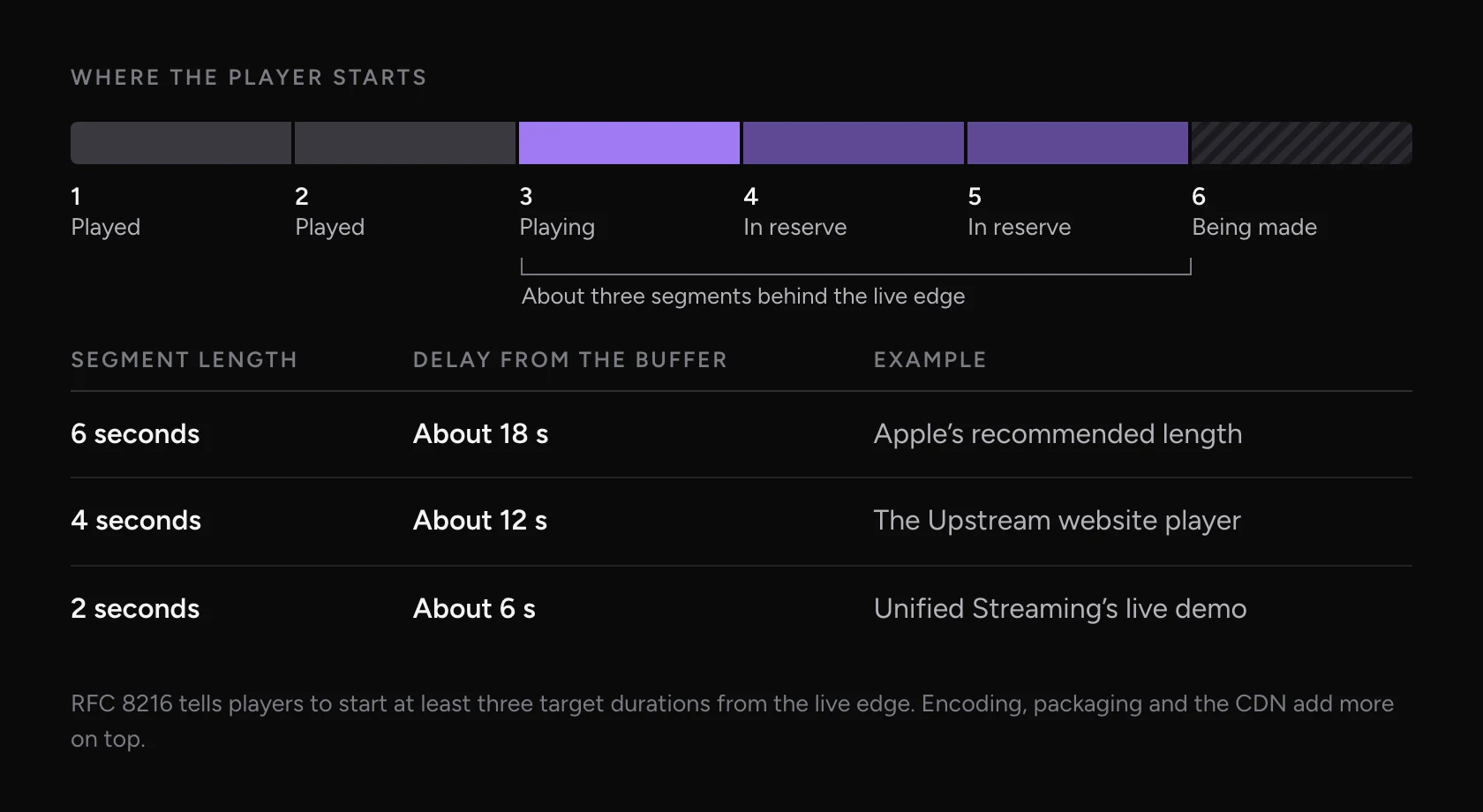
An HLS player can’t start on a segment that isn’t finished, and it keeps a few finished segments in reserve so a slow network doesn’t freeze the picture. RFC 8216 tells players not to start less than three target durations from the end of the playlist. So the delay is about three segments, plus the time to encode, package and deliver them.
Apple’s authoring spec recommends 6 second segments with a keyframe every 2 seconds. Three of those is about 18 seconds before anything else is added. Shorter segments cut the delay, and they also leave the player less slack.
Roger Pantos co-wrote the HLS spec at Apple. He described the delay like this when he introduced Low-Latency HLS:
Low-Latency HLS splits each segment into parts as short as 200 milliseconds. The player can ask for the next part before it exists. Apple’s target is under two seconds. YouTube and Twitch have their own low-latency modes. On YouTube it’s a setting on each broadcast: Normal, Low (under 10 seconds for most viewers) or Ultra-low (under 5). Neither low setting supports 4K.
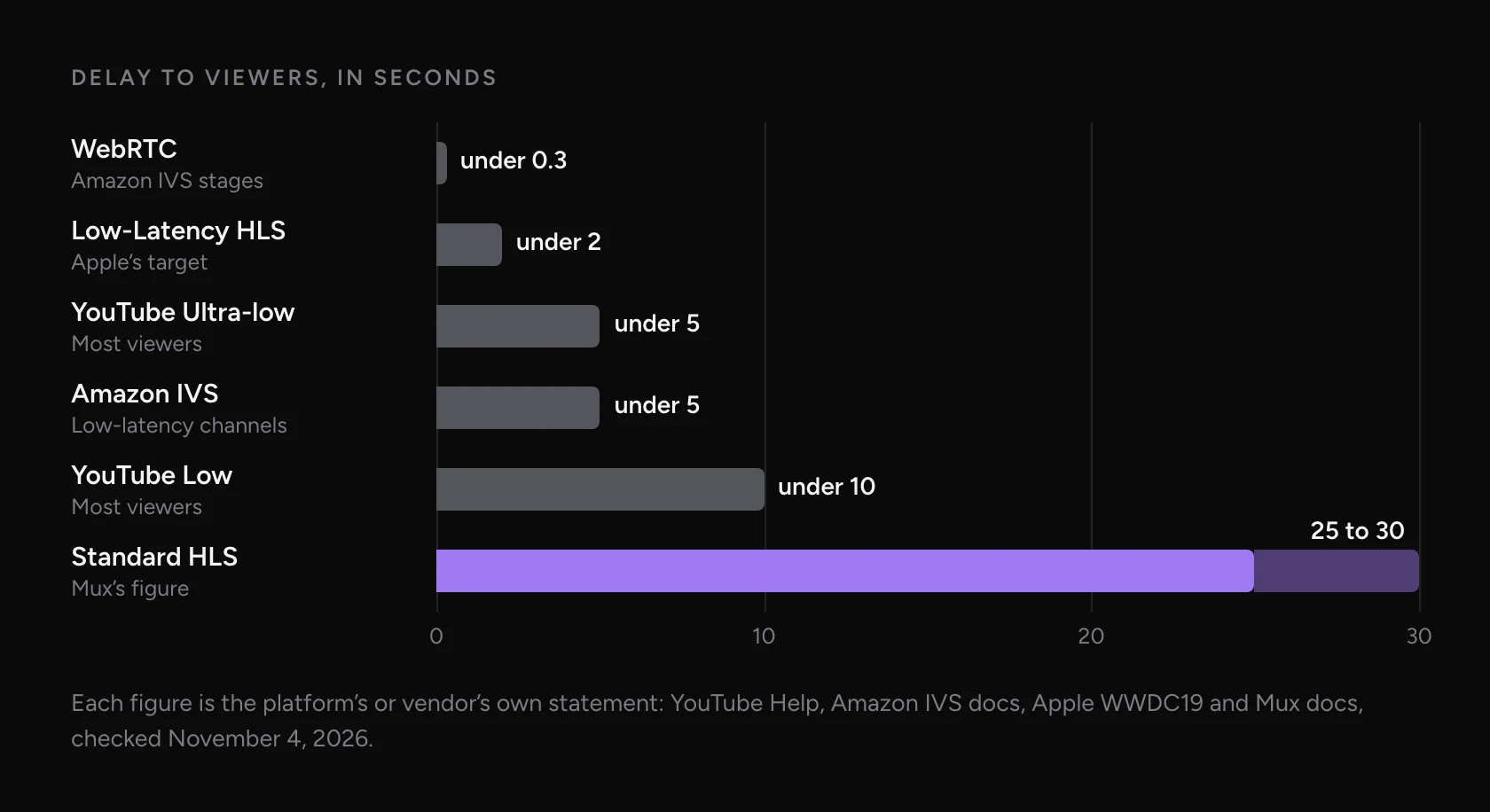
So if your YouTube stream is 30 seconds behind, OBS usually isn’t the cause. Check the latency setting on the YouTube broadcast first. Ultra-low gets you closest, at the cost of more buffering for viewers on slow connections.
YouTube - RTMPS or YouTube - HLS in OBS
Pick YouTube - RTMPS. YouTube recommends it, it works with every latency setting, and with a current OBS it carries H.264, HEVC and AV1.
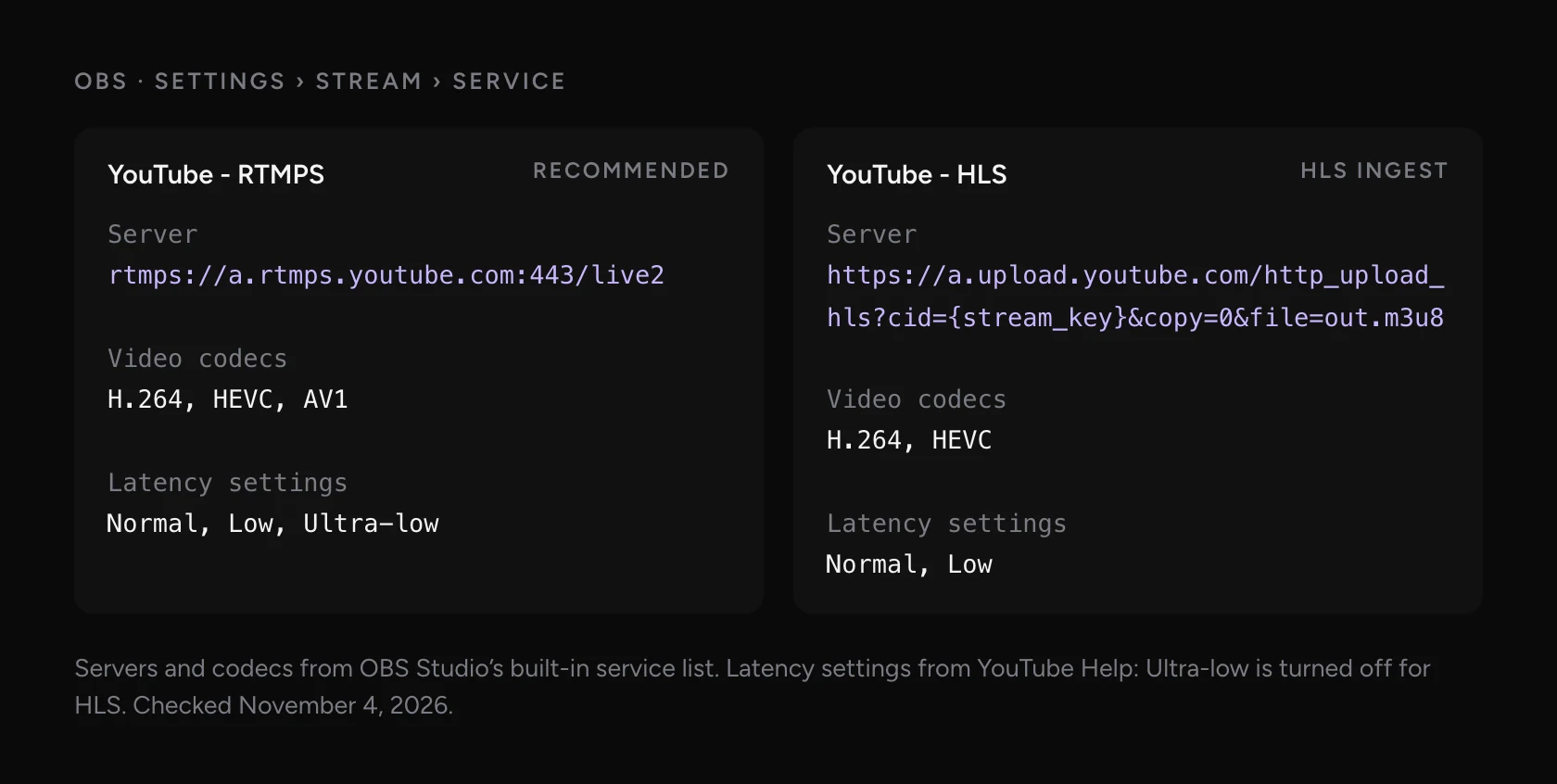
YouTube - HLS uploads short segments over HTTPS instead. YouTube describes it as better for 4K because of HEVC and HDR, and its HLS guide recommends segments of one to four seconds. It turns off Ultra-low latency and doesn’t take AV1.
HLS ingest used to be the only way to send HDR to YouTube from OBS. That changed with Enhanced RTMP: OBS 29.1 added HEVC and AV1 over RTMP in 2023, and OBS 30.1 added HDR in 2024. YouTube’s own pages haven’t all caught up. Its ingestion comparison table still lists only H.264 for RTMPS, while its encoder settings page lists HEVC and AV1. Use HLS ingest only if your encoder can’t send HEVC over RTMPS.
Which one to use for each job
| Job | Use | Why |
|---|---|---|
| OBS to YouTube | RTMPS | YouTube recommends it and it supports every latency setting |
| OBS to Twitch | RTMP | Twitch’s ingest servers take RTMP |
| OBS to Facebook | RTMPS | Facebook has required it since 2019 |
| HDR from an older encoder to YouTube | HLS ingest | If the encoder can’t send HEVC over RTMPS |
| A live stream on your own website | HLS and a player | It’s the format browsers and phones play |
| Guests and two-way calls | WebRTC | Under a second of delay, needed for conversation |
| Feeds over a bad network to a broadcaster | SRT | Built to recover from packet loss |
Can OBS output HLS?
Yes, in two ways, and neither one serves viewers. OBS can record to HLS files (in Advanced output mode, with Custom Output and the hls container), and it can push HLS to YouTube’s ingest. OBS took the HLS recording option out of Simple mode in version 28 because it “was a common cause of user confusion”.
To play a stream on your own site you need a server that makes the HLS, a CDN to deliver it and a player on the page. Our guide to embedding a live stream on your website compares the options, from a YouTube embed to running it yourself.
Is RTMP obsolete?
Not for sending video in. YouTube, Twitch, Facebook and Kick all publish RTMP or RTMPS ingest addresses, and Enhanced RTMP keeps adding to it. Twitch’s 2K streams, open to all Partners and Affiliates since June 2026, use HEVC through its Enhanced Broadcasting.
Professional broadcasters use it less. Bitmovin’s 2026 survey asked 486 video professionals what they use. For feeds into their systems, SRT led at 29%, ahead of HLS at 25% and RTMP at 19%. For delivery to viewers, HLS led at 78%. Those are broadcast and OTT teams, not creators. For a stream from OBS to the big platforms, RTMP and RTMPS are still what the platforms ask for.
RTMP in, HLS out, with Upstream
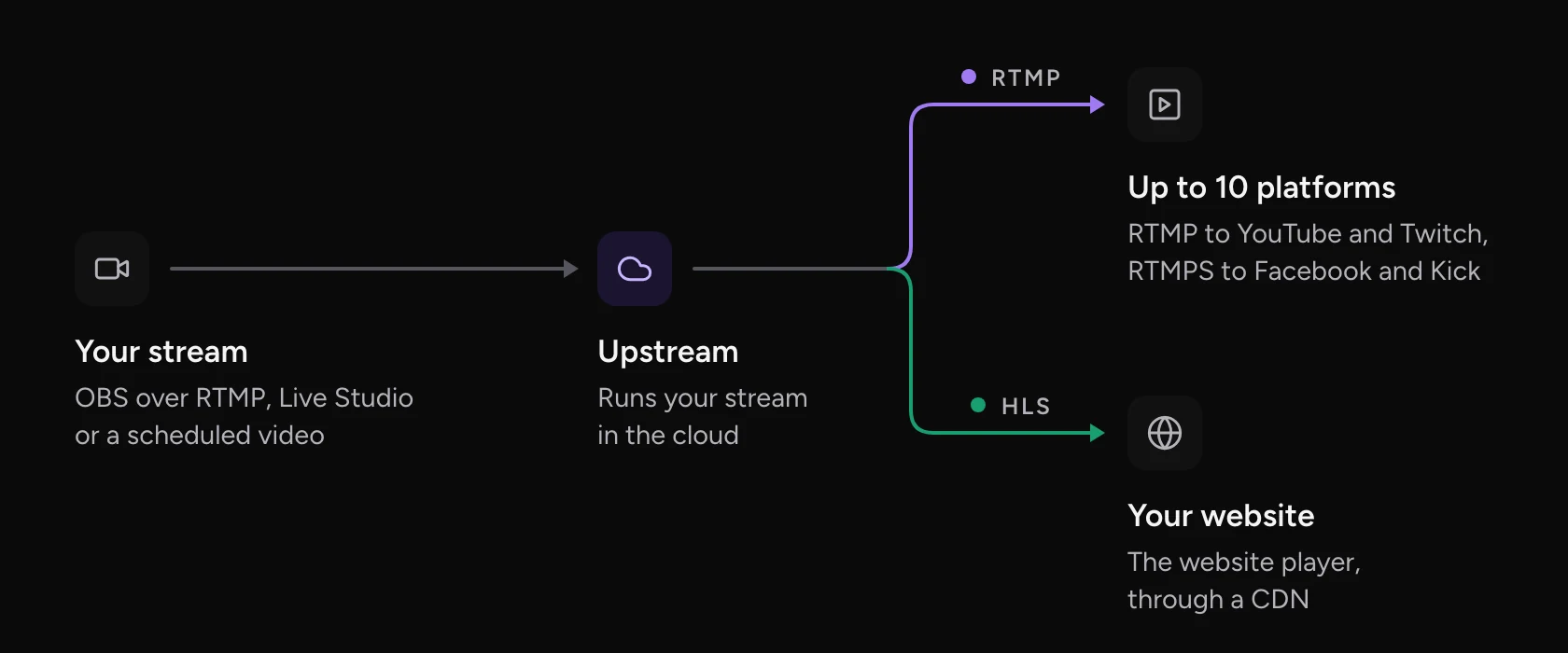
Upstream does both halves for you. Send OBS or any encoder to its RTMP server, or go live from Live Studio or scheduled video. Upstream sends the stream to up to 10 of 30+ platforms at once, each in the format that platform takes. That’s RTMP to YouTube and Twitch, RTMPS to Facebook and Kick, and SRT where you need it. Start free with 24 streaming hours a month, no credit card needed.
Your own website gets the same stream as HLS. The Upstream website player plays it through a CDN, with one embed code that stays the same between streams. It’s turning on for accounts in stages, so ask our team if you don’t see it yet.
HLS vs RTMP: FAQ
Is HLS better than RTMP?
Neither is better, because they do different jobs. RTMP sends your stream from the encoder to the platform, and HLS delivers it to viewers. Use RTMP or RTMPS in your encoder and let the platform make the HLS.
Can a browser play an RTMP stream?
No. Browsers played RTMP only through Flash, which ended in 2020. To show a stream on a web page, deliver it as HLS (or another web format) and use a video player.
Why is my YouTube stream 30 seconds behind?
YouTube delivers to viewers over HLS, and Normal latency keeps a large buffer. Switch the broadcast to Low or Ultra-low latency in YouTube Studio to get under 10 or 5 seconds for most viewers.
Should I use RTMP or RTMPS?
Use RTMPS when the platform offers it. It’s the same protocol over an encrypted connection, so your stream key isn’t sent in the clear. Facebook only accepts RTMPS, and YouTube recommends it.
Does HLS work on iPhone and Android?
Yes. iPhones and iPads play HLS natively in every browser. Android browsers play it too, natively or through a player script such as hls.js.
Sources
- Standards: RFC 8216, HTTP Live Streaming (section 6.3.3), Apple’s HLS authoring specification, Low-Latency HLS and the IANA port registry
- RTMP: Adobe’s RTMP specification (December 2012), Enhanced RTMP, Adobe’s Flash Player end of life and the Chromium Flash roadmap
- YouTube: encoder settings, ingestion protocol comparison, HLS ingestion and latency options
- Platforms: Twitch broadcasting docs, Twitch 2K streaming, Facebook Live Video API changelog, Amazon IVS and Mux on live latency
- OBS: the built-in service list and release notes for 28.0 and 29.1
- Survey: Bitmovin Video Developer Report 2026/2027
- Playlists: Unified Streaming’s public live demo, captured November 4, 2026