Updated

rtmp://a.rtmp.youtube.com/live2 – YouTube RTMP for Creators

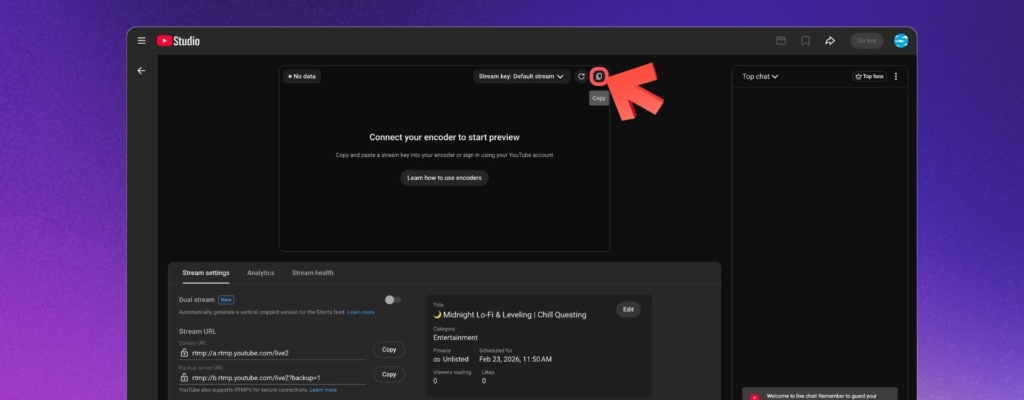
If you are streaming to YouTube with an encoder, the primary RTMP server URL is rtmp://a.rtmp.youtube.com/live2. If you are setting up backup ingest, the backup URL is rtmp://b.rtmp.youtube.com/live2?backup=1. Pair either URL with the stream key from YouTube Studio, paste both into OBS, vMix, Wirecast, or your cloud streaming tool, and you are ready to connect.

rtmp://a.rtmp.youtube.com/live2 – YouTube RTMP for Creators

That is the short answer most creators are looking for. The rest of this guide explains what each field does, how backup ingest works, and what to check when rtmp://a.rtmp.youtube.com/live2 does not connect or YouTube rejects the feed.

24/7 live streaming

Keep a live channel running 24/7.

Upload files, build a playlist, and let Upstream run continuous live playout from the cloud without OBS, a VPS, or an always-on computer.
What is Real-Time Messaging Protocol (RTMP Streaming)?

At its core, Real-Time Messaging Protocol (RTMP) is the underlying technology behind most live streams you watch online. It’s a communication protocol designed for high-performance transmission of audio, video, and data over the internet. Like a digital pipeline that carries your live content from your source (your hardware or cloud streaming solution) to the streaming platform (like YouTube, Twitch or Kick). RTMP is for live streams what HTML is for websites, sort of. And if you want to reach every platform at once, you can multistream to YouTube, Twitch and Kick from a single feed without extra encoders.

For a truly “live” experience, low latency is everything. RTMP minimizes delays, ensuring viewers see and hear what’s happening almost instantly. Developed by Adobe, RTMP is the backbone of live streaming. It’s still very relevant to today in 2026, for its efficiency and stability in delivering broadcast-quality content.

The Core RTMP Components: Stream URL and Stream Key

Before diving into YouTube settings, understand that any RTMP stream relies on two critical pieces of information to function: the RTMP Server URL and the Stream Key.

The RTMP Server URL tells your streaming software where to send your live video and audio data. It’s like a digital street address for the platform’s ingestion server. Without it, your stream wouldn’t know where to go. All (or most) YouTube users point their stream to the SAME URL, which is:

rtmp://a.rtmp.youtube.com/live2

The RTMP Stream Key is your unique identifier. Like a password for your specific live broadcast. It tells the server whose stream this is, ensuring your content is directed to your channel and not someone else’s. Together, these two elements create a secure and direct connection between your broadcast source and your audience. So make sure never to flash your stream key during the stream! Someone could take over your stream.

The stream key should look something like this, although it may be hidden in YouTube Studio and appear as dots  only) v8k2-m9p4-x7q1-w3n5-t6r8

If you copy the key while YouTube Studio is displaying “dots”, it’s ok! You will still be able to paste the key into your software, it just won’t ever be visible on the screen, which is better for security reasons.

What is YouTube RTMP and Why Does YouTube Use It?

YouTube uses RTMP as the primary method to ingest your stream data. When your streaming software sends content to YouTube, RTMP handles that transfer. YouTube uses it to receive your video and audio feed from your encoder or streaming platform. Prefer to skip the encoder entirely? You can go live straight from your browser with Upstream’s Live Studio, no OBS or PC required.

As an industry-standard protocol, RTMP offers broad compatibility. It’s like a USB for Live Streams as almost any professional streaming software, hardware or cloud platform can connect with YouTube via RTMP. It creates a stable, fast, consistent connection, ensuring your broadcast travels smoothly from your source to YouTube’s global audience without dropped frames or audio glitches.

After YouTube receives your stream, RTMP has done its part, and YouTube will process your stream in real-time and serve it to tens or thousands of viewers.

YouTube Live Stream Server URL: rtmp://a.rtmp.youtube.com/live2

The YouTube URL rtmp://a.rtmp.youtube.com/live2 has a few parts. Each part plays a vital role:

  • rtmp://: This prefix identifies the protocol being used. Real-Time Messaging Protocol tells your streaming software exactly how to communicate.
  • a.rtmp.youtube.com: This is YouTube’s dedicated server address. It’s the digital post office for your live stream, guiding your data to the right place within YouTube’s infrastructure. The “a” signifies the A-channel – the primary ingestion point on YouTube. All users stream to their A channel, and some use B for backups.
  • /live2: This is the specific stream path on the server. It acts like a unique folder or channel within YouTube’s system, ensuring your stream is routed to the correct processing engine.

This specific URL is essential for connecting your streaming software or platform to YouTube. It’s YouTube’s reliable, dedicated ingestion point for live video feeds, designed to handle the scale and demands of millions of concurrent broadcasts.

YouTube Backup URL rtmp://b.rtmp.youtube.com/live2?backup=1

There is also a “b” channel that you can use for backups, which looks like this: rtmp://b.rtmp.youtube.com/live2?backup=1 . YouTube will ensure that if your primary, a-channel stream fails, the “b channel” will take over.

This way you can always send a copy of your stream to your b channel from different hardware, and you can be sure your stream will NEVER stop. Streamers with high-stakes streams should definitely use the backup channel, when possible. When the primary stream reactivates and starts sending data again, YouTube will switch you to the a-channel automatically. Easy.

Some streamers use the b-channel to stream a constant “we are experiencing technical difficulties” screen, just in case. If you want to set up such a backup stream, check out Upstream’s 24/7 live streaming which lets you stream to either A or B or both channels at the same time.

No Auto-return Once your stream automatically switches to the B channel,  manual action is required to switch it back. This is a small price to pay for the fact that your stream was probably just saved from a completely stopping.

How to set up your YouTube backup ingest (step by step)

If you are running a high-stakes event or a 24/7 channel, configure the backup path before you go live, not after something breaks:

  1. Primary encoder: point your main encoder at rtmp://a.rtmp.youtube.com/live2 with the stream key from YouTube Studio.
  2. Backup encoder: send a second encoder or redundant output to rtmp://b.rtmp.youtube.com/live2?backup=1 for the same stream.
  3. Match both feeds: keep the resolution, bitrate, frame rate, keyframe interval, and audio settings aligned so YouTube can fail over cleanly.
  4. Start early: bring both feeds up before the event so Live Control Room can confirm the stream preview and backup connection.
  5. Test failover once: stop the primary encoder during rehearsal and make sure the stream stays live on the backup path.

Important: YouTube expects the primary and backup streams to use matching settings. If they drift apart, failover can break or throw ingestion errors.

Pre-flight checklist:

  • Start both feeds early enough for YouTube Studio to show the preview and backup connection.
  • Confirm the primary and backup encoders match on resolution, bitrate, frame rate, audio settings, and keyframe interval.
  • Kill the primary once during rehearsal and verify the stream stays live on the backup path.

If you would rather avoid managing two encoders yourself, Upstream’s 24/7 live streaming can handle the always-on RTMP side for you.

Your YouTube Stream Key: The RTMP Secret Explained

While the RTMP URL points to YouTube’s front door, your stream key is the critical password to get in, and lock in to your own channel (as opposed to someone else’s). This unique alphanumeric code authenticates your broadcast. It ensures that only your content goes to your channel, preventing unauthorized broadcasts. It looks something like this:

YouTube Stream key format / example:

k4m9-2xqp-7wn5-t6r8-v3z1

The RTMP URL gets your stream to the correct YouTube server, and the stream key tells that server exactly which channel it belongs to.

You’ll find your stream key in your YouTube Studio dashboard (see our step-by-step guide to finding your YouTube stream key),

Copy your RTMP Stream Key
  • Press “Go Live” or “Schedule Stream” via the “Manage tab”.
  • In the top right of the preview screen locate the key (only the copy button is visible after 2025 update)
  • Click to copy your key

It’s a secret for a reason. Never share it publicly; treat it like a password to keep your channel secure. Together, the RTMP URL and your unique stream key form the complete connection needed for a successful YouTube live broadcast.

rtmp://a.rtmp.youtube.com/live2 not working: quick checks

If YouTube is not receiving the feed, check these first:

  • Server URL: confirm you copied the exact stream URL from Live Control Room. If you are using secure transport, switch to the YouTube RTMPS preset or the RTMPS URL instead of plain RTMP.
  • Stream key: make sure the key in the encoder matches the current stream in YouTube Studio and has not been rotated or replaced.
  • Channel readiness: verify the channel is enabled for live streaming and does not have current live restrictions.
  • Encoder settings: check the ingest settings in YouTube Studio and make sure your encoder output matches them. If you are using a backup feed, primary and backup settings need to match closely.
  • Pre-flight test: start the encoder early, confirm the preview appears in Live Control Room, then test failover before the real event starts.

Why RTMP is used for YouTube Live Streams (including 24/7 Broadcasts)

RTMP is about connection, quality and reliability. Here’s how it elevates your streams:

  • High-Quality Transmission: RTMP is made for efficient, high-fi audio and video delivery. This means your viewers get a crisp, clear experience, whether you’re broadcasting in HD or 4K.
  • Continuous Reliability: The protocol’s design helps maintain continuous broadcasts. This reliability is foundational for uninterrupted live streams, especially crucial for channels designed to run 24/7.
  • Advanced Features: RTMP streams allow for sophisticated encoding settings, enabling you to optimize your video for different internet speeds and devices. It also supports custom stream designs, overlays, and other visual enhancements that elevate your brand.
  • Consistent Growth: By enabling stable, high-quality, and “always-on” content, RTMP helps pave the way for consistent watch time and channel growth. For creators looking to maximize discoverability and engagement around the clock, RTMP is a silent but powerful ally.

When to use Upstream instead of managing RTMP yourself

Manual RTMP setup is fine when you are running occasional live sessions from OBS or another encoder. It gets more fragile when you need a 24/7 channel, scheduled prerecorded live streams, backup routing, or one workflow that has to feed YouTube plus other destinations at the same time.

Upstream is the better fit when you want the infrastructure layer handled for you:

  • 24/7 and pre-recorded live channels: keep a channel running without leaving a local machine on.
  • Cloud multistreaming: send one workflow to YouTube, Twitch, Kick, TikTok, Rumble, and other RTMP destinations.
  • Scheduled programming and failover: reduce the number of manual encoder checks you need before every stream.
  • YouTube-ready setup: move faster when the goal is reliable publishing, not encoder tinkering.

If you only stream occasionally from a single computer, a local encoder may be enough. If you need a channel that stays live, reruns a catalog, or survives operator mistakes, cloud RTMP management usually wins.

Conclusion

The main YouTube RTMP URL is rtmp://a.rtmp.youtube.com/live2. The backup ingest URL is rtmp://b.rtmp.youtube.com/live2?backup=1. Use them with the stream key from YouTube Studio, keep primary and backup settings matched, and test the setup before the event. That gives you the cleanest path to a stable YouTube live stream, whether you run it manually or through a cloud workflow.

Pre-recorded live streaming

Turn recordings into live streams.

Upload videos, schedule them as live events, or keep a channel running up to 24/7 without staying on camera or leaving a computer online.