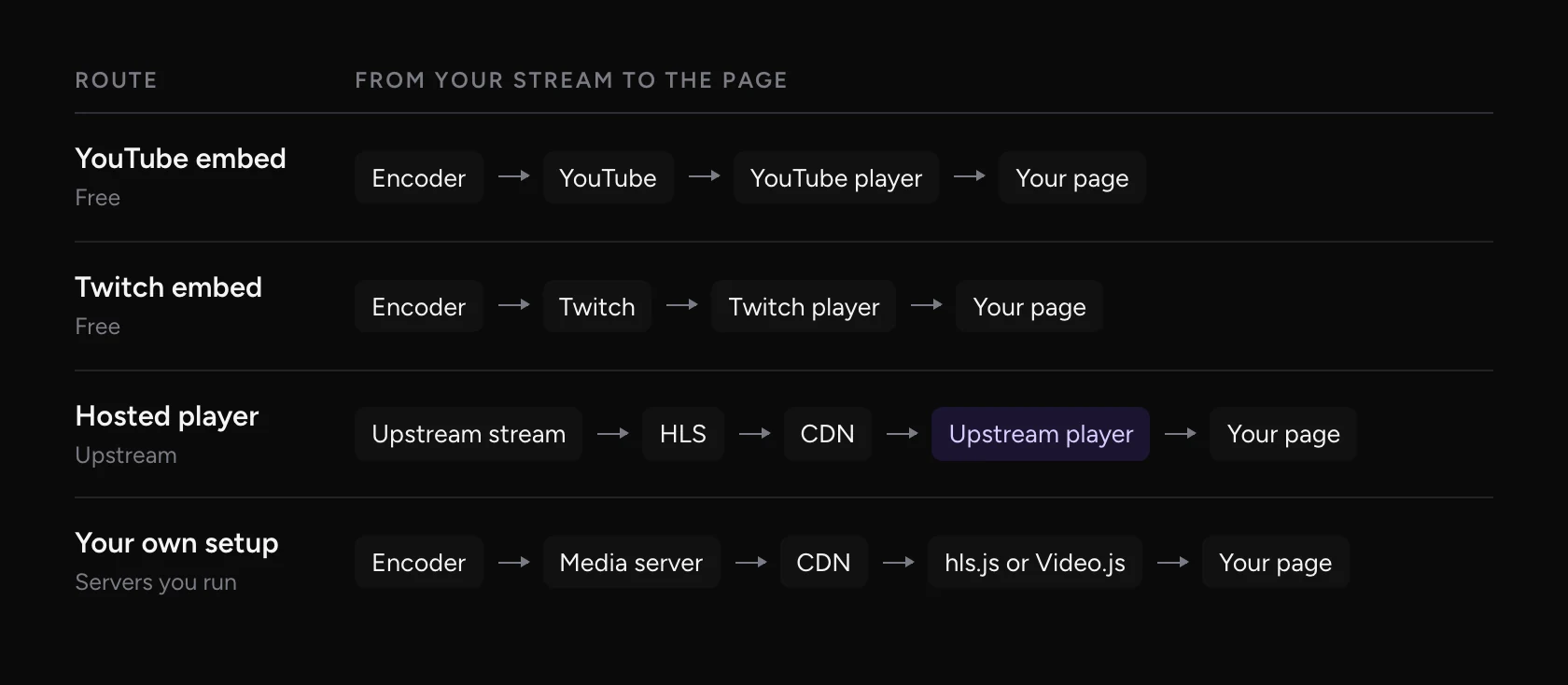
To put a live stream on your website, you paste a player’s embed code, a short piece of HTML called an iframe, into your page. The player can be YouTube’s or Twitch’s, a hosted player from the service that runs your stream, or one you build yourself with HLS. All four work. They differ in what sits around your video, what happens between broadcasts, and how much you have to run.
How to embed a YouTube live stream
Open the live video on YouTube, click Share, then Embed, and copy the code. Paste it into an HTML or Embed block on your page, such as a Custom HTML block in WordPress or an Embed block in Squarespace or Webflow.
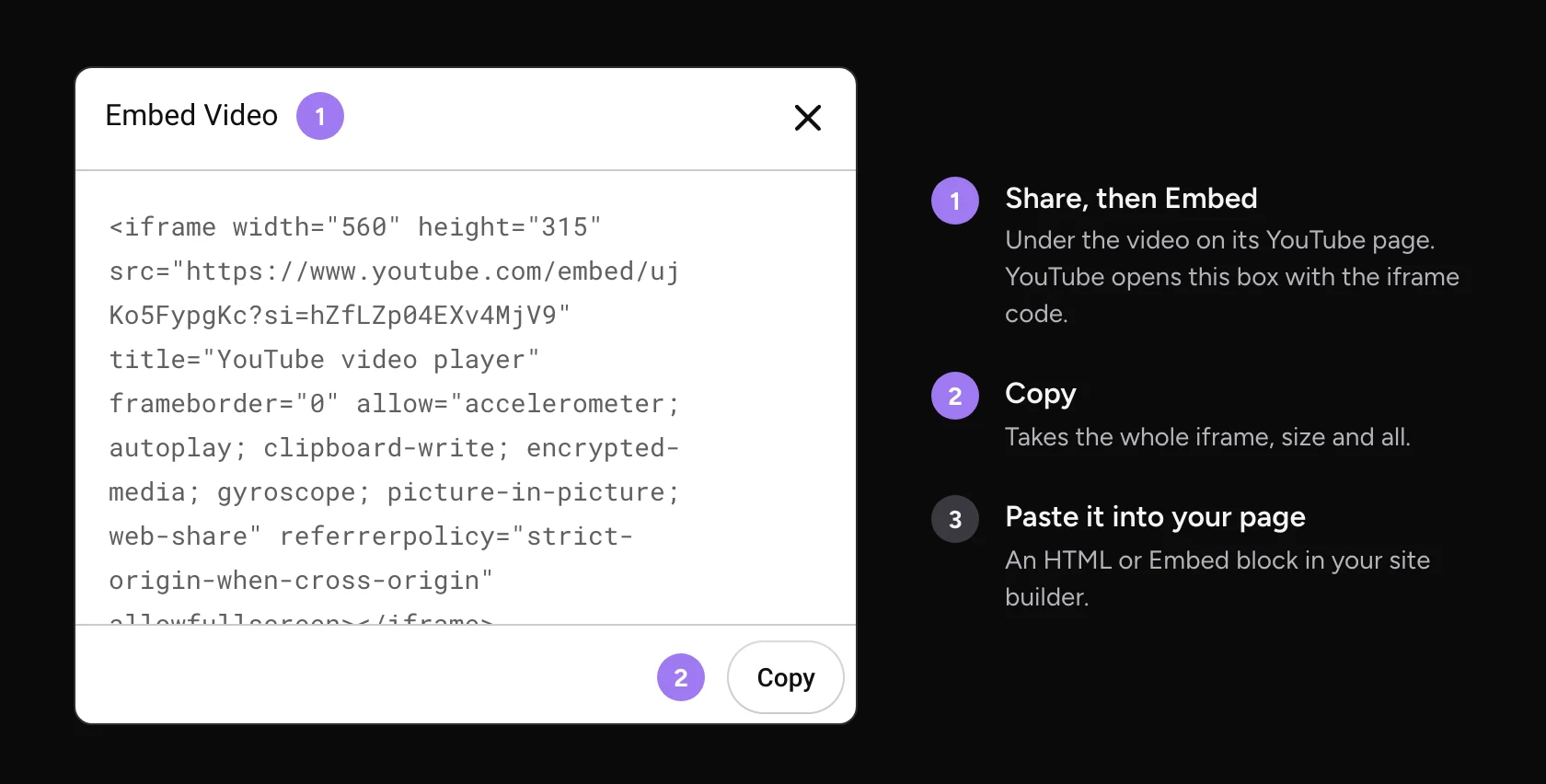
Before that works for a live stream, check three things:
- Your channel can embed live streams. YouTube lists it as an Advanced feature. It turns on with enough channel history, or once you verify your ID. Phone verification alone isn’t enough.
- Embedding is on. In YouTube Studio, open the video’s details, click Show more and check that Allow embedding is ticked.
- Your page sends a Referer. YouTube’s terms require it. If your site or a plugin sets a no-referrer policy, the embed shows Error 153 instead of the video.
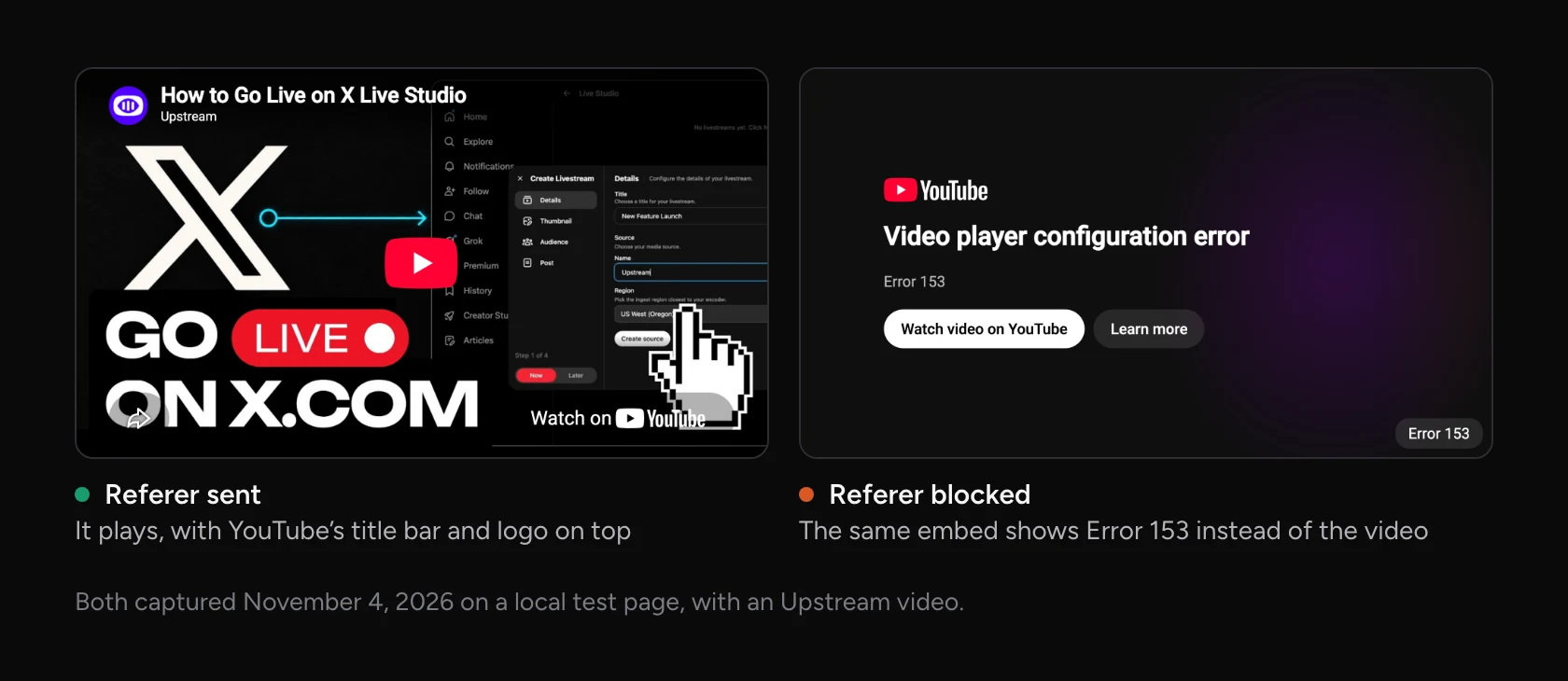
Visitors see YouTube’s player, with its logo and the video title. Since 2018 you can’t turn related videos off: the rel=0 setting only keeps them to your own channel. YouTube says embedded videos may show ads, and it doesn’t count autoplayed embeds as views.
What happens after the stream ends
A YouTube embed points at one video. When the broadcast ends, the embed shows the recording, and your next live stream gets a new video and a new embed code. If a broadcast runs longer than 12 hours, YouTube doesn’t keep a recording at all, so the old embed shows an unavailable video.
You’ll find a trick online: an embed address with your channel ID, embed/live_stream?channel=, that is meant to show whatever you have live. YouTube doesn’t document it, and it’s unreliable. When we checked on November 4, 2026, it played the live stream for one news channel and showed “This video is unavailable” for two others.
Privacy-enhanced mode still stores data
YouTube’s privacy-enhanced mode swaps the address for youtube-nocookie.com. YouTube says views there won’t be used to personalize the viewer’s YouTube experience. It doesn’t say nothing gets stored, and developers who tested it found it writes to local storage when the page loads and sets cookies once someone presses Play.

In the EU that usually means a consent banner holds the player back until a visitor agrees. Germany’s data protection authorities say embedding third-party content such as videos regularly discloses personal data to that third party, so it needs a legal basis. Many consent tools hide the player until then, and visitors may not notice anything is missing.
How to embed a Twitch stream
Twitch embeds follow your channel, so the same code shows whatever you stream. The address looks like this:
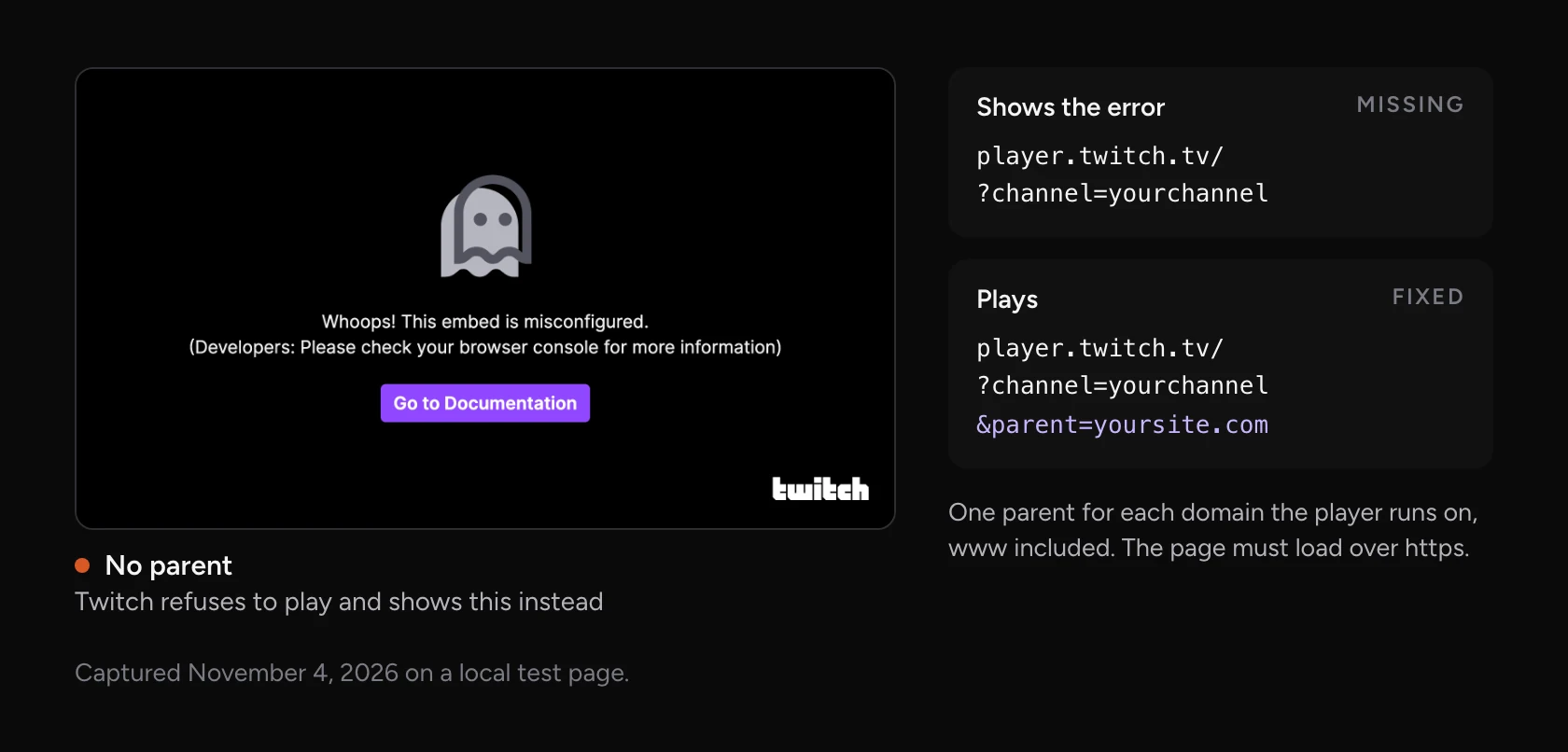
https://player.twitch.tv/?channel=yourchannel&parent=yoursite.com
Since June 2020 Twitch requires two things: your site must use https, and the code must list each domain it runs on as a parent. Add one parent for every domain, including www and any staging site. The player must be at least 400 by 300 pixels, and it won’t autoplay on phones.
How to embed a stream with a hosted player
A hosted player comes from the service that runs your stream instead of from a social platform. The player shows your video and nothing else, and it stays tied to your stream rather than to one broadcast. With Upstream it takes four steps:
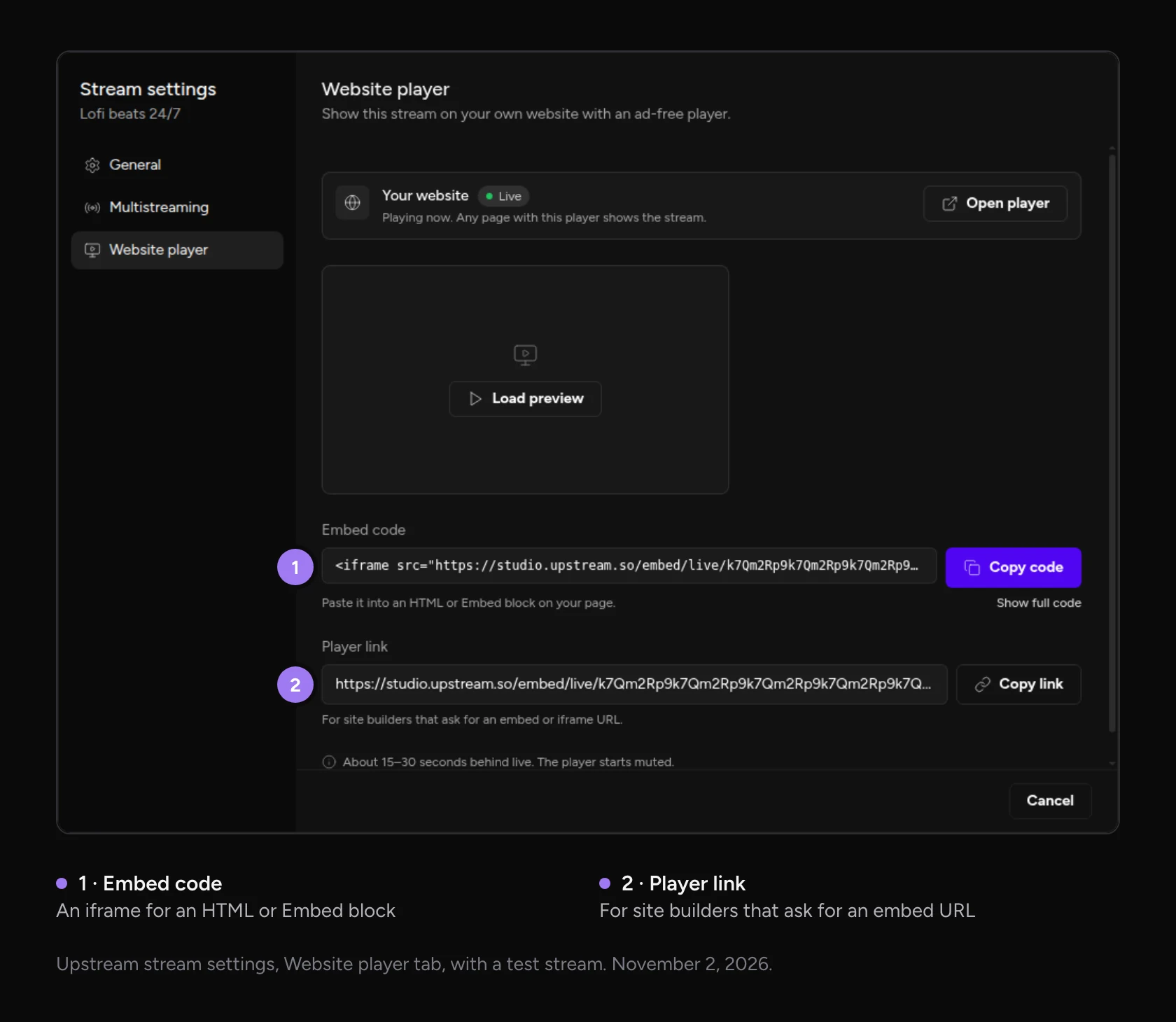
- Open your stream’s settings in Upstream and choose Website player.
- Copy the embed code. Or copy the player link if your site builder asks for an embed URL.
- Paste it into your page and publish.
- Start the stream. The player on your page starts by itself.
The code stays the same between streams. Stop tonight, start again tomorrow, and the player picks the stream up by itself. Between streams visitors see your stream’s name and Offline, then Starting soon when you press Start. Click through the screens below to see each one.
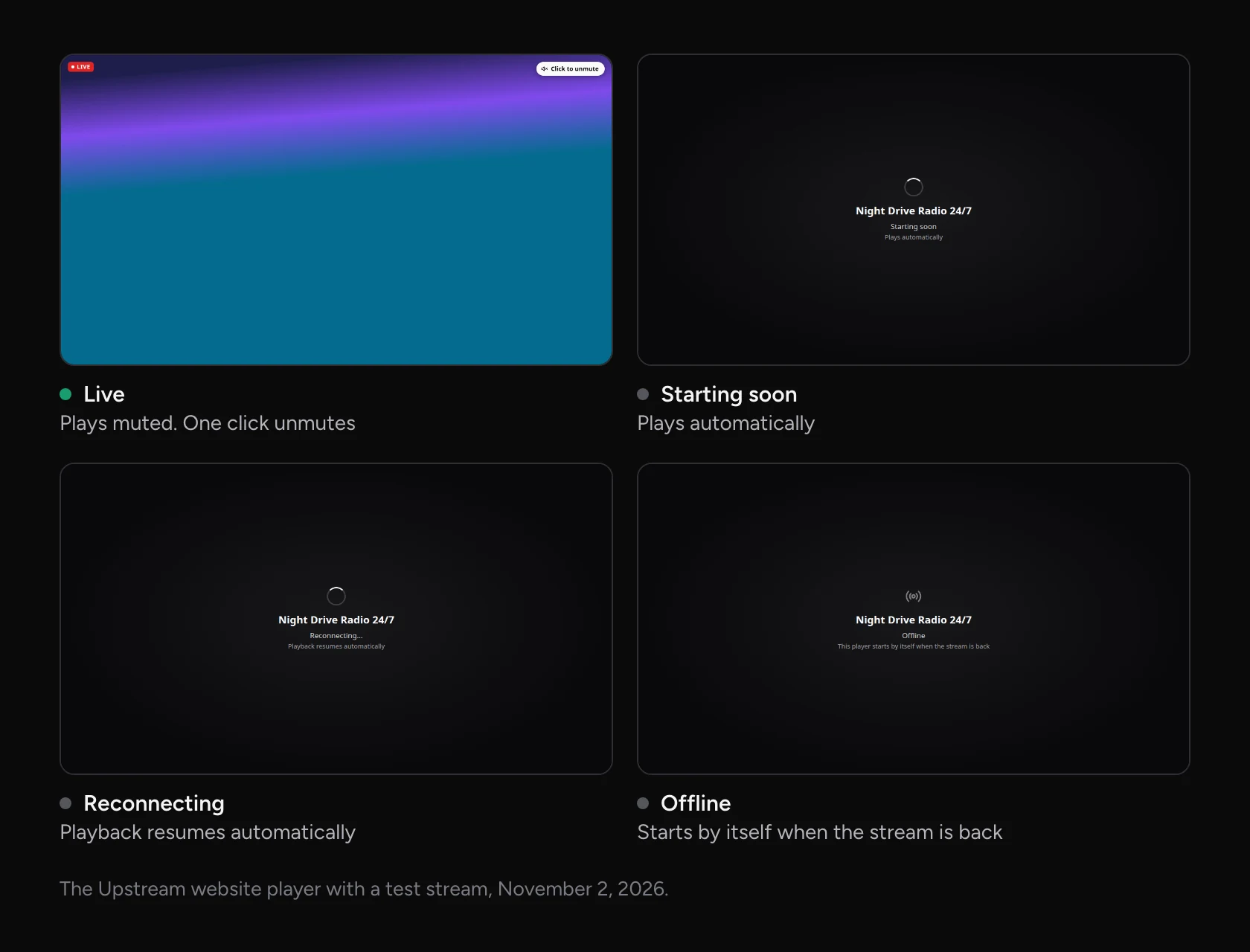
 Live
Lofi Hours
The player page shows no ads and sets no cookies. It plays about 15 to 30 seconds behind live, which suits watching along but not quick back-and-forth with viewers. It also runs next to your other platforms. Upstream sends the same stream to YouTube, Twitch and the rest, and your site gets its own copy outside your 10 destinations.
How to build your own HLS player
You can also run the whole chain yourself. Your encoder sends the stream to a media server, which packages it as HLS: a playlist and short video files. A CDN delivers those files, and a player script on your page plays them. Our free RTMP server guide shows how to set up MediaMTX, one popular open-source server.
Safari plays HLS natively. Chrome, Edge and Firefox need a script such as hls.js or Video.js, which feeds the video to the browser through Media Source Extensions. Chrome started playing HLS natively in late 2025, but Mux and the hls.js maintainers still advise using the script there. The server that hosts the files also needs CORS headers, or the player can’t load them from your page.
This gives you full control over the player, the look and the data. It also makes you responsible for uptime, scaling to a big audience, browser support and the CDN bill.
The four options side by side
Here is how they compare once a stream is on your page.
| YouTube embed | Twitch embed | Upstream website player | Your own player | |
|---|---|---|---|---|
| Around the video | YouTube’s logo, title and related videos | Twitch’s player and branding | Your video, a LIVE badge and the browser’s controls | Whatever you build |
| Ads | Can show YouTube ads | Set by Twitch | None | Up to you |
| Cookies | YouTube’s, even in privacy-enhanced mode | Twitch’s | None from the player page | Up to you |
| Next broadcast | The code points at one video | Follows your channel | The same embed code | The same address, if your server keeps it |
| Site rules | Needs the Referer header | https, and your domain in the code | Works on any site | Up to you |
| Delay to viewers | Your broadcast’s latency setting | Set by Twitch | About 15 to 30 seconds | Often 10 to 30 seconds |
| What you run | Nothing extra | Nothing extra | Nothing extra | A media server, a CDN and the player code |
Why embedded streams start muted
Browsers block video that plays sound by itself. Chrome, Safari and Firefox all let a video autoplay only when it’s muted, unless the visitor has already interacted with the site. So a live player that wants to start on its own has to start muted and offer an unmute button.

YouTube adds rules of its own. An embed may only autoplay once more than half of it is visible on screen, and only one YouTube player per page may autoplay. On an iPhone, a muted video autoplays inline only when the code sets playsinline. The Upstream player starts muted with a Click to unmute button, or Tap to unmute on phones.
Common embed problems
| What visitors see | Why | What to do |
|---|---|---|
| Playback on other websites has been disabled | Embedding is off for the video | Tick Allow embedding in YouTube Studio |
| Error 153, Video player configuration error | The page doesn’t send a Referer | Remove the no-referrer policy, or use strict-origin-when-cross-origin |
| This video is unavailable | A channel live_stream link that stopped working | Embed the video itself, or use a player tied to your stream |
| Whoops! This embed is misconfigured | The Twitch parent is missing or wrong | Add a parent for each domain, and serve the page over https |
| No player at all after the cookie banner | A consent tool blocks the iframe | Add a consent placeholder, or use a player that sets no cookies |
| Last week’s stream instead of today’s | The embed points at one YouTube video | Update the code for the new broadcast |
| The video plays with no sound | Browsers block autoplay with sound | Expected: viewers click to unmute |
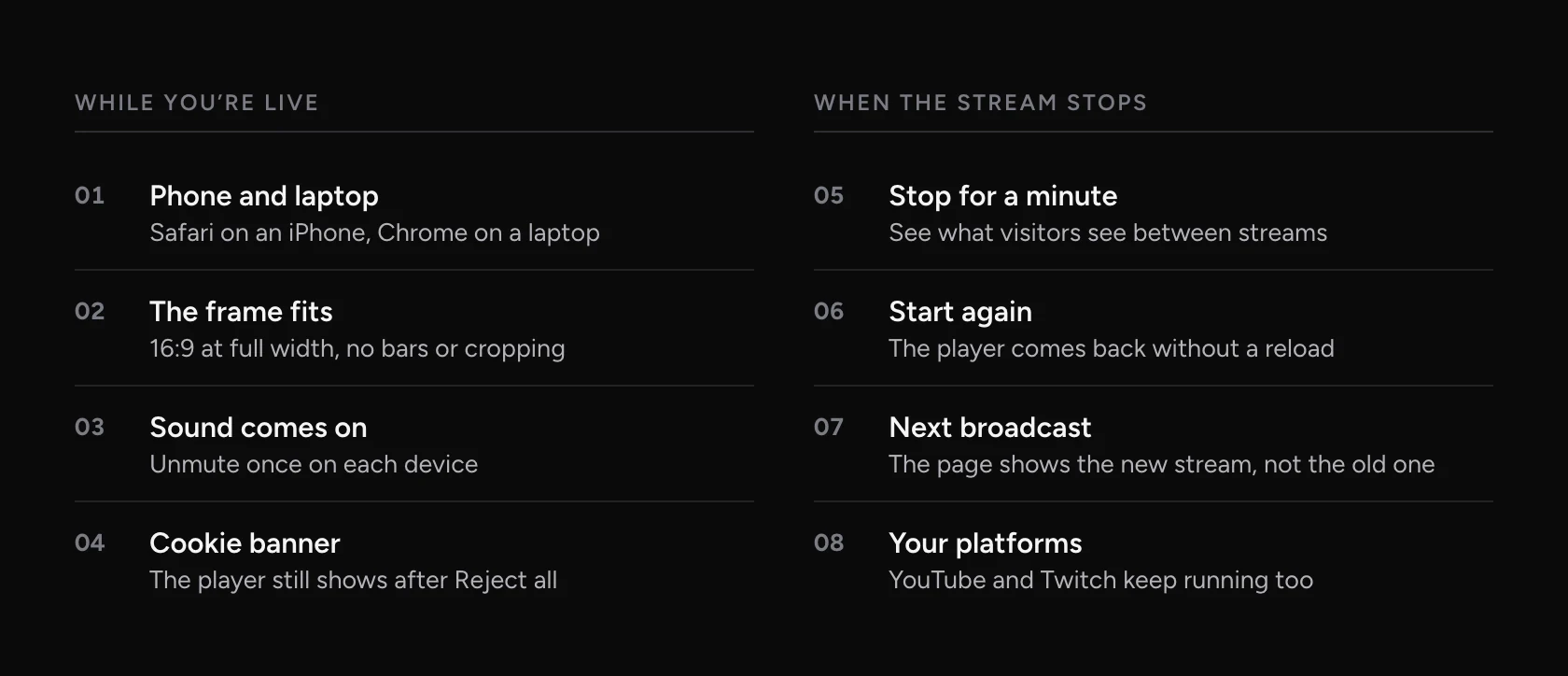
Whatever you pick, test the page the way visitors will see it before you share it.
Put your stream on your site with Upstream
A YouTube embed is fine for a one-off. For a stream you run every week, or a channel that’s live around the clock, you want a player that belongs to your stream. That’s the Upstream website player: one embed code that keeps working between broadcasts, no ads, no YouTube or Twitch branding and no cookies from the player page. It’s turning on for accounts in stages, so start free with 24 streaming hours a month and ask our team to add it.
The same Upstream stream goes out to up to 10 of 30+ platforms at once through multistreaming, so your site, YouTube and Twitch all carry the same stream. Run it live from OBS or Live Studio, or upload videos and keep a 24/7 channel on your homepage with your computer off.
Embedding a live stream: FAQ
Can I embed a live stream on my website for free?
Yes. YouTube and Twitch embeds are free, as long as your YouTube channel can embed live streams. Upstream’s free plan includes 24 streaming hours a month, and its website player is turning on for accounts in stages.
Why does my embedded live stream start muted?
Browsers only allow video to play by itself when it’s muted. Players start muted and show an unmute button, so viewers turn the sound on with one click.
Will the embed keep working after the stream ends?
A YouTube embed points at one video, so your next broadcast needs a new code. A Twitch embed follows your channel. The Upstream player is tied to your stream, so it shows Offline between broadcasts and starts again when you go live.
Do I need cookie consent for a live stream embed?
For a YouTube or Twitch embed in the EU, usually yes, because the player stores data on the visitor’s device. The Upstream player page sets no cookies. Ask whoever handles privacy for your site what applies to you.
Does an embedded live stream slow down my website?
The video loads inside the player’s iframe and comes from the platform or a CDN, not from your web server. Lazy loading helps: the Upstream embed code waits to load the player until a visitor scrolls near it.
Sources
- YouTube: Embed videos and playlists, player parameters, required minimum functionality, ads on embedded videos and feature access
- Twitch: Embedding video and clips and Twitch embedded player updates in 2020
- Browsers: Chrome autoplay policy, WebKit video policies for iOS, hls.js, Video.js FAQ and Mux on native HLS in Chrome
- Privacy: DSK guidance on digital services (paragraph 101), Stefan Judis and Jason Grigsby on youtube-nocookie
- Captures: YouTube and Twitch embeds on a local test page, and YouTube’s channel live link checked for three channels, November 4, 2026