
The YouTube Shorts bonus program is an invite only pilot that pays selected creators extra each month for posting Shorts. You can’t apply. YouTube invites channels in the YouTube Partner Program in the US, UK, Germany, Brazil, Japan and South Korea, by email or in YouTube Studio. If you’re invited and post the number of public Shorts in your invite each calendar month, you get a minimum payment, plus a possible bonus based on your organic engaged Shorts views.
YouTube announced the pilot on October 15, 2026, the same day X launched its own invite only video bonus.
Who gets invited to the Shorts bonus
Channels in the YouTube Partner Program (YPP) in six countries: the US, the UK, Germany, Brazil, Japan and South Korea. That’s from YouTube’s own Creator Insider channel, which also says more bonus opportunities are coming to more creators in more regions in the coming months.
YouTube hasn’t said how it picks channels inside those countries. Being in YPP in one of them makes you eligible for an invite, not certain to get one.
This isn’t the old Shorts Fund coming back. The Shorts Fund was a $100M pot YouTube paid out over 2021 and 2022 to creators making original Shorts, in YPP or not. YouTube called it temporary and replaced it with Shorts ad revenue sharing for YPP creators in early 2023. The new bonus is a limited time payment on top of your normal YouTube earnings, and only invited YPP channels get it.
Build the stream in the cloud.
Schedule videos, produce browser-based live shows, or send one feed to multiple platforms from the same Upstream workflow.
How to check for an invite and accept it
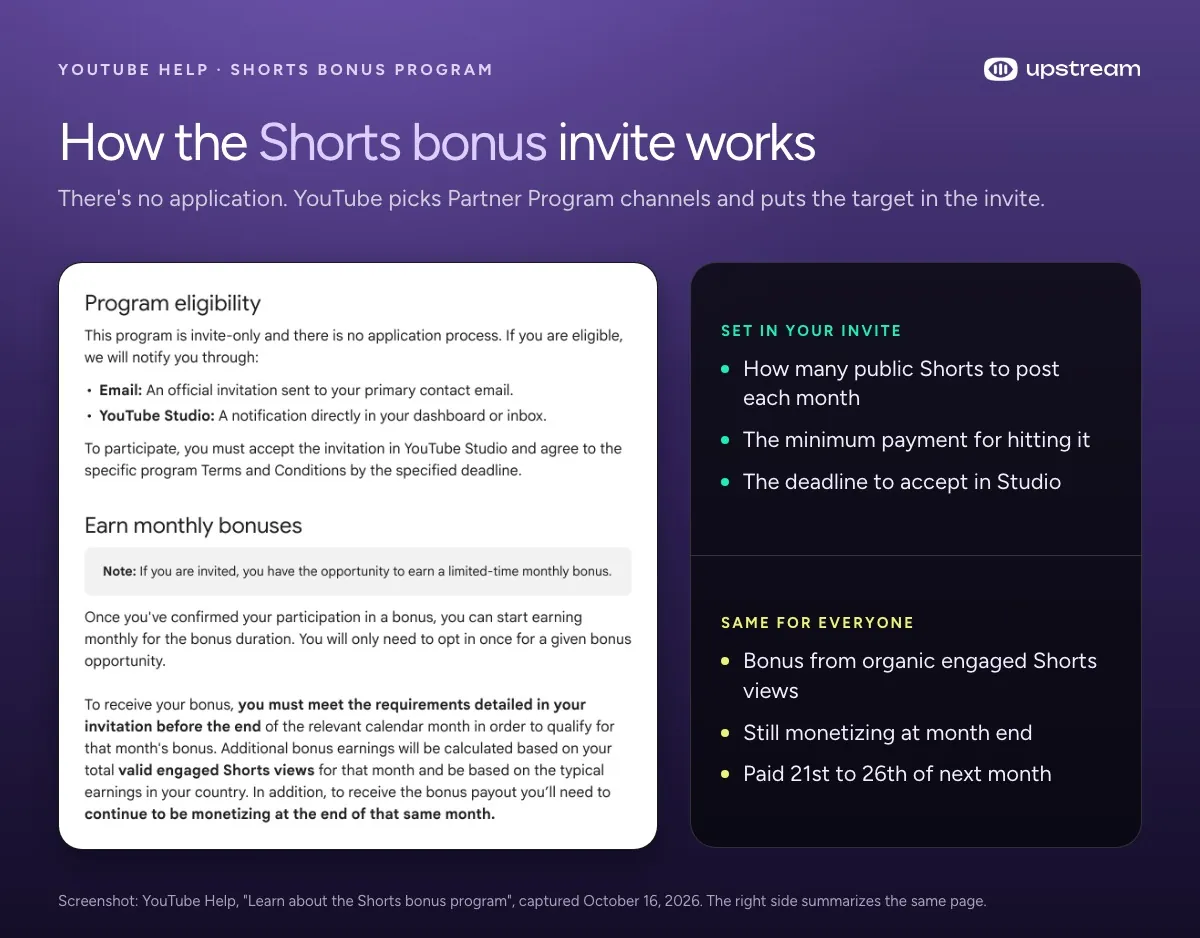
- Check your email. YouTube sends the invite to your channel’s primary contact email.
- Check YouTube Studio. The invite can also show up as a notification on your dashboard or in your Studio inbox. Look there even if no email arrived.
- Accept it in YouTube Studio. That’s how you claim the bonus: accept the invite and agree to the program’s terms before the deadline it gives. You only opt in once for the whole bonus period.
The invites shared publicly so far all say to join by November 15, 2026 to start earning for November. YouTube’s help page only says “by the specified deadline”, so go by the date in your own invite.
How the Shorts bonus payout is calculated
The bonus has two parts, and YouTube’s help page names both.
- The minimum payment. YouTube calls it the Promotional Offer Payment. You get it for uploading at least the number of public Shorts set in your invite within a calendar month.
- The extra bonus. YouTube calls it the Promotional Bonus. It’s based on your valid engaged Shorts views that month and on typical earnings in your country. It isn’t guaranteed, and it changes from month to month.
To get paid for a month you also have to still be monetizing at the end of that month. The quota resets with the calendar month, so a month where you miss the Shorts count earns no bonus.
What the invites shared so far offer
YouTube doesn’t publish the Shorts target or the amounts. They’re in your invite, and they differ from one invite to the next. These are screenshots creators posted on X on October 15 and 16, not YouTube’s figures:
| Shared by | Shorts a month | Guaranteed | Up to | Join by |
|---|---|---|---|---|
| Studio screenshot posted by @mws | 16 | $300 a month | $2000 a month | November 15 |
| Invite email posted by @Big_E | 12+ | Not shown | $1000 a month | November 15, 2026 |
| Studio screenshot posted by @Austvns | 12 | Not shown | $1000 a month | November 15 |
The Studio screenshot with the $300 guarantee also calls it a 3 month program. Treat these as examples of what an invite can look like. Yours can have a different target, payment and length.
What counts toward the Shorts bonus and what doesn’t
Only public Shorts count toward the monthly target. YouTube’s terms say “public Shorts”, so private and unlisted Shorts don’t help you hit it.
For the extra bonus, only organic engaged views count. YouTube says views “generated or sourced from advertisements” don’t count, so promoting a Short with ads won’t raise the bonus. An engaged view is one where the viewer stayed past the first few seconds, not counting loops. It’s not the same as the plain view count on your Shorts.
YouTube also validates the numbers before paying. The help page says the final count can take several days and “may vary” from what you see in YouTube Analytics.
A few more things decide whether a Short helps:
- Live streams don’t count. The terms only talk about Shorts you upload. A vertical live stream can show up in the Shorts feed, but it isn’t an uploaded Short, and YouTube says nothing about live streams counting.
- Clips from your own streams are fine, because they’re your content. What YouTube is cutting back on is reuploads of other people’s videos: since October 1 it gives less Shorts reach to channels that mostly reupload, and its Shorts monetization policies don’t pay for non original Shorts.
- Shorts longer than one minute that contain claimed content, such as a label’s music, are blocked, so they can’t earn.
How to check your engaged Shorts views
Open YouTube Studio, go to Analytics, and open the Engagement tab. YouTube says that tab includes your engaged views metrics, which is what the bonus is calculated from. Look at the calendar month, because the bonus is worked out month by month.
Use it as an estimate. YouTube’s final validated number decides the payout.
When the Shorts bonus gets paid
The bonus is added to your finalized YouTube earnings for the month you earned it and lands in your AdSense for YouTube account. YouTube pays it in the normal cycle, typically between the 21st and 26th of the following month. So a bonus earned in November would usually arrive between December 21 and 26. YouTube’s normal payment threshold still applies.
It’s a pilot, and YouTube says so in the terms: Google can change or cancel the program for any reason with 30 days notice, or right away for legal, security or abuse reasons.
Not in the YouTube Partner Program yet?
Then you can’t get an invite. As of October 2026, a channel can apply for YPP with 1000 subscribers plus either 4000 qualified watch hours in the last 12 months or 10M qualified Shorts views in the last 90 days.
That gets harder on February 1, 2027. New applicants will need 8000 qualified watch hours in the last 365 days or 20M qualified Shorts views in the last 90 days, still with 1000 subscribers. Channels already in YPP keep their status. From the same date, YouTube’s Shorts monetization policy also asks for 10M qualified Shorts views in the last 90 days to earn from the Shorts Creator Pool in a given month. The same page says YouTube is adding new Shorts incentive programs and will notify eligible creators directly as they launch. Our YouTube monetization requirements guide has the details.
YouTube Shorts bonus vs X’s Video Kickstart Bonus
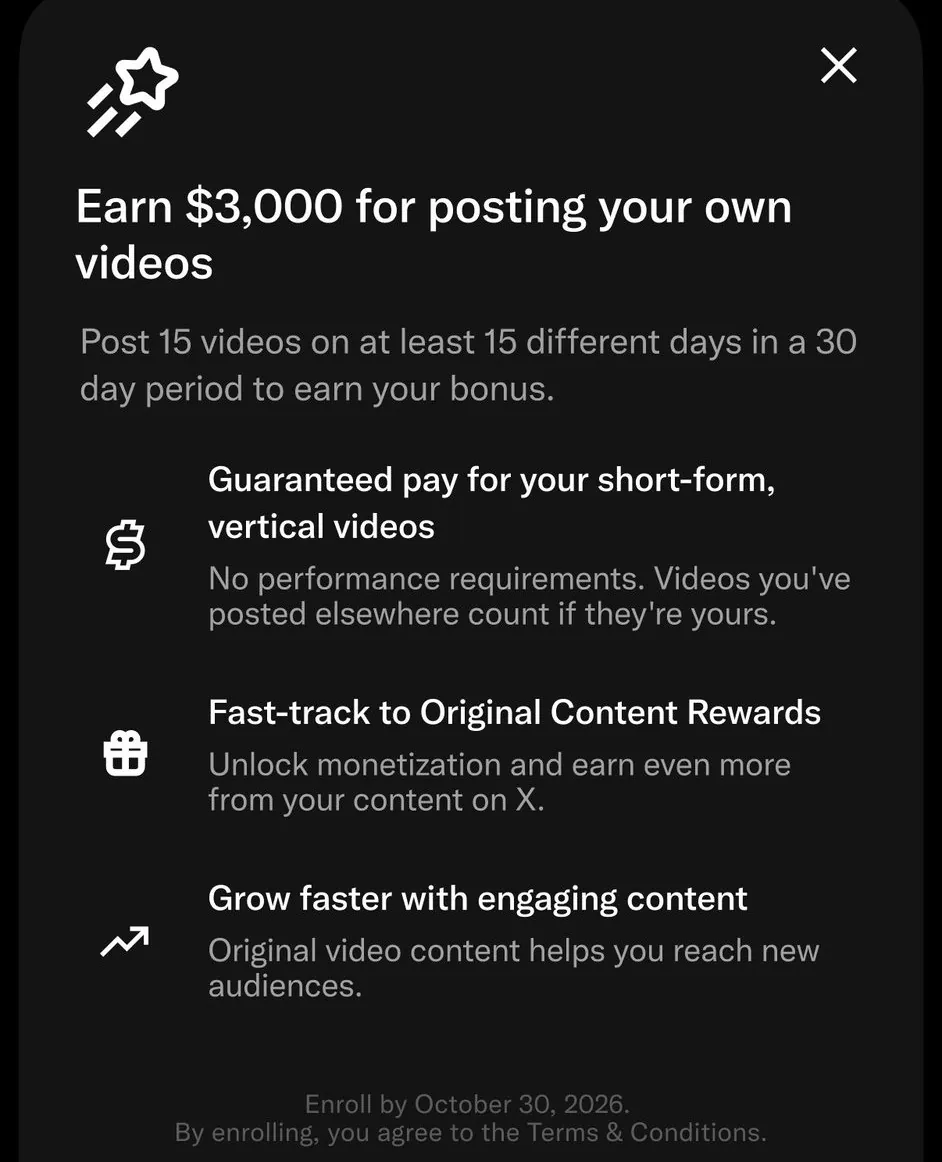
X launched its own invite only video bonus the same day. Allegra Jacchia, who works on creator product at X, announced it on X with this image of the enroll screen.
| YouTube Shorts bonus | X Video Kickstart Bonus | |
|---|---|---|
| How you join | Invite by email or in Studio, accept in Studio | Invite, then enroll in Creator Studio |
| Who | YPP creators in the US, UK, Germany, Brazil, Japan and South Korea | Invited creators (X hasn’t listed countries) |
| Target | The number of public Shorts in your invite, per calendar month | 15 videos on 15 different days within 30 days |
| Video rules | Public Shorts, organic views only for the bonus | Vertical, under 3 minutes, your own content |
| Posted elsewhere first | Not addressed | Allowed if there’s no watermark |
| Pay | Minimum payment plus a bonus from engaged Shorts views | X’s image says “Earn $3,000” with no performance requirements |
| Deadline | In your invite (November 15 in the ones shared) | Enroll by October 30, 2026 |
If you’re invited to both, one set of clips can cover both targets. A vertical clip under 3 minutes that you made yourself can go up as a YouTube Short and as an X video, as long as the X upload has no watermark. X’s bonus is for posted videos, not live streams on X. Our guide to going live on X covers that side.
Turn your live streams into your Shorts quota
If you stream, you already make the raw material for the 12 to 16 Shorts a month the shared invites ask for. Moments cut from your own streams are original clips, which is what YouTube’s Shorts policies pay for and what X’s bonus asks for. All you need is a VOD to cut them from.
Upstream handles the stream side from the cloud. Live Studio runs in your browser with up to 10 guests and screen share, so you can go live without setting up OBS. Multistreaming sends that one stream to up to 10 of 30+ supported platforms at once, so YouTube, Twitch and Kick all get it live. YouTube archives streams shorter than 12 hours on its own, and that VOD is what you cut your Shorts from. Post the same clips to X for the Kickstart target.
On days you’re not live, 24/7 and scheduled streams keep the channel running from the cloud with your computer off.
The free plan includes all of it: 24 streaming hours a month at 1080p30, no credit card and no watermark.
Sources
YouTube Help: Learn about the Shorts bonus program, YouTube Partner Program overview and eligibility, YouTube Shorts monetization policies and Understand your YouTube content performance (engaged views). Creator Insider, New! Monthly Shorts Bonus Program Pilot (October 15, 2026). Changes to the YouTube Partner Program for the February 1, 2027 thresholds. YouTube Blog on the old Shorts Fund: Introducing the YouTube Shorts Fund (2021) and Made on YouTube: supporting the next wave of creative entrepreneurs (September 20, 2022). Invite screenshots shared on X by @mws, @Big_E and @Austvns. X’s Video Kickstart Bonus: Allegra Jacchia’s announcement. YouTube Help on archiving live streams.