Upstream
Upstream
  • Product
    24/7 Live Streaming Run cloud channels that stay live around the clock. Live Studio Invite guests, share screens, and add branded overlays in the browser. Multistreaming Send one live feed to YouTube, Twitch, Kick, and RTMP endpoints. Pre-recorded Live Streaming Upload pre-recorded videos & Go Live without the stress of live production. Free plan 24 hours a month with no watermark. Multi-channel streaming Separate live channels from one account. Enterprise Setups for teams, labels and agencies. About Upstream Who we are and how Upstream works.
  • Features
    Scheduling Streams that start and end on their own. Multichat Every platform's chat in one feed. Overlays Layers and widgets in Stream Designer. Stings, jingles and ads Inserts that play between your videos. Playback controls Skip or play any file while you stay live. Audio and video playlists Loop music and visuals separately. Team access Invite your team, each with their own role. RTMP server Stream in from OBS or any encoder. Live Streaming API Run streams, media and queues from code. MCP Server Manage streams from your AI assistant. All features Everything Upstream does, on one page.
  • Platforms
    YouTube live streaming Twitch live streaming Kick live streaming Facebook live streaming Instagram live streaming TikTok TikTok live streaming Rumble live streaming Mixcloud live streaming 30+ more Plus any custom RTMP or SRT destination.
    Platform limits Bitrate and duration caps for each platform. Integrations Setup guides for OBS, vMix, cameras and more. VTuber Streaming Go live with your avatar on every platform.
  • Resources
    Blog Guides, platform rules and news for anyone who goes live. Guides Setup guides for 24/7 streams, multistreaming and RTMP. Release Notes The new features in each Upstream update, in one place. Free Tools Video, audio, thumbnail and AI tools, plus camera and mic checks. Helpdesk Step by step setup help and troubleshooting for Upstream. Live Streaming FAQ Short answers to what people ask before they go live. Compare Upstream Upstream side by side with Restream, StreamYard and others. Latest post YouTube Shorts Bonus Program: Who Gets Invited and How It Pays
  • Pricing
Login Sign up for free
Always-on 24/7 Live Streaming Run cloud channels that stay live around the clock.
Explore
Real-time live Live Studio Invite guests, share screens, and add branded overlays in the browser.
Explore
One stream, 30+ platforms Multistreaming Send one live feed to YouTube, Twitch, Kick, and RTMP endpoints.
Explore
Schedule & Automate Pre-recorded Live Streaming Upload pre-recorded videos & Go Live without the stress of live production.
Explore
Free plan 24 hours a month with no watermark.
Multi-channel streaming Separate live channels from one account.
Enterprise Setups for teams, labels and agencies.
About Upstream Who we are and how Upstream works.
Scheduling Streams that start and end on their own. Multichat Every platform's chat in one feed. Overlays Layers and widgets in Stream Designer. Stings, jingles and ads Inserts that play between your videos. Playback controls Skip or play any file while you stay live. Audio and video playlists Loop music and visuals separately. Team access Invite your team, each with their own role. RTMP server Stream in from OBS or any encoder.
Live Streaming API Run streams, media and queues from code.
MCP Server Manage streams from your AI assistant.
All features Everything Upstream does, on one page.
YouTube live streaming. 24/7 channels with midroll ads. Twitch live streaming. Streams restart on their own at 48 hours. Kick live streaming. Stay live with your computer off. Facebook live streaming. Schedule lives that start on their own. Instagram live streaming. Go live from your browser or the cloud. TikTok TikTok live streaming. Go live on TikTok and Instagram at once. Rumble live streaming. Add Rumble to your YouTube or Kick stream. Mixcloud live streaming. DJ sets and radio shows from your browser. 30+ more Plus any custom RTMP or SRT destination.
Platform limits Bitrate and duration caps for each platform.
Integrations Setup guides for OBS, vMix, cameras and more.
VTuber Streaming Go live with your avatar on every platform.
Blog
Guides
Release Notes
Free Tools
Helpdesk
Live Streaming FAQ
Compare Upstream
YouTube Shorts Bonus Program: Who Gets Invited and How It Pays YouTube Shorts Bonus Program: Who Gets Invited and How It Pays
Blog

YouTube Cuts Reach for Reuploaded Shorts, Kick Adds VOD Downloads: Streamer News, Sep 25 to Oct 2

Written by Mario Jankovic October 4, 2026 · Updated October 15, 2026 · 3 min read
  1. YouTube
  2. Twitch
  3. Kick
  4. X
  5. Discord
  6. OBS
  7. What this means if you stream on more than one platform

YouTube now gives less Shorts reach to channels that mostly reupload other creators’ videos without adding anything of their own. Twitch opened Streamer Shouts to more streamers, Kick launched VOD downloads and an hourly gift subs leaderboard, and OBS 33 is in public beta with a much newer browser engine.

YouTube

On October 1 TeamYouTube said it is updating Shorts recommendations to favor original content. Channels that “primarily” aggregate or reupload other creators’ videos “without significant changes” will likely get less distribution in the Shorts feed. Clips of someone else are still fine if you add your own commentary, editing or storytelling. YouTube says small technical changes or template edits made only to alter a video don’t count.
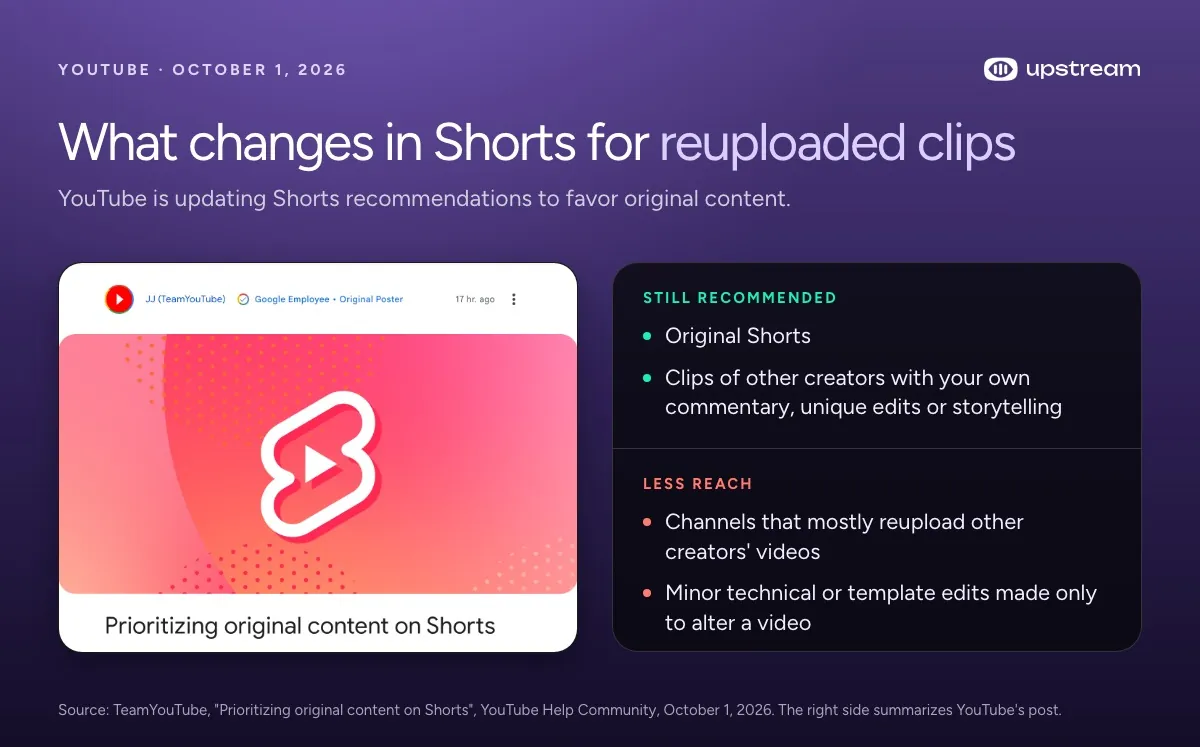
TeamYouTube post Prioritizing original content on Shorts next to what stays recommended and what gets less reach
TeamYouTube’s post, October 1, 2026. Read the full post.

Streamers cutting Shorts from their own VODs aren’t affected. Fan clip channels that repost raw stream moments are.

Cloud multistreaming

Stream everywhere from one feed.

Send one live feed to Upstream and let the cloud deliver it to YouTube, Twitch, Kick, Facebook, and custom RTMP without making your upload connection carry every copy.

Sign up for free See multistreaming features
2 / 10 on stage
MiaLeo
SourceStagePeopleBackstageChatDestinationsTriggers
Destinations

Where this stream goes when it is live.Streaming to 5 destinations.

  • Lofi HoursPrimary destinationChatReadyStartingStreaming
  • lofihoursMultistream destinationChatReadyStartingStreaming
  • lofihoursMultistream destinationChatReadyStartingStreaming
  • Lofi HoursMultistream destinationReadyStartingStreaming
  • TikTokMultistream destinationReadyStartingStreaming
Manage destinations

Twitch

Streamer Shouts lets you send a personal note, with a clip attached, to viewer groups that Twitch picks after a stream ends. You can send one Shout per group per day, starting the day after you stream, and you can’t schedule them. Viewers can react but can’t reply. The Shouts tab in Creator Dashboard shows sent, opened and reaction counts. (Twitch Help)

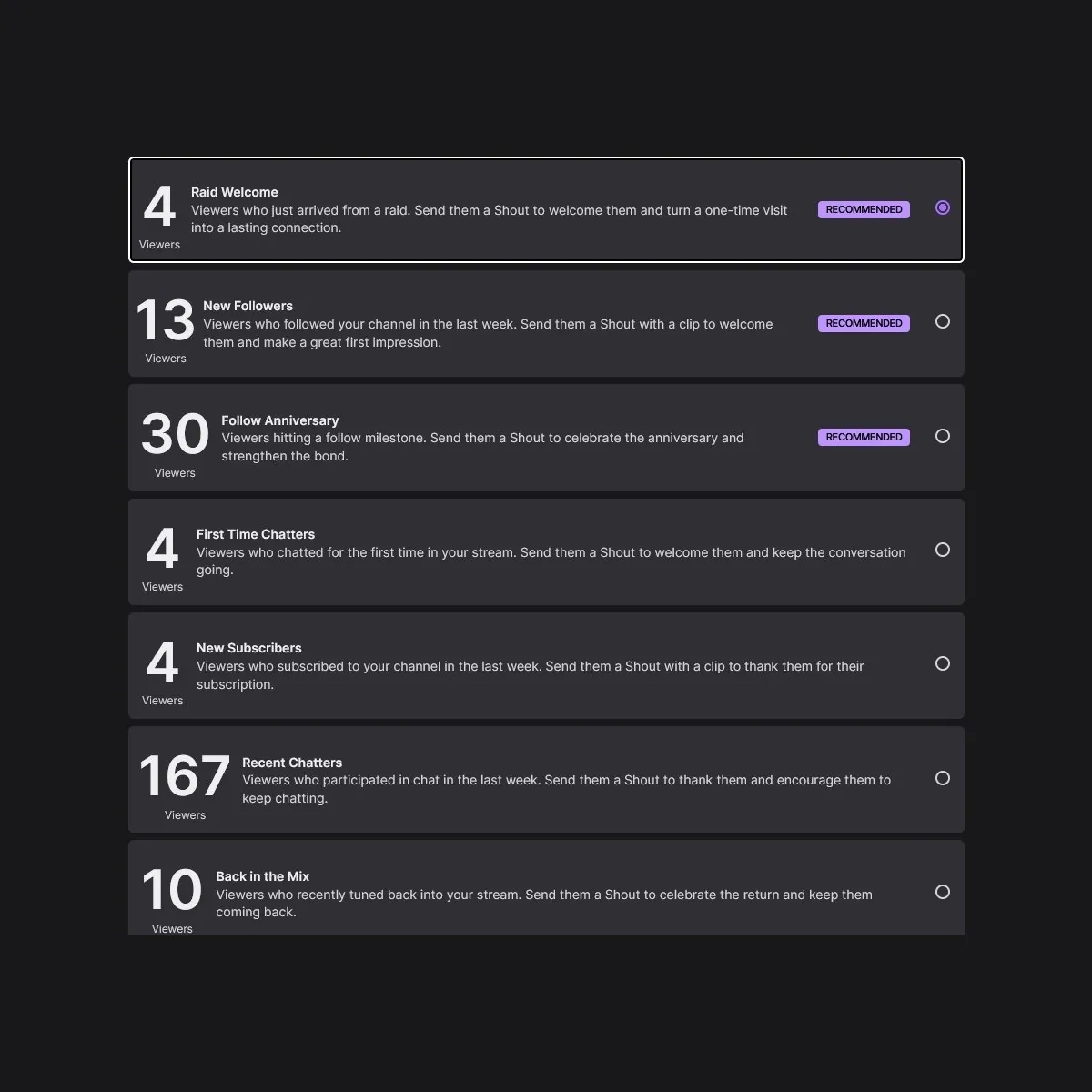
zachbussey avatarZach Bussey@zachbussey𝕏Twitch has dramatically expanded access to Streamer Shouts.Streamer Shouts lets streamers send direct messages to viewers in a variety of categories.Viewers will receive these messages in their Shouts Inbox beside their Whispers.Twitch Streamer Shouts viewer groups such as Raid Welcome, New Followers, Follow Anniversary and First Time ChattersOct 2, 2026View on X ↗
Zach Bussey’s screenshot shows the viewer groups: Raid Welcome, New Followers, Follow Anniversary, First Time Chatters, New Subscribers, Recent Chatters and Back in the Mix.

Twitch’s help page still calls Shouts a test for a select group, so some channels don’t have it yet.

Stream-o-Ween runs October 1 to 31. To get a chance at the Stream-o-Ween front page shelf, stream in an eligible category and add the Stream-o-Ween event tag. Hype Trains get a new set of five Halloween emotes for the month. (Twitch Blog)

Kick

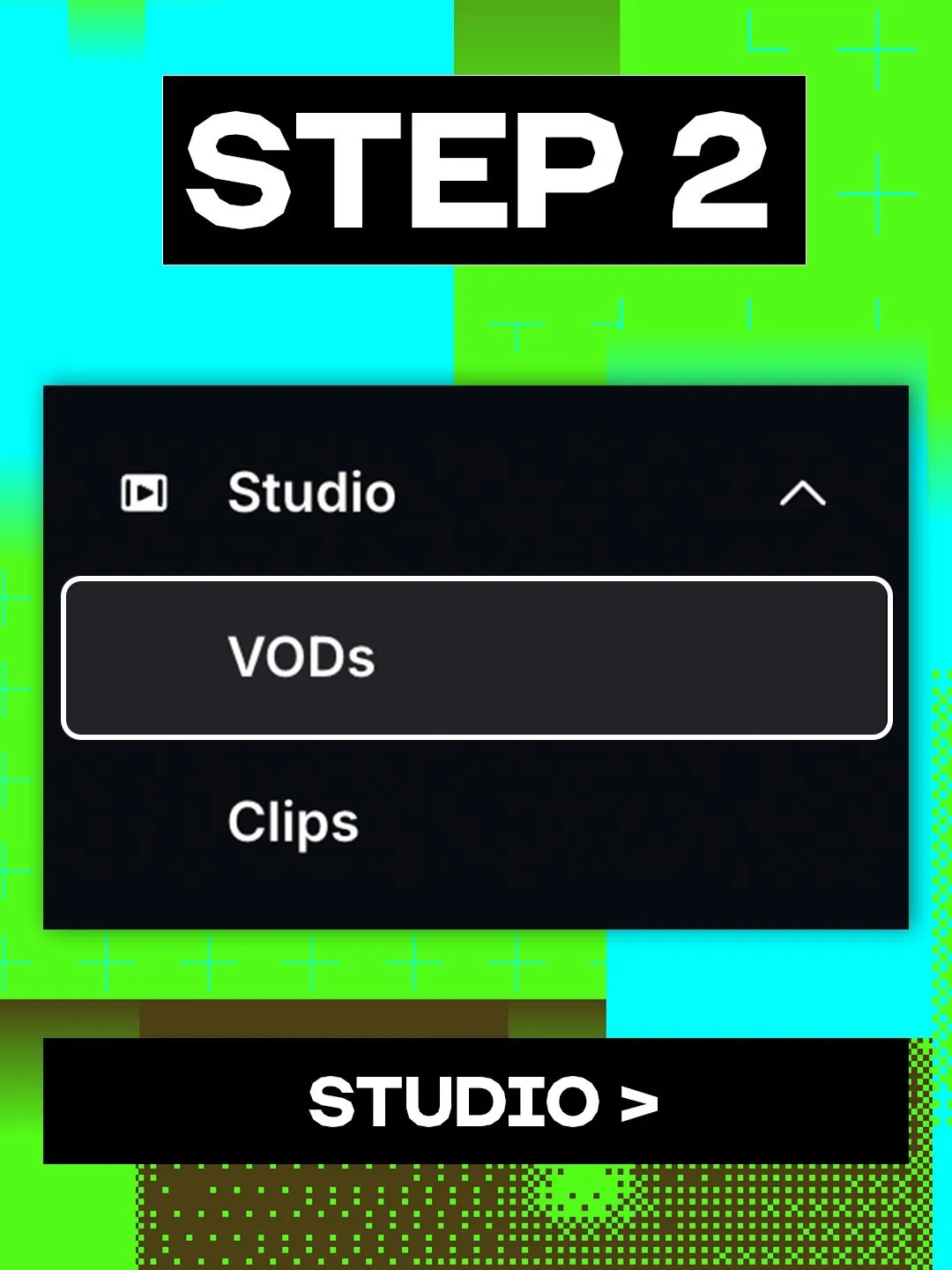
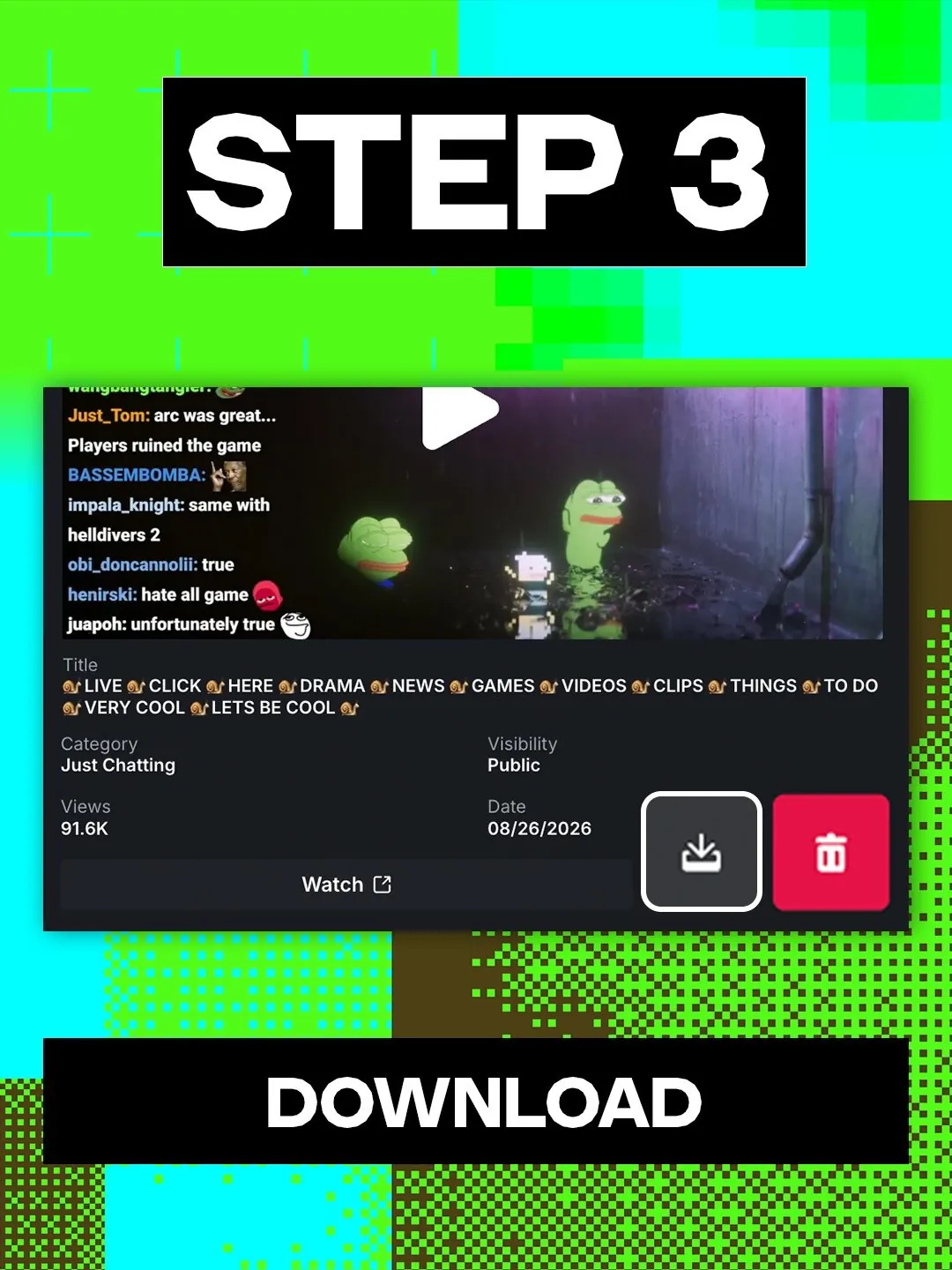
Since September 25 streamers can download their VODs straight from Kick. Open Creator dashboard, go to Studio, then VODs, and click the download button on the stream you want. Our guide to downloading Kick VODs covers how long Kick keeps them and how pinning works.

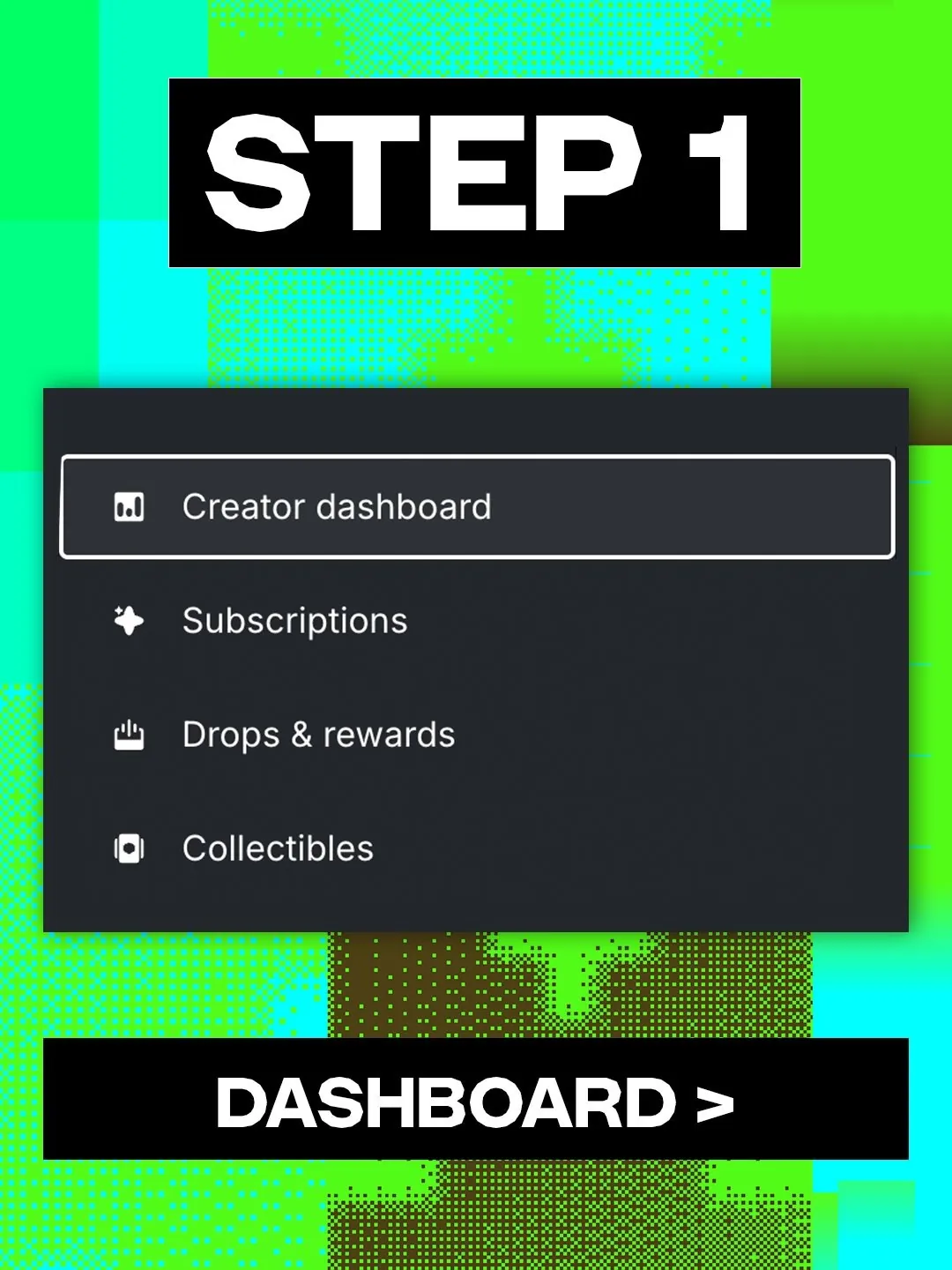
kick avatarKICK@kick𝕏you can now download your VODs straight from kickKick step 1: open Creator dashboardKick step 2: open Studio, then VODsKick step 3: click the download button on a VODSep 25, 2026View on X ↗
Kick’s own post with the three steps, September 25, 2026.

Kick also added a Global Gift Subs Leaderboard. It shows the top 50 channels by gifted subs, updates live and resets every hour on the hour (UTC). The channel that finishes an hour at #1 is featured on the homepage carousel for the next 30 minutes, as long as it’s still live. (Kick Help)
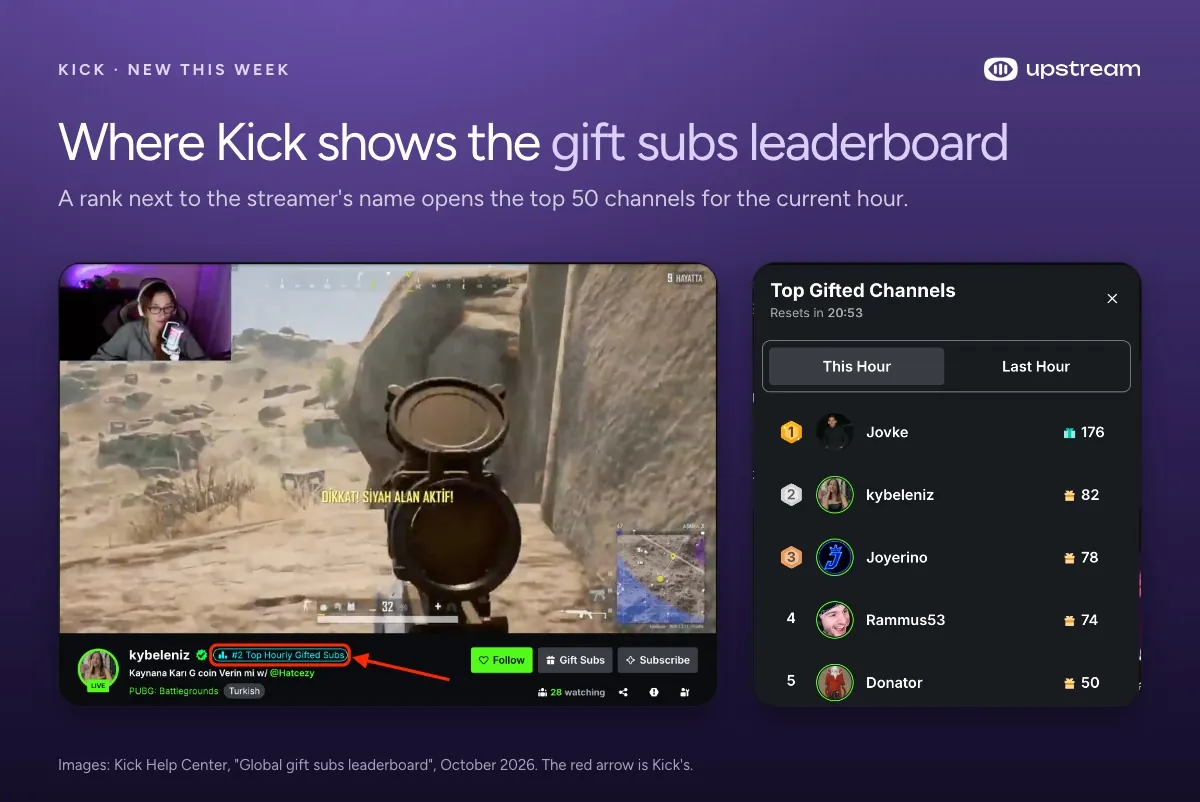
Kick stream page with a Top Hourly Gifted Subs rank next to the streamer name, and the Top Gifted Channels panel
Kick’s own images from its help center: the rank badge on a stream and the hourly panel it opens.

X

On September 29 the X Activity API added a broadcast.chat.remove event. Apps with the broadcast.read scope now get a real time notice when a host or moderator removes a chat message from a broadcast. That’s useful for any tool that mirrors or logs X live chat. (X developer changelog)

Discord

From September 29 Nitro members can upload files up to 1GB, up from 500MB. It’s rolling out over the week. Nitro Basic and free accounts (20MB since August 13) stay the same. (Discord on X)

OBS

OBS Studio 33.0 beta 5 came out on October 1, and the OBS team is asking for testers. It updates browser sources and docks from a July 2024 Chromium (CEF 127) to a September 2026 one (CEF 150). Stable 32.2.2 still has the old engine, which matters after the September chat overlay exploit that went through an outdated browser source.
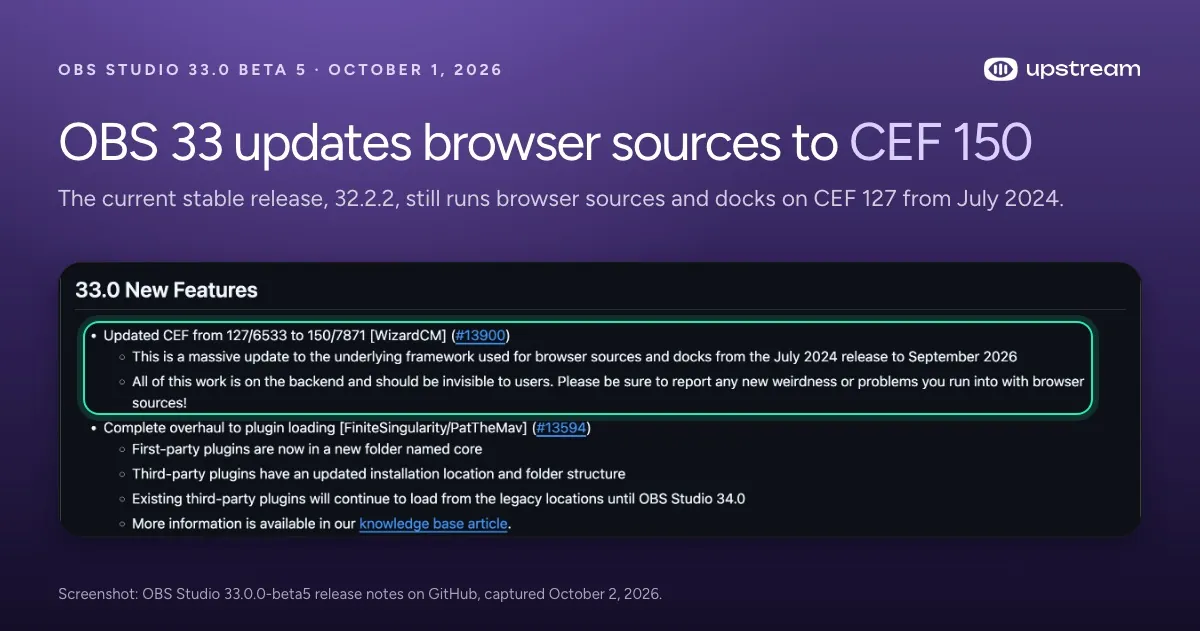
OBS Studio 33.0 beta 5 release notes with the CEF 127 to 150 update highlighted
The 33.0 feature list in the OBS Studio 33.0.0 beta 5 release notes.

First party plugins move to a new core folder. Third party plugins keep loading from their old locations until OBS 34.

What this means if you stream on more than one platform

Every change this week rewards being live where viewers are. Kick’s homepage spot only goes to channels that are live. Twitch Shouts only go to people who showed up. YouTube is pushing original content over reuploads.

Upstream sends one stream to up to 10 of 30+ platforms at once, so a single broadcast counts on YouTube, Twitch, Kick and X together. Live Studio runs in the browser with up to 10 guests, so there’s no OBS to patch. 24/7 and scheduled streams keep a channel live while your computer is off.

The free plan gives you 24 streaming hours a month at 1080p30, with no credit card and no watermark.
Published October 4, 2026
Mario Jankovic

About the author

Mario Jankovic

Product and Engineering

Mario Jankovic co-founded Upstream and runs product and engineering. He writes about running live streams from the cloud: 24/7 channels, multistreaming and Live Studio, and what we learn building them.

Keep exploring

Further reading

Browse all articles
YouTube Shorts Bonus Program: Who Gets Invited and How It Pays
Oct 16, 2026 Blog

YouTube Shorts Bonus Program: Who Gets Invited and How It Pays

Read article
How to Download Kick VODs (With Kick’s New Download Button)
Oct 3, 2026 Guides

How to Download Kick VODs (With Kick’s New Download Button)

Read article
How to Live Stream on YouTube Shorts
Sep 7, 2026 Guides

How to Live Stream on YouTube Shorts

Read article

Start streaming today

Go live to every platform, run a 24/7 channel, and produce live shows in your browser, with no software or server setup.

No credit card 24 hours/month free Full functionality
Start Streaming Free
Upstream

Run your streams from the cloud

Free plan: 24 streaming hours a month, no card, no watermark.

4.5 · 242 reviews on Trustpilot
Legal entity
Zukunft d.o.o.
Registered address
Groznjanska 32, 10000 Zagreb
Company VAT ID
Company VAT ID: HR62560895839
About | Contact us | Tools | Content standards | Privacy Policy | Terms of Service | Affiliate terms |

Product

  • Pricing
  • Upstream Features Overview
    • Multistreaming
    • Separate Audio and Video
    • Overlays: Stream Designer
    • Live Streaming Studio
    • Scheduling & Automation
    • Live Playback Controls
    • Play Stings, Jingles and Ads
    • Team Access
  • Enterprise Broadcasting Solutions

Resources

  • Helpdesk
  • Live Streaming FAQ
  • Blog
  • Release Notes
  • Live Streaming API
  • MCP Server
  • Free Live Streaming
  • YouTube Live Streaming
  • RTMP Server
  • Supported Platforms
  • Live Streaming Limits
  • Integrations

Compare Us

  • Compare Upstream
    • Upstream vs Runnel.live
    • Upstream vs OneStream
    • Upstream vs Live247
    • Upstream vs Gyre
    • Upstream vs Streaming Bots
    • Upstream vs Restream
    • Upstream vs StreamYard
    • Upstream vs LiveReacting
    • Upstream vs Playout.video

Free Tools

  • Design tools
  • Video tools
  • Audio tools
  • AI tools
  • Setup checks

Use cases

  • For Creators
  • For Music Labels
  • Church Streaming
  • VTuber Streaming
  • Multi-Channel Streaming

© 2026 Upstream. All rights reserved.

Stream once - reach every platform.

Sign up for free