Two tools may both support multistreaming but be designed for very different types of broadcasts.
Some are built for 24/7 streaming. Others focus on producing guest interviews in the browser.
Choosing software for the wrong type of stream can leave you paying for features you do not use.
We’ve grouped eight tools by the type of streaming they handle best, starting with Upstream, our cloud multistreaming software that also runs 24/7 and pre-recorded streams. For a ranked list rather than a breakdown by use case, see our guide to the best multistreaming software.
Quick Comparison
| Tool | Type | Best for | Free plan | Price, billed annually | Destinations |
|---|---|---|---|---|---|
| Upstream | Cloud streaming software | Multistreaming with 24/7 and pre-recorded streams built in | 1 stream, 24 hrs/mo, all features | $24/mo | 10 per stream |
| Castr | Playout + CDN hosting | TV-style channels | 7-day trial only | $16.67/mo | 6 to 30 by plan |
| Streamlabs | Creator suite + relay | Gamers who need built-in production tools | Dual Output to one horizontal and one vertical platform | $15.75/mo | Up to 4 with Dual Output on Ultra |
| Restream | Cloud relay + studio | Broad platform reach | 2 streaming platforms; Restream Studio broadcasts include branding | $16/mo | 8 at once, 30+ supported |
| StreamYard | Browser studio | Live guest shows | 1 streaming platform, StreamYard logo included | $35.99/mo | 3 or 8 per plan |
| Riverside | Recording-first studio | Edited video podcasts | 720p quality, watermark | $34/mo for multistreaming | Unlimited (Grow) |
| OneStream Live | Multistream + scheduling | Webinar distribution | 2 streaming platforms, 720p | $12/mo | 2 to 50 by plan |
| Vimeo | Video platform + webinars | Hosted webinars with registration | Limited free tier | $12/mo ($75/mo to simulcast) | 10 integrated + 20 custom RTMP destinations |
Note: Prices and plan limits were last checked in September 2026 and may change.
Go live from your browser.
Invite guests, share screens, build scenes, and add overlays without installing or wiring together another production stack.



Best Multistreaming Platforms for 24/7 Channels
A 24/7 channel is a live stream designed to stay online continuously, usually using pre-recorded video that loops or follows a schedule.
The playback source has to stay online the whole time. You can run it from your own computer or a server, but a cloud tool removes the need to keep local hardware running.
Upstream and Castr both support continuous channels, but their features and pricing are structured differently. For more tools built for 24/7, see our guide to the best 24/7 live streaming software.
Upstream
Upstream is cloud multistreaming software with 24/7 and pre-recorded streaming built in, plus a browser-based live studio.
The stream runs on Upstream’s servers, so your own computer does not have to stay on for the broadcast to continue.
It’s cloud streaming software for 24/7 channels, so a stream started today can run for months, as long as the streaming platform allows it.
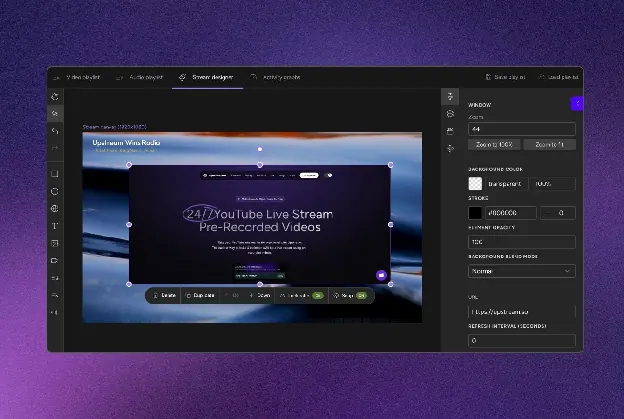
You can add files, reorder the playlist, and update overlays without restarting the stream.
Stream Designer lets you add and move visual elements, embed web content, and display the current song or video as it plays.
Upstream also combines YouTube, Twitch, Kick and Rumble chat into one feed while you stream, on all plans including the free one.
You can also add a multichat overlay from a third-party chat aggregation tool, like Social Stream Ninja, so messages from several platforms appear in one place on the stream.
Other key features:
- YouTube-verified encoder
- 100 GB storage per stream
- Scheduling and stream automation
- Stings, jingles, and ad inserts
Paid plans and the free plan include multistreaming, so you can send each stream to up to 10 of 30+ supported platforms without paying extra for the feature.
There’s a free plan with one stream, while paid plans differ only in the number of streams you can run at the same time.
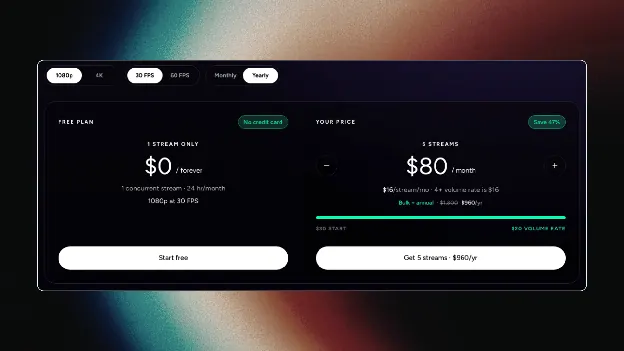
With the free plan, you can stream in 1080p at 30 frames per second (FPS), with 24 hours of streaming a month.
Paid plans start at $30 month-to-month or $24 per month when billed annually.
Castr
Castr describes its product as TV playout software.
Playout is scheduled programming built from recorded videos and live sources. Castr arranges that content into a continuous channel.
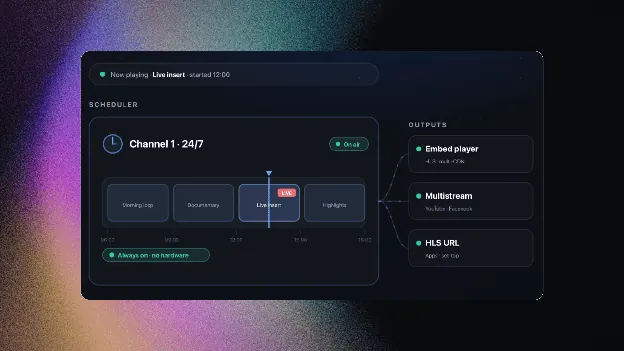
It also delivers video over its own content delivery network (CDN), so the channel can be embedded on your site, sold behind a paywall, or published through your own branded streaming apps, also known as OTT apps.
While Upstream charges based on the number of concurrent streams, with all features included, Castr’s plans include different amounts of bandwidth, storage, and other features.
Key features:
- TV Playout scheduling
- Multi-CDN delivery
- Embeddable website player
- Paywall and monetization
- White-label OTT apps
There is no free plan, only a seven-day trial. The tiers are shown below.
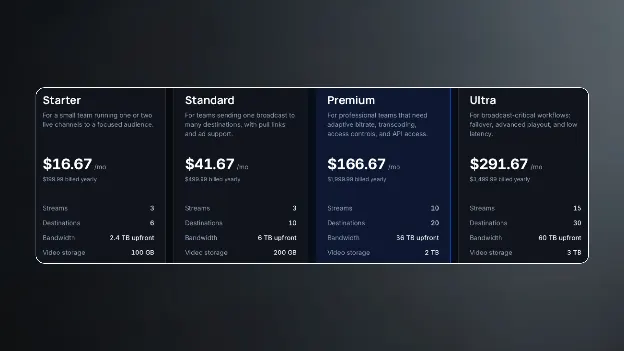
Starter includes three streams and six destinations (on annual billing), while higher plans add more bandwidth and destinations, as well as automatic video quality adjustment for different internet speeds.
Castr supports scheduled 24/7 playout, but looping is limited to higher plans and specific maximum durations.
It fits TV and radio channels, sports and event producers, and companies that want to show the broadcast through their own website, player, or app.
Best Multistreaming Platforms for Gaming
Gaming changes the priorities, because the stream is often produced live and the audience is typically spread across Twitch, YouTube, Kick, and TikTok.
Sending a separate stream to each platform from your computer uses more processing power and upload bandwidth.
But cloud multistreaming tools reduce the strain on your computer and internet connection.
Streamlabs
Streamlabs combines several creator tools in one product, including a desktop streaming app, alerts, overlays, tipping pages, and a mobile app.
Multistreaming is one of those tools.
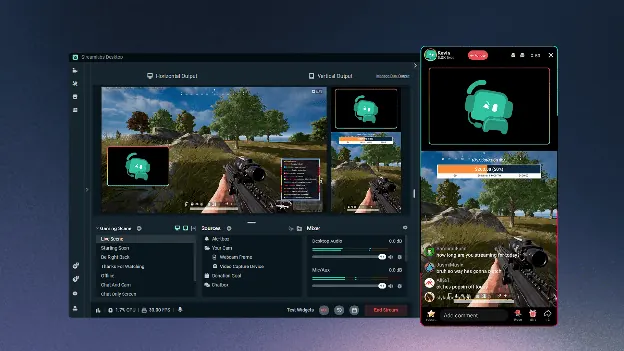
One notable feature is Dual Output, which can send horizontal and vertical versions of the stream at the same time, such as Twitch and TikTok.
There’s also the Streamlabs Console, which lets users broadcast from an Xbox without needing a capture card or a second computer.
Key features:
- Dual Output canvases
- Console streaming
- Overlay and alert library
- Chat from multiple platforms in one window
Streamlabs has a free version, while paid subscriptions add multistreaming and a broader bundle of creator tools.
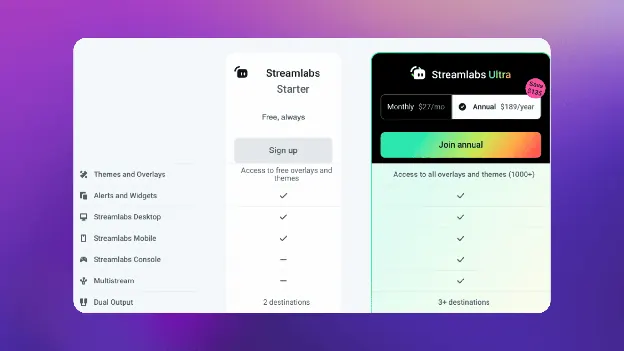
Multistreaming from the desktop app requires Streamlabs Ultra, at $27 a month or $189 a year.
Streamlabs makes the most sense when you need its production tools in addition to multistreaming. But if multistreaming is all you need, the next tool on this list might be a better option.
Restream
Restream is primarily a multistreaming relay, although it also includes a browser studio, chat, pre-recorded streaming, and recording tools.
More than 30 platforms are supported, though how many you use at once depends on the plan, from two on the free plan to eight on Business.
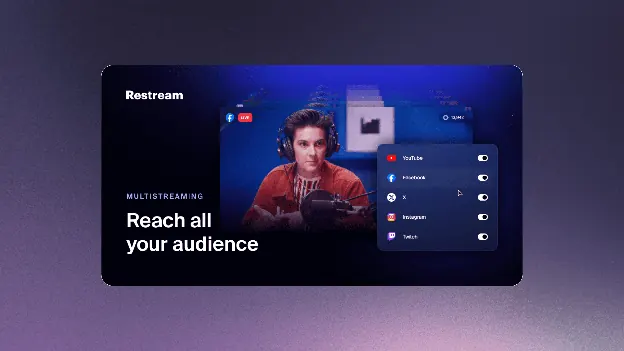
Its combined chat collects messages from supported platforms in one window during the stream.
Restream can also receive a stream from OBS, vMix, or another encoder and send it to the selected platforms.
Key features:
- 30+ supported platforms
- Combined cross-platform chat
- Browser studio with guests
- Pre-recorded uploads
- Per-platform stream titles
The free plan supports two destinations, while broadcasts produced in Restream Studio include Restream branding.
The paid tiers are shown below:
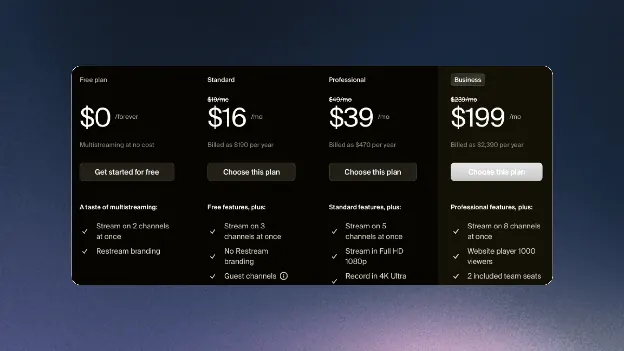
The Standard plan removes the branding, Professional adds Full HD streaming in Restream Studio, and Business lets you stream to up to eight destinations at once.
Compared to Streamlabs, Restream is a better choice if you already produce your stream in OBS or vMix and want to send it to a wide range of supported platforms.
If you want your channel to stay live between gaming sessions, Upstream is the better pick.
Like Restream, it takes one stream from OBS and delivers it to your destinations from the cloud, but it can also run your past streams 24/7, even with your computer turned off.
Best Multistreaming Platforms for Podcasts
Podcast production often benefits from a separate, high-quality recording of each participant.
StreamYard and Riverside can record participants locally and upload their tracks separately.
StreamYard
StreamYard is a browser studio, so hosts and guests join from a link with no software to install.
That matters for podcasts: a guest with no technical background can join in a minute.
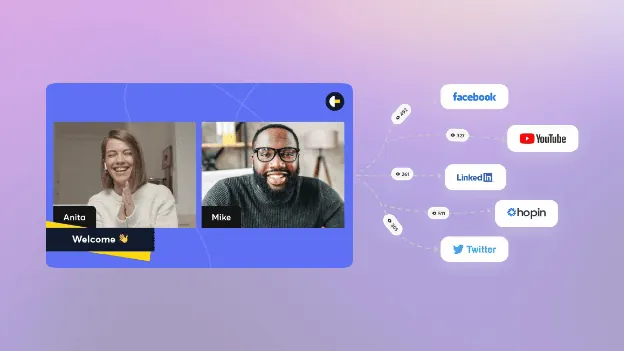
Each participant’s device records its own video and audio, up to 4K on Advanced, with separate 48 kHz WAV audio tracks.
Because each participant is recorded locally, the downloaded tracks are less dependent on connection quality than the live broadcast itself.
Compared to Riverside, StreamYard focuses primarily on producing the live show, with local recording as an additional feature.
Key features:
- Guest joining by link
- Local per-participant recording
- Branded overlays and layouts
- AI-generated clips
- Pre-recorded streams
It works well for interviews and panels that are streamed live and later published as podcast episodes.
Plans are shown below.
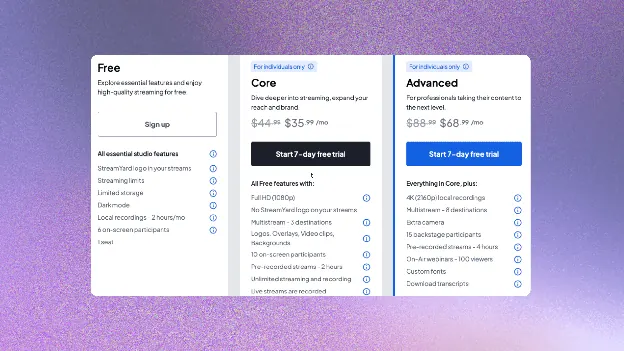
The free plan supports one destination and adds a StreamYard logo to the broadcast, while streaming to more destinations requires a paid plan.
StreamYard is a good fit when the live show and audience interaction matter as much as the finished podcast episode.
Riverside
Compared to StreamYard, Riverside focuses more on recording and editing than on producing the live broadcast.
Riverside records each participant at up to 4K, while live streams are limited to 1080p.
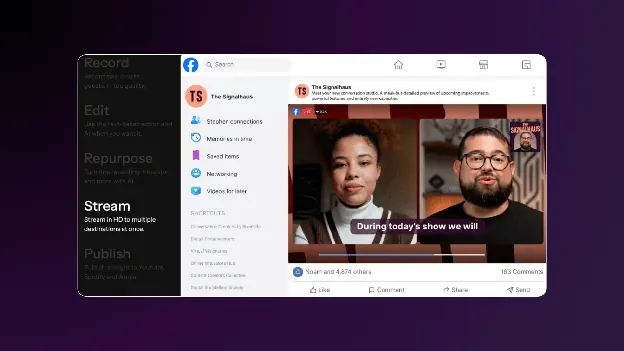
Riverside’s advantage is its editing tools, including a text-based editor that cuts the video when you delete words from the transcript.
Magic Clips then turns moments from a long recording into short vertical videos, which can reduce the manual work involved in finding and formatting short clips.
Key features:
- Local 4K recording
- Separate tracks per speaker
- Text-based video editing
- AI clips and transcripts
It fits podcasters whose main product is the edited episode and its clips.
Pricing info is shown below:
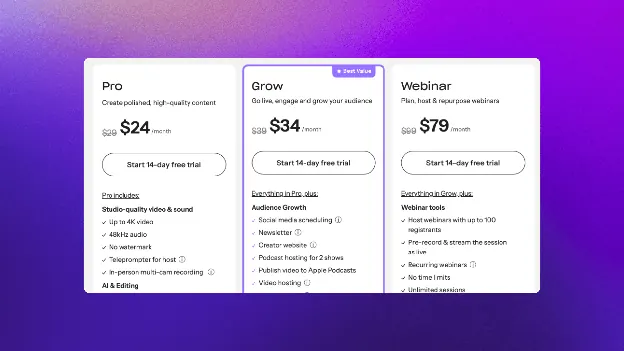
StreamYard’s plans differ mainly by the number of multistreaming destinations, while Riverside’s paid plans differ by features, studios, and the monthly allowance for downloading separate participant tracks. Our StreamYard pricing page lays each tier next to Upstream.
Live multistreaming starts on Grow.
Riverside also offers a custom Business plan with additional enterprise features.
Best Multistreaming Platforms for Webinars
For many webinar teams, registration, attendance data, and follow-up tools matter as much as destination count.
OneStream focuses on distributing a webinar to multiple destinations, while Vimeo adds registration and audience-management tools.
OneStream Live
OneStream Live is a cloud service that lets presenters stream from a browser, a recording, or an encoder such as OBS.
It supports more than 45 platforms, with the number of simultaneous destinations ranging from two to 50 by plan.
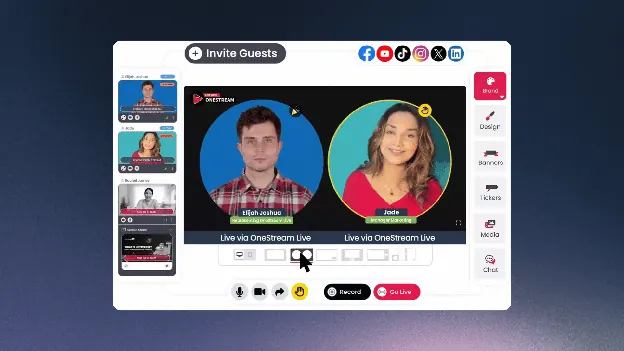
OneStream Live is useful when the webinar is already produced, and the main goal is to schedule it or send it to several platforms at once.
Custom websites enable you to create a branded page with your logo, description, and chat, even if you do not have a website.
Key features:
- 45+ destinations
- Pre-recorded scheduling
- Custom Websites
- Unified Chat
- Embeddable player
The plans differ mainly in the number of destinations, storage space, and team members you can add.
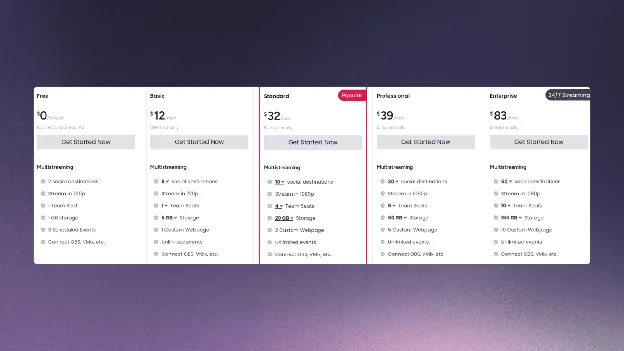
Free allows two destinations at 720p, paid plans support up to 50 destinations, and 24/7 streaming costs extra.
OneStream Live is best suited to webinar distribution rather than registration, attendance tracking, and follow-up.
Vimeo
Vimeo combines webinar tools with its existing video-hosting platform. Users can manage the video library, branded player, and viewer analytics within Vimeo rather than through each social platform.
Vimeo calls its multistreaming feature simulcasting.
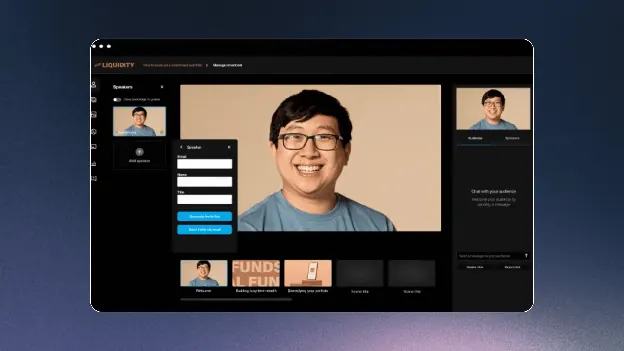
Its webinar tools include registration pages, branded reminder emails, live chat, polls, and attendance reports.
Per event, you can add 10 integrated platforms such as YouTube, Facebook, and LinkedIn, plus 20 custom RTMP destinations.
Key features:
- Registration and reminder emails
- Polls, chat, and Q&A
- 10 integrated platforms + 20 RTMP destinations per event
- Event and viewer analytics
- Video library and player
Vimeo’s paid plans are listed below, but there’s also a free basic plan.
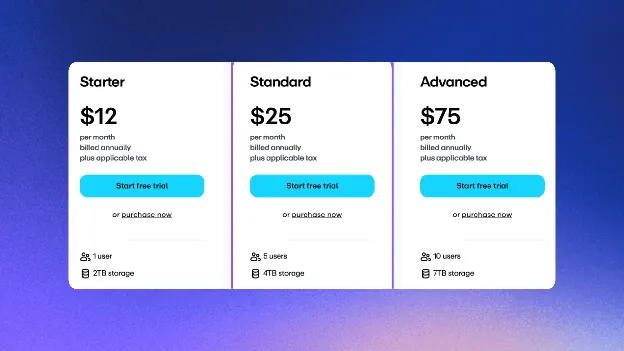
Starter and Standard cover hosting, while simulcasting, webinars, and virtual events require the Advanced plan at $75 a month.
There is also the Enterprise plan with the Events feature, which adds customizable reminder and follow-up emails for webinars.
Vimeo is best suited to companies that need video hosting, webinars, and viewer data in one product.
Also, if your webinar is recorded in advance, Upstream can stream it to up to 10 destinations at a set time, so your computer doesn’t need to stay on.
Test the workflow before choosing a plan
Which tool fits you best comes down to how you stream: live or pre-recorded, alone or with guests, and whether you need recordings or registration pages afterward.
A tool may look affordable until you realize you need a higher plan for more destinations, guest controls, local recordings, or pre-recorded streaming.
Test the workflow you will pay for. If you stream from OBS, send the same test to your intended destinations and check picture, sound and chat. For interviews, check the guest joining steps and the recording files you need afterward.
For a recorded webinar or continuous channel, test scheduling and playback with your computer off. Compare the plans that support that workflow, including destination count, storage and recording limits.
If your workflow includes pre-recorded broadcasts, scheduled content, or long-running streams, Upstream combines those features with multistreaming and a browser-based live studio.
You can try it for free and see whether it fits the way you stream.