Upstream.so
Upstream.so
  • Product
  • Features
  • Platforms
  • Resources
  • Pricing
Login Sign up for free
Release Notes

Website Player: an ad-free live stream player for your site

Written by Domagoj Franc November 13, 2026 · 5 min read
  1. What visitors see on your page
  2. One embed code for every stream
  3. How to add Website Player to your site
  4. What it costs
  5. How it compares with other website players
  6. FAQ
    1. Does Website Player show ads?
    2. Can I stream to my website and YouTube at the same time?
    3. How much bandwidth does a live stream on my website use?
    4. Does the embed code change for each stream?
    5. Does it work with WordPress, Wix and Squarespace?

Your Upstream.so stream can now play on your own website, in a player without ads, suggested videos or another platform’s logo. Website Player is a new destination, so one stream can go to your site and to YouTube, Twitch or Kick at the same time. It works for live, scheduled and 24/7 streams.

It costs $15 a month on an eligible paid plan and includes 1 TB of bandwidth every month. Restream offers its web player only on its $239 a month Business plan.

What visitors see on your page
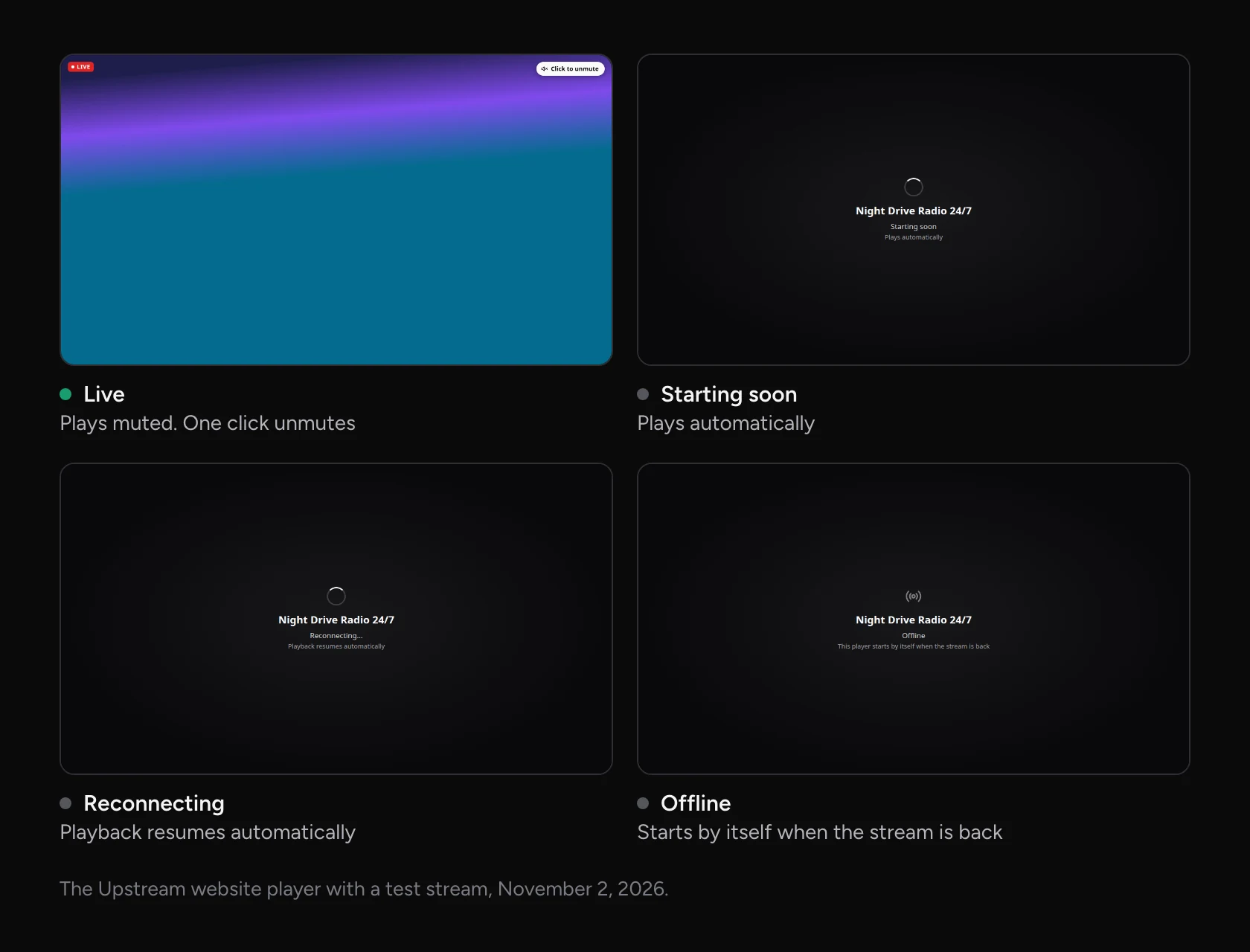
Four Upstream.so website player screens: Live, playing muted with a Click to unmute button, Starting soon, Reconnecting, and Offline
The player as your stream goes live, drops and stops. Visitors never have to reload the page.

The player starts muted, and one click turns the sound on. Visitors can go fullscreen, pop the video out with picture-in-picture, or send it to their TV with AirPlay or Chromecast. Between streams it shows your stream’s name and Offline, switches to Starting soon when you press Start, then plays by itself.

Video is delivered over HTTP Live Streaming (HLS), which plays in current browsers on phones and computers with nothing to install. Safari uses its built-in player and other browsers use hls.js.

One embed code for every stream

A YouTube embed points at one broadcast, so each new live stream needs a new code on your page. The Website Player code stays the same. Stop tonight, start again tomorrow, and the player on your page picks the stream up without you touching the site.

That also makes Website Player a simple way to run a 24/7 channel on your own website. Your playlist loops in the cloud and your page plays it around the clock, with your computer off.

How to add Website Player to your site
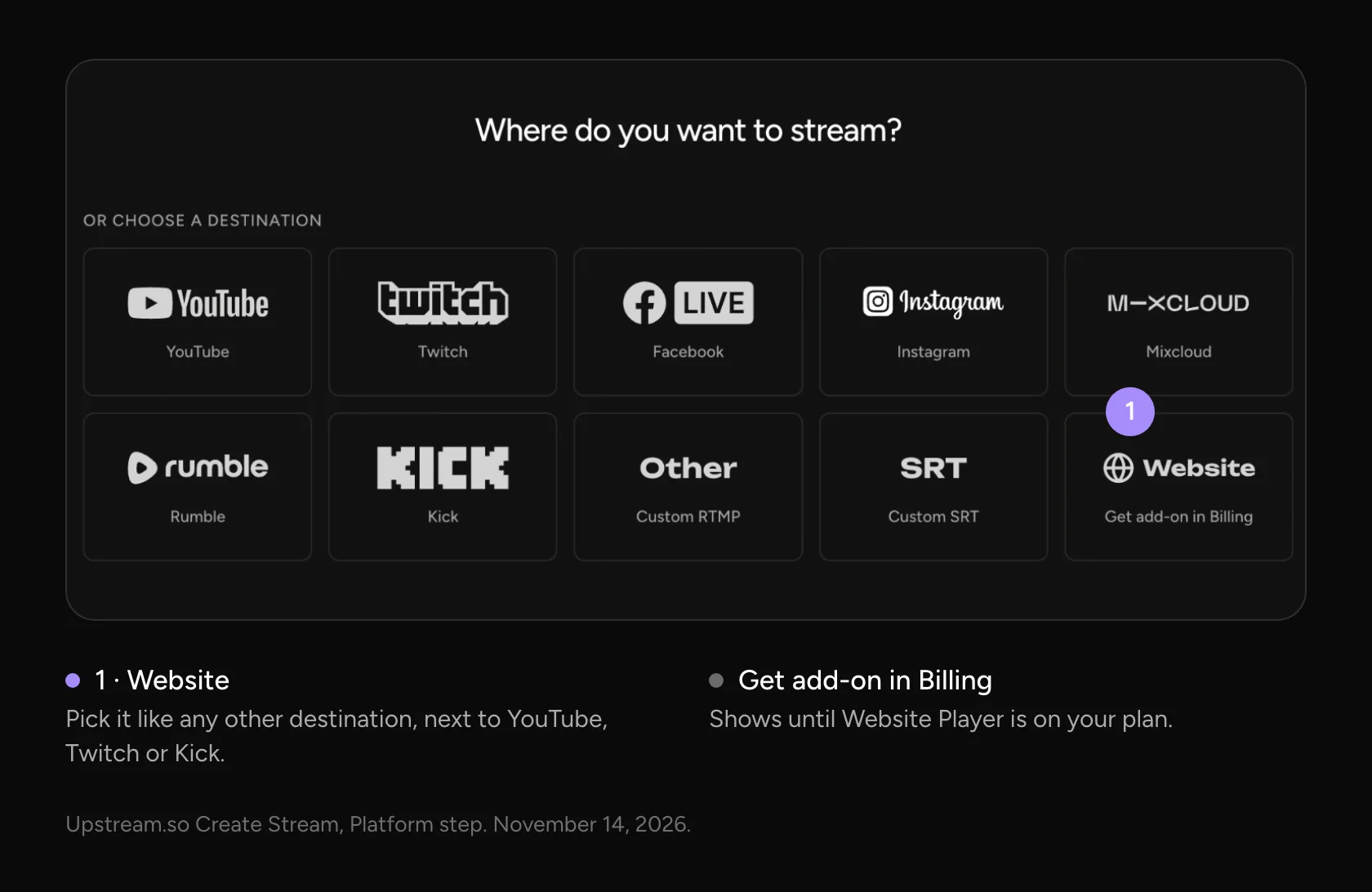
The Where do you want to stream? step in Upstream.so, with Website as a destination tile next to YouTube, Twitch, Facebook, Instagram, Mixcloud, Rumble, Kick, Custom RTMP and Custom SRT
Website sits next to the other destinations. One stream can go to all of them.
  1. On an eligible paid Upstream.so plan, open Manage subscription > Add-ons and choose Website player.
  2. For a new stream, select Website when you pick a destination. For an existing stream, add it under Stream settings > Multistreaming.
  3. Open Stream settings > Website player and copy the Embed code.
  4. Paste it into an HTML or Embed block on your page in WordPress, Wix, Squarespace or Webflow. If your site builder asks for a URL, copy the Player link instead.
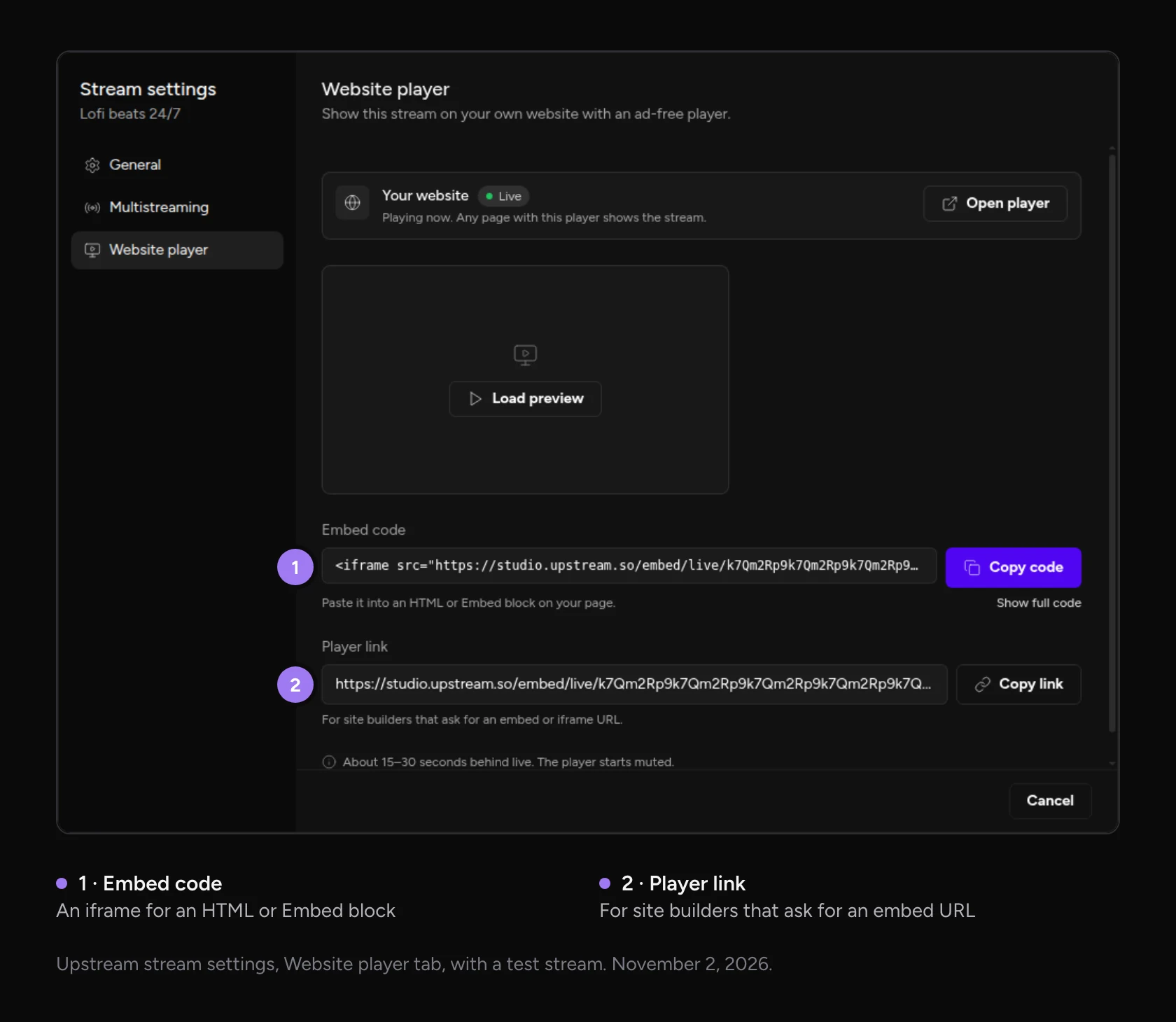
The Website player tab in Upstream.so stream settings, with the embed code and Copy code button, and the player link with Copy link
The Website player tab. Copy the code for your page, or the link for site builders that want a URL.

The embed code is a standard iframe. It fills the width of your page and keeps a 16:9 shape on phones. See every feature of the live stream player for your website on its product page. For YouTube, Twitch and self-hosted options, see our guide to embedding a live stream on your website.

What it costs

Website Player is a $15 a month add-on to an eligible paid Upstream.so plan. It includes 1 TB of bandwidth per full month. Bandwidth is the data sent to people watching on your site, so you pay for what they watch rather than per viewer. Your first billing period may be prorated to match your plan’s renewal date.

When your remaining bandwidth is projected to reach 200 GB, Upstream.so automatically buys another 1 TB for $15. Any unused bandwidth you buy carries forward.

At the default bitrate of 8 Mbps for video and 128 kbps for audio, one viewer uses about 3.7 GB an hour. So 1 TB covers roughly 270 hours of watching, such as an average of 10 people watching a stream that runs 27 hours in a month.

You can estimate your own usage in Manage subscription > Add-ons > Website player > Bandwidth calculator. It shows $15 for the example above. Because a top-up starts when about 200 GB is left, a second $15 can be charged before you use the full 1 TB.

Open Usage history in the same section to see bandwidth, watch time, playback sessions and the estimated peak number of viewers watching at once.

How it compares with other website players

Most streaming services charge more for the player, the bandwidth behind it, or both. This is what each one listed on its pricing page on November 14, 2026.

Website player comes withBandwidth includedExtra bandwidth
Upstream.so$15 a month add-on to an eligible paid plan1 TB a month$15 per TB
RestreamBusiness plan, $239 a month or $199 a month billed yearlyNot sold by bandwidth, up to 1,000 viewers at onceNot available
LivepushEvent plan, from $49 a month1 TB a month$0.07 per GB, about $70 per TB
DacastStarter plan, $39 a month billed yearly2.4 TB a year$0.30 per GB, about $300 per TB
CastrStarter plan, $19.99 a month200 GB a monthNot published
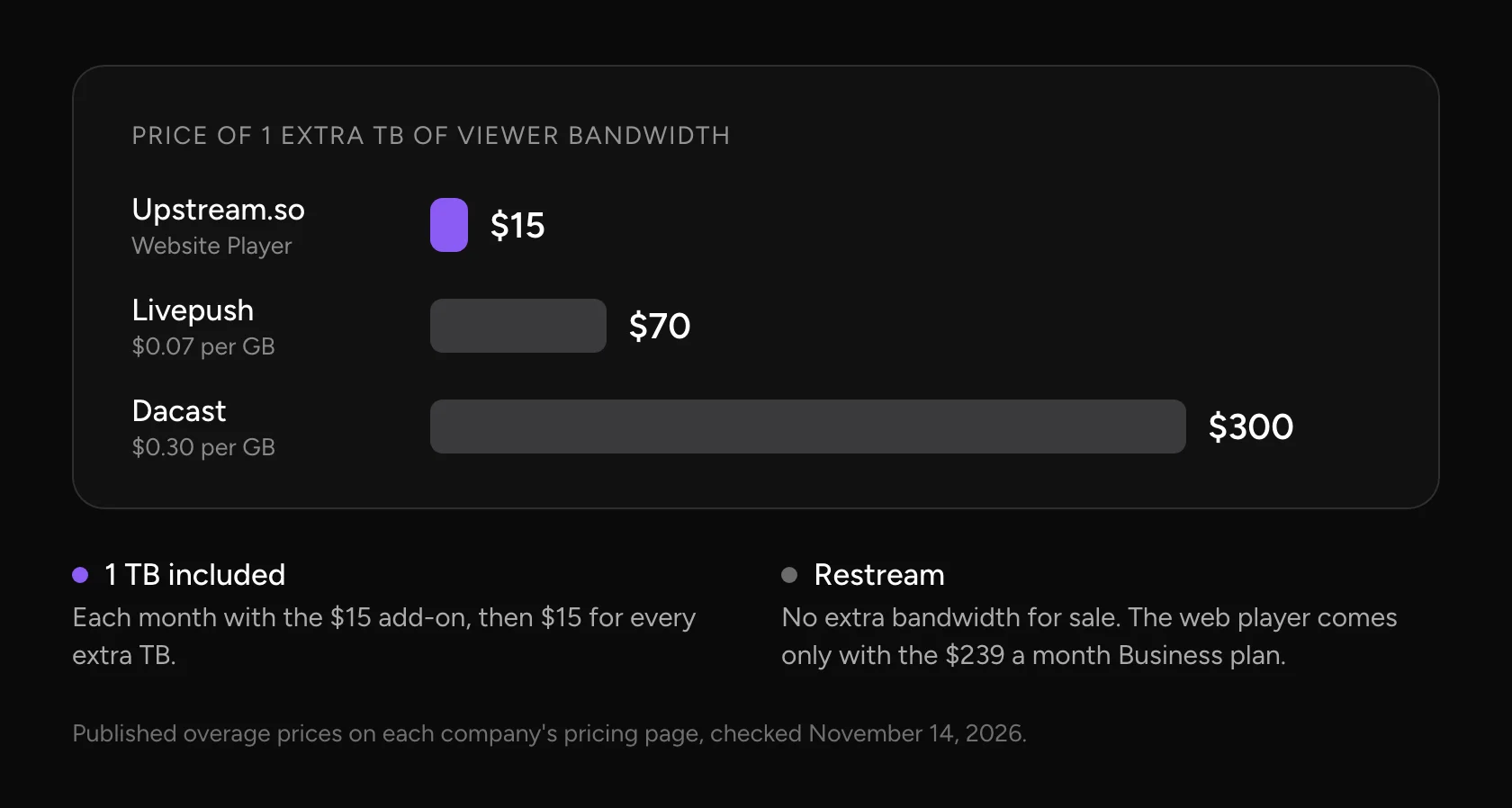
Bar chart of the price of 1 extra TB of viewer bandwidth: Upstream.so $15, Livepush $70 at $0.07 per GB, Dacast $300 at $0.30 per GB. Restream sells no extra bandwidth and keeps its web player on the $239 a month Business plan
One more terabyte for your viewers, priced from each company’s published overage rate.

A busy month costs Upstream.so users another $15 per terabyte. At Dacast’s published rate the same terabyte costs $300. Gyre, another 24/7 streaming service, has no website player at all.

FAQ

Does Website Player show ads?

No. The player shows your stream without ads, suggested videos or a platform logo.

Can I stream to my website and YouTube at the same time?

Yes. Website is a destination like YouTube, Twitch or Kick. Add it to the same stream and Upstream.so sends the video to all of them at once.

How much bandwidth does a live stream on my website use?

At the default 8 Mbps video and 128 kbps audio, each viewer uses about 3.7 GB an hour. The 1 TB included each month covers roughly 270 hours of watching, for example 10 people watching for 27 hours.

Does the embed code change for each stream?

No. The code stays the same. Between streams the player shows Offline, then Starting soon when you press Start, and plays once you’re live.

Does it work with WordPress, Wix and Squarespace?

Yes. Paste the embed code into an HTML or Embed block. Site builders that ask for a URL take the player link instead.

Build in the cloud

Build the stream in the cloud.

Schedule videos, produce browser-based live shows, or send one feed to multiple platforms from the same Upstream.so workflow.

Sign up for free See the platform
2 / 10 guests
MiaLeo
GuestsEncodersStyleChatDestinationsGraphics
Destinations

Where this stream goes when it is live.Streaming to 5 destinations.

  • Lofi HoursPrimary destination ChatReadyStartingStreaming
  • lofihoursMultistream destination ChatReadyStartingStreaming
  • lofihoursMultistream destination ChatReadyStartingStreaming
  • Lofi HoursMultistream destinationReadyStartingStreaming
  • TikTokMultistream destinationReadyStartingStreaming
Manage destinations
Published November 13, 2026
Domagoj Franc

About the author

Domagoj Franc

Co-Founder & CTO

Domagoj is a co-founder and CTO of Upstream.so. He writes about the platform underneath the product: infrastructure, backend architecture, and the automation that lets a small team keep its services online. Before Upstream.so he spent about ten years building backends for other people, usually leading the developers from idea to production.

Keep exploring

Further reading

Browse all articles
A new look for Upstream: calmer cards, pins and new themes
Oct 29, 2026 Release Notes

A new look for Upstream: calmer cards, pins and new themes

Read article
October Update: Multi-chat, 60 fps OBS Streams and AI Connectors
Oct 15, 2026 Release Notes

October Update: Multi-chat, 60 fps OBS Streams and AI Connectors

Read article
Fall Update: Kick Connect, Saved Destinations, Demo Streams and Link Imports
Oct 1, 2026 Release Notes

Fall Update: Kick Connect, Saved Destinations, Demo Streams and Link Imports

Read article

Start streaming today

Go live on up to 10 of 30+ platforms, run a 24/7 channel, and produce live shows in your browser, with no software or server setup.

No credit card 24 hours/month free Full functionality
Start Streaming Free
24/7 Live Streaming Run cloud channels that stay live around the clock. Live Studio Invite guests, share screens, and add branded overlays in the browser. Multistreaming Send one live feed to YouTube, Twitch, Kick, and RTMP endpoints. Pre-recorded Live Streaming Upload pre-recorded videos & Go Live without the stress of live production. Free plan 24 hours a month with no watermark. Multi-channel streaming Separate live channels from one account. Enterprise Setups for teams, labels and agencies. About Upstream.so Who we are and how Upstream.so works.
Overlays Layers and widgets in Stream Designer. RTMP server Stream in from OBS or any encoder. Multichat Every platform's chat in one feed. Stings, jingles and ads Inserts that play between your videos. Scheduling Streams that start and end on their own. Playback controls Skip or play any file while you stay live. Team access Invite your team, each with their own role. Backup streams A standby feed if your main one drops. Audio and video playlists Loop music and visuals separately. Media library & storage Organize files and cloud uploads. Live Streaming API Run streams, media and queues from code. MCP Server Manage streams from your AI assistant. Website player Embed your live stream on your site. All features Everything Upstream.so does, on one page.
YouTube live streaming Twitch live streaming Kick live streaming Facebook live streaming Instagram live streaming TikTok TikTok live streaming Rumble live streaming Mixcloud live streaming Up to 10 of 30+ Plus any custom RTMP or SRT destination.
Platform limits Bitrate and duration caps for each platform. Integrations Setup guides for OBS, vMix, cameras and more. VTuber Streaming Go live with your avatar on up to 10 of 30+ platforms.
Blog Guides, platform rules and news for anyone who goes live. Guides Setup guides for 24/7 streams, multistreaming and RTMP. Release Notes The new features in each Upstream.so update, in one place. Free Tools Video, audio, thumbnail and AI tools, plus camera and mic checks. Helpdesk Step by step setup help and troubleshooting for Upstream.so. Service status Current service health, uptime history and incident updates. Live Streaming FAQ Short answers to what people ask before they go live. Compare Upstream.so Upstream.so side by side with Restream, StreamYard and others. Latest post YouTube Dual Stream: What the Vertical Copy Does and How to Turn It Off
Always-on 24/7 Live Streaming Run cloud channels that stay live around the clock.
Explore
Real-time live Live Studio Invite guests, share screens, and add branded overlays in the browser.
Explore
One stream, up to 10 of 30+ platforms Multistreaming Send one live feed to YouTube, Twitch, Kick, and RTMP endpoints.
Explore
Schedule & Automate Pre-recorded Live Streaming Upload pre-recorded videos & Go Live without the stress of live production.
Explore
Free plan 24 hours a month with no watermark.
Multi-channel streaming Separate live channels from one account.
Enterprise Setups for teams, labels and agencies.
About Upstream.so Who we are and how Upstream.so works.
Overlays Layers and widgets in Stream Designer. RTMP server Stream in from OBS or any encoder. Multichat Every platform's chat in one feed. Stings, jingles and ads Inserts that play between your videos. Scheduling Streams that start and end on their own. Playback controls Skip or play any file while you stay live. Team access Invite your team, each with their own role. Backup streams A standby feed if your main one drops. Audio and video playlists Loop music and visuals separately. Media library & storage Organize files and cloud uploads.
Live Streaming API Run streams, media and queues from code.
MCP Server Manage streams from your AI assistant.
Website player Embed your live stream on your site.
All features Everything Upstream.so does, on one page.
YouTube live streaming. 24/7 channels with midroll ads. Twitch live streaming. Streams restart on their own at 48 hours. Kick live streaming. Stay live with your computer off. Facebook live streaming. Schedule lives that start on their own. Instagram live streaming. Go live from your browser or the cloud. TikTok TikTok live streaming. Go live on TikTok and Instagram at once. Rumble live streaming. Add Rumble to your YouTube or Kick stream. Mixcloud live streaming. DJ sets and radio shows from your browser. Up to 10 of 30+ Plus any custom RTMP or SRT destination.
Platform limits Bitrate and duration caps for each platform.
Integrations Setup guides for OBS, vMix, cameras and more.
VTuber Streaming Go live with your avatar on up to 10 of 30+ platforms.
Blog
Guides
Release Notes
Free Tools
Helpdesk
Service status
Live Streaming FAQ
Compare Upstream.so
YouTube Dual Stream: What the Vertical Copy Does and How to Turn It Off YouTube Dual Stream: What the Vertical Copy Does and How to Turn It Off
Upstream.so

Run your streams from the cloud

Free plan: 24 streaming hours a month, no card, no watermark.

4.6 · 245 reviews on Trustpilot
Legal entity
Zukunft d.o.o.
Registered address
Grožnjanska ulica 32, 10000 Zagreb, Croatia
Company VAT ID
Company VAT ID: HR62560895839
About | Contact us | Tools | Content standards | Security | Privacy Policy | Terms of Service | Affiliate terms | Legal notice |

Product

  • Pricing
  • Upstream.so Features Overview
    • Multistreaming
    • Media Library & Storage
    • Website Player
    • Separate Audio and Video
    • Overlays: Stream Designer
    • Live Streaming Studio
    • Scheduling & Automation
    • Live Playback Controls
    • Play Stings, Jingles and Ads
    • Team Access
  • Enterprise Broadcasting Solutions

Resources

  • Helpdesk
  • Service status
  • Live Streaming FAQ
  • Blog
  • Release Notes
  • Live Streaming API
  • MCP Server
  • Free Live Streaming
  • YouTube Live Streaming
  • RTMP Server
  • Supported Platforms
  • Live Streaming Limits
  • Integrations

Compare us

  • Compare Upstream.so
    • Upstream.so vs Runnel.live
    • Upstream.so vs OneStream
    • Upstream.so vs Live247
    • Upstream.so vs Gyre
    • Upstream.so vs Streaming Bots
    • Upstream.so vs Restream
    • Upstream.so vs StreamYard
    • Upstream.so vs LiveReacting
    • Upstream.so vs Playout.video

Free tools

  • Design tools
  • Video tools
  • Audio tools
  • AI tools
  • Setup checks

Use cases

  • For Creators
  • For Music Labels
  • Church Streaming
  • VTuber Streaming
  • Multi-Channel Streaming

© 2026 Upstream.so. All rights reserved.