Upstream
Upstream
  • Product
  • Features
  • Platforms
  • Resources
  • Pricing
Login Sign up for free
Guides

What is SCTE-35? Ad break markers for FAST channels

Written by Mario Jankovic November 5, 2026 · 7 min read
  1. What an SCTE-35 marker says
  2. A real SCTE-35 cue, decoded
  3. How the marker travels
  4. Why FAST channels need SCTE-35
  5. What Roku asks for
  6. Where markers get lost
  7. SCTE-35 and YouTube
  8. SCTE-35 with Upstream
  9. SCTE-35: FAQ
    1. What does SCTE stand for?
    2. What is the difference between SCTE-35 and SCTE-104?
    3. Does SCTE-35 insert the ads?
    4. Can FFmpeg add SCTE-35 markers?
    5. Do I need SCTE-35 for a YouTube channel?
  10. Sources

SCTE-35 is the standard way to mark ad breaks inside a live video stream. A small message travels with the video and says, in effect, “a break starts now and lasts two minutes”. FAST platforms such as The Roku Channel, Samsung TV Plus and Pluto TV read those markers and put their own ads into the gap. A channel without them usually has no breaks for the platform to sell.

The marker doesn’t pick the ads or insert them. It only says where the break is and how long it lasts. The platform’s ad system does the rest.
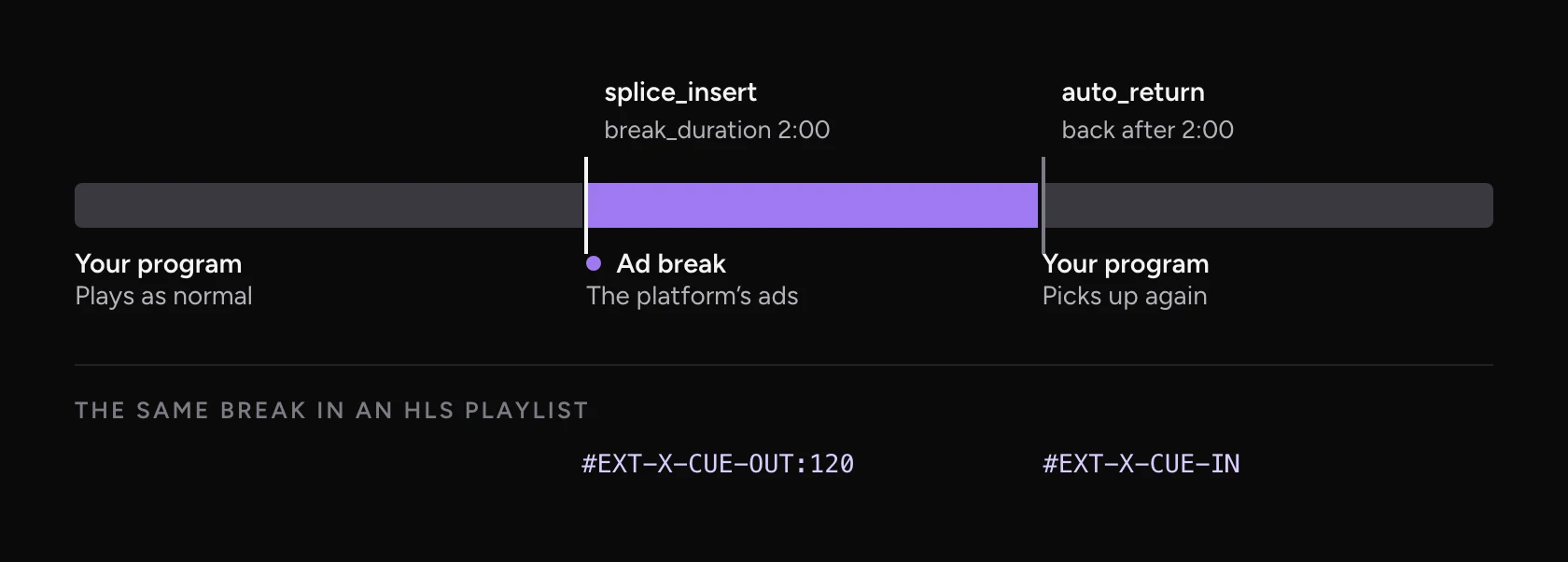
Timeline of a channel: the program, then a splice_insert marker starting a two minute ad break, then auto_return back to the program, with the matching HLS CUE-OUT and CUE-IN tags below
One ad break. The marker starts it and sets its length, and the stream returns to the program by itself.

What an SCTE-35 marker says

The standard is ANSI/SCTE 35, the Digital Program Insertion Cueing Message, published by SCTE. Its latest edition is numbered SCTE 35-1, next to a newer Part 2. It defines the messages and how they ride along with the video. It says nothing about which ads to play.

Most ad breaks use one of two commands:

splice_inserttime_signal
Command type56
What it saysLeave the program now, or at this frame, for this longSomething happens at this frame. A descriptor says what
What carries the meaningIts own fields: out of network, duration, auto returnA segmentation descriptor, such as Provider Placement Opportunity Start
Where you see itSimple ad breaks, and many FAST channelsRicher schedules: program starts, chapters, blackouts

A splice_insert for an ad break carries a few fields that matter:

  • out_of_network_indicator: 1 means leave the program for a break, 0 means come back.
  • splice_event_id: a number for this break, so its start and end can be matched.
  • splice_immediate_flag or pts_time: start the break now, or at an exact frame on the stream’s own clock.
  • break_duration: how long the break lasts, in ticks of a 90,000-per-second clock. Thirty seconds is 2,700,000 ticks.
  • auto_return: 1 means the program comes back by itself when the time is up, with no second message.

A real SCTE-35 cue, decoded

Unified Streaming runs a public demo stream with SCTE-35 breaks in it. On November 4, 2026 its playlist marked a 38.4 second break about every two minutes. Here is one of those cues, and what its bytes mean.
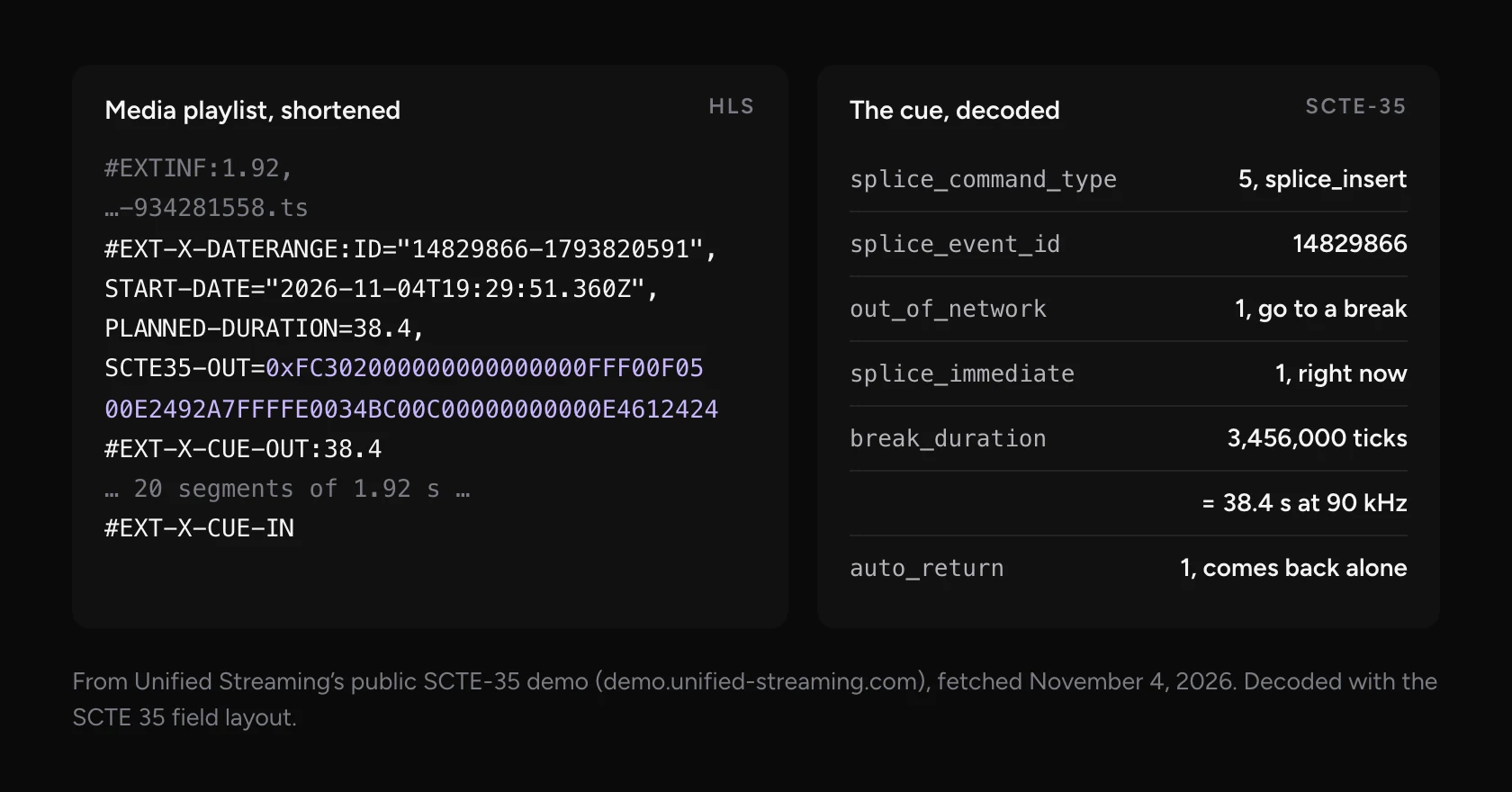
A real HLS playlist with an EXT-X-DATERANGE tag carrying SCTE35-OUT hex, then CUE-OUT 38.4 and CUE-IN, next to the decoded cue: splice_insert, out of network, immediate, break duration 3,456,000 ticks or 38.4 seconds, auto return
The hex after SCTE35-OUT is the cue itself. Decoded, it’s an immediate splice_insert for 38.4 seconds that returns by itself.

That’s the simplest form a break can take, and a common one. Google’s Live Stream API uses the same flags in its own example: out of network, immediate, with a duration and auto return.

How the marker travels

In an MPEG-TS stream, the format broadcasters send, SCTE-35 has its own track. It sits on a separate PID with stream type 0x86, and the program is tagged with the registration code CUEI so receivers know to look for it.

When the stream is turned into HLS for apps and players, the packager writes the cue into the playlist. RFC 8216 defines an EXT-X-DATERANGE tag with SCTE35-OUT and SCTE35-IN attributes for this. In practice the older EXT-X-CUE-OUT and EXT-X-CUE-IN tags are still the ones you see most. AWS calls them “the most common” type of ad marker. The demo above writes both.
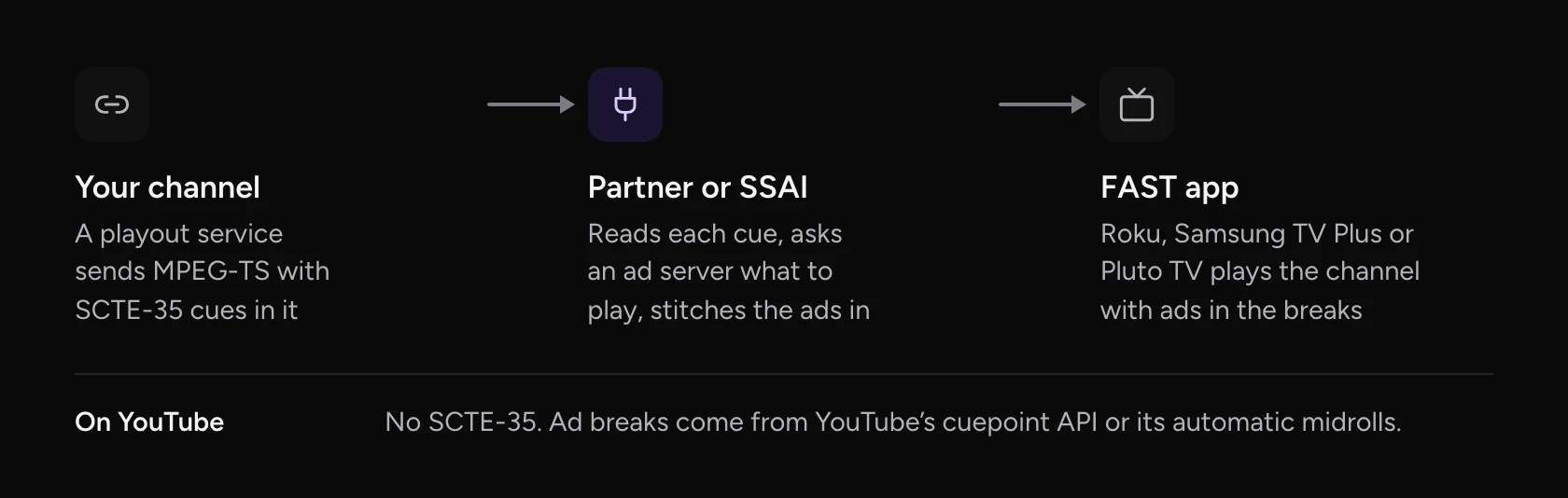
Flow: your channel sends MPEG-TS with SCTE-35 cues to a partner or SSAI service, which asks an ad server and stitches ads into the breaks, then a FAST app such as Roku or Samsung TV Plus plays it. YouTube uses its own cuepoint API instead
From your playout to a TV app. The partner in the middle turns markers into ads.

The service in the middle is usually called SSAI, server-side ad insertion. It reads each cue, asks an ad server what to play, and stitches the ads into the stream for each viewer. AWS Elemental MediaTailor, Google Ad Manager’s Dynamic Ad Insertion and the distribution partners behind most FAST channels, such as Amagi and Wurl, all work this way.

Why FAST channels need SCTE-35

FAST stands for free ad-supported streaming TV: linear channels in apps like The Roku Channel, Samsung TV Plus, Tubi and Pluto TV. Viewers don’t pay, so the ads are the business, and the platform needs to know where it can put them.
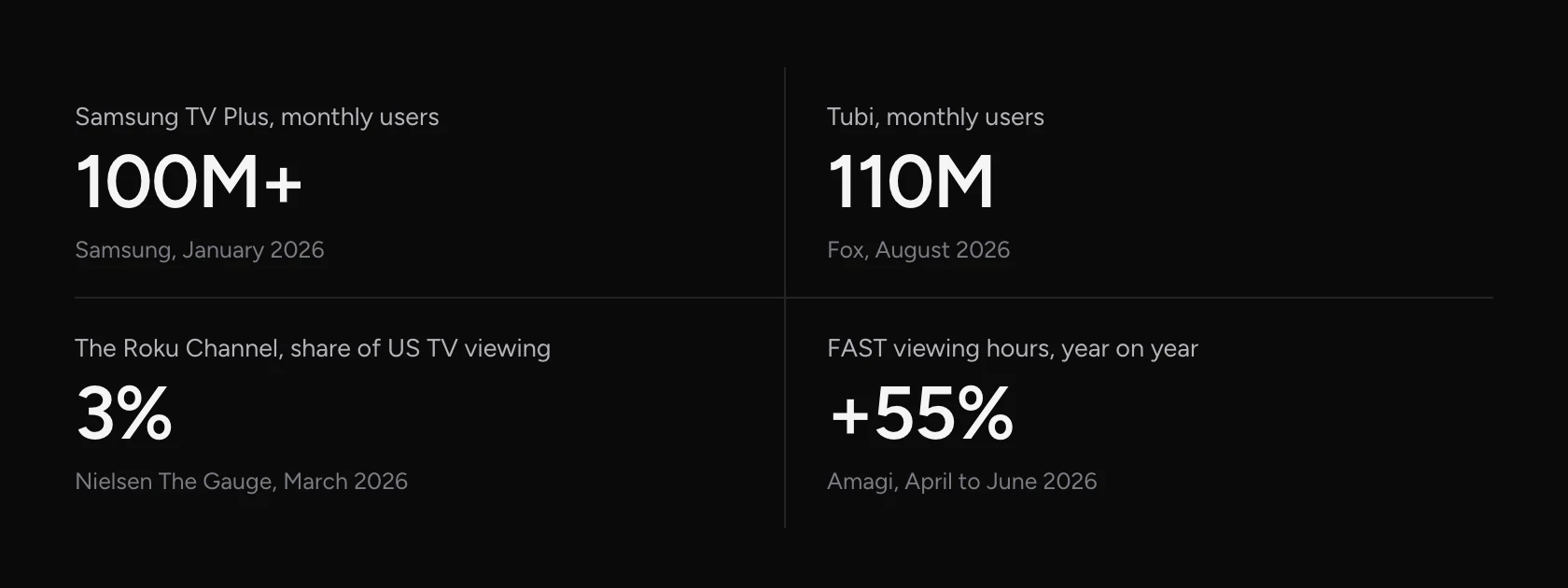
Four figures: Samsung TV Plus over 100 million monthly users, Tubi 110 million monthly users, The Roku Channel 3% of US TV viewing, FAST viewing hours up 55% year on year
FAST in 2026, from each company’s own figures and Nielsen.

Channels that come from cable often have breaks that don’t fit. Cable breaks are long and placed for cable advertisers. NDTV put it plainly when it started reshaping its breaks for FAST with Amagi:

GSGautam ShelarDirector, Growth and Digital Strategy, NDTVSVG“Our linear ad breaks weren’t built with FAST and connected TV viewers in mind”October 26, 2026Read the article ↗
Gautam Shelar, October 26, 2026.

What Roku asks for

Most FAST platforms keep their delivery specs private and share them with partners. Roku publishes its live linear ingest spec, so it’s the clearest public example of what a FAST channel must deliver. Version 3.4, updated October 26, 2026, asks for:

RequirementRoku’s spec
Ad markersSCTE-35 in the stream. splice_insert preferred, with a start, a duration and out of network set to true
Other markerstime_signal with a segmentation descriptor, type 0x22, 0x30, 0x32, 0x34 or 0x36
Ad load8 minutes an hour in 2 minute pods. Kids channels: 6 minutes in 90 second pods
VideoMPEG-TS, H.264 at 1080p preferred, constant bitrate, at least 12 Mbps for HD
DeliveryAWS MediaConnect, Zixi, SRT, RTP with FEC, or RTMP push
Program guide8 days, in blocks of at least 15 minutes
Who deliversOne of Roku’s Linear Certified Partners, such as Amagi, Wurl or Frequency

The last row matters most. You don’t send a channel to Roku yourself. A certified partner takes your stream, checks the markers, builds the guide and delivers it.

Where markers get lost

A cue only works if it survives every step between your playout and the ad system. These are the usual places it disappears.
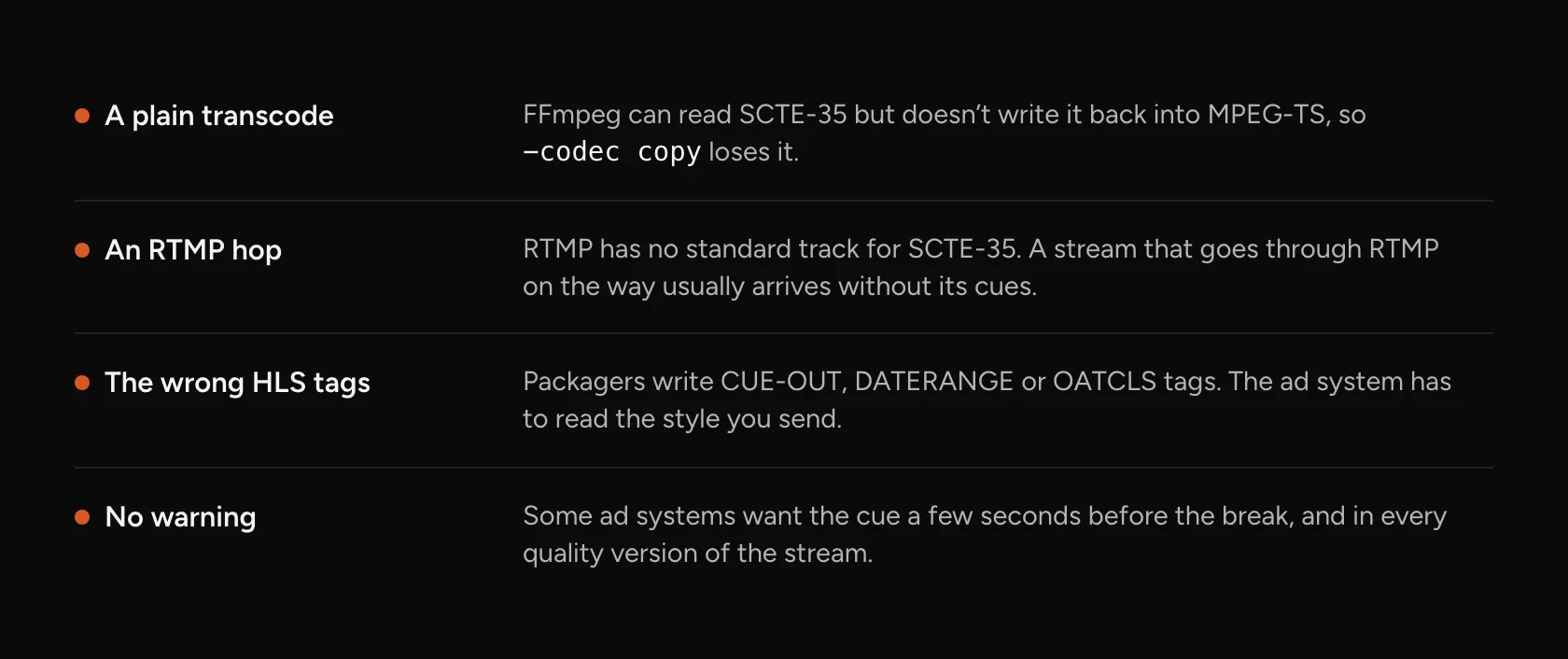
Four places SCTE-35 markers get lost: a plain FFmpeg transcode, an RTMP hop, HLS tags the ad system doesn’t read, and cues sent without warning
If a step in the chain doesn’t carry the cues, the platform sees a stream with no breaks.

FFmpeg is the most common trap. It can read SCTE-35 from a stream, but it doesn’t write it back into MPEG-TS, so a copy or a transcode drops it. On the FFmpeg mailing list, LTN Global engineer Devin Heitmueller answered the question this way:

Devin HeitmuellerDevin HeitmuellerLTN Globalffmpeg-user“You can’t simply use -codec copy to get SCTE-35”June 18, 2021Read the thread ↗
Devin Heitmueller, June 18, 2021.

Timing is the other one. Some ad systems want the cue several seconds before the break, and in all quality versions of the stream. Equativ’s spec, for example, asks for at least five seconds of warning.

SCTE-35 and YouTube

YouTube doesn’t use SCTE-35 for live ads. It has its own system. A cuepoint API starts an ad break, 30 seconds long unless you set a length. Automatic midrolls are placed by YouTube or run on a schedule, every 6 to 30 minutes. So a 24/7 channel on YouTube needs cuepoints or midroll settings, not markers in the stream.

SCTE-35 with Upstream

Upstream runs your channel from the cloud, 24/7 or on a schedule, from the videos you upload. You place ad breaks as markers in the playlist: at a set time inside a video, on a repeating timer, or after a set number of videos. Each break can be 5 to 300 seconds long, and can play a sting or slate video too.

On YouTube, those markers start a YouTube ad break through YouTube’s own API, and you can turn on automatic midrolls next to them. For broadcasters, our team sets up an MPEG-TS output over SRT as a managed setup on cloud playout. It carries the SCTE-35 track, EIT now and next, and SDT service names. The markers then go out as an immediate splice_insert with a break duration and auto return, the form Roku’s public spec lists as its preferred marker.

Upstream isn’t an ad server or an SSAI service, and it doesn’t deliver to Roku itself. It gives your certified partner a channel with the breaks already marked. Start free with 24 streaming hours a month to build the playlist, then talk to our team about the managed setup.

SCTE-35: FAQ

What does SCTE stand for?

The Society of Cable Telecommunications Engineers, the standards body that publishes SCTE-35. The full name of the standard is the Digital Program Insertion Cueing Message.

What is the difference between SCTE-35 and SCTE-104?

SCTE-104 is how broadcast automation tells an encoder about a break, over SDI or the network. The encoder turns it into SCTE-35, which travels inside the stream to the next system.

Does SCTE-35 insert the ads?

No. It only marks where a break starts and how long it lasts. An ad server picks the ads, and an SSAI service stitches them into the stream.

Can FFmpeg add SCTE-35 markers?

Not to an MPEG-TS output. FFmpeg can read SCTE-35, but it doesn’t write it, and a copy drops it. Broadcast tools such as TSDuck, packagers and playout systems add the markers instead.

Do I need SCTE-35 for a YouTube channel?

No. YouTube places live ads with its own cuepoint API and automatic midrolls. SCTE-35 matters when you deliver to FAST platforms and other broadcast systems.

Sources

  • SCTE: ANSI/SCTE 35-1, Digital Program Insertion Cueing Message
  • Carriage: RFC 8216 (section 4.3.2.7.1), AWS MediaTailor HLS ad markers, Google Cloud Live Stream ad break markers and Google Ad Manager live ad break encoding
  • Platforms: Roku live linear ingest specification (version 3.4), Equativ SSAI live ad markers, YouTube’s cuepoint API and live midrolls
  • FFmpeg: the MPEG-TS demuxer and the ffmpeg-user thread
  • Figures: Samsung TV Plus, Tubi, The Roku Channel and Amagi
  • The decoded cue: Unified Streaming’s public SCTE-35 demo, fetched November 4, 2026

Published November 5, 2026
Mario Jankovic

About the author

Mario Jankovic

Product and Engineering

Mario Jankovic co-founded Upstream and runs product and engineering. He writes about running live streams from the cloud: 24/7 channels, multistreaming and Live Studio, and what we learn building them.

Keep exploring

Further reading

Browse all articles
What Is a FAST Channel? Meaning, Examples and How to Start One
Jan 12, 2026 Blog

What Is a FAST Channel? Meaning, Examples and How to Start One

Read article
HLS vs RTMP: which one does your live stream need?
Nov 5, 2026 Guides

HLS vs RTMP: which one does your live stream need?

Read article
How to embed a live stream on your website
Nov 5, 2026 Guides

How to embed a live stream on your website

Read article

Start streaming today

Go live to every platform, run a 24/7 channel, and produce live shows in your browser, with no software or server setup.

No credit card 24 hours/month free Full functionality
Start Streaming Free
24/7 Live Streaming Run cloud channels that stay live around the clock. Live Studio Invite guests, share screens, and add branded overlays in the browser. Multistreaming Send one live feed to YouTube, Twitch, Kick, and RTMP endpoints. Pre-recorded Live Streaming Upload pre-recorded videos & Go Live without the stress of live production. Free plan 24 hours a month with no watermark. Multi-channel streaming Separate live channels from one account. Enterprise Setups for teams, labels and agencies. About Upstream Who we are and how Upstream works.
Scheduling Streams that start and end on their own. Multichat Every platform's chat in one feed. Overlays Layers and widgets in Stream Designer. Stings, jingles and ads Inserts that play between your videos. Playback controls Skip or play any file while you stay live. Audio and video playlists Loop music and visuals separately. Media library & storage Organize files and cloud uploads. Website player Embed your live stream on your site. Team access Invite your team, each with their own role. RTMP server Stream in from OBS or any encoder. Backup streams A standby feed if your main one drops. Live Streaming API Run streams, media and queues from code. MCP Server Manage streams from your AI assistant. All features Everything Upstream does, on one page.
YouTube live streaming Twitch live streaming Kick live streaming Facebook live streaming Instagram live streaming TikTok TikTok live streaming Rumble live streaming Mixcloud live streaming 30+ more Plus any custom RTMP or SRT destination.
Platform limits Bitrate and duration caps for each platform. Integrations Setup guides for OBS, vMix, cameras and more. VTuber Streaming Go live with your avatar on every platform.
Blog Guides, platform rules and news for anyone who goes live. Guides Setup guides for 24/7 streams, multistreaming and RTMP. Release Notes The new features in each Upstream update, in one place. Free Tools Video, audio, thumbnail and AI tools, plus camera and mic checks. Helpdesk Step by step setup help and troubleshooting for Upstream. Service status Current service health, uptime history and incident updates. Live Streaming FAQ Short answers to what people ask before they go live. Compare Upstream Upstream side by side with Restream, StreamYard and others. Latest post YouTube Dual Stream: What the Vertical Copy Does and How to Turn It Off
Always-on 24/7 Live Streaming Run cloud channels that stay live around the clock.
Explore
Real-time live Live Studio Invite guests, share screens, and add branded overlays in the browser.
Explore
One stream, 30+ platforms Multistreaming Send one live feed to YouTube, Twitch, Kick, and RTMP endpoints.
Explore
Schedule & Automate Pre-recorded Live Streaming Upload pre-recorded videos & Go Live without the stress of live production.
Explore
Free plan 24 hours a month with no watermark.
Multi-channel streaming Separate live channels from one account.
Enterprise Setups for teams, labels and agencies.
About Upstream Who we are and how Upstream works.
Scheduling Streams that start and end on their own. Multichat Every platform's chat in one feed. Overlays Layers and widgets in Stream Designer. Stings, jingles and ads Inserts that play between your videos. Playback controls Skip or play any file while you stay live. Audio and video playlists Loop music and visuals separately. Media library & storage Organize files and cloud uploads. Team access Invite your team, each with their own role. RTMP server Stream in from OBS or any encoder. Backup streams A standby feed if your main one drops.
Live Streaming API Run streams, media and queues from code.
MCP Server Manage streams from your AI assistant.
All features Everything Upstream does, on one page.
YouTube live streaming. 24/7 channels with midroll ads. Twitch live streaming. Streams restart on their own at 48 hours. Kick live streaming. Stay live with your computer off. Facebook live streaming. Schedule lives that start on their own. Instagram live streaming. Go live from your browser or the cloud. TikTok TikTok live streaming. Go live on TikTok and Instagram at once. Rumble live streaming. Add Rumble to your YouTube or Kick stream. Mixcloud live streaming. DJ sets and radio shows from your browser. 30+ more Plus any custom RTMP or SRT destination.
Platform limits Bitrate and duration caps for each platform.
Integrations Setup guides for OBS, vMix, cameras and more.
VTuber Streaming Go live with your avatar on every platform.
Blog
Guides
Release Notes
Free Tools
Helpdesk
Service status
Live Streaming FAQ
Compare Upstream
YouTube Dual Stream: What the Vertical Copy Does and How to Turn It Off YouTube Dual Stream: What the Vertical Copy Does and How to Turn It Off
Upstream

Run your streams from the cloud

Free plan: 24 streaming hours a month, no card, no watermark.

4.6 · 245 reviews on Trustpilot
Legal entity
Zukunft d.o.o.
Registered address
Grožnjanska ulica 32, 10000 Zagreb, Croatia
Company VAT ID
Company VAT ID: HR62560895839
About | Contact us | Tools | Content standards | Security | Privacy Policy | Terms of Service | Affiliate terms | Legal notice |

Product

  • Pricing
  • Upstream Features Overview
    • Multistreaming
    • Media Library & Storage
    • Website Player
    • Separate Audio and Video
    • Overlays: Stream Designer
    • Live Streaming Studio
    • Scheduling & Automation
    • Live Playback Controls
    • Play Stings, Jingles and Ads
    • Team Access
  • Enterprise Broadcasting Solutions

Resources

  • Helpdesk
  • Service status
  • Live Streaming FAQ
  • Blog
  • Release Notes
  • Live Streaming API
  • MCP Server
  • Free Live Streaming
  • YouTube Live Streaming
  • RTMP Server
  • Supported Platforms
  • Live Streaming Limits
  • Integrations

Compare us

  • Compare Upstream
    • Upstream vs Runnel.live
    • Upstream vs OneStream
    • Upstream vs Live247
    • Upstream vs Gyre
    • Upstream vs Streaming Bots
    • Upstream vs Restream
    • Upstream vs StreamYard
    • Upstream vs LiveReacting
    • Upstream vs Playout.video

Free tools

  • Design tools
  • Video tools
  • Audio tools
  • AI tools
  • Setup checks

Use cases

  • For Creators
  • For Music Labels
  • Church Streaming
  • VTuber Streaming
  • Multi-Channel Streaming

© 2026 Upstream. All rights reserved.