Upstream
Upstream
  • Product
    24/7 Live Streaming Run cloud channels that stay live around the clock. Live Studio Invite guests, share screens, and add branded overlays in the browser. Multistreaming Send one live feed to YouTube, Twitch, Kick, and RTMP endpoints. Pre-recorded Live Streaming Upload pre-recorded videos & Go Live without the stress of live production. Free plan 24 hours a month with no watermark. Multi-channel streaming Separate live channels from one account. Enterprise Setups for teams, labels and agencies. About Upstream Who we are and how Upstream works.
  • Features
    Scheduling Streams that start and end on their own. Multichat Every platform's chat in one feed. Overlays Layers and widgets in Stream Designer. Stings, jingles and ads Inserts that play between your videos. Playback controls Skip or play any file while you stay live. Audio and video playlists Loop music and visuals separately. Team access Invite your team, each with their own role. RTMP server Stream in from OBS or any encoder. Live Streaming API Run streams, media and queues from code. MCP Server Manage streams from your AI assistant. All features Everything Upstream does, on one page.
  • Platforms
    YouTube live streaming Twitch live streaming Kick live streaming Facebook live streaming Instagram live streaming TikTok TikTok live streaming Rumble live streaming Mixcloud live streaming 30+ more Plus any custom RTMP or SRT destination.
    Platform limits Bitrate and duration caps for each platform. Integrations Setup guides for OBS, vMix, cameras and more. VTuber Streaming Go live with your avatar on every platform.
  • Resources
    Blog Guides, platform rules and news for anyone who goes live. Guides Setup guides for 24/7 streams, multistreaming and RTMP. Release Notes The new features in each Upstream update, in one place. Free Tools Video, audio, thumbnail and AI tools, plus camera and mic checks. Helpdesk Step by step setup help and troubleshooting for Upstream. Live Streaming FAQ Short answers to what people ask before they go live. Compare Upstream Upstream side by side with Restream, StreamYard and others. Latest post YouTube Shorts Bonus Program: Who Gets Invited and How It Pays
  • Pricing
Login Sign up for free
Always-on 24/7 Live Streaming Run cloud channels that stay live around the clock.
Explore
Real-time live Live Studio Invite guests, share screens, and add branded overlays in the browser.
Explore
One stream, 30+ platforms Multistreaming Send one live feed to YouTube, Twitch, Kick, and RTMP endpoints.
Explore
Schedule & Automate Pre-recorded Live Streaming Upload pre-recorded videos & Go Live without the stress of live production.
Explore
Free plan 24 hours a month with no watermark.
Multi-channel streaming Separate live channels from one account.
Enterprise Setups for teams, labels and agencies.
About Upstream Who we are and how Upstream works.
Scheduling Streams that start and end on their own. Multichat Every platform's chat in one feed. Overlays Layers and widgets in Stream Designer. Stings, jingles and ads Inserts that play between your videos. Playback controls Skip or play any file while you stay live. Audio and video playlists Loop music and visuals separately. Team access Invite your team, each with their own role. RTMP server Stream in from OBS or any encoder.
Live Streaming API Run streams, media and queues from code.
MCP Server Manage streams from your AI assistant.
All features Everything Upstream does, on one page.
YouTube live streaming. 24/7 channels with midroll ads. Twitch live streaming. Streams restart on their own at 48 hours. Kick live streaming. Stay live with your computer off. Facebook live streaming. Schedule lives that start on their own. Instagram live streaming. Go live from your browser or the cloud. TikTok TikTok live streaming. Go live on TikTok and Instagram at once. Rumble live streaming. Add Rumble to your YouTube or Kick stream. Mixcloud live streaming. DJ sets and radio shows from your browser. 30+ more Plus any custom RTMP or SRT destination.
Platform limits Bitrate and duration caps for each platform.
Integrations Setup guides for OBS, vMix, cameras and more.
VTuber Streaming Go live with your avatar on every platform.
Blog
Guides
Release Notes
Free Tools
Helpdesk
Live Streaming FAQ
Compare Upstream
YouTube Shorts Bonus Program: Who Gets Invited and How It Pays YouTube Shorts Bonus Program: Who Gets Invited and How It Pays
Release Notes

Live Studio and Team Access Updates

Written by Bojan Opacak November 7, 2025 · Updated October 10, 2026 · 3 min read

We’re thrilled to announce one of our biggest updates yet, making Upstream a more powerful streaming and collaboration tool.

Mix Live Input with Live Studio

This release is a major milestone in Upstream’s evolution: we are expanding our reach from being the top-choice for 24/7 pre-recorded streaming to become a top choice for a complete live broadcasting platform. The new Live Studio tab on your Stream Edit page is our first step toward giving you the best of both worlds: the reliability of automated content with the ability to achieve instant connection with your audience via real-time broadcasting.

Now you can mix live RTMP or HLS streams into your content. Switch effortlessly between pre-recorded content and live inputs like OBS, or display both: your 24/7 playlist and your live feed as an overlay using some of our preset screen configurations.

/dist/uploads/2025/11/Combine-Pre-recorded-live-stream-with-OBS.mp4

Key capabilities:

  • Go live with your webcam directly from OBS
  • Layer any RTMP/HLS input over pre-recorded streams
  • Appear in a commentary-style box with customizable display presets

This opens up exciting new possibilities for creators who want to interact with their their communities, real-time. Whether you’re doing live commentary over pre-recorded gameplay, hosting Q&A sessions, or simply showing your face to connect with viewers, you now have the tools to do it.

And this is just the beginning. Live Studio represents our first major step toward making Upstream a top-tier platform for real-time live streaming. Expect more powerful live broadcasting features in the coming months as we continue building tools that let you stream your way: automated, live, or anywhere in between.

Because as every creator knows, showing up live truly matters.

Live Studio

Go live from your browser.

Invite guests, share screens, build scenes, and add overlays without installing or wiring together another production stack.


Sign up for free See Live Studio
Lofi Hours21:42Now playingMidnight tapeLofi Hours
LayersDesignTemplatesComponentsChatDestinationsTriggers
Layers
  • Station name
  • Now playing
  • Clock
  • Visualizer
  • Follow QR
  • StreamElements alerts
  • Background frame

Team Access: Collaborate Without Compromise

You asked, we listened. Working with a team shouldn’t mean sharing passwords or constantly switching accounts. Our new Team Access feature lets you invite collaborators to your Upstream account with precisely the right level of access for their role (available on all plans at no extra cost).

How Team Access Works:

Invite team members by email from your Account settings, and they’ll join using their own login credentials. They can seamlessly switch to working in your account while you maintain full control over what they can see and do.
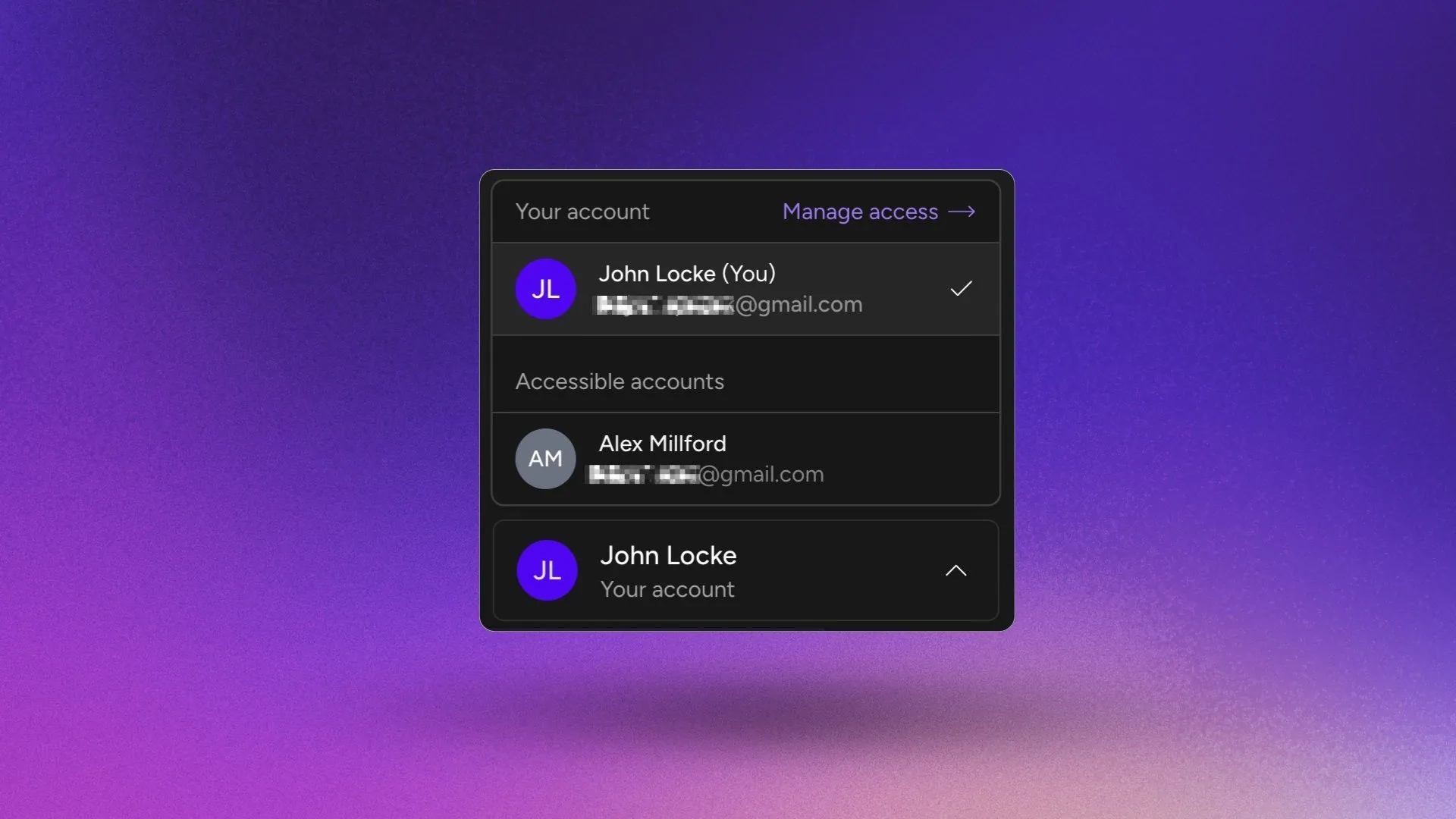
Team Box

Three permission levels to fit every role:

  • View Only: Perfect for clients and stakeholders who need visibility without editing rights. They can view streams, playlists, and schedules, but can’t make any changes.
  • Moderator: Built for your content creators and editors who manage daily operations. They can customize streams, manage media, create playlists, schedule content, and configure streaming destinations, but can’t create new streams, manage team members, or access billing.
  • Manager: For fully trusted team members who help run your account. They can do everything a Moderator can, plus create streams and manage team permissions (though billing remains in your control and Managers can not see anything billing related).

Permissions can be updated or revoked instantly from your Team Access dashboard, giving you the flexibility to adapt as your team grows and evolves.

UI Changes & Improvements

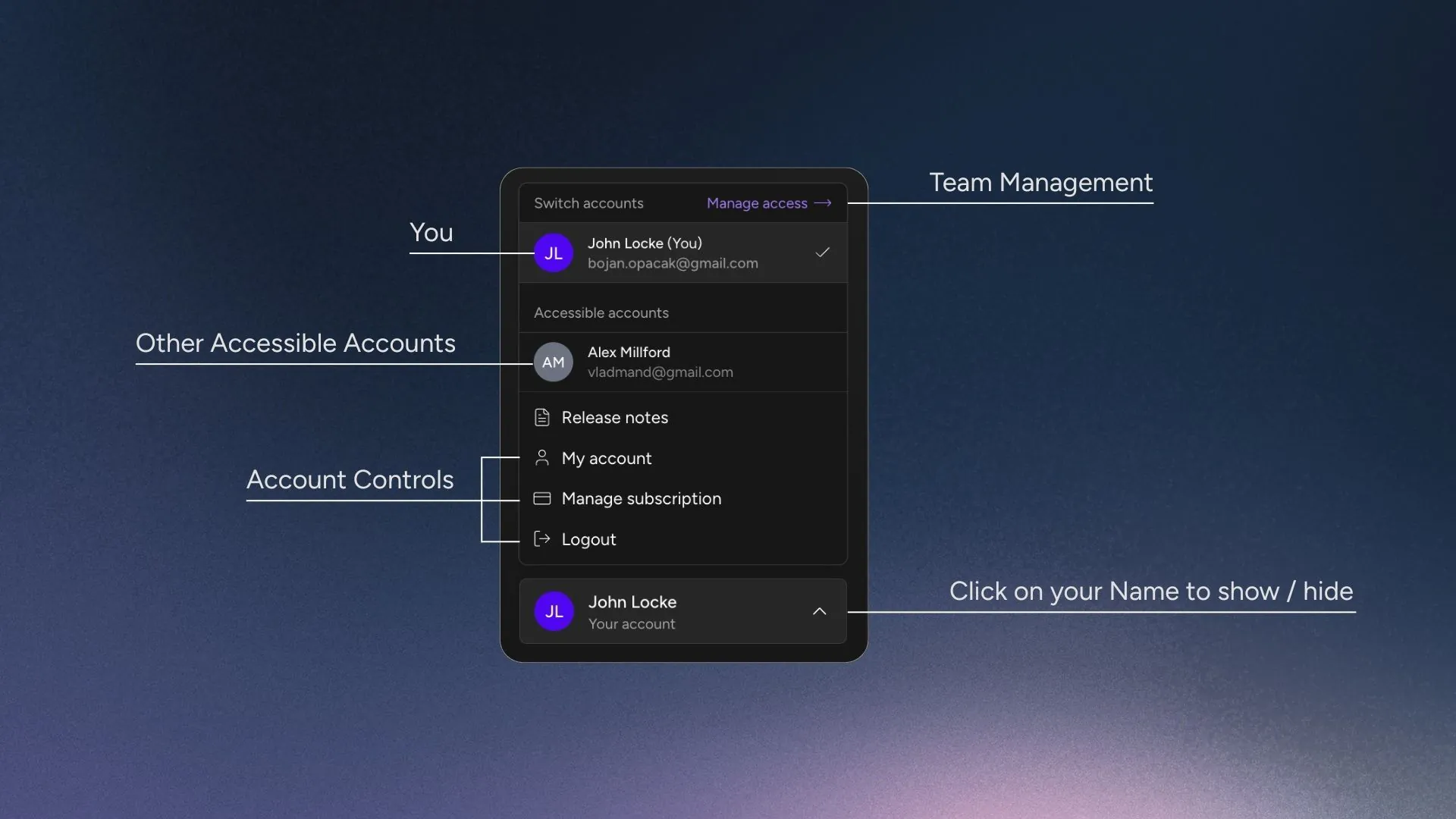
Additionally, we reorganized the main menu to better work with the new Team Access feature. Your main account controls are now easily accessible by clicking on your name in the lower part of the main menu.

Clicking on your name / profile icon will bring up these options:

  • Switching between accounts
  • Managing Team Access options
  • Your Account Settings
  • Billing / Manage Subscription
  • Logging out
New Account Controls on Upstream

This way, all the account administration links on one place, but out of the way while you are doing your daily work. Everything is easy to reach, but tucked away under your Name / Profile Badge.


Together, Live Studio and Team Access give you something powerful: the freedom to stream however you want, with whoever you want. Automated or live. Solo or collaborative. Your stream, your way.

These updates mark an important milestone for Upstream. Building on our foundation as the go-to 24/7 streaming platform, we are now offering a wider spectrum of streaming features for creators who want to automate, broadcast live, and build with their teams, all in one place, without using multiple tools.

Keep streaming and stay tuned for big updates ahead!
Published November 7, 2025
Bojan Opacak

About the author

Bojan Opacak

Content and Growth

Bojan writes for Upstream about live streaming strategy, platform policy changes, creator monetization, and practical workflows for 24/7 channels. He reads the platform rules and help pages and turns them into step by step guides for creators and small teams.

Keep exploring

Further reading

Browse all articles
October Update: Multi-chat, 60 fps OBS Streams and AI Connectors
Oct 15, 2026 Release Notes

October Update: Multi-chat, 60 fps OBS Streams and AI Connectors

Read article
Fall Update: Kick Connect, Saved Destinations, Demo Streams and Link Imports
Oct 1, 2026 Release Notes

Fall Update: Kick Connect, Saved Destinations, Demo Streams and Link Imports

Read article
Upload HEVC and MOV Videos and Re-encode Them in Upstream
Aug 20, 2026 Release Notes

Upload HEVC and MOV Videos and Re-encode Them in Upstream

Read article

Start streaming today

Go live to every platform, run a 24/7 channel, and produce live shows in your browser, with no software or server setup.

No credit card 24 hours/month free Full functionality
Start Streaming Free
Upstream

Run your streams from the cloud

Free plan: 24 streaming hours a month, no card, no watermark.

4.5 · 242 reviews on Trustpilot
Legal entity
Zukunft d.o.o.
Registered address
Groznjanska 32, 10000 Zagreb
Company VAT ID
Company VAT ID: HR62560895839
About | Contact us | Tools | Content standards | Privacy Policy | Terms of Service | Affiliate terms |

Product

  • Pricing
  • Upstream Features Overview
    • Multistreaming
    • Separate Audio and Video
    • Overlays: Stream Designer
    • Live Streaming Studio
    • Scheduling & Automation
    • Live Playback Controls
    • Play Stings, Jingles and Ads
    • Team Access
  • Enterprise Broadcasting Solutions

Resources

  • Helpdesk
  • Live Streaming FAQ
  • Blog
  • Release Notes
  • Live Streaming API
  • MCP Server
  • Free Live Streaming
  • YouTube Live Streaming
  • RTMP Server
  • Supported Platforms
  • Live Streaming Limits
  • Integrations

Compare Us

  • Compare Upstream
    • Upstream vs Runnel.live
    • Upstream vs OneStream
    • Upstream vs Live247
    • Upstream vs Gyre
    • Upstream vs Streaming Bots
    • Upstream vs Restream
    • Upstream vs StreamYard
    • Upstream vs LiveReacting
    • Upstream vs Playout.video

Free Tools

  • Design tools
  • Video tools
  • Audio tools
  • AI tools
  • Setup checks

Use cases

  • For Creators
  • For Music Labels
  • Church Streaming
  • VTuber Streaming
  • Multi-Channel Streaming

© 2026 Upstream. All rights reserved.

Produce live shows right from your browser.

Sign up for free