Upstream.so is the best Gyre alternative for a 24/7 stream of your videos. It costs $30 a month instead of $49. One stream reaches up to 10 of 30+ platforms at once, while Gyre needs a paid stream slot for each platform. Both run in the cloud with your computer off.
Upstream.so also runs live shows: Live Studio puts up to 10 guests on your stream. Gyre’s feature page lists no live studio, and Gyre has no free plan. Upstream.so’s free plan streams 24 hours a month with no card.
Gyre alternatives compared
Prices are in US dollars, checked November 12, 2026. Monthly rates below cover the stated cloud loop unless a row gives a time cap or a usage rate. Full HD means 1080p. The frame rate, in fps, is the number of frames shown per second.
| Tool | Monthly price and loop limit | Destinations | Free option |
|---|---|---|---|
| Gyre | $49 Start; 24/7 at 1080p60 | 1 per stream; 8 supported platforms | 7 day trial with watermark; card required, then $99/month |
| Upstream.so | $30; 24/7 at 1080p30 | Up to 10 per stream, from 30+ platforms | 24 hours/month at 1080p30 |
| Playout.video | $29 Creator; 24/7 loop, calendar runs from $49 | 5 on Creator | 2 hours/session, watermark |
| LiveReacting | $39.99 for 24/7; eligible new users pay $21.99 for first 5 months | 5 on the 24/7 plan | 3 streams/month, 30 minutes per stream, 720p |
| Castr | $199.99 Premium; prerecorded Infinite Loop | 20 shared across the account | 7 day trial |
| Livepush | $39 Creators; continuous 24/7 | 25 on current pricing page | 20 hours/month; loops excluded |
| Live247 | About $19.66 for 30 days; hourly billing | 1 YouTube channel per stream | 1 hour of credit with newuser code |
| Runnel.live | Advertised $6 plus uploads; minute billing, 24/7 queue | 1 per stream; built for YouTube | None advertised; prepaid from $1 |
| Streaming Bots | $20; 24/7 at 1080p30 | Up to 3 | 24 hour trial; card terms not documented |
| OneStream Live | $69 for 1080p with add-on; up to 30 days per broadcast | YouTube only in 24/7 mode | Free plan excludes 24/7 |
| Restream | Loop price not verified; event capped at 10 loops or 40 hours | Core plans: 2 to 8; loop package terms need confirmation | Free plan excludes looping |
| OBS Studio | $0 software; host must stay on | 1 output; more with a plugin or relay | Free software; power and hosting cost extra |
LiveReacting's offer needs code KICKSTART2026 and ends November 30, 2026. It applies to new customers at 1080p30. Usage bills for Live247 and Runnel.live can vary with run time and file charges. Platform rules still apply to cloud loops.
Why people leave Gyre
A Gyre plan buys stream slots, and one slot sends one playlist to one platform. Its standard plans sell 1, 4 or 8 Full HD slots. Sending the same playlist to four platforms uses the whole $99 Start+ bundle. Its feature page lists no live guest studio and no overlay editor.
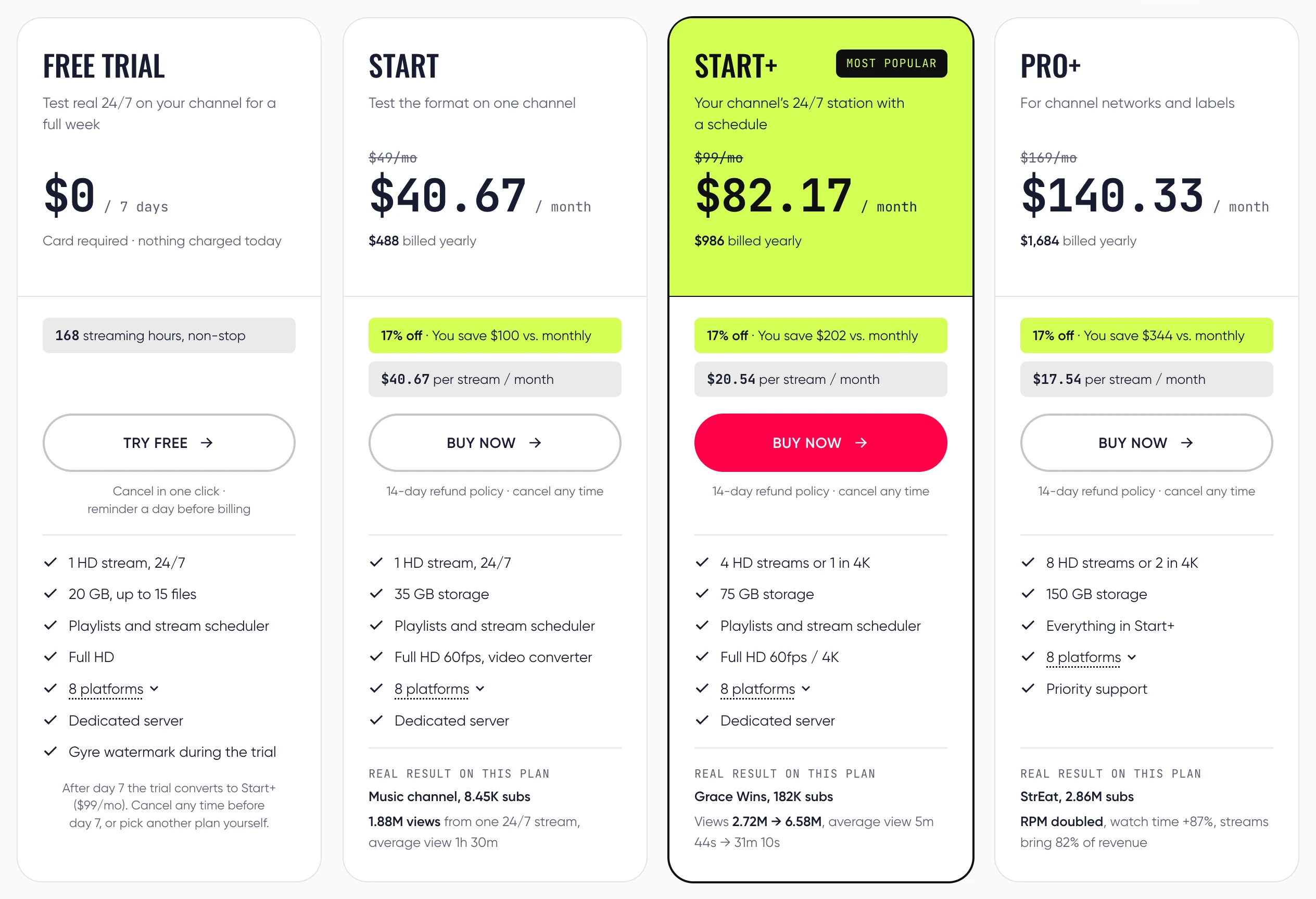
Gyre Start includes playlists and the stream scheduler for $49 a month, or $40.67 a month billed yearly. It has 35 GB of storage and a dedicated server. You can choose from eight platforms, with one platform per stream. Start+ has 75 GB; PRO+ has 150 GB.
Gyre has no free plan. Its 7 day trial needs a card and shows the Gyre watermark. It converts to Start+ at $99 a month unless you cancel before day 7 or choose another plan. Gyre’s $49 includes 60 fps. Upstream.so’s 1080p60 stream costs $40, still $9 under Gyre Start, and it reaches up to 10 of 30+ platforms where Gyre reaches one. For one channel on several platforms Gyre loses badly, because each platform eats a Gyre slot.
1. Upstream.so: a 24/7 stream to up to 10 of 30+ platforms
Upstream.so is the best place to move a Gyre playlist: the same cloud loop, plus live shows on the same stream. Upload your videos and set the playlist to loop. Our servers keep it live after you close your computer. The paid 24/7 plan has unlimited streaming hours.
Sending one feed to several sites at once is called multistreaming. Upstream.so sends one stream to up to 10 of 30+ supported platforms. YouTube, Twitch and Kick are built in, along with Facebook, Instagram, Rumble and Mixcloud. TikTok uses a custom RTMP connection: a server address and stream key from an eligible account.
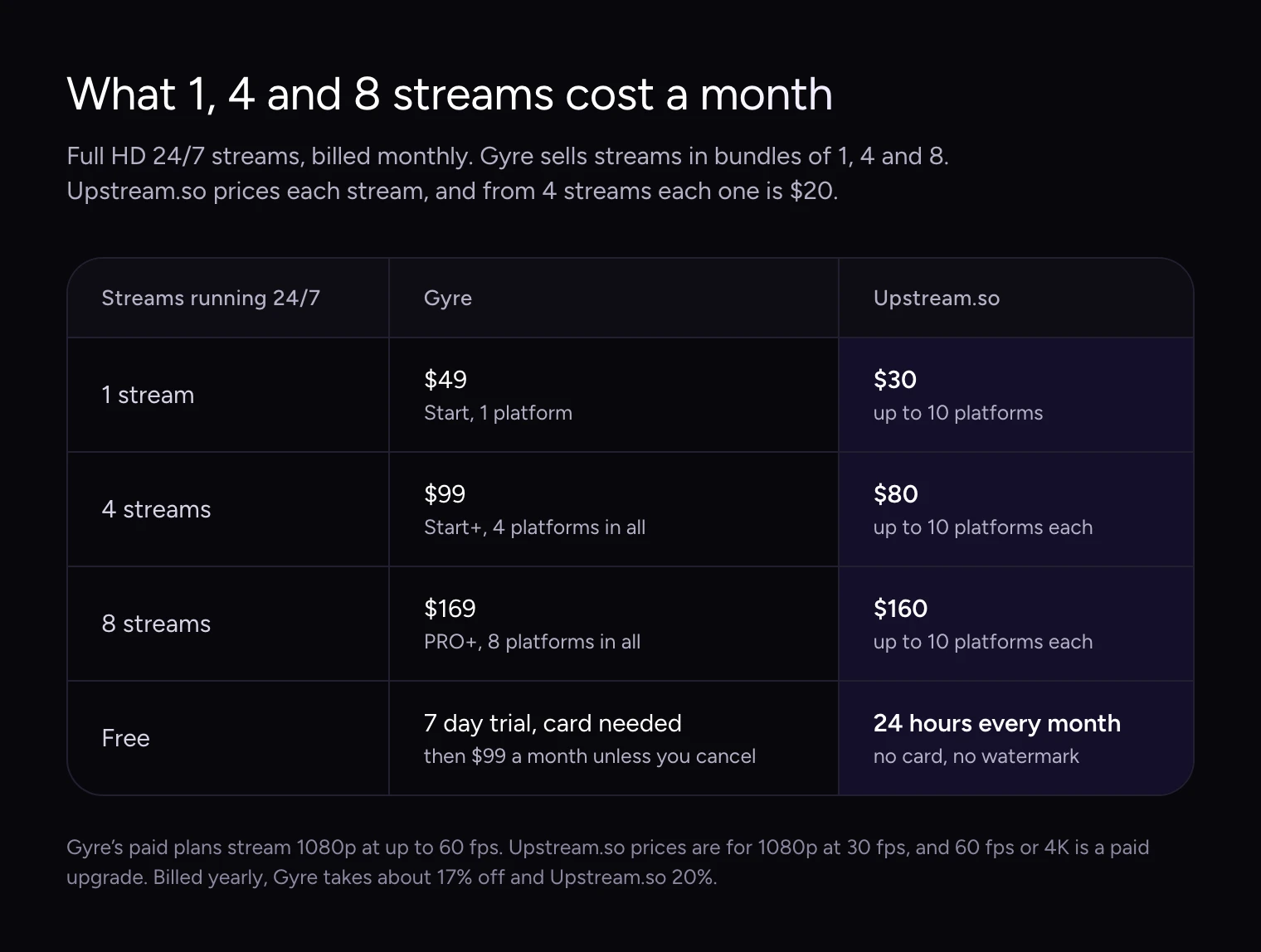
Four platforms need four Gyre slots at $99 a month. On Upstream.so, the same feed can reach those four sites from one $30 stream. The ten destinations in the table are examples, and Gyre’s own multistreaming guide confirms one platform per stream. If you run four separate channels, each with its own playlist, you need four streams, and the prices below apply. Custom RTMP and SRT connections let you send video to services that accept those stream formats.
How many platforms one stream reaches
At monthly rates, one stream costs $30 on Upstream.so versus $49 on Gyre. Four streams cost $80 versus $99, and eight cost $160 versus $169. Two Upstream.so streams cost $50 in total, and three cost $70.
With yearly billing, one Upstream.so stream is $24 a month. From four streams, the rate is $20 per stream monthly or $16 billed yearly. See Upstream.so pricing and the Upstream.so vs Gyre comparison for the plan choice that fits your channel count.
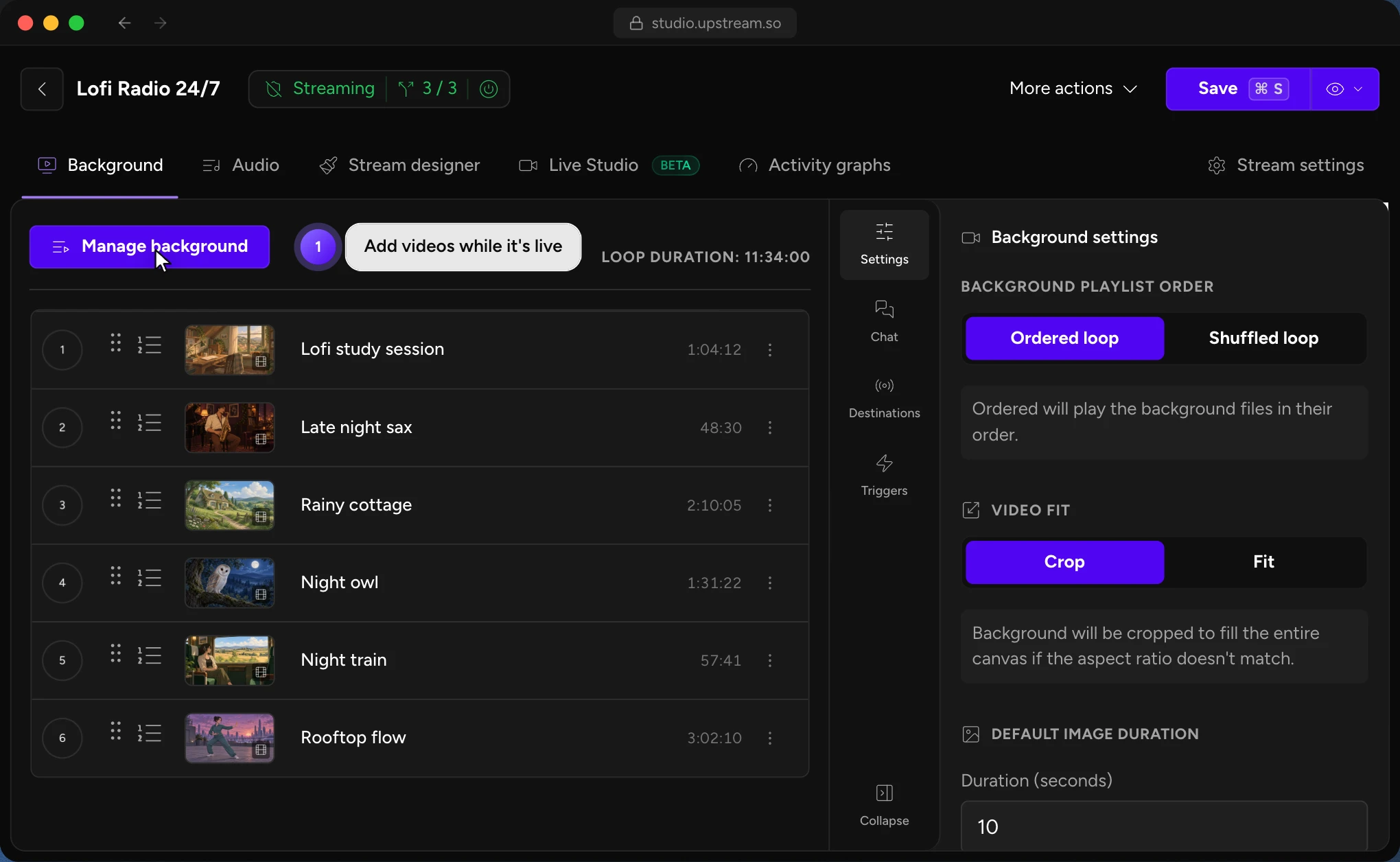
The playlist can play in order or shuffle. You can add videos while the stream runs and see the loop duration in the editor. With separate audio and video playlists, you can change the music under your visuals without making a new video file.
Overlays put text or graphics on top of the video. You can edit them while live, including a logo or a now playing bar. Live Studio lets you bring up to 10 guests into a live show on the same channel. Stream start and stop schedules can run once, daily or weekly.
The free plan gives you 24 hours a month at 1080p30. The hours renew monthly. Signing up needs no card, and the stream is watermark-free. Paid hours are unlimited, but a site's own broadcast cap still applies. On Twitch, Upstream.so reconnects after the 48 hour limit with a short break.
2. Playout.video: playlists with a paid calendar tier
Playout.video's Creator plan runs a 24/7 video playlist to five destinations for $29 a month. Yearly billing brings it to $19 a month. The loop has no stated time cap. Running a calendar schedule needs Channel at $49 monthly or $39 a month billed yearly.
Creator includes overlays and a studio for eight guests. Extra streams are seats added to the same plan at its per-stream rate. The free plan has a two hour session cap and a watermark. These gates are set out in Playout.video's plan guide; see also Upstream.so vs Playout.video.
3. LiveReacting: a loop with chat games
LiveReacting's dedicated 24/7 plan adds trivia and giveaways to a video loop. It sends one 1080p30 stream to five destinations and supports three on-screen guests. It runs until you stop it, subject to platform limits. The list price is $39.99 monthly or $396 yearly.
New customers can use KICKSTART2026 to pay $21.99 a month for the first five months, then $39.99. The offer ends November 30, 2026. The free plan allows three half-hour streams a month at 720p with a watermark. See LiveReacting pricing and Upstream.so vs LiveReacting.
4. Castr: Infinite Loop on Premium
Castr's prerecorded Infinite Loop needs Premium at $199.99 a month, or $166.67 a month billed yearly. The loop has no stated end cap. Premium allows ten files per prerecorded stream. Its 20 destinations are shared across the account, rather than a fresh allowance for another stream.
Castr's separate TV Playout tool has different limits. Full HD TV Playout needs Ultra at $349.99 a month. For a Gyre-style file loop, compare prerecorded streaming with Premium pricing. Castr offers a seven day trial without a card. A built-in guest room for Infinite Loop is not documented.
5. Livepush: 24/7 on the $39 Creators plan
Livepush Creators supports continuous 24/7 streams for $39 a month or $390 a year. The yearly rate works out to $32.50 a month. Its current pricing table lists 25 destinations. The $15 Pro plan does not qualify for continuous 24/7, as its 24/7 plan guide explains.
Creators has no monthly hour cap or stated event length cap for this job. The free plan gives 20 hours a month but excludes loops. Livepush's pricing and help pages disagree on the tier for editing a playlist while live. Confirm that feature before buying if you change the queue on air. Live guests need an external studio.
6. Live247: an hourly YouTube loop
Live247 loops a playlist from the cloud to a single YouTube channel. Its public app lists 2.73 US cents an hour. That works out to about $19.66 for a 30 day month or $20.31 for 31 days. Extra storage may add to the bill.
The app describes 24/7 loops with no stated maximum run time. One stream uses one YouTube stream key. A native overlay editor and live guest workflow are not documented. Live247 offers one hour of credit with code newuser. The rate comes from its public app's billing code, not a fixed monthly plan. See Upstream.so vs Live247.
7. Runnel.live: a low cost queue for one destination
Runnel.live has the lowest advertised paid cloud rate in this comparison: $6 a month plus upload fees. Billing runs by the minute. It is built for YouTube, with partial support for Twitch and Rumble. One stream sends to one destination, and another live stream has its own usage bill.
The queue runs 24/7 with no stated duration cap. You can shuffle it or add videos while live. Runnel.live says it does not add overlays. Upload charges depend on the file, so use the quote shown before upload. Check Runnel.live's rates and Upstream.so vs Runnel.live. Our low cost 24/7 streaming comparison covers the budget options.
8. Streaming Bots: $20 for up to three platforms
Streaming Bots adds overlays and music to a 1080p30 loop for $20 a month. One stream reaches up to three platforms through YouTube, Twitch or a custom stream connection. It runs until you stop it or reach its scheduled end. The plan includes 65 GB of storage.
Streaming Bots advertises a 24 hour trial. Card and watermark terms for that trial are not documented. A native guest studio is also not documented. See Upstream.so vs Streaming Bots.
9. OneStream Live: YouTube broadcasts capped at 30 days
OneStream Live's 24/7 mode runs for up to 30 days per broadcast. You then create a new stream. It can send the same playlist to several YouTube channels, but this mode is YouTube-only. You cannot add videos to that playlist once it is live.
For 1080p, Standard at $39 plus the $30 monthly 24/7 add-on totals $69. The add-on is available on any paid plan; Basic's $45 combined bill is for 720p. Enterprise at $99 includes three 24/7 streams. The free plan excludes 24/7. See OneStream pricing, its 24/7 limits and Upstream.so vs OneStream Live.
10. Restream: check the looped event cap
Restream's documented looped video event stops at ten loops or 40 hours, whichever comes first. Its looping guide also says playlists do not loop. That event cannot cover a week-long unattended run. The broader Upload & Stream page advertises 24/7 uses, so longer runs need confirmation from Restream.
A current price for the loop package was not verified. The core plans include two destinations free, three for $19 monthly, five for $49 and eight for $239. Those rates do not establish the bill for an uploaded loop. See Upstream.so vs Restream or Restream alternatives if live shows are your main use.
11. OBS Studio: free software on a running computer
OBS Studio is free software that can loop your videos for as long as the host stays on. Hardware and power cost extra. Media Source loops one file; VLC Video Source loops a playlist and needs VLC installed. One normal output sends to one platform. More outputs need a plugin or a relay service.
OBS can reconnect after a network drop. A computer restart or an update that restarts the host still ends the running stream. Our 24/7 streaming software guide compares cloud tools and software you run yourself.
How to switch from Gyre to Upstream.so
You can test the move on Upstream.so's free plan before you cancel Gyre. Allow time for your files to upload and process. The free allowance is 24 hours a month.
- Create a free Upstream.so account.
- Upload your source videos, or import them from a Google Drive, Dropbox or OneDrive link.
- Build the video playlist. Choose an ordered or shuffled loop, and add a separate music playlist if needed.
- Connect your channels. One stream can reach up to 10 destinations at once.
- Test the picture and sound on a separate test broadcast. Check the playlist order and your chosen destinations.
- For the final switch, stop the Gyre broadcast and start or schedule the Upstream.so stream. Confirm it is live on your channels before cancelling Gyre.
Follow the 24/7 YouTube setup guide to build your first test stream. Choose a paid plan when you are ready to run beyond the free hours.
Keep a live channel running 24/7.
Upload files, build a playlist, and let Upstream.so run continuous live playout from the cloud without OBS, a VPS, or an always-on computer.





Frequently asked questions
What is the best Gyre alternative?
Upstream.so is the best Gyre alternative. One 1080p30 stream costs $30 a month, reaches up to 10 of 30+ platforms at once and adds overlays and live shows with up to 10 guests in Live Studio. Gyre Start costs $49 for one platform per stream, and Gyre has no free plan.
Is there a free Gyre alternative?
Upstream.so has a free plan with 24 hours of streaming a month at 1080p30. It needs no card and adds no watermark. Paid plans stream with no hour limit from $30 a month. OBS Studio is free software, but your own computer or server must stay on.
What is the cheapest Gyre alternative?
Upstream.so is the best value Gyre alternative: $30 a month, $19 under Gyre Start, with up to 10 of 30+ platforms per stream, overlays, schedules and Live Studio, plus a free plan with 24 hours a month. Runnel.live ($6 a month plus upload fees, billed by the minute) and Live247 (about $19.66 for a 30 day YouTube loop before extras) charge less because each stream pipes a loop to one destination with no documented live studio, and Runnel.live adds no overlays.
Which Gyre alternative can multistream?
Upstream.so sends one stream to up to 10 of 30+ platforms at once. Playout.video Creator and LiveReacting's 24/7 plan reach five; Streaming Bots reaches up to three. Gyre charges a paid stream slot for every platform, so YouTube, Twitch, Kick and Facebook at once take its whole $99 Start+ bundle.
How much does Gyre cost?
Gyre Start costs $49 a month for one Full HD stream. Start+ costs $99 for four Full HD streams or one 4K stream. PRO+ costs $169 for eight Full HD streams or two 4K streams. Gyre has no free plan: its 7 day trial requires a card and converts to Start+ at $99 monthly unless cancelled before day 7 or changed.
Is Upstream.so cheaper than Gyre?
Yes. Upstream.so is $30 a month for one 1080p30 stream; Gyre is $49 with 1080p60 included. Four streams cost $80 versus $99, and eight cost $160 versus $169. Even at 1080p60, one Upstream.so stream is $40, and each Upstream.so stream reaches up to 10 of 30+ platforms where each Gyre stream reaches one.
How do I move a stream from Gyre to Upstream.so?
Upload your source videos to Upstream.so, build a looping playlist and connect your channels. Test the stream within the free plan's 24 hour monthly allowance. When ready, stop the Gyre broadcast and start the new stream. Confirm it works before cancelling Gyre.