Upstream.so
Upstream.so
  • Product
  • Features
  • Platforms
  • Resources
  • Pricing
Login Sign up for free
Guides

YouTube Jewels: How Gifts and Paid Hype Work and What Creators Earn

Written by Mario Jankovic November 13, 2026 · 6 min read
  1. What changed on November 6
  2. How hype works
  3. How much creators earn from Jewels
  4. How to turn on gifts and hype with Jewels
  5. Where gifts don't work
  6. What viewers should know before buying Jewels
  7. Free hype, paid hype and gifts compared
  8. Gifts only pay while you're live
  9. Sources

YouTube Jewels are a virtual currency viewers buy on youtube.com or in the YouTube app. They spend them on gifts during live streams. Since November 6, 2026 they can also spend them on extra hypes for new videos in the US, the UK, Canada, Germany, Ireland, Italy, Poland, Spain and Turkey. Creators earn Rubies from them. For gifts, every 2 Jewels give the creator 1 Ruby, and YouTube pays $0.01 per Ruby.

So 1000 Jewels spent on gifts in your stream earn you 500 Rubies, which is $5.

What changed on November 6

Hype used to be free only. Viewers in these countries could hype a new video 3 times a week, and that was it. Now fans on mobile can redeem Jewels to keep hyping after the free ones run out. Each extra hype adds points toward the country leaderboard, and the creator earns Rubies for it.

Fans who hype a video with Jewels in its first 7 days also get their handle listed in a recognition section of the video description. Brazil, South Korea, Taiwan and Japan had this first, earlier in 2026.
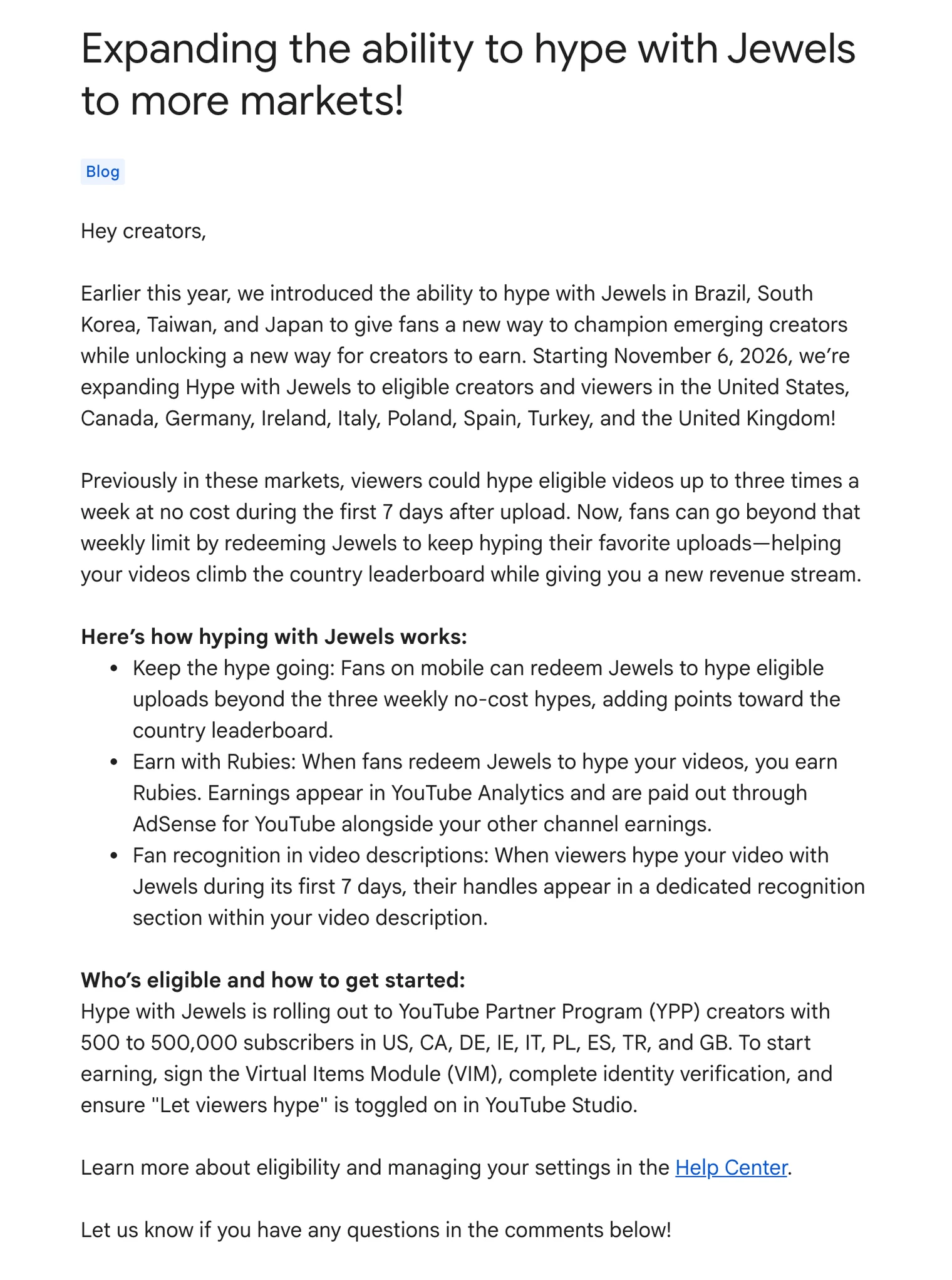
TeamYouTube's November 2026 post announcing hype with Jewels in the US, Canada, Germany, Ireland, Italy, Poland, Spain, Turkey and the UK
TeamYouTube's announcement on the YouTube Help Community, November 6, 2026.

YouTube's own hype help page hadn't caught up when we checked on November 13. It still listed only Brazil, Japan, Korea and Taiwan for the description credit.

How hype works

Hype is a way for viewers to push a new video from a smaller channel up a weekly leaderboard. It only works on long-form videos uploaded in the last 7 days, from channels in the YouTube Partner Program with 500 to 500k subscribers.

Every viewer gets 3 free hypes a week, and they reset on Monday at midnight local time. A hype gives the video points, and smaller channels get a bigger bonus. YouTube's example: one hype on a channel with 500 subscribers is worth 7500 points, while one hype on a channel with 500k subscribers is worth 50. The leaderboard isn't personalized, so everyone in the same country sees the same list.
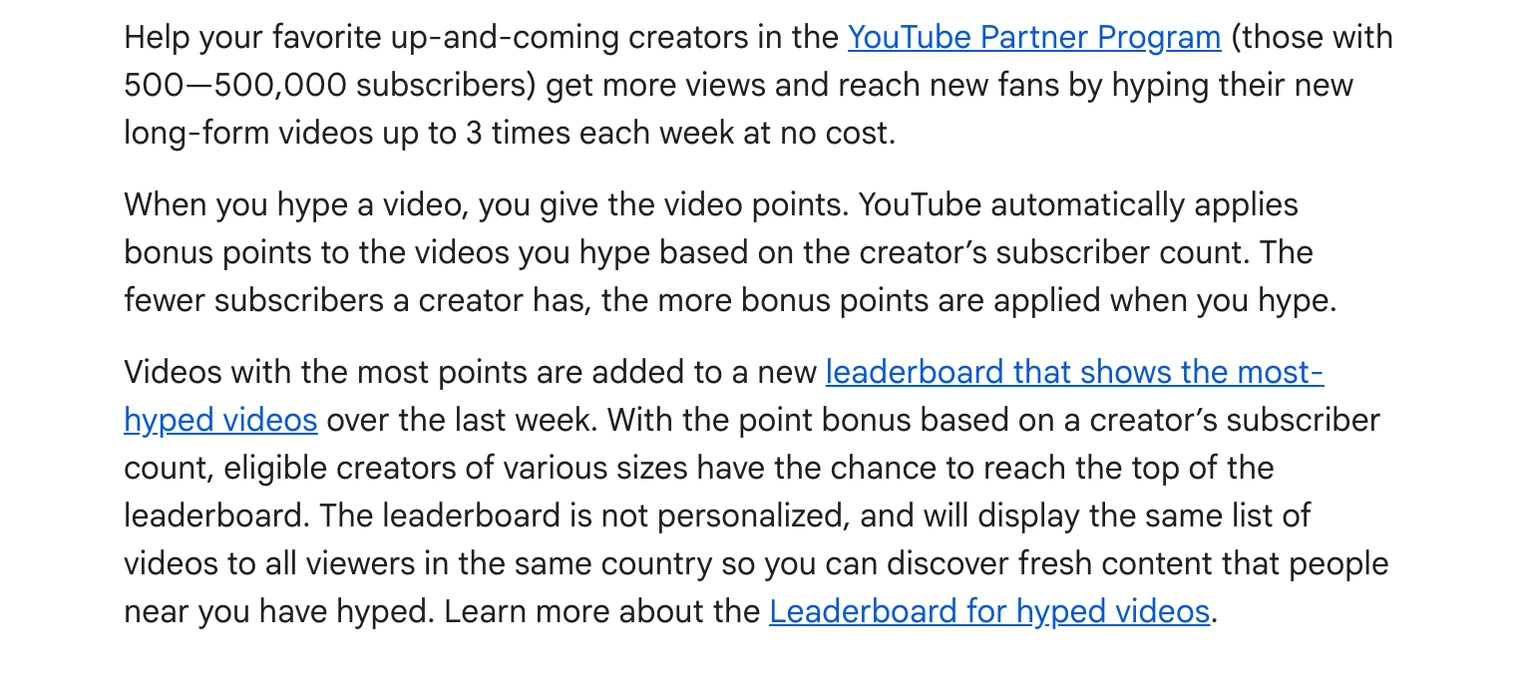
YouTube's hype help page explaining the 3 free weekly hypes, the bonus points for smaller channels and the country leaderboard
YouTube Help: Hype a video, November 13, 2026.

Hype is in 39 countries, including the US, the UK, India, Brazil, Mexico, Japan and most of the EU. Paid hype with Jewels is in fewer: the 9 countries above plus the 4 that had it first. Viewers hype from the YouTube mobile app, under the video, by swiping the comment preview until the Hype button shows up. There's no undo, and creators can't see who hyped them.

How much creators earn from Jewels

For gifts, YouTube publishes the rate. Every 2 Jewels a viewer redeems for gifts earn you 1 Ruby, and YouTube pays $0.01 per Ruby. You get half a cent per Jewel spent on you.
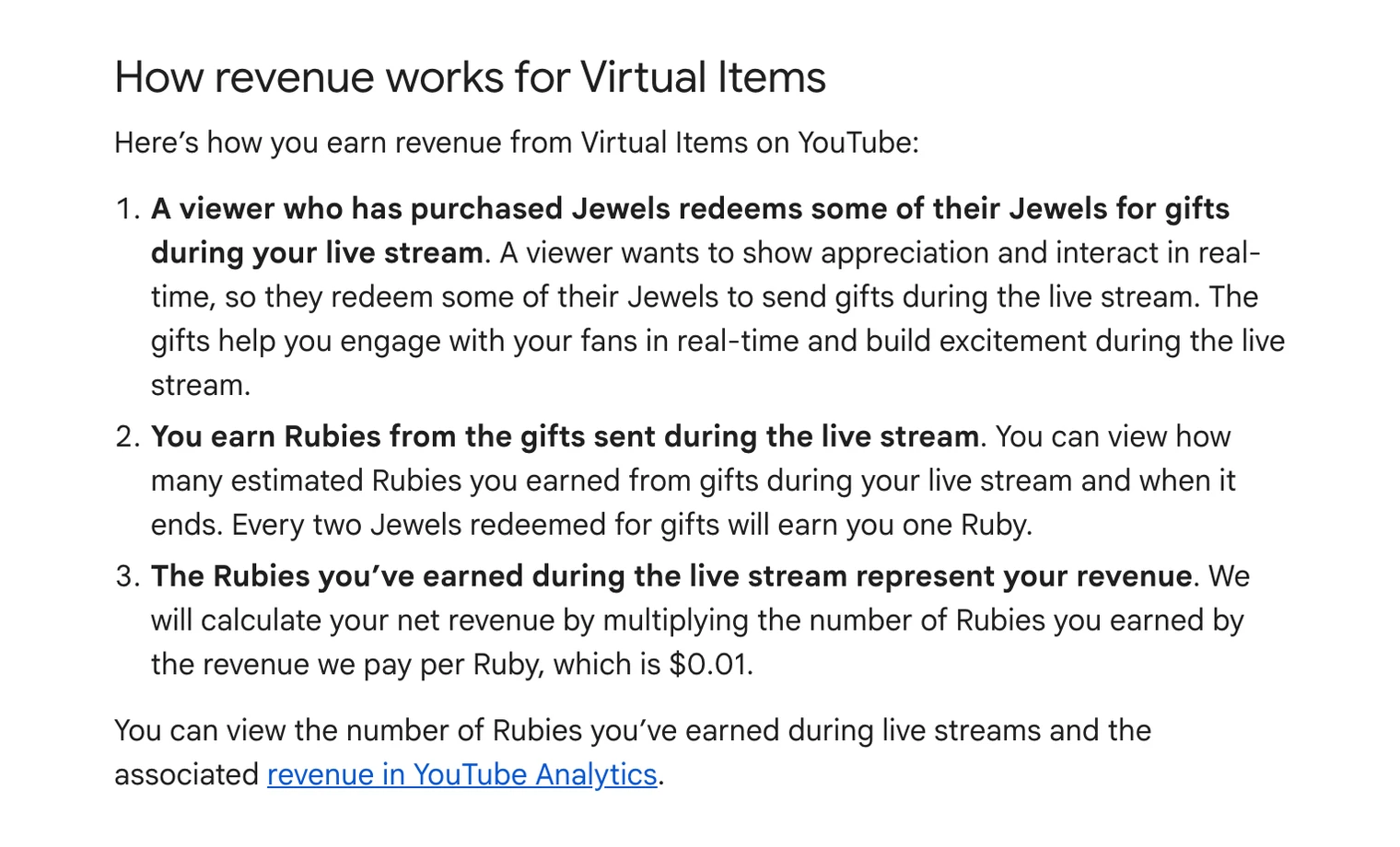
YouTube's Virtual Items policy: every two Jewels redeemed for gifts earn one Ruby, and YouTube pays $0.01 per Ruby
YouTube Help: Virtual Items Program Policies for Creators, November 13, 2026.

For hype, YouTube says you earn Rubies but hasn't published how many per Jewel. Rubies from both show up in YouTube Analytics, under Revenue and then the How you make money card. They get paid through AdSense with the rest of your YouTube Partner Program earnings.

What a viewer pays for those Jewels is a different number. YouTube sells Jewels in bundles, and the price depends on the bundle and the country. The app shows how many Jewels each gift or hype costs before the viewer sends it.

How to turn on gifts and hype with Jewels

Your channel has to be in the YouTube Partner Program, and you have to be 18 or older. Your AdSense account also has to pass identity verification with a driver's license, passport, state ID or green card. Then:

  1. On a computer, open YouTube Studio and select Earn in the left menu.
  2. Open the Supers & gifts tab and scroll to "Turn on gifts in live streams".
  3. Click Get started and accept the Virtual Items Module. If AdSense hasn't verified you yet, Studio asks you to verify first.
  4. Gifts switch on for your vertical and horizontal live streams as soon as you accept.
  5. For paid hype, also check that Let viewers hype is on in YouTube Studio.

In the YouTube Studio app it's Earn, then Gifts, then Turn on. You can turn gifts off again from the same tab, and your past earnings stay in Analytics.

If AdSense never asks you to verify, YouTube says to contact Creator Support to trigger it. Once AdSense asks, you have 45 days to send your documents, or monetization on the channel pauses until it's done.

Where gifts don't work

Gifts don't show up on live streams that are age restricted, made for kids, unlisted or private, on YouTube Giving fundraisers, or when live chat is off. Hype is limited to long-form videos from the last 7 days, so Shorts and older uploads can't be hyped.

Vertical live streams sent from OBS or other streaming software can get gifts too, not only streams started in the YouTube app. YouTube's policy page says you may not see the gifts in your streaming software. To follow them, watch your stream in the YouTube mobile app or read them as system messages in the Live Control Room chat.

What viewers should know before buying Jewels

  • You have to be 18 or older and in a country where Jewels are sold.
  • YouTube caps spending at about $500 a day and $2000 a week, shared with Super Chat, Super Stickers and Super Thanks. You can hold at most 30k Jewels at a time.
  • Jewels aren't refundable, except where local law gives you a right to a refund.
  • Bonus Jewels from YouTube promotions can expire, and they're spent first.
  • If your account is deleted or terminated, its Jewels are gone.

Free hype, paid hype and gifts compared

Free hypeHype with JewelsGifts
WhereLong-form videos, first 7 daysLong-form videos, first 7 daysLive streams
Viewer paysNothing, 3 a weekJewels, after the 3 free hypesJewels
Creator earnsLeaderboard points onlyRubies (rate not published)1 Ruby per 2 Jewels, $0.01 per Ruby
Channel size500 to 500k subscribers500 to 500k subscribersAny YPP channel
Fan creditMonthly Hype Star badge for top hypersHandle in the video descriptionName and photo shown on the stream
Countries391399 countries and territories

Gifts only pay while you're live

Gifts are the one Jewels feature that works on streams, and they only come in while a public stream with chat is running. The hours you're live are the hours you can earn from them.

Upstream.so makes those hours easier to fill. Live Studio runs your show from a browser tab with guests and screen share, so there's no OBS to set up. With multistreaming, the same stream goes to up to 10 of 30+ platforms at once, YouTube included. YouTube, Twitch, Kick and Rumble chat come into one feed. 24/7 and scheduled streams keep a channel live from our servers while your computer is off.

You can start on the free plan, which includes 24 streaming hours a month at 1080p30.

Live Studio

Go live from your browser.

Invite guests, share screens, build scenes, and add overlays without installing or wiring together another production stack.


Sign up for free See Live Studio
Lofi Hours21:42Now playingMidnight tapeLofi Hours
LayersDesignTemplatesComponentsAnimationsChatDestinationsTriggers
Layers
  • Station name
  • Now playing
  • Clock
  • Visualizer
  • Follow QR
  • StreamElements alerts
  • Background frame

Sources

TeamYouTube on the YouTube Help Community: Expanding the ability to hype with Jewels to more markets (November 6, 2026). YouTube Help: Hype a video, Virtual Items Program Policies for Creators, Virtual items policy for viewers, Turn on and manage gifts, powered by Jewels, Gifts eligibility and availability and Verify your identity for gifts, powered by Jewels. All read on November 13, 2026.
Published November 13, 2026
Mario Jankovic

About the author

Mario Jankovic

Product and Engineering

Mario Jankovic co-founded Upstream.so and runs product and engineering. He writes about running live streams from the cloud: 24/7 channels, multistreaming and Live Studio, and what we learn building them.

Keep exploring

Further reading

Browse all articles
YouTube Shorts Bonus Program: Who Gets Invited and How It Pays
Oct 16, 2026 Blog

YouTube Shorts Bonus Program: Who Gets Invited and How It Pays

Read article
YouTube Side-by-Side Ads: How They Work and What to Check
Aug 29, 2025 Blog

YouTube Side-by-Side Ads: How They Work and What to Check

Read article
How to Add Chat to OBS: YouTube, Twitch and Kick
Nov 10, 2026 Guides

How to Add Chat to OBS: YouTube, Twitch and Kick

Read article

Start streaming today

Go live on up to 10 of 30+ platforms, run a 24/7 channel, and produce live shows in your browser, with no software or server setup.

No credit card 24 hours/month free Full functionality
Start Streaming Free
24/7 Live Streaming Run cloud channels that stay live around the clock. Live Studio Invite guests, share screens, and add branded overlays in the browser. Multistreaming Send one live feed to YouTube, Twitch, Kick, and RTMP endpoints. Pre-recorded Live Streaming Upload pre-recorded videos & Go Live without the stress of live production. Free plan 24 hours a month with no watermark. Multi-channel streaming Separate live channels from one account. Enterprise Setups for teams, labels and agencies. About Upstream.so Who we are and how Upstream.so works.
Overlays Layers and widgets in Stream Designer. RTMP server Stream in from OBS or any encoder. Multichat Every platform's chat in one feed. Stings, jingles and ads Inserts that play between your videos. Scheduling Streams that start and end on their own. Playback controls Skip or play any file while you stay live. Team access Invite your team, each with their own role. Backup streams A standby feed if your main one drops. Audio and video playlists Loop music and visuals separately. Media library & storage Organize files and cloud uploads. Live Streaming API Run streams, media and queues from code. MCP Server Manage streams from your AI assistant. Website player Embed your live stream on your site. All features Everything Upstream.so does, on one page.
YouTube live streaming Twitch live streaming Kick live streaming Facebook live streaming Instagram live streaming TikTok TikTok live streaming Rumble live streaming Mixcloud live streaming Up to 10 of 30+ Plus any custom RTMP or SRT destination.
Platform limits Bitrate and duration caps for each platform. Integrations Setup guides for OBS, vMix, cameras and more. VTuber Streaming Go live with your avatar on up to 10 of 30+ platforms.
Blog Guides, platform rules and news for anyone who goes live. Guides Setup guides for 24/7 streams, multistreaming and RTMP. Release Notes The new features in each Upstream.so update, in one place. Free Tools Video, audio, thumbnail and AI tools, plus camera and mic checks. Helpdesk Step by step setup help and troubleshooting for Upstream.so. Service status Current service health, uptime history and incident updates. Live Streaming FAQ Short answers to what people ask before they go live. Compare Upstream.so Upstream.so side by side with Restream, StreamYard and others. Latest post YouTube Dual Stream: What the Vertical Copy Does and How to Turn It Off
Always-on 24/7 Live Streaming Run cloud channels that stay live around the clock.
Explore
Real-time live Live Studio Invite guests, share screens, and add branded overlays in the browser.
Explore
One stream, up to 10 of 30+ platforms Multistreaming Send one live feed to YouTube, Twitch, Kick, and RTMP endpoints.
Explore
Schedule & Automate Pre-recorded Live Streaming Upload pre-recorded videos & Go Live without the stress of live production.
Explore
Free plan 24 hours a month with no watermark.
Multi-channel streaming Separate live channels from one account.
Enterprise Setups for teams, labels and agencies.
About Upstream.so Who we are and how Upstream.so works.
Overlays Layers and widgets in Stream Designer. RTMP server Stream in from OBS or any encoder. Multichat Every platform's chat in one feed. Stings, jingles and ads Inserts that play between your videos. Scheduling Streams that start and end on their own. Playback controls Skip or play any file while you stay live. Team access Invite your team, each with their own role. Backup streams A standby feed if your main one drops. Audio and video playlists Loop music and visuals separately. Media library & storage Organize files and cloud uploads.
Live Streaming API Run streams, media and queues from code.
MCP Server Manage streams from your AI assistant.
Website player Embed your live stream on your site.
All features Everything Upstream.so does, on one page.
YouTube live streaming. 24/7 channels with midroll ads. Twitch live streaming. Streams restart on their own at 48 hours. Kick live streaming. Stay live with your computer off. Facebook live streaming. Schedule lives that start on their own. Instagram live streaming. Go live from your browser or the cloud. TikTok TikTok live streaming. Go live on TikTok and Instagram at once. Rumble live streaming. Add Rumble to your YouTube or Kick stream. Mixcloud live streaming. DJ sets and radio shows from your browser. Up to 10 of 30+ Plus any custom RTMP or SRT destination.
Platform limits Bitrate and duration caps for each platform.
Integrations Setup guides for OBS, vMix, cameras and more.
VTuber Streaming Go live with your avatar on up to 10 of 30+ platforms.
Blog
Guides
Release Notes
Free Tools
Helpdesk
Service status
Live Streaming FAQ
Compare Upstream.so
YouTube Dual Stream: What the Vertical Copy Does and How to Turn It Off YouTube Dual Stream: What the Vertical Copy Does and How to Turn It Off
Upstream.so

Run your streams from the cloud

Free plan: 24 streaming hours a month, no card, no watermark.

4.6 · 245 reviews on Trustpilot
Legal entity
Zukunft d.o.o.
Registered address
Grožnjanska ulica 32, 10000 Zagreb, Croatia
Company VAT ID
Company VAT ID: HR62560895839
About | Contact us | Tools | Content standards | Security | Privacy Policy | Terms of Service | Affiliate terms | Legal notice |

Product

  • Pricing
  • Upstream.so Features Overview
    • Multistreaming
    • Media Library & Storage
    • Website Player
    • Separate Audio and Video
    • Overlays: Stream Designer
    • Live Streaming Studio
    • Scheduling & Automation
    • Live Playback Controls
    • Play Stings, Jingles and Ads
    • Team Access
  • Enterprise Broadcasting Solutions

Resources

  • Helpdesk
  • Service status
  • Live Streaming FAQ
  • Blog
  • Release Notes
  • Live Streaming API
  • MCP Server
  • Free Live Streaming
  • YouTube Live Streaming
  • RTMP Server
  • Supported Platforms
  • Live Streaming Limits
  • Integrations

Compare us

  • Compare Upstream.so
    • Upstream.so vs Runnel.live
    • Upstream.so vs OneStream
    • Upstream.so vs Live247
    • Upstream.so vs Gyre
    • Upstream.so vs Streaming Bots
    • Upstream.so vs Restream
    • Upstream.so vs StreamYard
    • Upstream.so vs LiveReacting
    • Upstream.so vs Playout.video

Free tools

  • Design tools
  • Video tools
  • Audio tools
  • AI tools
  • Setup checks

Use cases

  • For Creators
  • For Music Labels
  • Church Streaming
  • VTuber Streaming
  • Multi-Channel Streaming

© 2026 Upstream.so. All rights reserved.