Apparently, no, not any more. For years, the “YouTube Face” was the gold standard. You know the one. Mouth open. Eyes wide. Hands on cheeks. It screamed “CLICK ME.” But things change.
The fake shock face seems to be on the decline as the internet seems to be tired of it. The algorithm (and people) changing constantly. The audience is smarter. So is this tactic still effective? I mean we flirted with it too, so we would also like to know:
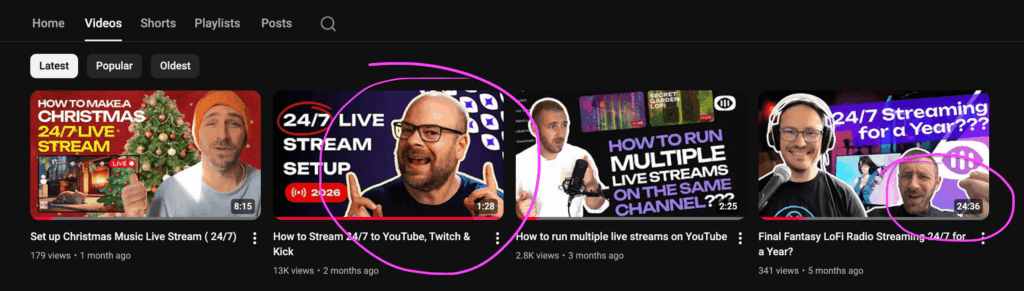
What should be our thumbnails strategy for 2026, one that works and that actually gets clicks? If you run a YouTube Channel discovery is everything. We all really need to get this right.
The Myth Behind Open Mouths & YouTube Thumbnails
We call it the “Gape.” It dominated YouTube for a decade. The logic was simple: Faces are inherently attention grabbing, as we have a large portion of the brain reserved for recognising faces. Thats why we see faces everywhere, even if theyre not there: on the moon, on toast, in rocks…
Aside from simply showing a face, high emotion and basic shock emotions should lead to arousal which should lead to high clicks. That’s the assumption, at least. But when it comes to the effectiveness of the “Gape”, the data says the tide has turned.
Build the stream in the cloud.
Schedule videos, produce browser-based live shows, or send one feed to multiple platforms from the same Upstream workflow.
Thumbnails with faces do not always beat thumbnails without faces.
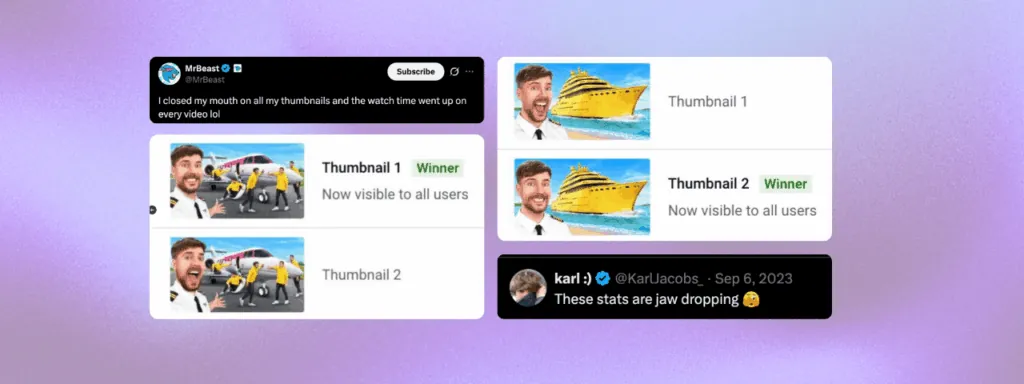
Closed mouth expressions won more than open-mouthed. Natural, mid-action facial expressions won in posed vs candid tests. Occasionally unusual expressions won over traditional excited faces.
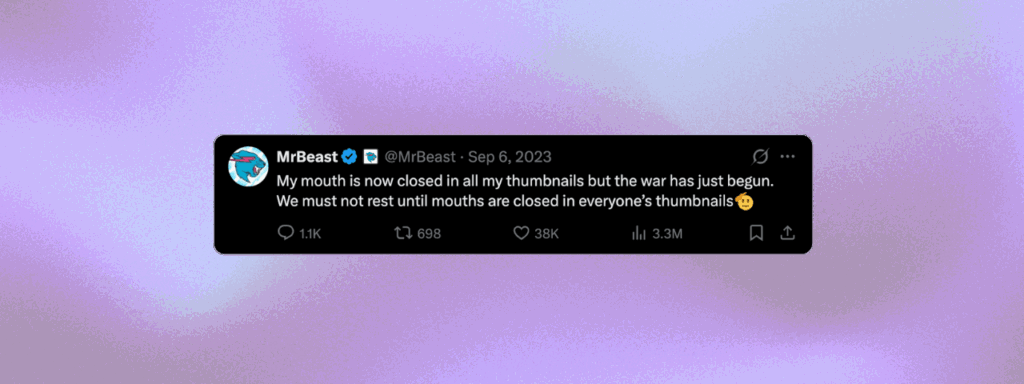
Even MrBeast noticed this. He tested it. He found that a friendly smile often beats the fake shock face. This changes the conversation around the whole thumbnail x face issue. Viewers associate extreme shock with clickbait now. They think you are overpromising, which could lead to disapointment. Authenticity apparently creates trust. Fake shock creates skepticism, after the novelty wears out.
Why You Need a New Strategy
The algorithm cares about the number of clicks (Click Through Rate, CTR) and whether people stay (Average View Duration, AVD). If your thumbnail promises an tsunami but delivers a tiny splash, you lose. Retention drops and the algorithm buries you. This is the core risk of misaligning your content and your thumbnails (and title) with the goal of getting more clicks. It seeems it’s better to get the right clicks, rather than just more clicks. This same principle applies to traditional SEO: sure, you may craft an amazing title and metadescription and get a click, but if the users don’t find what they were initially looking for (intent), your page will perform worse and worse with every such click.
Still, competition is heavy, and you cannot use a static approach and hope for the best. You need open a curiosity gap with the thumbnails. You DO need a click before you get the watch, in any case.
Decoding CTR
CTR is the percentage of people who click. It is the gatekeeper to algorithmic growth on YouTube and we need to look at the psychological levers that influence it:
- Clarity: The viewer must get it in one second or less
- Emotion: A real smile, a look of focus or even an unusual expression works better than the “scream” face we got used to.
- Curiosity: Show the setup. Hide the punchline.
- Value: Why should they watch? Why is it different than other videos on this topic?
The Mobile-First Rule
Most people watch on phones. If your thumbnail fails on a 6-inch screen, it fails everywhere. This should be your guideline for choosing a thumbnail that works across all devices.
Design for small screens:
- Minimal Text: 3 or 4 words max.
- Large Fonts: Make it super-readable. ExtraBold white letters with a thin black outline will always work with your identity.
- Clear Subject: Fill the frame.
- No Clutter: If it doesn’t help the story, delete it.
Stop Guessing and Start A/B Testing Multiple Thumbnails.
YouTube lets you test up to three thumbnails. This is the “Test & Compare” feature. It is the best way to decide, because you can easily get proof of whats working and what’s not. For example, as Josiah Hritsko notes,
- Create three versions.
- Run the test immediately.
- Let the data decide.
A 7% increase in traffic might sound small. But over a year? That can be the difference between a dead channel and a hit.
However, if your channel is fresh, and your reach is small, testing might not work for you. There will simply not be enough data for the statistics to show you whats actually working and what isn’t. In that case, you may need to test live, and reassess after you see the numbers rolling in (or not rolling in).
Best Practices for 24/7 Live Streams
24/7 streams are unique. The content never stops, and it probably changes slightly, over time. Your thumbnail has to explain what is happening right now. This adds a layer to the strategy: You can change the thumbnails as your stream evolves and fluctuates. Change it to keep it in tune with the season or playlist you are streaming, but keep in mind your visual identity, and the users who already got used to seeing your stream thumbnail.
If you already have a strong stream, keeping the thumbnails relatively similar and only changing some smaller elements should safer bet than going all in and testing wildly different styles. The viewers get used to clicking on the same or similar thumbnail, to reach their favorite 24/7 YouTube Channel, once they’re already hooked. And if you change too much, they may not recognize it right away.
Beyond Faces: What Works in 2026?
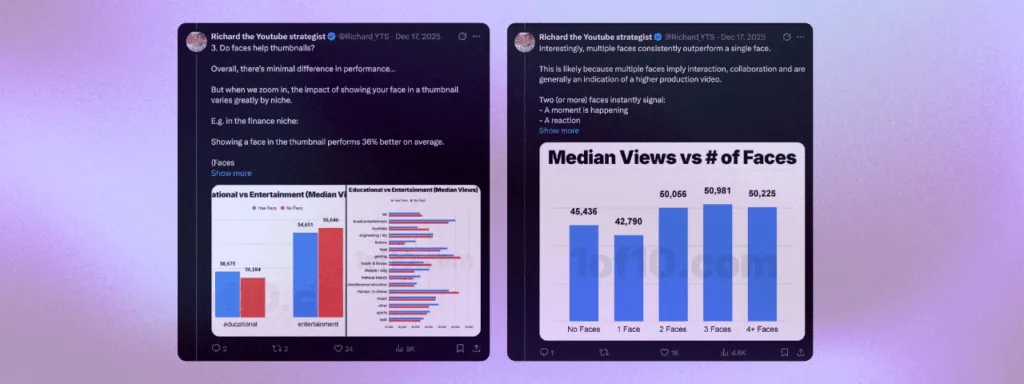
If the Gape is out, what is in in 2026? Richard the YouTube Strategist conducted a study of videos with over 62 Billion+ views from 2025, and while you should take a look at Richard’s post to learn from all the insights, two insights stand out:
Faces still work: our brain is simply wired to be attracted to faces, so they perform 36% better on average. Interestingly, “multiple faces outperform a signle face.”
- Faces: Still works.
- Simplicity: Clean backgrounds. High quality.
- Curiosity: Visuals that ask a question.
- Action: Show the project result. Show the impact. Don’t just show a face reacting to it.
- Vivid Colors: Primary colors seem to be ruling (Red, Yellow, Green)Stand out in white mode and in dark mode.
- High Contrast: Thumbnails are a small format, and anything that helps faster recognition, like defined lines, is a bonus.
- Dynamic Action Poses: Rather than just standing, action poses carry more meaning about the video, and are generally more exciting.
- Quality: With all the AI tools, many YouTube thumbnails started looking similar. This is your chance to shine with well thought out and designed thumbs.
Actionable Steps
Ready to fix your CTR? Follow this workflow to come up with thumbnails that work:
- Concept First: Decide on the thumbnail before you record / create (crazy, right? But do try!)
- Take Photos: Do not use blurry screenshots of your video. If you have to, use AI to improve them if they’re a bit potato-quality.
- The Squint Test: Shrink it down to the size of your actual thumb fingernail. Can you still read it and understand what the video is about?
- Check Competitors: Stand out from the crowd. Copy what works, and give your own unique take on it.
- A/B Test: Verify your assumptions on which YouTube Thumbs Work with data.
Summary
We had a weird couple of years looking at gaping faces on our YouTube Home screens, but the generic open mouth seems
to fading for the last two years. It seems that simplicity and simple friendly faces are making a comeback in 2026,
and I’m looking forward to see a less shocked YouTube Dashboard.
A good YouTube Thumbnail means
respecting the viewer. You need to show a preview of what’s “underneath” and be honest about it. If you want to
iterate on a simpler style, the free
YouTube thumbnail maker gives you editable 1280×720
templates in the browser. Getting a 100 clicks and 80 people watching it to the end is a better signal to the YouTube
Algorithm than getting a 1000 people to click and leave before the 5-second mark. That can actually hurt your VOD or
Live Stream performance!
Curious about 24/7 live streams? Try Upstream’s free plan and stream in minutes. Get 24 hours of live streaming every month, no credit card. You have the content, we have the servers & the best 24/7 live streaming tool out there.