H.264 works across more live-streaming setups. H.265 can deliver similar quality at a lower bitrate, but your encoder, streaming app, connection, and platform must support it.
H.264 and H.265 are video compression standards. H.264 is also called AVC, and H.265 is also called HEVC, as explained in the OBS video formats guide. HEVC is not a third codec. It is another name for H.265.
H.265 compresses video more efficiently. You can use that advantage for a lower bitrate at similar quality or more retained detail when the bitrate stays the same. That makes H.265 more efficient, not automatically better for live streaming.
A codec is only one part of the setup. The streaming app creates and sends the video, the connection carries it, and the platform receives it. The diagram below shows how those parts fit together.
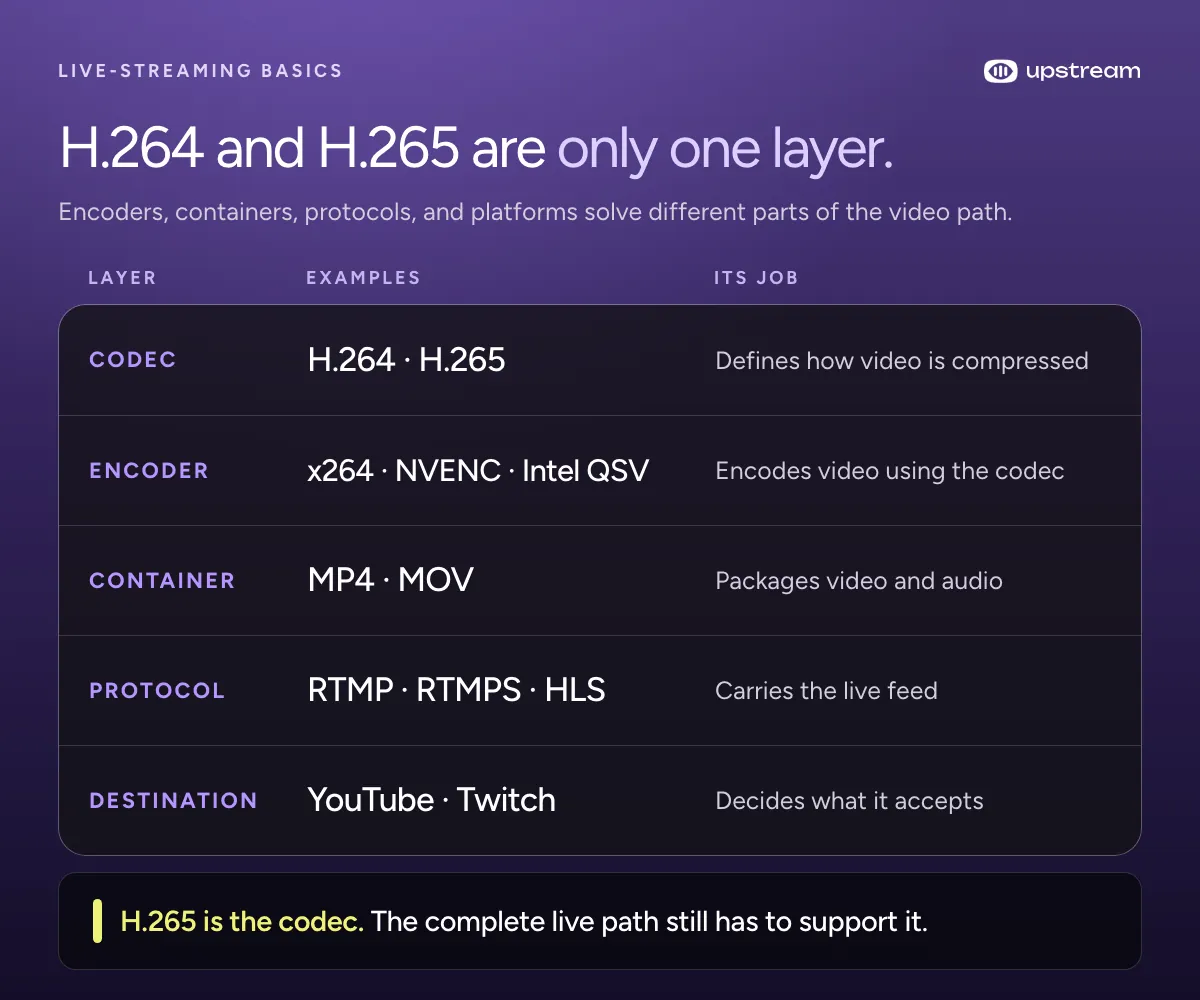
Which codec should you use for live streaming?
For choosing software or hardware and connecting it to YouTube, follow our live streaming encoder setup guide.
Use H.264 for most live-streaming setups. Choose H.265 when your encoder, streaming app, connection, and platform support it and its bandwidth, quality, or HDR benefit is worth the extra testing.
| Streaming situation | Recommended codec | Why |
|---|---|---|
| One unchanged encoded output sent to several platforms or an untested RTMP endpoint | H.264 | It has the broadest documented compatibility |
| YouTube on a tested RTMP, RTMPS, or HLS path | H.264 or H.265. Use H.265 for HDR. | H.265 is useful when its efficiency helps or HDR requires it |
| Twitch 2K Enhanced Broadcasting | H.265 at 1440p, H.264 at 1080p and lower | Twitch uses different codecs for different outputs |
| Standard Twitch, Kick, Rumble, Facebook Live, LinkedIn Live, or X Media Studio Producer | H.264 | Their standard or currently documented input paths specify H.264 |
| OBS does not expose a compatible HEVC streaming encoder | H.264 | Stock OBS cannot create an H.265 stream without compatible encoding hardware |
If you are unsure what your setup supports, choose H.264. Use H.265 only after testing the actual platform, streaming app, account, endpoint, resolution, and HDR setting.
Build the stream in the cloud.
Schedule videos, produce browser-based live shows, or send one feed to multiple platforms from the same Upstream workflow.
What is the difference between H.264 and H.265?
The codec names describe standards, not specific encoders. x264 and x265 are software encoders for H.264 and H.265, respectively. NVENC, AMD AMF, Intel Quick Sync, and Apple VideoToolbox are hardware encoding paths that may support one or both codecs depending on the device and use case.
YouTube says HEVC generally provides 25 to 50 percent more data compression than H.264 at the same video quality. That can mean a lower upload bitrate at similar quality, or better quality when the available bitrate stays fixed.
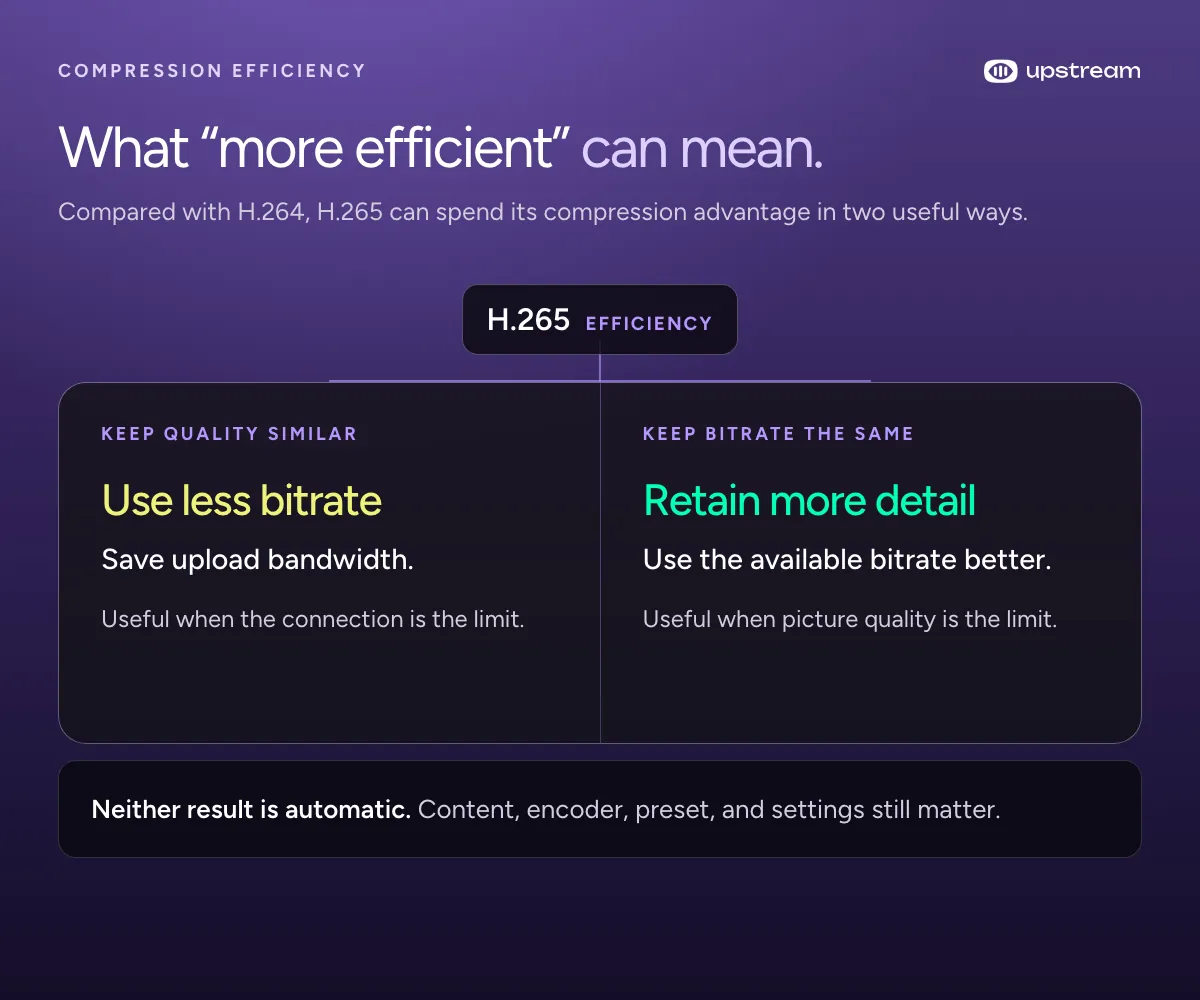
A lower bitrate does not help if the streaming app, connection, or platform cannot use H.265. H.265 also does not guarantee better image quality, lower latency, or lower CPU use. Those results depend on the encoder, its settings, the protocol, and the rest of the live path.
| Decision | H.264 / AVC | H.265 / HEVC |
|---|---|---|
| Compression | Typically needs a higher bitrate for similar quality | Typically reaches similar quality at a lower bitrate |
| Live support | Broad | Depends on the complete path |
| Best fit | General streaming and multistreaming | A tested platform-specific workflow |
Does H.265 reduce CPU usage in OBS?
Not by itself. Stock OBS supports HEVC only through hardware encoders. Compared with OBS’s x264 software encoder, hardware HEVC usually uses less general CPU time because the dedicated media engine takes work off the CPU. Compared with hardware H.264 on the same media engine, HEVC does not guarantee lower CPU use or lower total system load.
That does not guarantee the complete stream will avoid overload. Resolution, frame rate, encoder settings, rendering, a separate recording encode, and additional outputs still consume system resources. H.264 is different because OBS can encode it with either the included x264 software encoder or compatible hardware.
Why can H.265 work for recording but fail during a live stream?
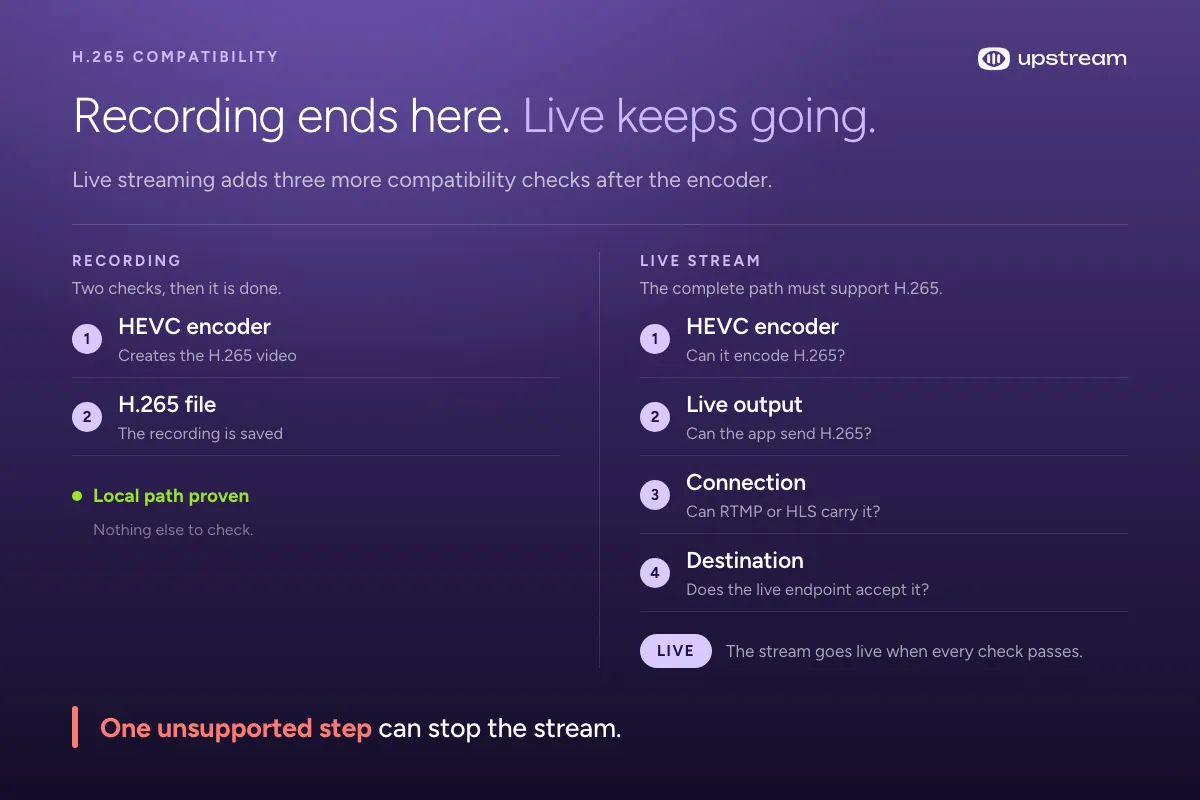
Creating an H.265 recording requires a compatible encoder and file container. Playing or editing it later also requires HEVC decoder support. Live streaming adds a live output, an ingest protocol, and a platform. Multistreaming can add several platforms with different codec rules.
Check the path in this order:
- Encoder: Can the selected encoder create H.265 in real time?
- Recording container or live output: For recording, does the file container allow HEVC? For streaming, does the broadcasting application’s live output support it?
- Ingest protocol: Can the protocol signal and carry HEVC correctly?
- Platform: Does the chosen live endpoint accept it for this feature and account?
- Other platforms: If the encode is relayed unchanged, can every platform accept it?
OBS can expose H.265 for recording while a destination’s streaming path still offers only H.264. Seeing H.265 in the recording menu means OBS exposed an HEVC encoder for the selected recording format. A successful test recording confirms that the recording path works. Neither result proves that the selected streaming service accepts it.
Does H.265 need hardware acceleration in OBS?
Yes, for encoding with stock OBS. In stock OBS Studio, H.265 requires a compatible hardware encoder. OBS does not include an x265 software encoder. Depending on the platform and use case, OBS can expose HEVC through NVIDIA NVENC, AMD AMF, Intel Quick Sync, Apple VideoToolbox, or VA-API. The OBS 29.1 release notes document HEVC support through VA-API on compatible Linux systems. This is an OBS limitation, not a rule of the H.265 standard.
That hardware is not always a separate graphics card. The OBS hardware encoding guide documents Intel Quick Sync on integrated graphics. It lists VideoToolbox HEVC for recording on Apple Silicon, while its streaming section lists H.264, so do not assume an HEVC recording option is also available for streaming. Saying “stock OBS needs compatible video-encoding hardware for H.265” is more accurate than saying every H.265 workflow needs a dedicated GPU.
CPU-only H.265 encoding still exists outside OBS. FFmpeg can encode HEVC through libx265, and x265 presets trade encoding speed for compression efficiency. That does not make x265 an option in stock OBS or guarantee that a CPU-only encode will hold the required live frame rate.
H.265 decoding is not hardware-only either. FFmpeg includes a native software HEVC decoder, so a GPU or hardware accelerator is not required to decode the format.
Can you use an H.265 video in a pre-recorded or 24/7 live stream?
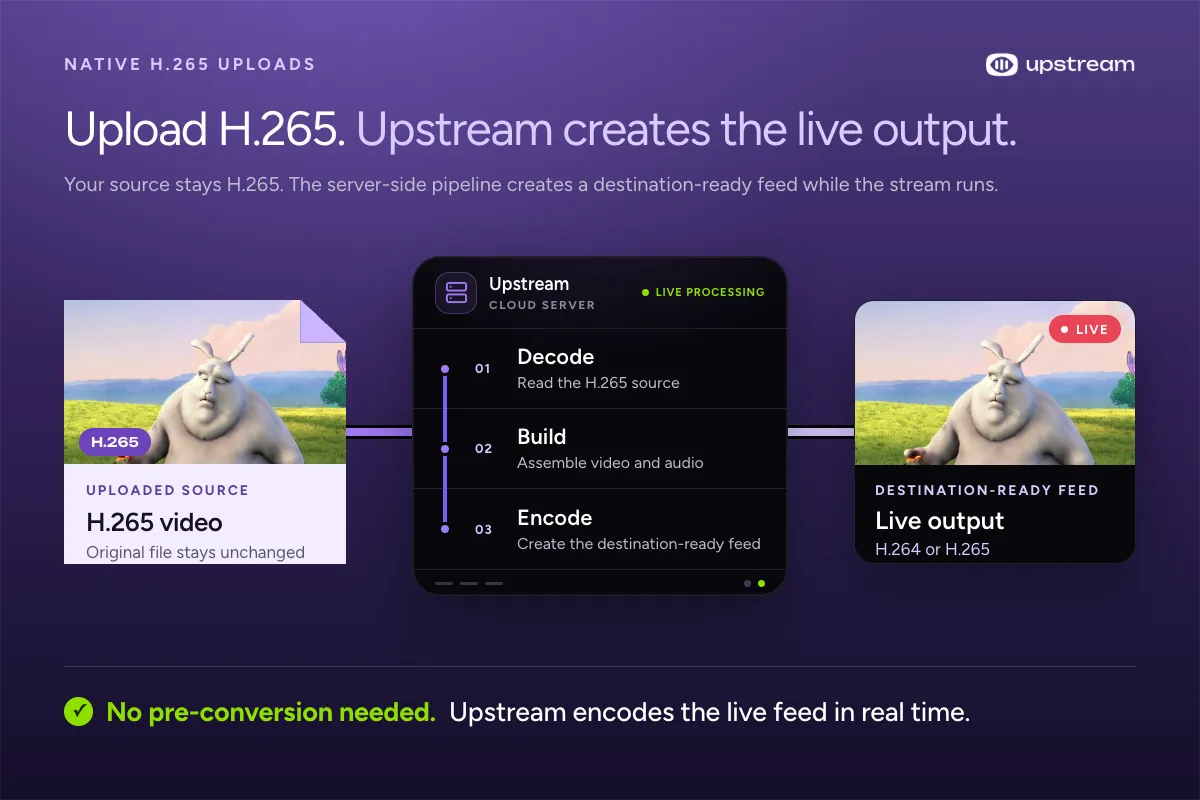
Live streams can start with something other than a camera or an OBS feed. Pre-recorded live streaming and 24/7 live streaming often use uploaded videos. In that workflow, the uploaded video is a source for the program, not the final feed sent to the streaming platform.
A customer asked us how to convert an H.265 video to H.264 before uploading it to Upstream. They did not need to. Upstream accepts both H.264 and H.265 uploads and can use the H.265 file directly inside the stream. If a file still needs different settings, you can re-encode it inside Upstream without a separate converter.
If you need an H.264 copy for another editor or player, the free HEVC to H.264 MP4 converter runs on your device. Re-encoding can lose detail. It produces 8-bit video without HDR tone mapping, so use a desktop editor with colour controls for HDR footage.
When the stream runs, Upstream hardware-decodes the H.265 source, renders the complete program, and encodes the outgoing live feed. The original upload stays H.265, so the customer does not need to create a separate H.264 copy first. Destination-aware H.265 output is in the product pipeline and should not be confused with current native H.265 upload support.
Does RTMP support H.265?
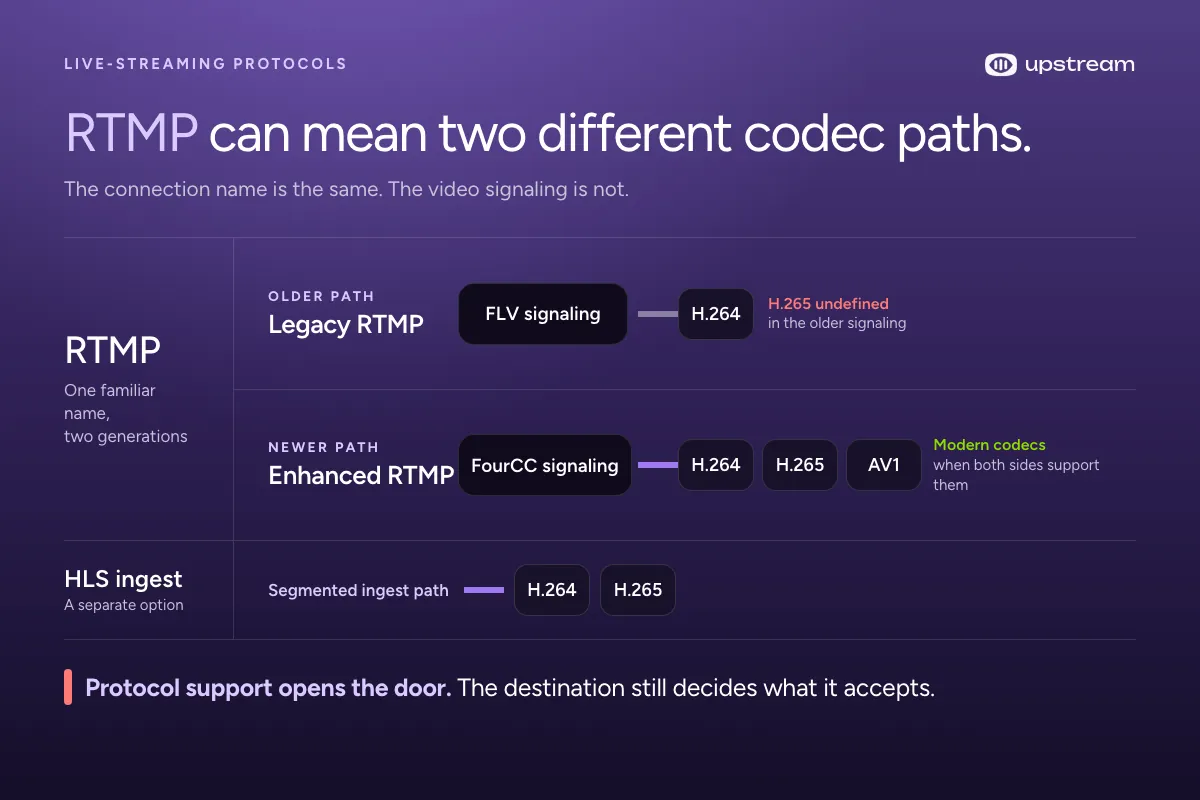
Legacy RTMP and FLV signaling did not define H.265. E-RTMP, commonly called Enhanced RTMP, defines HEVC signaling. People use “RTMP” for both paths, which is why older guides say H.265 is impossible while current OBS and YouTube setups offer it.
RTMP, or Real-Time Messaging Protocol, carries a live stream from an encoder to a streaming platform. In the common legacy setup, the video sits inside FLV. The OBS formats guide lists FLV support as H.264 video and AAC audio, which explains the old H.264-only rule.
Why did legacy RTMP mean H.264 only?
The older FLV video signaling had a small set of codec identifiers. H.264 fit that system and became the normal choice for RTMP ingest. H.265 arrived later, so simply selecting HEVC in an encoder didn’t make an older RTMP server understand what it received.
What did Enhanced RTMP change?
Enhanced RTMP added a FourCC-based way to identify newer video codecs. A FourCC is a four-byte identifier that tells the receiver which codec is coming. The Enhanced RTMP specification includes modern codec signaling for HEVC and AV1, while keeping the RTMP workflow people already use.
OBS Studio 29.1 added HEVC and AV1 streaming over Enhanced RTMP in May 2023. That didn’t make every RTMP server compatible. The broadcasting application’s output and the ingest server both need compatible Enhanced RTMP signaling. Separately, the selected video encoder must be able to produce HEVC, and the platform still decides which codecs it accepts.
In Veovera’s 2023 announcement, Jean-Baptiste Kempf, identified there as president of VideoLAN, summarized the reason for the update:
“RTMP is still everywhere, but we need support for modern codecs, and other features that should be standard.”
Which live-streaming platforms support H.265?
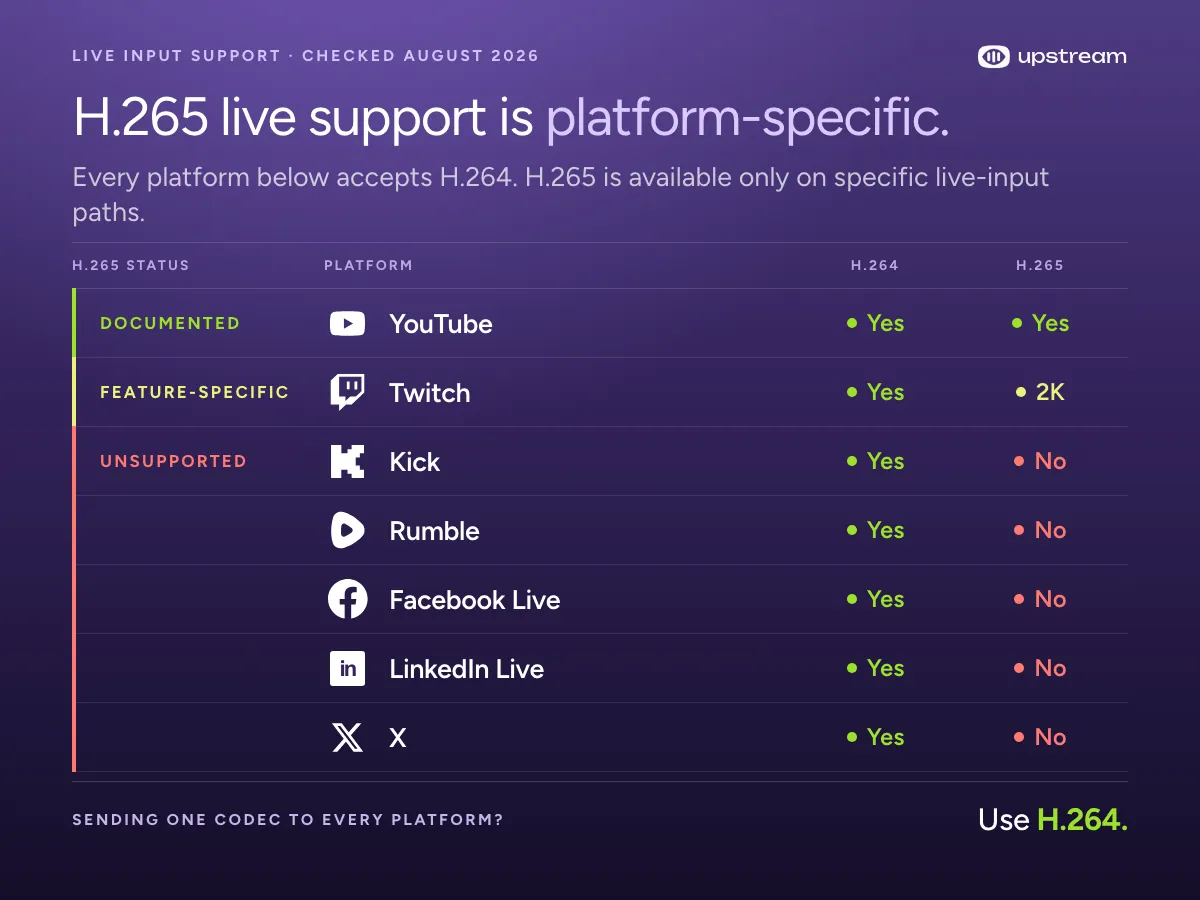
Current documentation shows H.265 live input on YouTube and feature-specific H.265 on Twitch. Kick explicitly rejects H.265, Facebook Live API specifies H.264 only, and the current Rumble, LinkedIn Live, and X Media Studio Producer guides specify H.264 without listing H.265.
Enhanced RTMP can carry H.265, but each platform still decides whether it accepts the codec on a particular live-input path.
| Platform or path | H.264 | H.265 |
|---|---|---|
| YouTube RTMP/RTMPS | Yes | Yes |
| YouTube HLS | Yes | Yes |
| YouTube HDR live | Not supported for HDR | Required |
| Standard Twitch at 1080p or lower | Yes | Not the standard path |
| Twitch 2K Enhanced Broadcasting | For 1080p and lower | For 1440p |
| Kick | Yes | Explicitly unsupported |
| Rumble | Yes | Not documented |
| Facebook Live API | Required | Other formats may be rejected |
| LinkedIn Live | Yes | Not documented |
| X Media Studio Producer | Yes | Not documented |
| Legacy RTMP/FLV signaling | Defined | Not defined |
| Enhanced RTMP specification | Defined | Defined |
| Custom or unknown RTMP endpoint | Common, verify | Only with explicit support |
YouTube codec and bitrate guidance last verified October 5, 2026. Other platform entries were last reviewed in August 2026. “Not documented” means the current guide or specification reviewed does not list H.265. It is not the same as Kick’s explicit rejection.
Does YouTube support H.265 live streaming?
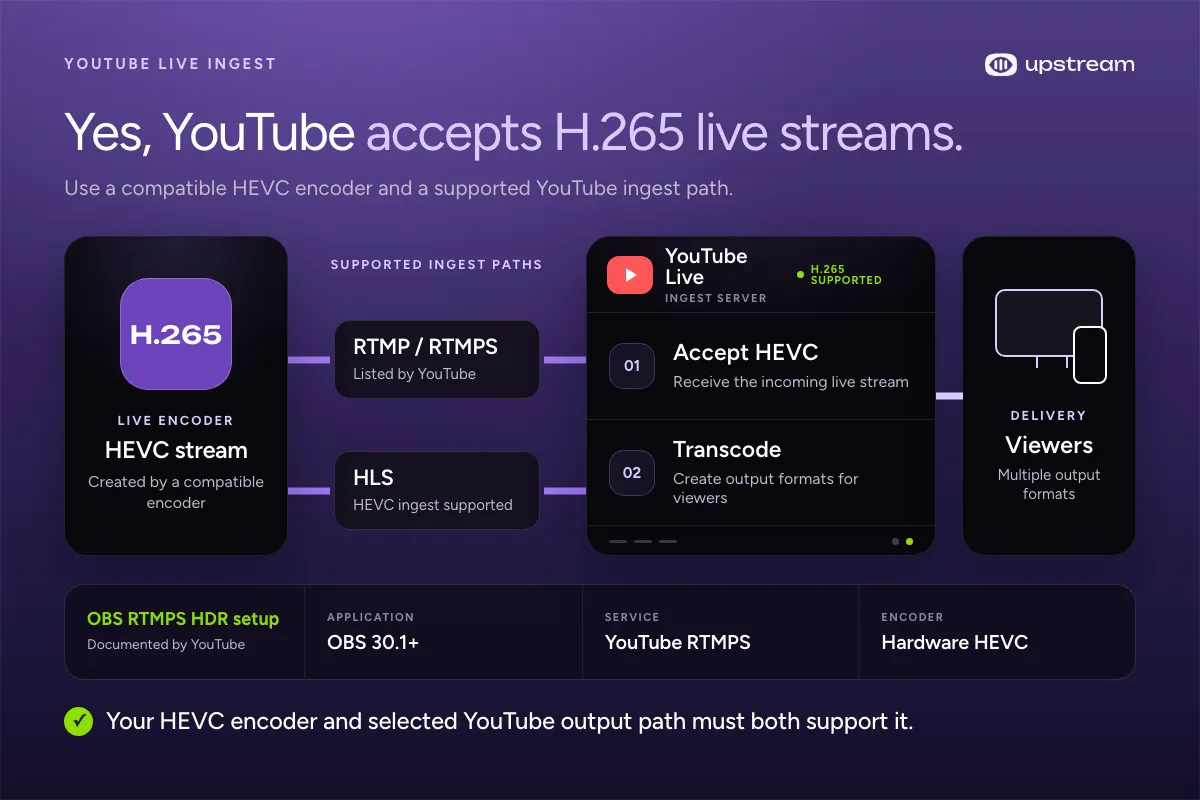
Yes. YouTube accepts H.265, also called HEVC, as live-stream input. Its current encoder settings list H.265 for RTMP and RTMPS, and its HLS ingest documentation supports HEVC too.
Live-stream ingest is the path encoded video takes from your encoder into YouTube. After YouTube accepts the feed, it transcodes the stream into playback versions for different resolutions, network conditions, and devices. Viewers do not need to receive an unchanged copy of your H.265 encoder output.
YouTube support does not make every encoder setup compatible. Your encoder must create HEVC, your streaming app must offer it for the selected output, and that output must send the correct codec signaling. If one of those parts is missing, the H.265 stream will not start correctly.
Can OBS stream H.265 to YouTube?
Yes. Stock OBS can stream HEVC to YouTube when H.265 is available as a streaming encoder and you select a compatible YouTube output. OBS 29.1 added HEVC streaming over Enhanced RTMP for YouTube.
For YouTube’s documented OBS-over-RTMPS HDR setup, its instructions specify OBS 30.1 or newer, YouTube RTMPS, and a hardware HEVC encoder. This is one documented H.265 setup, not a rule that every H.265 stream must use HDR.
Configure the live event, start the encoder, and confirm that the preview appears in YouTube before going live. The preview is the practical check that the complete path works.
Which codec is better for YouTube at your upload speed?
On YouTube Live, H.265 can make a higher resolution or frame rate practical on the same upload connection. This works only when your encoder and YouTube ingest path support H.265. It is not a reason to choose H.265 for every platform.
| Resolution / fps | H.264 video | H.265 video | Upload +20% H.264 / H.265 |
|---|---|---|---|
| 720p30 or 720p60 | 8 Mbps | 6 Mbps | 9.8 / 7.4 Mbps |
| 1080p30 | 14 Mbps | 10 Mbps | 17.0 / 12.2 Mbps |
| 1080p60 | 17 Mbps | 12 Mbps | 20.6 / 14.6 Mbps |
| 1440p30 | 21 Mbps | 15 Mbps | 25.4 / 18.2 Mbps |
| 1440p60 | 34 Mbps | 24 Mbps | 41.0 / 29.0 Mbps |
| 4K30 | 42 Mbps | 30 Mbps | 50.6 / 36.2 Mbps |
| 4K60 | 50 Mbps | 35 Mbps | 60.2 / 42.2 Mbps |
These figures use YouTube’s recommended video bitrates, checked October 5, 2026. Upload estimates add 128 Kbps stereo audio and 20% planning headroom: (video + 0.128) × 1.2. They are connection estimates, not quality benchmarks. The recommended bitrates are distinct from YouTube’s published minimum settings and are not maximum limits. Use more headroom on an unstable or shared connection.
Run several upload tests and use the lowest stable result, not the best single result. Then test representative motion, monitor the encoder, and confirm the YouTube preview before going live.
When should you use YouTube HLS ingest instead?
Use HLS when your encoder explicitly supports YouTube’s HLS ingest and higher ingest latency is acceptable. HLS sends the live feed in short media segments rather than through the continuous connection used by RTMP.
YouTube accepts both H.264 and HEVC through HLS ingest, including HEVC for HDR streams. You send one encoded stream, and YouTube transcodes it into multiple output formats for viewers.
YouTube says HLS ingest usually has higher latency than RTMP and WebRTC because it is segment-based. RTMPS is usually the better fit when quick audience interaction matters.
Does Twitch support H.265 live streaming?
Yes, Twitch supports H.265 through its 2K Enhanced Broadcasting path, but standard Twitch streaming at 1080p and lower still uses H.264 or AVC. Treat HEVC on Twitch as support for a specific feature, resolution, encoder setup, and eligible account, not as a replacement for the normal H.264 workflow.
Twitch introduced the separate Dual Format and 2K features on June 17, 2026. Dual Format creates horizontal and vertical layouts. In the 2K workflow, HEVC carries the 1440p stream while AVC remains in use for 1080p and lower. Twitch says 2K Enhanced Broadcasting is available to Partners and Affiliates.
The same announcement lists up to 9 Mbps for 1440p and 7.5 Mbps for 1080p. Those numbers belong to Twitch’s named rollout and shouldn’t be treated as a general H.264 versus H.265 benchmark.
Twitch also describes transcoding on its servers for Partners and many Affiliates in the relevant Enhanced Broadcasting paths, not a guarantee for every account and setup.
If Twitch is one part of a wider broadcast, also check the current official Twitch simulcasting guidelines.
Does Kick support H.265 live streaming?
No. Kick does not currently accept H.265 live input. Its current streaming guide lists x264, NVIDIA NVENC H.264, and AMD H.264 encoders, and explicitly says that H.265 encoding is unsupported.
If you need to send the same program to Kick and other platforms, use H.264 for the shared stream. The alternative is a workflow that creates a separate H.264 output for Kick.
Does Rumble support H.265 live streaming?
Not on Rumble’s currently documented live-ingest path. Rumble’s current livestream settings specify RTMP with H.264 profile 4.1 for 30 fps or H.264 profile 4.2 for 60 fps. They do not list H.265.
The same guide says Rumble transcodes an accepted feed into playback formats for viewers. That server-side transcode does not mean its ingest accepts HEVC. If you need to send the same program to Rumble and other platforms, use H.264 for the shared stream or create a separate H.264 output for Rumble.
Do Facebook Live, LinkedIn Live, and X support H.265 live streaming?
Use H.264 for the currently documented live-input paths on Facebook, LinkedIn, and X Media Studio Producer. The Facebook Live API requirements specify H.264 video and AAC audio only, and say other formats may be rejected. LinkedIn’s encoder settings specify H.264 video with AAC audio over RTMP or RTMPS. X Media Studio Producer specifies H.264/AVC for both RTMP and HLS inputs.
These requirements describe the stream each platform accepts from your encoder. Unless a platform documents an H.265 ingest path for your selected account or feature, send H.264.
What happens when you multistream H.265 to several platforms?
An unchanged H.265 relay stays H.265, so every destination has to accept it. A transcoding setup can create a compatible output for each platform. Multistreaming means sending the same live program to more than one platform.
When one encoded feed is reused across platforms, H.264 is usually the safer choice because it is supported more widely. Copying encoded packets without decoding or encoding them does not change the codec. You can reuse one H.265 feed only after confirming that your encoder, streaming app, connection, and selected platforms support it. H.265 can also work when your multistreaming service creates a compatible encode for each destination. Test each stream before going live.
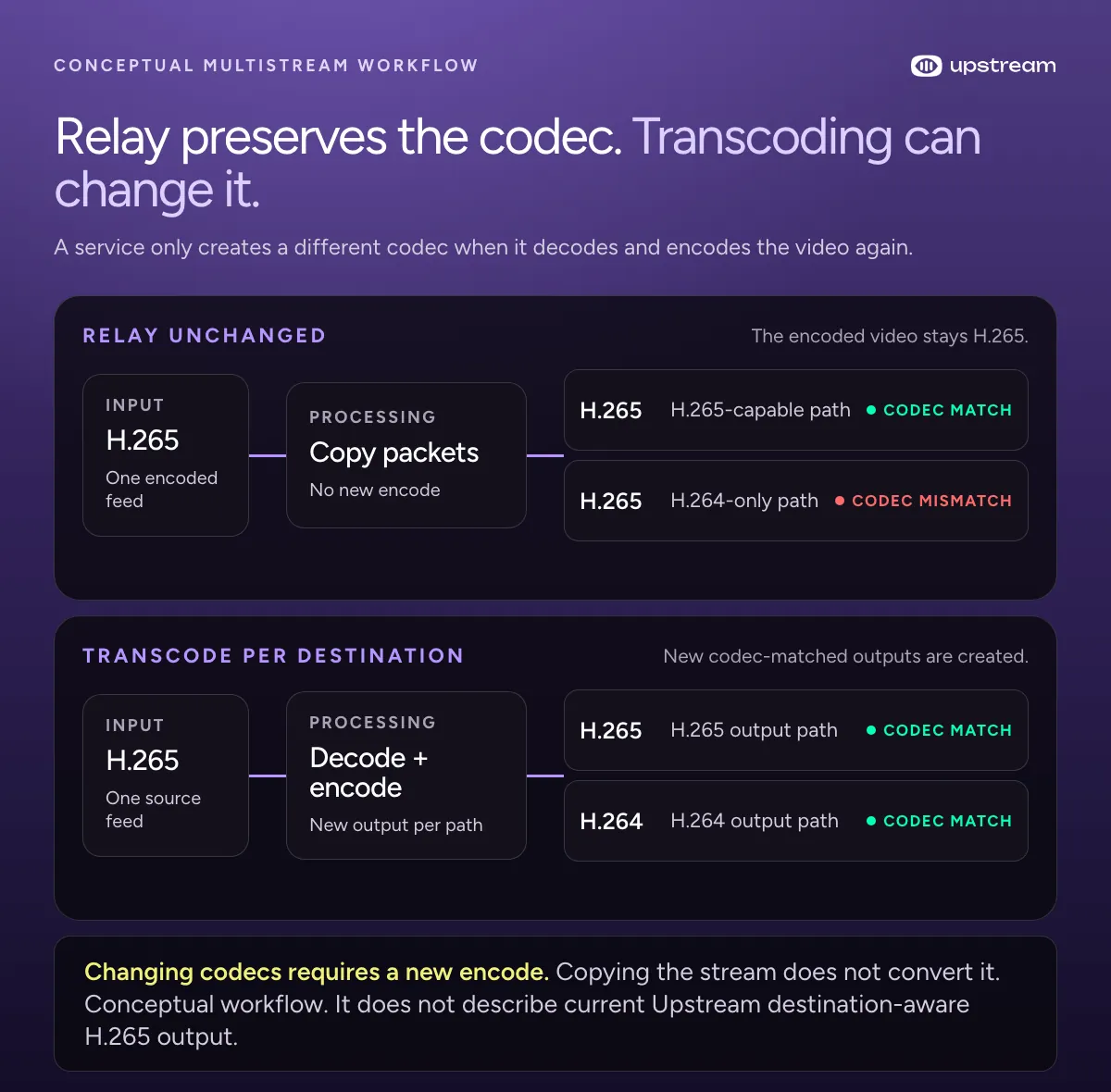
A cloud multistreaming service can receive one outbound live feed and fan it out to several platforms, which saves upload bandwidth from your computer.
Should you use H.264 for Twitch and H.265 for YouTube?
You can, but only if your setup creates two encodes or a service confirms per-platform codec conversion. Two local encodes add system load and may need more upload bandwidth. Do not assume that copying one stream changes H.265 into H.264 on the way to Twitch.
Upstream’s setup guide explains how to send one live feed to YouTube and Twitch. For that simple workflow, H.264 avoids separate encodes. It is generally less compression-efficient than H.265, but it is easier to send, monitor, and troubleshoot as one shared output.