
YouTube constantly finds new ways to keep people watching. As more people moved away from traditional TV something was missing: the ability to tune-in, any time, without making too many decisions, and simply watch, and keep watching something. As 24/7 Live Streams are booming over the last few years and becoming a whole new content format, YouTube confirms this with another 24/7 streaming format: YouTube Stations.
What Are YouTube Stations?
YouTube Stations are continuous, 24/7 YouTube livestreams made from video playlists on a channel. Just like a regular TV or radio channel, always on, 24/7 Streaming. While many streamers are already running always-on Live Streams on their channel with tools like Upstream, YouTube Stations is an entirely new limited concept, where you can arrange your existing (already uploaded) videos into a YouTube playlist flow, and start a 24-7 station.
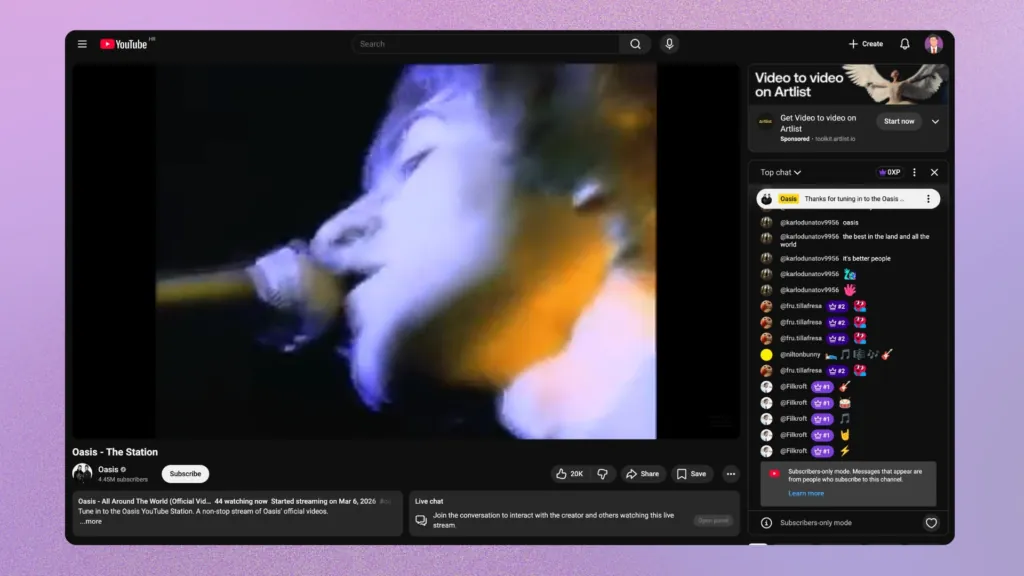
The main purpose of stations is to be like traditional Radio or TV, offering a passive, “lean-back” viewing experience. Viewers can tune in and let the content play without choosing the next video. This is a big change from actively picking what to watch each time the video ends.
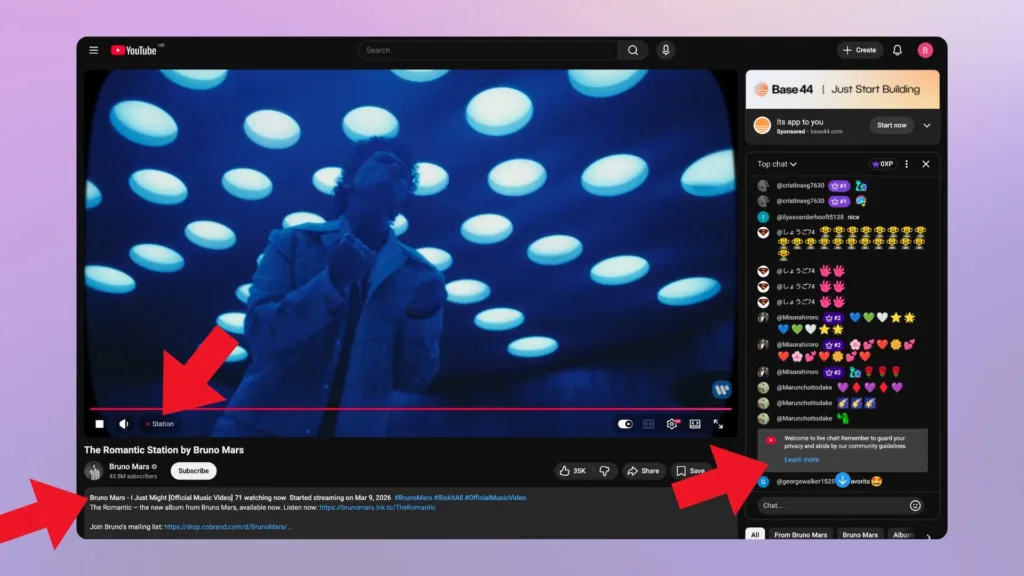
YouTube Stations show a “Station” badge instead of “Live”. This badge appears next to the channel name, showing these continuous broadcasts are different from regular “Live” streams. It tells viewers they are watching a curated, pre-recorded broadcast of a YouTube playlist that runs on a loop. This feature fits YouTube’s bigger plan to boost live content and keep people watching longer on the platform, and in this case, to stay longer on each channel.
Build the stream in the cloud.
Schedule videos, produce browser-based live shows, or send one feed to multiple platforms from the same Upstream workflow.
How YouTube Stations Work
YouTube Stations are video playlists stringed together in a continuous live broadcast.
- Playlist Broadcasts: Any existing video playlist on a channel can automatically become a continuous, looping stream. This means creators can set up a themed channel, like “Best of 90s Music Videos” or “Daily Tech News Highlights,” and run it non-stop.
- Real-time Chat: Even though the content is pre-recorded, Stations include live chat viewer count. This builds community, letting viewers chat and meet around the content they love.
- Lean-Back Viewing Experience: This is the point of the Station idea. Viewers cannot skip tracks, rewind, or fast-forward within a Station. It’s like regular TV: you tune in and watch what’s on. You can’t skip ahead or rewind. A passive experience, sought by many!
- Display Information: As each video plays, its title and the artist’s name (if applicable) are automatically shown below the player, giving viewers context.
Why YouTube is Doing This Now
- Keeping Viewer Attention: YouTube wants to increase watch time and keep users on the platform longer. By offering an always-on channel, they reduce the need for viewers to actively search for new content, keeping them watching. Data from Google’s own insights often highlights how important longer viewing sessions are.
- Growth of Live Content: YouTube is stepping up their live content game over the past few years, as more and more people are watching LIVEs daily. YouTube Stations extend this engagement by offering a continuous “live” presence, even when creators aren’t broadcasting new, spontaneous content.
- Adapting to Smart TV: More people are watching YouTube on their smart TVs. This often favors a relaxed, channel-like experience, much like traditional linear TV. YouTube Stations fit this trend directly, with easy, continuous content. No need to reach for the remote control.
- Alignment with FAST Channels: Stations are riding on the rise of Free Ad-Supported Streaming TV (FAST) channels, like Pluto TV or Tubi. These services offer curated, linear programming for free, supported by ads. YouTube gives its creators a similar option, letting them make their own “FAST-like” channels.
YouTube Stations and YouTube Music Stations: What’s the Difference?
It’s easy to mix up the new YouTube Stations livestream feature with existing YouTube Music functions:
YouTube Music has long offered “Radio Stations” and “Mixes.” These are personalized listening “radio-like” experiences for listening and finding new music. For example, if you like a particular song, YouTube Music can make a “radio station” or a “mix” around it, playing similar artists and tracks. These are mostly about audio and interactive, letting users skip songs, like, or dislike suggestions.
The new Stations, however, are entirely different. They focus on continuous video broadcasts from a channel’s own existing content. They are not personalized audio recommendations. Instead, they loop a pre-selected playlist of videos, offering a fixed, linear viewing experience.
The goals are different: YouTube Music’s features are about interactive, personalized audio discovery, while Stations are a lean-back, non-interactive, continuous video broadcast – much like 24/7 live streams we talk about so much here at the Upstream blog.
However, their simplicity may be actually lacking for some creators and channel owners who are used to creating richer, more dynamic experiences.
Current Limits for Creators Using YouTube Stations
YouTube Stations have some limits:
- Video-Only Requirement: Stations need existing YouTube videos. So, creators with only audio, podcasts, or other non-video content can’t use them in a Station. Bruno Mars’s station has 2-second loops in place for some tracks, to circumvent this rule. Not ideal.
- Static Playlists: A simple looping playlist of existing videos can feed predictable.
- Lack of Programming Control: A big limit is the current inability to schedule different content for specific times or days. A Station loops the same playlist 24/7. Creators can’t easily add live parts, special events, or daily shows like a regular 24/7 streams.
- No Crossfade: Tracks stop and start abruptly.
- No Overlays: Most 24/7 creators use stream overlays to make their streams more dynamic and engaging. With External Encoders like OBS & Upstream creators can embed full websites, interactive widgets, unified chat and all kinds of media as layers on top of their streams to make the content more dynamic. None of this is available with YouTube Stations.
- No Live Studio Appearances: You can’t take over live for a scheduled webcam appearance mid stream like you can with External Encoders.
- Initial Focus on Music: Early adoption has been mainly by official (major) artist channels (like Oasis). This is just YouTube testing music content first before rolling it out wider.
- Invite-Only Access: The rollout has been slow and quiet and by invite only. There’s (still) no public way to apply or clear rules to get in. This means not all creators can access the feature yet.
Going Beyond YouTube Stations with Upstream
YouTube Stations are basically “light” 24/7 streams. But for creators who want to build a true, rich 24/7 live stream, a simple playlist loop isn’t enough – you need the precision and power of a professional broadcast suite. Upstream.so was built to turn “static streams” into dynamic, “lean-back” experiences that run reliably in the cloud.
1. YouTube-Verified Professionalism & Cloud Reliability.
- One-Click Connect: Forget messy stream keys; connect via the secure YouTube API for instant setup.
- Zero Hardware Stress: Since everything runs on Upstream’s dedicated servers, you can turn off your computer and go offline while your stream stays live 24/7.
- Fail-Safe Broadcasting: Our Backup Stream feature ensures that even if a primary feed hits a snag, your viewers never see a black screen, protecting your channel’s reputation and watch-time metrics.
2. The “Canva-Style” Stream Designer
While YouTube Stations are visually limited, Upstream’s drag-and-drop Stream Overlay Designer gives you total creative control without needing a graphic designer.
- Interactive Widgets: Embed live website data, real-time chat highlights, and subscriber counts.
- Dynamic Overlays: Add logos, custom fonts, and professional lower-thirds to build a recognizable brand.
- Third-Party Integrations: Seamlessly pull in StreamElements or Streamlabs alerts for real-time engagement and donation alerts.
3. Advanced Scheduling & Live-on-the-Fly Control
A professional station needs variety. Upstream allows you to move beyond simple loops with a high-level command center:
- “DJ-Style” Playback: Use live playback controls to skip, rewind, or jump to any track instantly without stopping the stream.
- Independent A/V Playlists: Our unique architecture lets you manage audio and video separately. Loop a couple of high-quality background animations once while cycling through thousands of audio tracks, saving you from rendering massive multi-GB files.
- Vertical & Shorts Support: Specifically target mobile scrollers by broadcasting 24/7 in vertical formats to appear in the YouTube Shorts feed.
4. Maximized Reach & Monetization
Upstream is way more than a video encoder:
- Multistream to Up to 10 Platforms at Once: Send your 24/7 feed to YouTube, Twitch, Kick, TikTok, Facebook, and Rumble simultaneously at no extra cost.
- Direct Monetization: Use Ad Cue Points to trigger YouTube ads exactly when you want them, turning your back catalog into a passive revenue stream.
- Collaborate: Use Team Access to invite editors and managers to update your playlist or visuals without sharing your account passwords.
5. Live Studio
Upstream is much more than pre-recorded loops! At any point, you can enter our Live Studio, invite guests over webcam, share your screen, and go “live-live” on top of your 24/7 broadcast.
24/7 Live Streaming is here to stay
YouTube Stations are a big change in YouTube’s live content strategy, and a clear-cut sign 24/7 streams are gaining traction. YouTube stations offer a 24/7 viewing experience from existing playlists, without the need for external encoders. However, the basic feature set of YouTube stations may not be enough for streamers looking for a more dynamic, TV-like experience building.
This is where Upstream comes in – you can set up your 24/7 YouTube Live Stream fully with a drag and drop interface. Add crossfades, or make only-audio streams. Upload separate audio and video or image background files or make use of the full live streaming production studio, along with live webcam input and screen sharing with up to 10 guests for podcasts, webinars or meetings and online co-watching sessions. Plus, Multistreaming (10 destinations) is included with each stream.
To make really engaging always-on content, more than looping playlists try the Upstream streaming Suite. It comes with a ton of tools to give you better programming and interaction tools you need to do well in 24/7 live streaming.
Visit www.upstream.so to learn more about making your continuous streaming strategy work better and getting more audience engagement.