
In July 2026, the company launched X Live Studio alongside a $1 million creator incentive pool. The message is obvious: X wants to take on Twitch, YouTube Live, and TikTok Live for streaming talent.
Is X live streaming actually ready, though? The Live Studio dashboard has real tools that creators can use. Custom thumbnails, scheduling, audience controls, and RTMP support for Upstream, OBS, and Streamlabs are all there. But the $8/month X Premium paywall keeps casual streamers out. The platform has a track record of embarrassing technical failures during big events. And that $1 million fund? We don’t know how the payouts work yet.
This article is for creators who are wondering whether X live streaming fits into their multi-platform strategy. Here is what we will cover:
- What X Live Studio offers and who can access it
- How the $1 million creator fund actually works
- X’s monetization options (and why the 97/3 split is not what most people think)
- How to go live on X, step by step
- The problems X still needs to solve
- How to grow your audience on the platform
What Is X Live Studio?
X Live Studio is a redesigned live streaming control room built into X’s Creator Studio at x.com/i/live-studio. X Head of Product Nikita Bier announced it on July 1, 2026. It gives paying subscribers one place to create, manage, and grow live streams. X calls it the future of live streaming on the platform, and the older Media Studio Producer is still available while people transition over.
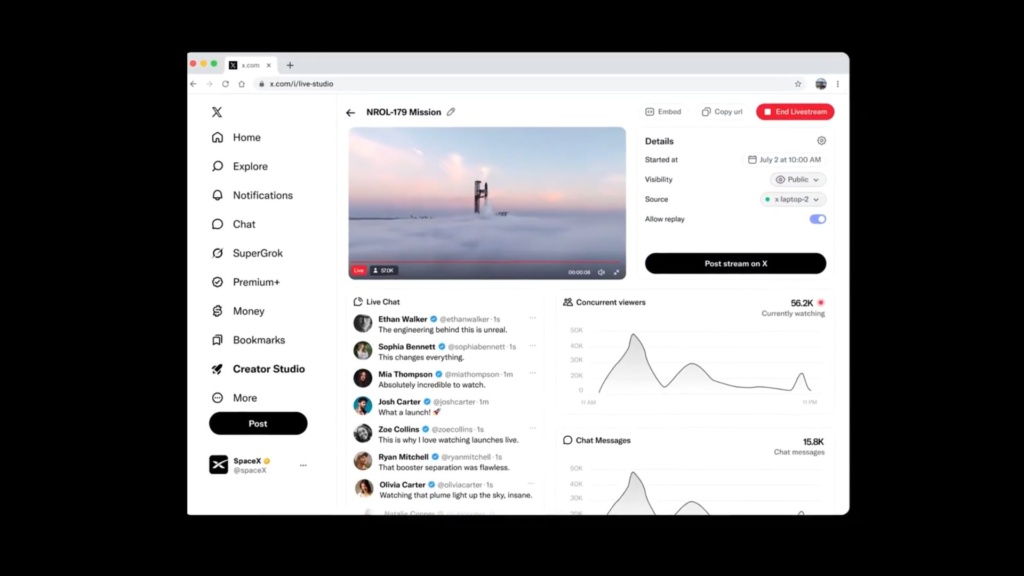
The tool is in beta and rolling out in select regions: Virginia, Oregon, California, and international cities including Sydney, Seoul, Mumbai, Singapore, Paris, Sao Paulo, Frankfurt, Dublin, and Tokyo. You need an active X Premium subscription ($8/month or $84/year) to use it.
Key Features of X Live Studio
Stream Setup and Scheduling:
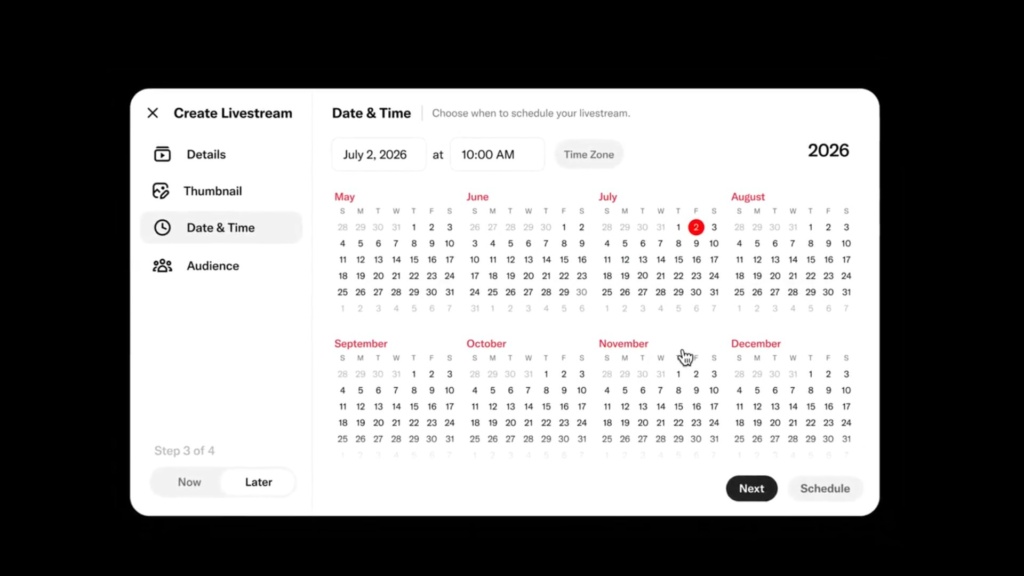
- Click “New Livestream” to start, then select your source, upload a thumbnail, configure audience settings, and choose to go live now or schedule for later
- Schedule broadcasts up to one year in advance
- Scheduled streams include countdown timers and automatic or manual start options
- Set audience access levels: Everyone, Verified Accounts, Accounts You Follow, Subscribers, or Chat Off
Real-Time Broadcast Dashboard:
Every livestream gets its own details page that acts as your command center while you are broadcasting. You can update your stream title at any time without interrupting the broadcast, adjust audience and chat settings mid-stream, enable or disable chat, or control who can participate in conversations. You can also monitor stream health and connection diagnostics in real time.
Live Analytics:
- Concurrent viewers and watch time
- Viewer activity trends and chat participation rates
- Top countries and device breakdowns
- Reply activity tracking
- Metrics stay available after your stream ends for post-broadcast analysis
Professional Broadcasting:
- RTMP support for Upstream, OBS Studio, Streamlabs, vMix, and Wirecast
- Reuse RTMP sources across multiple broadcasts so you do not have to reconfigure each time
- Private test streams to check your setup before going public
- Geo-restrictions to limit where your stream can be viewed
- Stream key management for multi-camera setups and custom overlays
- Download completed livestreams after they end for repurposing
Share and Distribution:
- Post your livestream directly to X
- Copy your livestream URL for sharing anywhere
- Generate embed code for external websites, newsletters, blogs, and partner sites
- LiveCut for clipping highlights during a live stream to share as standalone posts
Key Insight: The subscriber-only gating stands out. Twitch and YouTube do not let you restrict streams to paying subscribers directly; X does, which turns live content into a premium product.
X’s $1 Million Creator Fund: What We Actually Know
The headline was simple enough: X set aside $1 million to reward live streamers during the upcoming payout cycle. Nikita Bier confirmed it publicly and told creators to start building their streaming audiences “now.”
But as of mid-2026, the details are still vague:
| What We Know | What Is Still Unclear |
|---|---|
| $1M total pool confirmed by X | Exact eligibility criteria |
| Available during the upcoming rewards cycle | Payout formula (viewership? engagement? stream duration? subscriber streams?) |
| Requires X Premium subscription | Payment schedule and minimum thresholds |
| Targeted at live streamers specifically | Whether it stacks with existing creator payouts |
How Does the Fund Compare?
$1 million looks good in a headline until you put it in context. Twitch and YouTube have built predictable monetization systems over years. X’s fund is a one-time experiment, a trial bonus to get creators to test the platform. If the streaming experience works and audiences show up, some creators might stay. If not, the kickstart money will not be enough to sustain a creator ecosystem on its own.
Also, isn’t 1 million a bit… not enough?
The bottom line: Start building your X live streaming audience now if you want a shot at this fund. Early movers usually do best when platforms launch new incentives. But do not bank on the payout until X publishes actual rules.
How X Live Streaming Monetization Actually Works
X has multiple revenue streams for creators, and it is important to understand the difference between them. The original content mixed up two very different programs.
Creator Subscriptions: The 97/3 Split
The 97% revenue split applies only to X Creator Subscriptions (formerly Super Follows), not to ad revenue sharing. Here is how it works:
- Creators charge followers $2.99, $4.99, or $9.99/month for exclusive content
- Creators keep up to 97% of subscription revenue until they hit $50,000 in lifetime earnings
- After $50,000, the split drops to up to 90%
- X does not take a platform cut. The deductions are third-party payment processing fees and Apple or Google’s 30% on in-app purchases
A creator with 1,000 subscribers at $4.99/month earns roughly $4,700/month after fees. That is competitive compared to other platforms.
Ad Revenue Sharing: What Changed in 2024
X’s ad revenue sharing program changed on November 8, 2024. The old model, which paid creators based on ads shown in replies to their posts, was discontinued. The new system works like this:
- Payouts are based on engagement (replies, reposts, likes) from verified Premium users
- Up to 25% of Premium subscription payments go to creators
- Engagement from users on higher Premium tiers counts for more
- X does not publish an official per-impression rate, and the pool is limited because only verified-user engagement qualifies
In practice, most creators earn very little from this program, often just a few dollars per million total impressions. The people making real money on X do it through products, brand deals, services and the overall larger reach, not just platform payouts.
Other Monetization Options
| Method | How It Works | Earning Potential |
|---|---|---|
| Amplify Pre-Roll | Monetize from video ads shown before your content | Variable, depends on ad market |
| Direct Sponsorships | Brands pay you to feature products in streams | $100 to $5,000+ per sponsored stream |
| Tips | One-time payments from followers via Stripe or PayPal | Unpredictable; no X platform cut |
| Ticketed Spaces | Charge $1 to $999 for access to live audio sessions | 3% X cut under $50K; 20% above |
X vs. Competitors: Monetization Comparison
| Platform | Subscription Split | Ad Revenue Model | Main Advantage |
|---|---|---|---|
| X | Up to 97/3 (Subscriptions) | Premium engagement-based | Best subscription split in the industry |
| Twitch | 50/50 (standard) | CPM-based ad revenue | Established gaming audience |
| YouTube Live | 70/30 (Super Chat/Subscriptions) | 55/45 ad split after thresholds | Massive general audience plus search discovery |
| TikTok Live | ~50/50 (gifts) | Creator Fund (limited) | Viral discovery algorithm |
X’s 97/3 subscription split is the standout feature. But the platform does not have the viewership scale or predictable ad infrastructure of its competitors… yet. For creators considering X live streaming, the math works best if you can convert followers into paying subscribers. Relying on platform payouts alone is not a viable strategy.
How to Live Stream on X: Step-by-Step Setup
Getting started with X live streaming takes some preparation. Here is the full process.
What You Will Need
- X Premium or Premium+ subscription ($8/month minimum; the Basic plan does NOT include live streaming)
- Account active for at least 3 months
- A verified email and two-factor authentication enabled
- Stable internet connection (9Mbps upload minimum recommended)
- Broadcasting software (optional): Upstream, OBS Studio, Streamlabs, or a hardware encoder for RTMP
Step 1: Subscribe to X Premium
Visit verified.x.com and activate Premium. Make sure your account shows the blue checkmark. You cannot access Live Studio without it.
Step 2: Access Live Studio
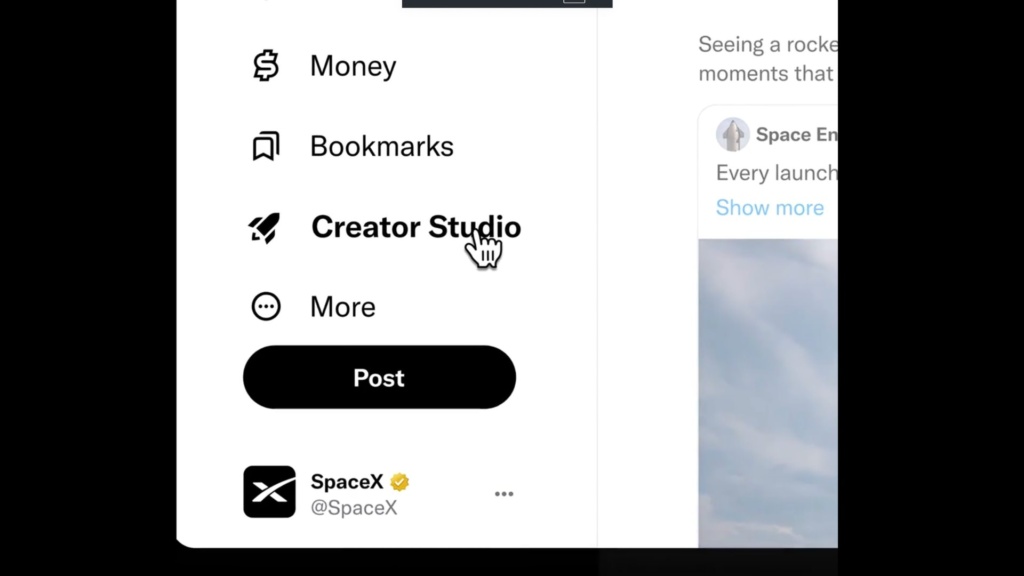
- Log into X on desktop
- Navigate to Creator Studio and click “Live Studio”, or go directly to x.com/i/live-studio
Step 3: Create Your Livestream
- Click “New Livestream”
- Select your source (camera or RTMP encoder)
- Thumbnail: Upload a custom image that represents your content
- Audience: Choose who can view and chat. Your options are Everyone, Verified Accounts, Accounts You Follow, Subscribers, or Chat Off
- Scheduling: Go live immediately or schedule your broadcast for later (up to one year in advance)
Step 4: Configure Technical Settings
For browser streaming: Select your camera and microphone directly in the dashboard.
For professional RTMP streaming (recommended):
- In Live Studio, go to Sources > Create Source
- Select RTMP, choose your nearest region
- Copy your RTMP URL and Stream Key
- Paste both into Upstream, OBS Studio, or Streamlabs (in your streaming software’s Settings > Stream > Custom)
- Match these specifications for best results:
- Resolution: 1280×720 at 60fps (recommended) or 1920×1080 at 30fps (maximum) (interesting!)
- Video bitrate: 9Mbps recommended, 12Mbps max
- Audio: AAC-LC at 128kbps
- Keyframe interval: Every 3 seconds
Step 5: Go Live
Watch the stream health indicator in your dashboard. Once it shows a stable connection, click “Go Live.” Monitor your real-time analytics (viewer count, chat activity, and engagement trends) throughout the broadcast.
Pro Tip: Always run a 5-minute test stream before any scheduled broadcast. Check your audio levels, video quality, and connection stability. The stream health indicator in Live Studio will catch issues before your audience sees them.
X Live Streaming Challenges: What X Still Needs to Fix
X’s live streaming push is ambitious, but the platform has real problems that creators should keep in mind.
The X Premium Paywall
Requiring an $8/month subscription for live streaming access is a real barrier. Twitch and YouTube let anyone stream for free. On X, casual streamers, the kind of creators who often become tomorrow’s stars, are locked out. That limits the total pool of creators and, by extension, the diversity of content available to viewers.
A History of Technical Failures
X’s live infrastructure has failed publicly at the worst possible moments:
- May 2023: Ron DeSantis’s presidential campaign launch on X Spaces collapsed when servers “kind of melted” under load
- August 2024: Elon Musk’s live interview with Donald Trump crashed and became inaccessible
- September 2023: Musk’s own livestream from the U.S.-Mexico border suffered repeated outages
These were not minor glitches. They were high-profile failures witnessed by millions. For X live streaming to succeed, the infrastructure has to prove it can handle large audiences under pressure. A polished dashboard does not matter if the stream drops mid-broadcast.
Building a Live Culture on a Text Platform
X users are used to short-form text, images, and quick video clips. Getting them to watch longer, interactive live streams requires a fundamental behavior shift. Twitch built its culture around gaming over a decade. YouTube Live leverages the world’s second-largest search engine. X is asking users to adopt an entirely new consumption habit, and asking creators to bet their time that it will stick.
The Competition Is Already Winning
| Platform | Strength | Monthly Active Users |
|---|---|---|
| Twitch | Gaming dominance, established monetization | 140M+ |
| YouTube Live | Search discovery, massive general audience | 2.7B+ (YouTube total) |
| TikTok Live | Viral algorithm, mobile-first interactive content | 1B+ |
| X | Real-time cultural conversation, text-to-live bridge | 600M+ |
X’s edge is its real-time information ecosystem. Breaking news, cultural moments, and live commentary already happen on X. Live streaming could extend that strength, but only if the platform can deliver technically and culturally.
How to Grow Your Audience With X Live Streaming
Success on X Live Studio takes strategy, not just showing up. Here is how to approach it.
Plan Content That Fits X’s Culture
X users gravitate toward commentary, analysis, and real-time reactions. Formats that tend to work:
- Live Q&As: Answer follower questions in real time
- Breaking news commentary: React to events as they unfold
- Behind-the-scenes content: Show your process, workspace, or daily routine
- Interactive workshops: Teach a skill with live viewer participation
- Co-streaming discussions: Go live with other creators for debates or interviews
Stream consistently. Pick a schedule and stick to it. Viewers come back when they know when to find you.
Promote Across Platforms
Do not rely on X’s algorithm alone to surface your streams:
- Post about upcoming streams 24 to 48 hours in advance with a custom graphic
- Share LiveCut clips as standalone posts after each stream
- Quote-tweet relevant trending topics while you are live to capture passing traffic
- Cross-promote on Instagram, TikTok, and YouTube Shorts pointing viewers to your X stream
- Pin your live stream link to your X profile during broadcasts
Engage Actively During Streams
Live streaming works when it is two-way. The most successful X streamers read and respond to chat comments by name, ask viewers questions and weave their answers into the discussion, run impromptu polls or “this or that” votes in chat, thank new followers and subscribers publicly, and end streams with a clear call to action like “Same time tomorrow” or “Subscribe for exclusive subscriber-only streams.”
Use Data to Improve
X Live Studio’s dashboard gives you real-time analytics. After every stream, review:
- Viewer peak times: When did the most people watch? Plan future streams around those windows
- Engagement rate: Which moments sparked the most chat activity? Do more of that
- Audience geography: Are your viewers local or global? Adjust your timing accordingly
- Device breakdown: If most viewers are on mobile, make sure your stream text and visuals read well on smaller screens
Frequently Asked Questions About X Live Streaming
How much does X Premium cost to access Live Studio?
X Premium starts at $8/month or $84/year. Live streaming is not available on the Basic tier. You need at least the standard Premium plan. Some accounts with 2,500+ verified followers may qualify for free Premium.
What is the difference between X’s 97/3 split and ad revenue sharing?
The 97/3 revenue split applies only to Creator Subscriptions, where followers pay a monthly fee ($2.99 to $9.99) for exclusive content. It does NOT apply to ad revenue sharing. X’s separate ad revenue program pays based on engagement from verified Premium users, and most creators earn very little from it.
Can you multistream to X and other platforms at the same time?
Yes, with some caveats. X supports RTMP streaming, so you can use multistreaming tools to broadcast to X, Twitch, YouTube Live, and other platforms simultaneously. But X Premium is still required as the entry fee, and subscriber-only streams on X would need to be public if you are simulcasting elsewhere. Tools like Upstream make multistreaming to X alongside other platforms straightforward.
Is X Live Studio available on mobile?
As of July 2026, Live Studio is a desktop-only tool accessed through Creator Studio at studio.x.com. You can still go live from mobile using X’s native mobile live feature, but the full scheduling, RTMP, and analytics capabilities require the desktop dashboard.
How does X’s $1 million creator fund payout work?
X has confirmed the $1 million pool exists but has not published payout details as of mid-2026. It is unclear whether rewards will be based on viewership, engagement, stream duration, subscriber-only content, or a combination. Creators should watch X’s official announcements for eligibility criteria and payment structures.
What streaming software works with X Live Studio?
Any software that supports RTMP streaming works with X Live Studio. The most popular options are Upstream (free multistreaming to 40+ platforms), OBS Studio (free), Streamlabs Desktop (free with optional premium features), and hardware encoders like those from Teradek or Blackmagic. You will need to copy your RTMP URL and Stream Key from Live Studio into your broadcasting software.
Conclusion: Should You Start Live Streaming on X?
X’s launch of Live Studio and its $1 million creator fund are a real attempt to enter the live streaming market. The platform has solid tools: RTMP support, detailed audience controls, and the best subscription revenue split in the business at 97/3. For creators already building on X, adding live streaming makes sense as a way to deepen audience connection.
But the problems are real too. The $8/month Premium paywall keeps casual creators out. Technical reliability at scale is still unproven. And the $1 million fund’s ambiguity makes it impossible to plan around financially.
The smart strategy: Treat X live streaming as an additional distribution channel, not your primary platform. Build your audience there while keeping your presence on Twitch, YouTube Live, or wherever your core community is. Multistreaming makes this easy. You can broadcast to X, Twitch, and YouTube simultaneously without extra effort, which lets you tap into X’s real-time culture while protecting yourself against its infrastructure risks.
Ready to stream to multiple platforms at once? Upstream lets you broadcast live to X, Twitch, YouTube, and 40+ other platforms simultaneously with no complicated setup and no extra bandwidth. Sign up for free and start multistreaming today.
Stream everywhere from one feed.
Send one live feed to Upstream and let the cloud deliver it to YouTube, Twitch, Kick, Facebook, and custom RTMP without making your upload connection carry every copy.
Further reading: How to Multistream to X, Twitch & YouTube Simultaneously | X Live Studio vs. Twitch Studio: Which Is Better for New Streamers?
Sources: X @XCreators Official Announcement, X Help Center,
Not sure your connection can hold X’s recommended 9 Mbps? Check it against your upload speed with our free bitrate calculator before you schedule the broadcast.