
It seems to me that the creators running faceless channels have figured out how to produce good content without relying on their personality and good looks to attract and retain viwers. For some of (what’s up my fellow introverts?) showing the face was a big no-no, and a barrier to entry into this game.
However, with the streaming and content creation tools we have available, the time has come to shine without showing the face. This guide shows you how to create, grow, and make money from faceless YouTube channels. We’ll also look at how 24/7 cloud live streaming can help you grow and automate your channel even more.
What is a Faceless YouTube Channel and Why Are They Popular?
A faceless YouTube channel is a place for content where the creator’s face or personal identity isn’t the main focus. Instead, it’s all about the content itself. This could be educational stories, background sounds, animated explanations, or collections of videos.
It’s easy to see why this way of working is popular. Creators get more privacy, it’s easier to start (no need for fancy cameras or personal branding), and they can focus purely on making good content. This method also allows for a lot of growth, as content creation can often be made simpler or even semi-automatic.
Faceless channels are growing fast for two main reasons. First, there are now many easy-to-use AI tools for making content. Second, people are really looking for specific, valuable content, no matter who makes it. For example, WatchMojo has over 25.9 million subscribers by making list-style videos without anyone on screen. Their success shows how much you can achieve by focusing on content first.
How to Start a Faceless YouTube Channel
Starting a faceless YouTube channel needs careful planning, just like any other content project. The main goal is to build a strong base that helps people find your content and shows its value.
Find a Faceless Niche
The first step is to find your niche. This means finding a topic that many people want to see but doesn’t have too much competition. Look for trending topics on YouTube, check online forums, and use keyword tools to find audiences that aren’t being served well. Do you want to teach, entertain, or help people relax? A clear niche makes it easier to get loyal viewers.
If you are interested in a niche that is highly competetive, like “Relaxing” or “LoFi” it is crucial to find your sub-niche! Simply creating content for “everyone” will probably not work. Some great examples of this are these two channels, which I think nailed the sub-niche game.
- Ambient Outpost crafts incredible atmospheres and moods. Totally recommend checking it out. Also genuinely nice persons behind the channel.
- RelaxationMeditation also nails this high-tech, futuristic yet relaxing sub-niche business quite well.
Learn from these two guys – they chose their overall niche (atmo) and then went deep into their own specific sub-niche or sub-genre, and kept at it. This works.
Planning
Once your niche is clear, planning your content and strategy is your next step. This includes writing good stories, creating or finding good visuals and videos, and deciding how you’ll do your voiceovers. You can use a human voice for a personal feel or use advanced AI voice generators for speed and consistency, but in any case it is this stage, the planning, where you should spend quite some time. There are multiple reasons:
- Good planning can save time later on, in production
- You can spend time writing scripts that are easier to produce, and have the same reach as some more complicated / expensive ideas
- The better you define the video, easier it is to delegate (to a human, AI or to yourself even)
- A well planned out content Schedule will keep you on-edge and remove procrastination points
Tools
For making content, several key tools can make your work easier:
- AI voice generators: Tools like Murf.ai or ElevenLabs offer voices that sound real.
- Stock footage sites: Services like Pexels, Pixabay, or Storyblocks provide high-quality video clips and images. You can even use the Canva pro plan with an inbuilt stock catalogue.
- Light Editing Software: Use Capcut or Canva to stich together images and videos and slap your voice on top! They are super simple to use, but lack some deeper features found in pro software.
- Heavy Editing software: Easy-to-use options like DaVinci Resolve (free) or Adobe Premiere Pro can help you put your visuals and audio together professionally. Sometimes doing something in Canva can take hours, while it’s a few clicks in Premiere.
- Full-on AI production environments: Personally I don’t want to recommend any, since I was not happy with any of their outputs in early 2026. But who knows, you may find what you are looking for. Also, these tools now improve dramatically almost weekly so the jury is still out!
- AI Avatars: While not exactly faceless, you could use an AI avatar generator that you can train with photos or videos. These are getting dangerously good these days, and if your content is good, you could pull it off. Pro tip on avatars: Why does everyone seem to be focused on creating a likeness of a human being? AI is excellent at making non-realistic avatars. I wouldn’t mind a penguin telling me about the south pole, or a water droplet teaching me on how to unclog my drain. Think beyond what you see being repeated over and over again.
YouTube SEO
Finally, set up your channel so people can find you. Luckily, YouTube is the worlds second biggest search engine, and the first one is owned by the same company. So there is much potential for being found, if you are using the right words in your content.
Use keywords that your target audience is actually searching for. A well-optimized channel needs to continuously make sure that content reaches the right viewers – and this takes quite a bit of research and may not be obvious the first time you get into it. But more you spend time reaserching the psychology of your niche, you will notice patterns emerging. After a few months it will be clear to you what works, what does not work, and what others are doing (and what words they are using).
The Strategy
YouTube SEO is a massive industry, but following a simple blueprint can be the difference between 150 views and 150,000 views.
- Do your keyword research first: Are people interested in this? How exactly do they search for this? What specific words do they use?
- Craft the Title, Thumbnail, and Description BEFORE your content: It sounds counterintuitive, but you gain a significant advantage by focusing on the Click-Through Rate (CTR) and effectiveness before you even begin production.
- Check out the competition: Learn from what is already working in your niche.
Free YouTube SEO Tools
| Free Tool | Usage for SEO |
|---|---|
| YouTube Search Bar | Use the suggestion mechanism—simply type a few letters to see what people are actually searching for. |
| Google Search Console | Find actionable data from your own website traffic to see what keywords people use to find you. |
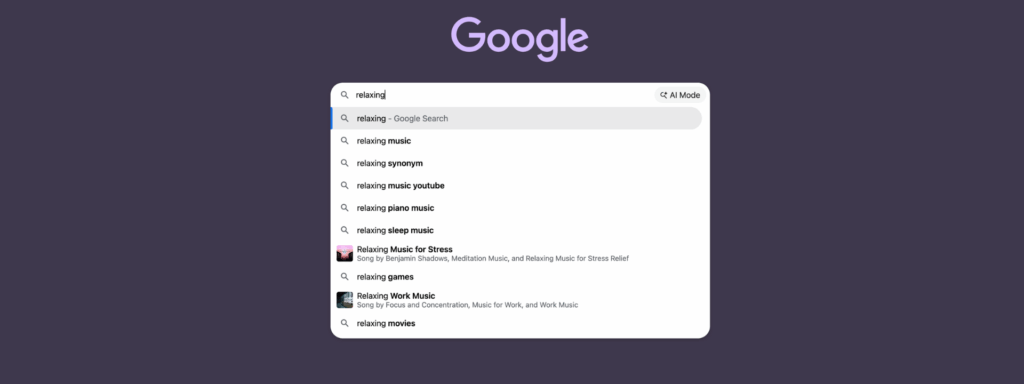
| Google Search Bar | Leverage predictive suggestions to find high-volume keywords and sub-niches like “Piano” or “Sleep.” |
| Google Trends | Compare search volume over time and see what’s currently spiking in popularity. |
| Research community discussions to find the exact questions and “pain points” your audience has. |
You can also try Google Trends, or check out what people are actually asking on Reddit.
Paid YouTube Seo Tools
Some paid tools can be a bit pricey ($120+) per month, but the investment is usually worth it, even if just for a month, just to get a lot of data, and then you can act on it in the next couple of months. You can try all these apps for free for a few days, and see if it’s useful for you. And keep in mind that these apps do not have 100% data on everything, but they will confidently pretend like they do. Some numbers are approximations and estimates, so take everything with a grain of salt.
The good thing these apps can give you is signals – signals on what content is being clicked on and searched for. If your channel is about flowers, for example, you may discover that a certain shade of color of orchids is getting the most clicks – then make a video on that particular sub-sub-shade of color. If you get the signal right, and craft your titles and thumbnails well, that video is on the right path to virality and success. It’s actually pretty simple like that.
| Paid Tool | Usage for SEO |
|---|---|
| SEMrush | The industry standard. Excellent for finding quality keywords by spying on competitor websites and getting related search data. |
| Ahrefs | A powerful alternative to SEMrush that excels at finding hundreds of content opportunities if you dig into their data. |
| AnswerThePublic | Great for discovery; it groups searches by intent and shows the specific questions people are asking. |
| Moz | A solid keyword and site audit tool that typically offers a cheaper entry point than SEMrush. |
When your content is done and uploaded, you can:
- A/B Test Titles and Thumbnails (Create 3 or more versions for testing, give them a week to work through the algorithm, and choose your winner. It doesnt matter if its only a 3% difference, views and differences add up over time!)
- Regularly update your Titles and Thumbs (Keep your thumbnails relevant. Change your face in the old videos, so it looks more like “the new you”. For example, Mr. Beast updated many of his old thumbnails with his new and improved version of his slightly older face and way whiter and larger teeth.
All that said, some of the most viral videos did not start from careful research. They just felt right. If you have a gut feeling that something may work, and it keeps haunting you, then do it! Trust your hunch and try it. You can always pivot and learn from it. But if you don’t try – we’ll never know.
Faceless Channels Inspiration
There are many chances and ways to “make it” with faceless channels. Here are some popular ideas that are doing well today, with real examples:
| Niche | Channel | Description |
|---|---|---|
| Relaxation | CSM Relaxing | ASMR & Slime videos (4.7M subscribers). |
| Relaxation | The Mindful Movement | Guided meditations and mindfulness (1M subscribers, not 100% faceless). |
| Education | School of Life | Big ideas and philosophy through animation (9.5M subscribers). |
| Fitness | Trainer Winny | Animated bodybuilding and fitness advice (800k subscribers). |
| Motivational | Ben Lionel Scott | Cinematic motivational speeches (3M+ subscribers). |
| True Crime | Mr. Nightmare | Viral horror and scary true stories (7M subscribers). |
| AI & Tech | Zinny Studio | AI-driven marketing trends and faceless channel tutorials. |
Remember, even without a face, good visuals and especially clear audio are most important.
AI for Faceless YouTube Content Creation: Making Your Work Easier
Artificial intelligence isnt just novelty: it’s changing how content is made. For faceless channels, AI tools are making the whole production process smoother, making high-quality content easier and faster to create. Also, it is easier than ever to create terrible slop content – I guess the power trully lies in us, content creaters. Don’t make slop – even though the rewards may be tempting at the start, you are likely to hit a wall once the streaming platforms figure out how to deal with “inauthentic content“, which is YouTube’s new phrase for mass produced slop.
Research & Script writing is one area where AI shines, at least getting about 50-90% done for you. Tools like ChatGPT, Gemini or Claude can help you brainstorm ideas, plan video structures, and even write engaging stories. This cuts down a lot on the time spent creating content, letting you focus on making your message better.
For AI voiceovers, the technology has come a long way. Modern AI voice generators can make voices that sound so natural, many listeners can’t tell them apart from a human. This means you don’t need expensive voice actors or the time it takes to record your own voice.
Visuals and editing also get a boost from AI. AI-powered video editors can do things like cut scenes, fix colors, and even make simple animations automatically. When you combine this with big libraries of stock footage and graphic design tools (like Canva-style editors that you can just drag and drop elements in), making great-looking videos is easier than ever. There is no excuse any more.
The main point of using AI is to automate boring or impossible tasks. By letting AI handle the repetitive work, you free up valuable time. By getting a drone shot above the pyramids being built is something you could not do on your own without a time machine. This all lets you focus on growing your channel, engaging your audience, writing, editing and coming up with unique content ideas that really connect with people.
Why 24/7 Live Streaming Helps Your Faceless Channel Grow
While pre-recorded videos are an important pillar on which to build your channel, running a continuous live stream offers a powerful, often overlooked way for faceless channels to grow a lot. This turns your channel and your existing content into an “always-on” TV-like experience.
The benefits of 24/7 live streaming are big:
- Always findable: Your stream is always live, which means it’s more likely to show up in YouTube’s recommendations and search results.
- More watch time: Continuous streams naturally build up more watch hours, which is a key factor for YouTube’s system.
- More subscribers: Being present all the time and getting high watch times leads directly to faster subscriber growth.
- Shows up higher in feeds: Platforms often give live content a boost, giving your channel an advantage.
- Reaches all time zones: Your content is available to viewers worldwide, no matter their local time. This taps into a global audience.
- Instant Connection with Your Audience: Chatting and leaving comments are not the same. Chatting live creates an instant meaningful connection, if you learn how to handle your chat well. (for a great example see the Final Fantasy LoFi Radio (24/7) – the chat there is ALWAYS active, much thanks to the creators own effort. Maybe a bit of bots. A bit of both.)
This constant broadcast creates a “linear channel” experience, much like regular TV or radio. Viewers can tune in anytime, knowing something will always be playing. This builds loyalty and routine, making people watch longer and come back often.
But the problem with traditional 24/7 streaming has always been how hard it is technically. Running a stream around the clock usually needs a dedicated computer, special software like OBS, and a strong internet connection. This setup can crash, lose power, and needs constant checking. This makes true automation hard, especially for faceless channels that want to be efficient.
Upstream: Your Tool for Automated 24/7 Faceless Channel Growth
This is where Upstream comes in. It provides what you need to run fully automatic, always-on faceless channels without the technical headaches. Upstream is made to power your 24/7 live streams, so you can focus on content, not on the setup.
- Cloud-Based RTMP Streaming Servers: Upstream means you don’t need local computers, OBS, or complex server setups. Your stream runs reliably 24/7 on our dedicated cloud servers, built just for continuous live broadcasting. This means your content stays live, even after you turn off your device. It’s truly “set it and forget it.”
- Automated Scheduling & Playlists: Take back your time. With Upstream, you can schedule your pre-recorded videos to loop continuously. This keeps your channel always on without you needing to do anything by hand. Set specific start and end times, or set it to repeat daily, and Upstream handles the rest. This steady presence is vital for building an audience.
- Multistream to 10+ Platforms: Reach more people instantly. Upstream’s multistream feature lets you broadcast your faceless content to as many as 10 different platforms at the same time. This includes YouTube, Twitch, TikTok, Facebook Live, Kick, Rumble, and any other platform that takes an RTMP feed. You manage it all from one easy Upstream dashboard, without extra cost or effort.
- Drag-and-Drop Stream Designer for Custom Overlays: Make your stream look professional with ease. Upstream’s drag-and-drop Stream Designer lets you add overlays, logos, track titles, album art, and interactive alerts (like for new subscribers or donations) in seconds, with no coding. This Canva-style editor helps you make your stream look exactly how you want it.
- Vertical Stream Support: Get mobile viewers. Upstream lets you change your stream to a vertical format. This makes your content perfect for YouTube Shorts and people who watch on their phones. This helps you reach millions of users who scroll through vertical feeds, making sure your content is seen where most people watch it today.
- Live Playback Controls & On-the-Fly Playlist Management: Stay in control of your content in real-time. Skip tracks, rewind, or play any video in your playlist instantly, all without ever stopping your live stream. You can also add new videos, remove ones that aren’t doing well, or reorder your playlist on the fly. This keeps your faceless stream fresh and responsive to your audience.
- Monetization & Ad Insertion Control: Make the most money from your continuous streams. Upstream gives you exact control over mid-roll ads by letting you put YouTube ad cue points at the best times. This makes sure your 24/7 stream makes money well, while keeping viewers engaged by avoiding ads at bad moments.
- Backup Streams & YouTube Verified Encoder: Keep broadcasting without interruptions and with top quality. Upstream’s backup stream feature keeps a second stream ready to take over right away if your main stream has any problems. This ensures true 24/7 reliability. Also, Upstream is an official YouTube Verified Software Encoder, meaning it meets YouTube’s highest standards for quality, security, and reliability.
Ready to change how you create content and build a truly automatic, always-on faceless channel? See how Upstream can power your 24/7 live streams and help your channel reach new heights.
How to Make More Money From Your Faceless YouTube Channel (Beyond Ads)
While a faceless channel helps you get viewers, you can make even more money by using different strategies. Just relying on ads means you’re missing out on other ways to earn.
AdSense revenue is a natural place to start. For 24/7 live streams, the constant watch time greatly increases how many ads are shown, leading to more money than with videos you upload sometimes. The longer your content is watched, the more chances for ads.
Beyond AdSense, affiliate marketing is a strong way to make money. Put product recommendations that fit your content into your video descriptions, pinned comments, or even as small overlays in your stream. For example, a lofi channel could link to noise-canceling headphones, or an educational channel could recommend books or software.
Selling digital products is another option that can grow a lot. E-books, templates, courses, or special content related to your niche can bring in direct money. A meditation channel could sell guided meditation packs, while a tech channel could offer AI prompt guides or productivity templates.
As your audience gets bigger, merchandise and sponsorships become possible. Even without a face, you can sell channel-branded items (like “The Mindful Movement” yoga mats) or get sponsorships from companies that fit your niche. These can be very profitable.
Finally, think about Patreon or channel memberships. These platforms let your most dedicated viewers support your content directly. In return, they get special benefits, early access, or ad-free experiences. This helps build a strong community around your faceless content.
Check out our blog post on making money streaming.
Tips for Steady Growth for Your Faceless Channel
Building a successful faceless YouTube channel takes time and consistent effort. It’s not a quick race. Steady growth needs continuous work and smart planning.
Consistency is key for both uploading content and having reliable 24/7 streaming schedules. Regular content keeps your audience interested and tells YouTube’s system that your channel is active. A dependable 24/7 stream makes sure your channel is always there, helping viewers get into a routine of watching.
Talking with your audience is still very important, even without a face. Reply to comments, build community in your video sections, and use chat features during live streams. Asking questions in your videos or running polls can get people to interact. Show you appreciate your viewers, and they will feel connected to your content.
Cross-promotion can help you grow much faster. Share small clips of your YouTube content on platforms like TikTok, Instagram, or X (formerly Twitter). This sends people back to your main channel. Working with other faceless channels in similar areas can also show your content to new audiences.
Regularly check your analytics. YouTube Analytics gives you a lot of information about what content does best, who your audience is, how long they watch, and where traffic comes from. Understanding this information helps you make better content choices, do more of what works, and improve areas that aren’t connecting with viewers.
Why not start Faceless Channel in 2026?
Faceless YouTube channels give you a great chance to build profitable online channels that can grow a lot, all while keeping their privacy and sanity. Unlike person-based channels, faceless channels hey allow for better teamwork, delegation of tasks and using automation. By choosing a good niche and sub-niche, using AI to create content, and by adding 24/7 cloud live streaming, creators can get big growth and make a passive income. This way of working puts the focus on the content itself, not on a person, opening doors for anyone with a good idea and the tools to make it happen – even if you are super shy!
Ready to change how you create content and build a truly automated, always-on faceless channel? See how Upstream can power your 24/7 live streams and help your channel reach new heights. Sign up for free today and see what’s possible for your content.