For years, Twitch kept a tight grip on its creators. You streamed only there, or you didn’t stream on Twich at all. Twitch has since allowed simulcasting. But the current situation is tricky. In late 2025 and early 2026, we saw a wave of bans targeting streamers who technically followed the rules but messed up the details.
Twitch is fine with you streaming elsewhere. They are not fine with you using their site as a billboard for their competition. Here is how to handle the rules without risking your channel.
Rules on Simulcasting
The short answer to does Twitch allow multistreaming is definitely “yes”. In October 2023, Twitch dropped its exclusivity rules. Before that, Partners and Affiliates signed contracts saying they would only stream live content on Twitch. Today, that restriction is gone.
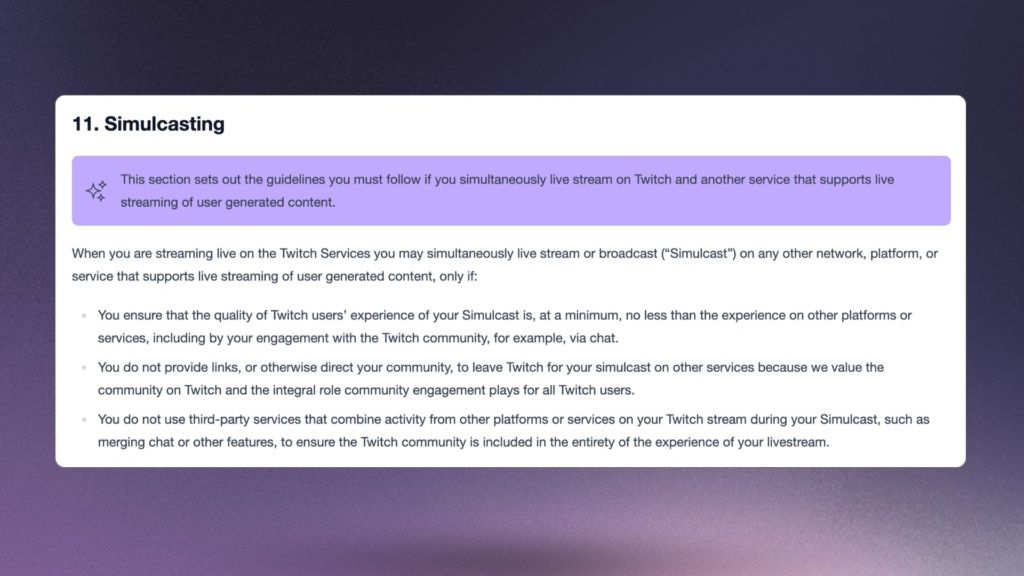
Who can do it? Everyone except streamers with Twitch-exclusive agreements (some big names and partnerships)
- Partners
- Affiliates
- Streamers just starting out
You can go live on Twitch, YouTube, Kick, TikTok, and Facebook at the same time. There is no penalty for the act itself. But Twitch has specific rules to ensure you don’t treat them like a “second screen.”
They care about three things.
- Quality: You can’t make Twitch look worse than YouTube.
- Engagement: You have to talk to your Twitch chat and not display messages from elsewhere
- No Directing Traffic: You can’t tell people to leave Twitch to watch somewhere else.
These sound simple. But recent bans prove they are easy to mess up.
1. Twitch stream must be equal or higher quality than the rest
Twitch wants to make sure a viewer on their site gets an experience equal to (or better than) a viewer on Kick. This is the “Quality Parity” rule.
If you are streaming to YouTube and Kick at the same time as Twitch, your Twitch stream cannot be lower quality.
- Resolution: You can’t send 1080p to YouTube and 720p to Twitch.
- Framerate: You can’t do 60fps on Kick and 30fps on Twitch.
- Latency: You can’t intentionally delay the Twitch stream.
If your bandwidth is tight, you have to lower the bitrate and quality everywhere. Not just on Twitch.
Then there is the engagement rule which also contributes to the quality of the experience. You cannot ignore your Twitch chat. If you are multistreaming, you must read and reply to the Twitch community.
How to get in trouble:
- Having your Twitch chat closed while reading YouTube Super Chats for hours.
- Saying, “I’m not reading Twitch chat today, go to Kick.”
How to do it right:
- Use a combined chat dock (visible only to you) to see messages from all platforms.
- Shout out Twitch subs just as loud as you shout out YouTube donations.
2. You can’t display a unified chat from all platforms
This is the most common reason for warnings in 2026. The rule is strict. You cannot show a combined chat box on your Twitch video feed that includes messages from other platforms.
Why do they hate this? Twitch thinks it ruins the user experience.
We saw this with the anime creator Gigguk in early 2026. He got a formal warning for using a tool that put YouTube and Twitch chat in a single on-screen box. Twitch viewers saw YouTube chats they couldn’t interact with.
So, does Twitch allow multistreaming with chat on screen? Only if that chat is exclusive to Twitch.
To stay safe, separate what you see from what the audience sees.
- On-Stream: Use a chat widget that only pulls from Twitch.
- Private Dock: Use a tool to see all messages in one place on your second monitor.
You can read a YouTube comment out loud. You just can’t show the text of that comment on the Twitch video feed, which reduces the intearctive overlay options for creators, as you’re not allow to use StreamElements Sub Notifications etc…
Don’t send traffic away from Twitch
The “No Off-Platform Direction” rule stops creators from stealing the audience from Twitch.
Throughout 2025, Twitch cracked down on “User Spam.” This targeted channels using aggressive panels or bots to push viewers to Kick. If your “About” section is a giant banner saying “UNCENSORED STREAM HERE” with a link to Kick, you are at risk.
You can promote your other channels. But it has to be passive.
- Allowed: A link to your YouTube in your bio, right next to your Twitter.
- Allowed: Saying, “I’m also on YouTube if that works better for you.”
- Banned: Giant text on screen saying “Stream ending here, moving to Kick.”
- Banned: A permanent watermark with the Kick logo.
How To Multistream to Twitch
You Generally have two options, either use a cloud re-streaming service like Upstream, or set up multistreaming on your PC.
Multistreaming technically means sending data to multiple servers. Doing this directly from your PC requires huge upload speed and a powerful computer. Most creators use a cloud service to handle the heavy lifting.
You need a tool that takes one stream and splits it to Twitch and YouTube. You also need a dashboard that lets you see all your chats without putting them on the video feed.
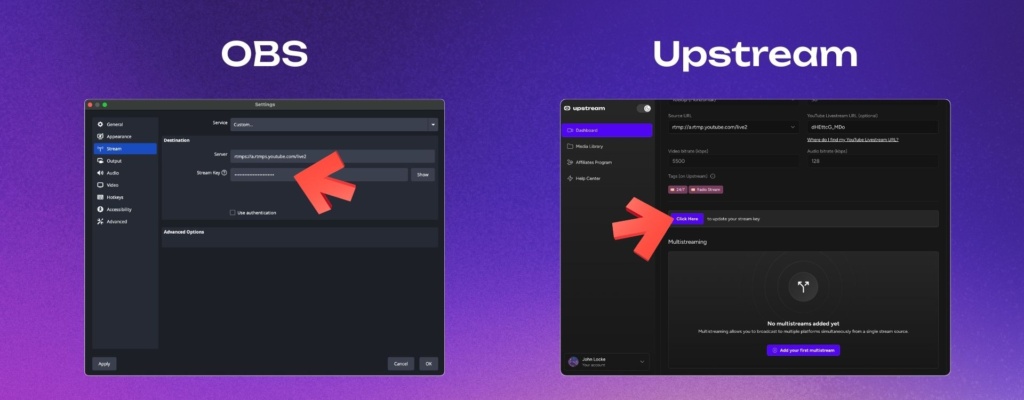
This is where Upstream comes in. Managing three different dashboards and stream keys is a headache. Upstream provides the tech to handle the distribution. It lets you focus on the show. By centralizing your stream management, you reduce the risk of technical errors. You don’t want to accidentally leave a “Stream Starting” scene up on one platform while you are live on another.
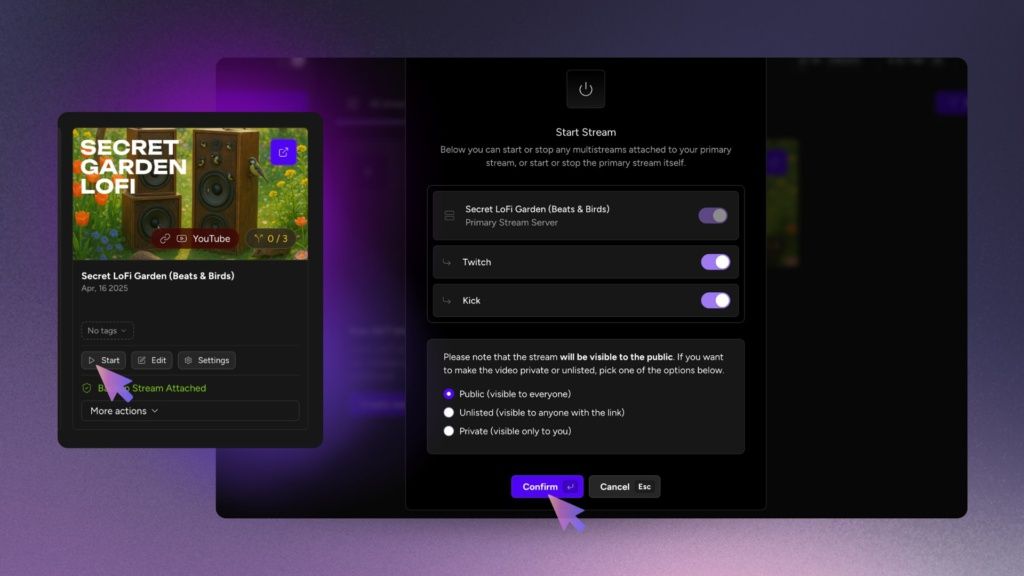
Your Simulcasting Safety Checklist
To keep your channel safe, follow this list.
- DO stream to Twitch, YouTube, Kick, and Facebook, TikTok, wherever – at the same time.
- DO ensure Twitch gets your best video quality (1080p, 60fps).
- DO use a private tool to read chats from all platforms.
- DO put normal links to your other channels in your Twitch bio.
- DON’T put merged chat overlays on your Twitch video feed.
- DON’T use watermarks that tell users to leave Twitch.
- DON’T use bots that spam links to rival platforms.
- DON’T ignore your Twitch audience.
Multistream, but with Care!
The days of sticking to just one platform are gone. Does Twitch allow multistreaming? Yes, because they know creators need to build audiences everywhere. But this freedom comes only if you respect the rules. You have to follow the Twitch Simulcasting Guidelines.
The bans we see from time to time aren’t because people are multistreaming. They happen because people either did not really think about it, or they were sloppy. They use merged chats, low-bitrate streams, or aggressive spam. Follow the quality rules. Don’t merge the chats.
Granted, the simulcasting guidelines are purposefuly vague and short, and many situations could be borderline, and they do give Twitch the permission to interpret them as they see fit. However, the core is clear, and simulcasting is now available to (almost) everyone.
Ready to expand your reach without the technical headaches? Check out Upstream. It helps you broadcast safely and keep your streams compliant.